
TextView文字描边实现
TextView文字描边实现
需求描述
文字显示在图片的上面,图片的内容是不确定了,为了防止文字与图片的颜色相近导致用户看不到或者看不清文字的问题,所以显示文字描边,避免问题。
实现
实现思想
使用TextPaint绘制相同文字在TextView的底部,TextPaint的字显示要比原始的字大一些,这样看起来就像是有描边的文字。
代码
1.attrs.xml文件
<?xml version="1.0" encoding="utf-8"?>

<resources>

    <!-- 有描边的自定义TextView-->

    <declare-styleable name="StrokeTextView">

        <!--描边的颜色 -->

        <attr name="stroke_color" format="color" />

        <!-- 描边的宽度 -->

        <attr name="stroke_width" format="dimension" />

    </declare-styleable>

</resources>
2.StrokeTextView的实现
package com.zm.autostroketextview;

import android.content.Context;

import android.content.res.TypedArray;

import android.graphics.Canvas;

import android.graphics.Color;

import android.graphics.Paint;

import android.support.annotation.Nullable;

import android.text.TextPaint;

import android.util.AttributeSet;

import android.view.ViewGroup;

import android.widget.TextView;

/**

 * 文字内容有描边的TextView

 * Author: zhangmiao

 * Date: 2018/4/13

 */

public class StrokeTextView extends TextView {

    private TextView outlineTextView = null;

    public StrokeTextView(Context context) {

        this(context, null);

    }

    public StrokeTextView(Context context, @Nullable AttributeSet attrs) {

        this(context, attrs, 0);

    }

    public StrokeTextView(Context context, @Nullable AttributeSet attrs, int defStyleAttr) {

        super(context, attrs, defStyleAttr);

        outlineTextView = new TextView(context, attrs, defStyleAttr);

        init(attrs);

    }

    private void init(AttributeSet attrs) {

        //1.获取参数

        TypedArray ta = getContext().obtainStyledAttributes(attrs, R.styleable.StrokeTextView);

        int stroke_color = ta.getColor(R.styleable.StrokeTextView_stroke_color, Color.WHITE);

        float stroke_width = ta.getDimension(R.styleable.StrokeTextView_stroke_width, 2);

        //2.初始化TextPaint

        TextPaint paint = outlineTextView.getPaint();

        paint.setStrokeWidth(stroke_width);

        paint.setStyle(Paint.Style.STROKE);

        outlineTextView.setTextColor(stroke_color);

        outlineTextView.setGravity(getGravity());

    }

    @Override

    public void setLayoutParams(ViewGroup.LayoutParams params) {

        super.setLayoutParams(params);

        outlineTextView.setLayoutParams(params);

    }

    @Override

    protected void onMeasure(int widthMeasureSpec, int heightMeasureSpec) {

        super.onMeasure(widthMeasureSpec, heightMeasureSpec);

        //设置轮廓文字

        CharSequence outlineText = outlineTextView.getText();

        if (outlineText == null || !outlineText.equals(getText())) {

            outlineTextView.setText(getText());

            postInvalidate();

        }

        outlineTextView.measure(widthMeasureSpec, heightMeasureSpec);

    }

    @Override

    protected void onLayout(boolean changed, int left, int top, int right, int bottom) {

        super.onLayout(changed, left, top, right, bottom);

        outlineTextView.layout(left, top, right, bottom);

    }

    @Override

    protected void onDraw(Canvas canvas) {

        outlineTextView.draw(canvas);

        super.onDraw(canvas);

    }

}
3.布局文件中StrokeTextView的使用
<?xml version="1.0" encoding="utf-8"?>

<LinearLayout xmlns:android="http://schemas.android.com/apk/res/android"

    xmlns:app="http://schemas.android.com/apk/res-auto"

    android:layout_width="match_parent"

    android:layout_height="match_parent"

    android:background="@color/colorPrimary">

    <com.zm.autostroketextview.StrokeTextView

        android:layout_width="wrap_content"

        android:layout_height="wrap_content"

        android:text="Hello World!"

        app:stroke_color="@android:color/white"

        app:stroke_width="2dp" />

</LinearLayout>
4.结果显示
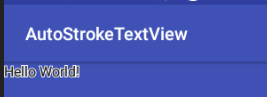
TextView文字描边实现的更多相关文章
- Android TextView文字描边的实现!!
Android开发:文字描边 转自:http://www.oschina.net/code/snippet_586849_37287 1. [代码][Java]代码 1 2 3 4 5 6 7 8 9 ...
- Android:TextView文字跑马灯的效果实现
解决TextView文字显示不全的问题. 简单设置跑马灯的效果: <TextView android:id="@+id/textView" android:layout_wi ...
- 用CSS3实现文字描边
CSS3作为新兴的前端技术可以实现很多复杂变化的效果,比如文字描边. 这里主要用到text-shadow属性,顾名思义就是为文字加上阴影效果.例: text-shadow:10px 5px 2px # ...
- cocos2d-x 利用CCLabelTTF制作文字描边与阴影效果的实现方法
// // myttf.h// // Created by 王天宇 on 14-6-12. // // #ifndef ____SLG__myttf__ #define ____SLG__myttf_ ...
- CSS3文字描边 CSS3字体外部描边
给需要实现文字描边的元素添加如下CSS3的属性 text-shadow:#000 1px 0 0,#000 0 1px 0,#000 -1px 0 0,#000 0 -1px 0; -webkit-t ...
- Android TextView 文字居中
有2种方法可以设置TextView文字居中: 一:在xml文件设置:android:gravity="center" 二:在程序中设置:m_TxtTitle.setGravity( ...
- 常用CSS3效果:用text-shadow做CSS3 文字描边
思路: 利用CSS3的text-shadow属性,对文字的四个边均用阴影. 最终效果: 单纯的为了实现效果.未作任何美化. 实现代码: HTML: <div>文字描边效果</div& ...
- ps怎么给文字描边
在设计的时候,单一的文字,往往对人没有多少的吸引力,这就需要我们在文字上加一些文字特效,比如说外发光,描边,投影,等等.在这里我们详细的介绍一下文字的输入,和文字描边的怎么增加,删除的经验.(这些方法 ...
- 设置TextView文字居中
有2种方法可以设置TextView文字居中: 一:在xml文件设置:android:gravity="center" 二:在程序中设置:m_TxtTitle.setGravity( ...
随机推荐
- redis get乱码
- Spring Cloud Eureka的集群配置(六)
1.再次创建2个Eureka工程 工程名:microservicecloud-eureka-7002 工程名:microservicecloud-eureka-7003 2.pom.xml文件 < ...
- 包管理工具-yarn
今天知道了一个新的包管理工具叫yarn,总结如下: 如果你知道npm的使用过程,那么yarn你就觉着相见恨晚呐...... npm存在的问题: >安装的时候无法保证速度的一致性 >安全问题 ...
- oracle数据导出以及导入
导出 1.服务器上mkdir创建一个真实目录/home/oracle/dump 2.sqlplus /nolog 3.conn /as sysdba; 4.SQL> create directo ...
- Ubuntu16.04 安装Tensorflow1.7过程记录二:安装CUDA及Tensorflow
参考 How to install Tensorflow 1.7.0 using official pip package 其中的CUDNN应该改为7.05for CUDA9.0 后面安装的spyde ...
- C++矩阵加速经典题目:Warcraft III 守望者的烦恼 [vijos 1067]
Warcraft III 守望者的烦恼 背景 守望者-warden,长期在暗夜精灵的的首都艾萨琳内担任视察监狱的任务,监狱是成长条行的,守望者warden拥有一个技能名叫"闪烁", ...
- javafx安装
可在官网http://efxclipse.bestsolution.at/ 下载 其中http://efxclipse.bestsolution.at/install.html#all-in-one ...
- boost--文件、目录操作
filesystem库是文件系统操作库,可以使用其中的basic_path类用来操作目录.文件,使用需要包含编译好的system库和filesystem库,我们一般不直接使用basic_path,而是 ...
- 关于PHP读取HTTP头的部分
本文转载自https://my.oschina.net/luoczi/blog/86608 1.关于PHP读取HTTP头的方法 $_SERVER['PHP_SELF'] #当前正在执行脚本的文件名,与 ...
- 在ExtJS中查看视频
listeners: { render: function() { win.update( '<video src="' + path+ '" width="100 ...