
TextView文字描边实现
TextView文字描边实现
需求描述
文字显示在图片的上面,图片的内容是不确定了,为了防止文字与图片的颜色相近导致用户看不到或者看不清文字的问题,所以显示文字描边,避免问题。
实现
实现思想
使用TextPaint绘制相同文字在TextView的底部,TextPaint的字显示要比原始的字大一些,这样看起来就像是有描边的文字。
代码
1.attrs.xml文件
<?xml version="1.0" encoding="utf-8"?>

<resources>

    <!-- 有描边的自定义TextView-->

    <declare-styleable name="StrokeTextView">

        <!--描边的颜色 -->

        <attr name="stroke_color" format="color" />

        <!-- 描边的宽度 -->

        <attr name="stroke_width" format="dimension" />

    </declare-styleable>

</resources>
2.StrokeTextView的实现
package com.zm.autostroketextview;

import android.content.Context;

import android.content.res.TypedArray;

import android.graphics.Canvas;

import android.graphics.Color;

import android.graphics.Paint;

import android.support.annotation.Nullable;

import android.text.TextPaint;

import android.util.AttributeSet;

import android.view.ViewGroup;

import android.widget.TextView;

/**

 * 文字内容有描边的TextView

 * Author: zhangmiao

 * Date: 2018/4/13

 */

public class StrokeTextView extends TextView {

    private TextView outlineTextView = null;

    public StrokeTextView(Context context) {

        this(context, null);

    }

    public StrokeTextView(Context context, @Nullable AttributeSet attrs) {

        this(context, attrs, 0);

    }

    public StrokeTextView(Context context, @Nullable AttributeSet attrs, int defStyleAttr) {

        super(context, attrs, defStyleAttr);

        outlineTextView = new TextView(context, attrs, defStyleAttr);

        init(attrs);

    }

    private void init(AttributeSet attrs) {

        //1.获取参数

        TypedArray ta = getContext().obtainStyledAttributes(attrs, R.styleable.StrokeTextView);

        int stroke_color = ta.getColor(R.styleable.StrokeTextView_stroke_color, Color.WHITE);

        float stroke_width = ta.getDimension(R.styleable.StrokeTextView_stroke_width, 2);

        //2.初始化TextPaint

        TextPaint paint = outlineTextView.getPaint();

        paint.setStrokeWidth(stroke_width);

        paint.setStyle(Paint.Style.STROKE);

        outlineTextView.setTextColor(stroke_color);

        outlineTextView.setGravity(getGravity());

    }

    @Override

    public void setLayoutParams(ViewGroup.LayoutParams params) {

        super.setLayoutParams(params);

        outlineTextView.setLayoutParams(params);

    }

    @Override

    protected void onMeasure(int widthMeasureSpec, int heightMeasureSpec) {

        super.onMeasure(widthMeasureSpec, heightMeasureSpec);

        //设置轮廓文字

        CharSequence outlineText = outlineTextView.getText();

        if (outlineText == null || !outlineText.equals(getText())) {

            outlineTextView.setText(getText());

            postInvalidate();

        }

        outlineTextView.measure(widthMeasureSpec, heightMeasureSpec);

    }

    @Override

    protected void onLayout(boolean changed, int left, int top, int right, int bottom) {

        super.onLayout(changed, left, top, right, bottom);

        outlineTextView.layout(left, top, right, bottom);

    }

    @Override

    protected void onDraw(Canvas canvas) {

        outlineTextView.draw(canvas);

        super.onDraw(canvas);

    }

}
3.布局文件中StrokeTextView的使用
<?xml version="1.0" encoding="utf-8"?>

<LinearLayout xmlns:android="http://schemas.android.com/apk/res/android"

    xmlns:app="http://schemas.android.com/apk/res-auto"

    android:layout_width="match_parent"

    android:layout_height="match_parent"

    android:background="@color/colorPrimary">

    <com.zm.autostroketextview.StrokeTextView

        android:layout_width="wrap_content"

        android:layout_height="wrap_content"

        android:text="Hello World!"

        app:stroke_color="@android:color/white"

        app:stroke_width="2dp" />

</LinearLayout>
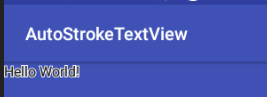
4.结果显示
TextView文字描边实现的更多相关文章
- Android TextView文字描边的实现!!
Android开发:文字描边 转自:http://www.oschina.net/code/snippet_586849_37287 1. [代码][Java]代码 1 2 3 4 5 6 7 8 9 ...
- Android:TextView文字跑马灯的效果实现
解决TextView文字显示不全的问题. 简单设置跑马灯的效果: <TextView android:id="@+id/textView" android:layout_wi ...
- 用CSS3实现文字描边
CSS3作为新兴的前端技术可以实现很多复杂变化的效果,比如文字描边. 这里主要用到text-shadow属性,顾名思义就是为文字加上阴影效果.例: text-shadow:10px 5px 2px # ...
- cocos2d-x 利用CCLabelTTF制作文字描边与阴影效果的实现方法
// // myttf.h// // Created by 王天宇 on 14-6-12. // // #ifndef ____SLG__myttf__ #define ____SLG__myttf_ ...
- CSS3文字描边 CSS3字体外部描边
给需要实现文字描边的元素添加如下CSS3的属性 text-shadow:#000 1px 0 0,#000 0 1px 0,#000 -1px 0 0,#000 0 -1px 0; -webkit-t ...
- Android TextView 文字居中
有2种方法可以设置TextView文字居中: 一:在xml文件设置:android:gravity="center" 二:在程序中设置:m_TxtTitle.setGravity( ...
- 常用CSS3效果:用text-shadow做CSS3 文字描边
思路: 利用CSS3的text-shadow属性,对文字的四个边均用阴影. 最终效果: 单纯的为了实现效果.未作任何美化. 实现代码: HTML: <div>文字描边效果</div& ...
- ps怎么给文字描边
在设计的时候,单一的文字,往往对人没有多少的吸引力,这就需要我们在文字上加一些文字特效,比如说外发光,描边,投影,等等.在这里我们详细的介绍一下文字的输入,和文字描边的怎么增加,删除的经验.(这些方法 ...
- 设置TextView文字居中
有2种方法可以设置TextView文字居中: 一:在xml文件设置:android:gravity="center" 二:在程序中设置:m_TxtTitle.setGravity( ...
随机推荐
- stm32-arduino-f103
希望给工作中偶尔要用的一些辅助板卡(例如运行信息现场记录)找一个快速开发的手段,Arduino作为流行的开源嵌入硬件框架,组件丰富,资料众多,所以想以Arduino作为平台.但是Arduino板子基本 ...
- django admin的实用配置
https://www.cnblogs.com/wumingxiaoyao/p/6928297.html
- docker--在centos镜像安装mysql
一.安装centos镜像 1.拉取最新版本centos镜像(拉取centos7 则使用centos:7即可) docker pull centos:lasted 2.查看已有镜像 docker ima ...
- 线程池ThreadPoolExecutor源码分析
在阿里编程规约中关于线程池强制了两点,如下: [强制]线程资源必须通过线程池提供,不允许在应用中自行显式创建线程.说明:使用线程池的好处是减少在创建和销毁线程上所消耗的时间以及系统资源的开销,解决资源 ...
- ----关于统计字符出现次数的JS循环以及indesxOf函数----
以下将会通过JS循环判断字符“banana”出现次数 以及调用indexOf中的函数来实现统计 <!DOCTYPE html> <html> <body> &l ...
- DecimalFormat 的用法
DecimalFormat 是 NumberFormat 的一个具体子类,用于格式化十进制数字. DecimalFormat 是 NumberFormat 的一个具体子类,用于格式化十进制数字.Dec ...
- Python+Selenium 利用ID,XPath,tag name,link text,partial link text,class name,css,name定位元素
使用firefox浏览器,查看页面元素,我们以“百度网页”为示例 一.ID定位元素 利用find_element_by_id()方法来定位网页元素对象 ①.定位百度首页,输入框的元素 ②.编写示 ...
- (PMP)解题技巧和典型题目分析(0903-2班)
1.计算题 ,5 2.概念题,少 3.情景题,很多 C B C D ------------------------------------------------------------------ ...
- (PMP)第4章-----项目整合管理
4.1 制定项目章程 输入 工具与技术 输出 1.商业文件 (商业论证,效益管理计划) 1.专家判断 1.项目章程 2.协议 2.数据收集 (头脑风暴,焦点小组,访谈) 2.假设日志 3.事业环境因素 ...
- 关于Bell数的一道题目
考虑 T3+1 {1,2,3,4} T3是3个元素的划分,如果在里面加入子集{4}, 4被标成特殊元素, 就形成了T4一类的划分(里面的子集的并集是{1,2,3,4}) T2是2个元素的划 ...