
[ Talk is Cheap Show me the CODE ] : jQuery Mobile页面布局
当我们专注地研究人类生活的空虚,并考虑荣华富贵空幻无常时,也许我们正在阿谀逢迎自己懒惰的天性。
Written In The Font
为了app的手机端,我选择了 jQuery Mobile ,学习中出一系列的博客吧.我喜欢的一句话 “Talk is Cheap Show me the CODE”,所以过多的废话 jjyy 我不太会,我直接上代码上样式.想玩手机端的可以来看下哦.
工具: Aptana Studio 3 + 火狐
学习内容:
创建单页布局
移动页面分:页眉,页脚和内容三部分.下面实现一个hello world(程序员的大门)页面:
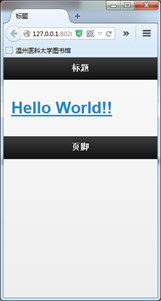
show the code:
<!DOCTYPE html>

<html>

<head>

    <meta charset="utf-8">

    <title>Hello World</title>

    <meta name="viewport" content="width=device-width, initial-scale=1">

    <link rel="stylesheet"  href="css/jquery.mobile-1.3.2.css">

    <script src="js/jquery.js"></script>

    <script src="js/jquery.mobile-1.3.2.js"></script>

</head>

<body>

    <div id="page1" data-role="page" >

        <div data-role="header">    <h1> 标题</h1></div>

        <div data-role="content">   <h1> <a href="#">Hello World!!</a></h1></div>

        <div data-role="footer">    <h1> 页脚</h1></div>

    </div>

</body>

</html>
建多页布局
多页布局是单页布局的一个集合,创建一个Html文件包括很多个界面,也可以创建很多个html文件,每个文件包括一个页面爆他们连接起来.
这里我们用一个html方便进行.
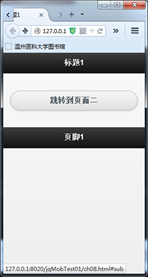

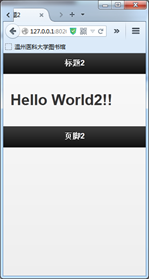
show the code
<!DOCTYPE html>

<html>

<head>

    <meta charset="utf-8">

    <title>测试</title>

    <meta name="viewport" content="width=device-width, initial-scale=1">

    <link rel="stylesheet"  href="css/jquery.mobile-1.3.2.css">

    <script src="js/jquery.js"></script>

    <script src="js/jquery.mobile-1.3.2.js"></script>

</head>

<body>

    <div id="page1" data-role="page" >

        <div data-role="header">    <h1> 标题1</h1></div>

        <div data-role="content">    <h1> <a href="#sub" data-role="button">跳转到页面二</a></h1></div>

        <div data-role="footer">    <h1> 页脚1</h1></div>

    </div>

    <div data-role="page2" id="sub">

        <div data-role="header">    <h1> 标题2</h1></div>

        <div data-role="content">    <h1> Hello World2!!</h1></div>

        <div data-role="footer">    <h1> 页脚2</h1></div>

    </div>

</body>

</html>
data-role="button" 自动默认的button按钮样式
jQuery Mobile 中的按钮可通过三种方法创建[ 按钮会在下面 详细讲]:
- 使用 <button> 元素
- 使用 <input> 元素
- 使用 data-role="button" 的 <a> 元素
利用网格对齐内容
网格是用放置对象,使他们对齐的工具.
可使用的布局网格有四种:ui-grid-a ui-grid-b ui-grid-c ui-grid-d
可使用的内容类有四种:ui-block-a ui-block-b ui-block-c ui-block-d
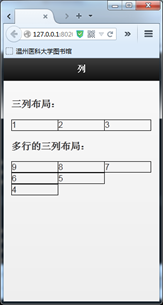
show the code:
<!DOCTYPE html>

<html>

<head>

    <meta charset="utf-8">

    <title>测试</title>

    <meta name="viewport" content="width=device-width, initial-scale=1">

    <link rel="stylesheet"  href="css/jquery.mobile-1.3.2.css">

    <script src="js/jquery.js"></script>

    <script src="js/jquery.mobile-1.3.2.js"></script>

</head>

<body>

<div data-role="page" id="pageone">

  <div data-role="header">

  <h1>列</h1>

  </div>

  <div data-role="content">

   <h3>三列布局:</h3>

   <div class="ui-grid-b">

     <div class="ui-block-a" style="border: 1px solid black;"><span>1</span></div>

     <div class="ui-block-b" style="border: 1px solid black;"><span>2</span></div>

     <div class="ui-block-c" style="border: 1px solid black;"><span>3</span></div>

   </div>

   <h3>多行的三列布局:</h3>

   <div class="ui-grid-b">

     <div class="ui-block-a" style="border: 1px solid black;"><span>9</span></div>

     <div class="ui-block-b" style="border: 1px solid black;"><span>8</span></div>

     <div class="ui-block-c" style="border: 1px solid black;"><span>7</span></div>

     <div class="ui-block-a" style="border: 1px solid black;"><span>6</span></div>

     <div class="ui-block-b" style="border: 1px solid black;"><span>5</span></div>

     <div class="ui-block-a" style="border: 1px solid black;"><span>4</span></div>

   </div>

  </div>

</div>

</body>

</html>
设计可折叠布局
可以通过点击或触摸来隐藏或显示可折叠的内容.
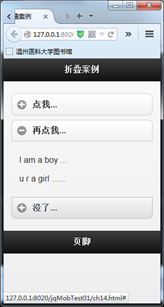
show the code:
<!DOCTYPE html>

<html>

<head>

    <meta charset="utf-8">

    <title>Jeff Li</title>

    <meta name="viewport" content="width=device-width, initial-scale=1">

    <link rel="stylesheet"  href="css/jquery.mobile-1.3.2.css">

    <script src="js/jquery.js"></script>

    <script src="js/jquery.mobile-1.3.2.js"></script>

</head>

<body>

    <div data-role="page" id="subone">

        <div data-role="header">

            <h1>折叠案例</h1>

        </div>

        <div data-role="content">

            <div data-role="collapsible">

                <h3>点我... </h3>

                <p>点了是sb</p>

            </div>

            <div data-role="collapsible-set">

                <div data-role="collapsible" data-collapsed="false">

                    <h3>再点我...</h3>

                    <p>I am a boy ...</p>

                    <p>u r a girl ......</p>

                </div>

                <div data-role="collapsible" >

                    <h3>没了...</h3>

                    <p>I am expanded on page load222...</p>

                    <div data-role="collapsible">

                        <h3>I am expanded on page load333</h3>

                    <p>I am expanded on page load333...</p>

                    </div>

                </div>

            </div>

        </div>

        <div data-role="footer">

            <h1>页脚</h1>

        </div>

    </div>

</body>

</html>
Editor's Note
路漫漫其修远兮 我将上下而求索
[ Talk is Cheap Show me the CODE ] : jQuery Mobile页面布局的更多相关文章
- [ Talk is Cheap Show me the CODE ] : jQuery Mobile页面布
[ Talk is Cheap Show me the CODE ] : jQuery Mobile页面布局 当我们专注地研究人类生活的空虚,并考虑荣华富贵空幻无常时,或许我们正在阿谀逢迎自己懒惰的天 ...
- [ Talk is Cheap Show me the CODE ] : jQuery Mobile工具栏
[ Talk is Cheap Show me the CODE ] : jQuery Mobile工具栏 Written In The Font " Wirte less Do more& ...
- jQuery Mobile页面跳转切换的几种方式
jQuery Mobile在移动开发中越来越受到欢迎. 而他的各个版本号也在持续不断的更新中.相同的我也非常喜欢它,它加快了我们开发HTML5的速度. 同一时候又具备jQuery一样的操作方法. 学起 ...
- (二)Jquery Mobile介绍以及Jquery Mobile页面与对话框
Jquery Mobile介绍以及Jquery Mobile页面与对话框 一. Adobe Dreamweaver CS6 环境 最新版本的cs6会支持JM的使用,有自动提示功能,很强大.安装说明地 ...
- jQuery Mobile 页面事件
jQuery Mobile 页面事件 在 jQuery Mobile 中与页面打交道的事件被分为四类: Page Initialization - 在页面创建前,当页面创建时,以及在页面初始化之后 P ...
- 用谷歌浏览器Chrome浏览jQuery Mobile页面需要配置Tomcat服务器
在浏览jQuery Mobile 页面中,除了 Chrome浏览器出错外,其他的浏览器都ok: 这里,是因为需要单独配置 Tomcat 服务: 1.先配置java jdk: 2.下载,安装,配置,To ...
- 02.Jquery Mobile介绍以及Jquery Mobile页面与对话框
一.为什么要学Jquery Mobile JqueryMobile 是jquery的移动版本,懂基本的jquery知识,会简单的html+css就可以完成很多复杂的功能,还有就是这个框架在企业中用 ...
- JQuery Mobile 图片布局
JQuery Mobile 图片布局 1.实现效果
- jQuery mobile网格布局
3.4 内容格式化 jQuery Mobile中提供了许多非常有用的工具与组件,如多列的网格布局.折叠形的面板控制等,这些组件可以帮助开发者快速实现正文区域内容的格式化. 3.4.1 网格布局 jQu ...
随机推荐
- spring自带测试配置
spring自带的测试注解 @ContextConfiguration(locations="classpath:applicationContext.xml")@RunWith( ...
- oracle ebs
甲骨文公司的应用产品,全称是Oracle 电子商务套件(E-Business Suit),是在原来Application(ERP)基础上的扩展,包括ERP(企业资源计划管理).HR(人力资源管理).C ...
- 2019.03.26 bzoj4444: [Scoi2015]国旗计划(线段树+倍增)
传送门 题意简述:现在给你一个长度为mmm的环,有nnn条互不包含的线段,问如果强制选第iii条线段至少需要用几条线段覆盖这个环,注意用来的覆盖的线段应该相交,即[1,3],[4,5][1,3],[4 ...
- 实践中 XunSearch(讯搜)更新索引方案对比
检测PHP-SDK的运行条件(查看是否支持XunSearch) $prefix/sdk/php/util/RequiredCheck.php $prefix #替换成你的安装目录 使用 XunSe ...
- Solaris:你好奇的十件事
想想你周围的人,看看他们正在使用的操作系统.绝大部分人的电脑都在用主流操作系统:Windows,MacOS,甚至是Ubuntu.当说到Solaris,Unix和BSD的时候,其他人还以为你说鸟语呢.除 ...
- 使用java开发spark的wordcount程序(多种实现)
package spark; import org.apache.spark.SparkConf; import org.apache.spark.api.java.JavaPairRDD; impo ...
- Redis sentinel之集群搭建
环境 由于不太熟悉docker,所以,把docker当虚拟机来用,服务器环境如下: Redis Server 环境搭建 Redis Server 01 搭建 并且制作Redis镜像 容器建立 # do ...
- 回顾django内容
回顾: 1 HTTP协议:(重点) -请求 -请求首行 -GET /index HTTP/1.1 -请求头部(在django框架中,可以从META中取出来) -key:value------>\ ...
- Eclipse导入web项目报错找不到HttpServletRequest解决方法
解决方法 右击项目-> Properties -> Java Build Path -> Add Library -> Server Runtime -> next -& ...
- 安装完Ubuntu后通过shell脚本一键安装软件
安装完Ubuntu后通过shell脚本一键安装软件 以下代码中#是单行注释 :<<! ! 是多行注释. 运行的时候需要把多行注释去掉. 比如把以下代码保存为install.sh, 那么在终 ...