
转:VB.NET Office操作之Word
在这里给出了一个Word操作的类,该类具备了对word 文档操作的基本功能,包括word 文档的新建,打开,保存,另存,插入图片,插入表格,插入文字,读取文字,定位光标位置,移动光标,移动到指定页等等操作。在下一篇文章中我将给出这个类实现的实例,读者可以借鉴下
程序引用的是Microsoft Word 14.0 Object Library 使用word 2007 +VS2010
 '*********************************************************************

 '作者:章鱼哥,QQ:3107073263 群:309816713

 '如有疑问或好的建议请联系我,大家一起进步

 '*********************************************************************

 Imports Microsoft.Office.Interop

 Public Class Class_Word1

     Public ZWordApplic As Word.Application

     Private ZDocument As Word.Document

     Public Sub New() '生成类实例

         ZWordApplic = New Word.Application

         ZWordApplic.Visible = True

     End Sub

     '新建一个Word文档

     Public Sub NewDocument()

         ZDocument = ZWordApplic.Documents.Add() '新建一个文档

     End Sub

     '使用模板新建一个文档

     Public Sub ModulNewDocument(ByVal FileAddress As String)

         ZDocument = ZWordApplic.Documents.Add(FileAddress)

     End Sub

     '打开一个文档

     Public Sub OpenWordDocument(ByVal FileAddress As String, ByVal IsReadOnly As Boolean)

         Try

             ZDocument = ZWordApplic.Documents.Open(FileAddress, Nothing, IsReadOnly)

         Catch ex As Exception

             MsgBox("您输入的地址不正确")

         End Try

     End Sub

     '关闭一个文档

     Public Sub CloseWordDocument()

         ZWordApplic.Quit()

         System.Runtime.InteropServices.Marshal.ReleaseComObject(ZWordApplic)

         ZWordApplic = Nothing

     End Sub

     '关闭所有打开的文档

     Public Sub CloseAllDocuments()

         ' ZWordApplic.Documents.Close(Word.WdSaveOptions.wdDoNotSaveChanges)

         ZWordApplic.Documents.Close(Word.WdSaveOptions.wdDoNotSaveChanges)

     End Sub

     '保存文档

     Public Sub Save()

         Try

             ZDocument.Save()

             MsgBox("保存成功")

         Catch ex As Exception

             MsgBox(ex.Message)

         End Try

     End Sub

     '另存为

     Public Sub SaveAs(ByVal FileAdress As String)

         Try

             ZDocument.SaveAs2(FileAdress)

             MsgBox("另存为成功!")

         Catch ex As Exception

             MsgBox(ex.Message)

         End Try

     End Sub

     '插入文字

     Public Sub InsertText(ByVal text As String)

         ZWordApplic.Selection.TypeText(text)

     End Sub

     '插入表格

     Public Sub InsertTabel(ByVal Tabel As DataTable)

         Dim ZTabel As Word.Table

         ZTabel = ZDocument.Tables.Add(ZWordApplic.Selection.Range, Tabel.Rows.Count + , Tabel.Columns.Count)

         '添加表头

         For i =  To Tabel.Columns.Count

             ZTabel.Rows().Cells(i).Range.InsertAfter(Tabel.Columns(i - ).ColumnName)

         Next

         '添加表格数据

         For i =  To Tabel.Rows.Count +

             For j =  To Tabel.Columns.Count

                 ZTabel.Rows(i).Cells(j).Range.InsertAfter(Tabel.Rows(i - ).Item(j - ).ToString)

             Next

         Next

         ZTabel.AllowAutoFit = True

         ZTabel.ApplyStyleFirstColumn = True

         ZTabel.ApplyStyleHeadingRows = True

     End Sub

     '插入图片

     Public Sub InsertPic(ByVal PicAddress As String)

         Try

             ZWordApplic.Selection.InlineShapes.AddPicture(PicAddress, False, True)

         Catch ex As Exception

             MsgBox("图片地址不正确 ")

         End Try

     End Sub

     '读取文字

     Public Sub ReadText()

         ZWordApplic.Selection.WholeStory()

         ZWordApplic.Selection.Copy()

     End Sub

  '获取当前的光标位置信息,存放在数组中

     Public Function GetCursor() As ArrayList

         Try

             Dim cursor As New ArrayList

             '当前光标所在的页数

             Dim Page As Object = ZDocument.Application.Selection.Information(Word.WdInformation.wdActiveEndAdjustedPageNumber)

             '当前光标所在行数

             Dim row As Object = ZDocument.Application.Selection.Information(Word.WdInformation.wdFirstCharacterLineNumber)

             '当前光标所在列数

             Dim cul As Object = ZDocument.Application.Selection.Information(Word.WdInformation.wdFirstCharacterColumnNumber)

             cursor.AddRange({Page, row, cul})

             Return cursor

         Catch ex As Exception

             MsgBox(ex.Message)

             Return Nothing

         End Try

     End Function

     '鼠标定位到指定页

     Public Sub GoToPage(ByVal Page As Integer)

         Try

             '跳转到指定页码

             ZDocument.Application.Selection.GoTo(Word.WdGoToItem.wdGoToPage, Word.WdGoToDirection.wdGoToFirst, Page)

         Catch ex As Exception

             MsgBox(ex.Message)

         End Try

     End Sub

     '光标调到指定行。这个是绝对跳转

     Public Sub GoToAbsolutLine(ByVal Row As Integer)

         Try

             '跳转到指定行,说明:这个行是相对于整个文档来算的,将如第一页就2行,你跳到第三行的时候,就是第2页的第1行

             '读者可自行测试,目前还实现不了给定页,行,列调到精确位置的功能。至少我还没实现。这里就不进行实现了

             ZDocument.Application.Selection.GoTo(Word.WdGoToItem.wdGoToLine, Word.WdGoToDirection.wdGoToFirst, Row)

         Catch ex As Exception

             MsgBox(ex.Message)

         End Try

     End Sub

     '光标调到指定行。这个是相对跳转。大家应该理解什么意思的

     Public Sub GoToOppsiteLine(ByVal Row As Int16)

         Try

             '读者可自行测试,目前还实现不了给定页,行,列调到精确位置的功能。至少我还没实现

             If Row >=  Then '如果大于0,像后跳转

                 ZDocument.Application.Selection.GoTo(Word.WdGoToItem.wdGoToLine, Word.WdGoToDirection.wdGoToNext, Math.Abs(Row))

             Else '小于0,像前跳转

                 ZDocument.Application.Selection.GoTo(Word.WdGoToItem.wdGoToLine, Word.WdGoToDirection.wdGoToPrevious, Math.Abs(Row))

             End If

         Catch ex As Exception

             MsgBox(ex.Message)

         End Try

     End Sub

     '左移光标

     Public Sub MoveLeft()

         ZDocument.Application.Selection.MoveLeft() '每次移动1位

     End Sub

     '右移

     Public Sub MoveRight()

         ZDocument.Application.Selection.MoveRight() '每次移动1位

     End Sub

     '上移

     Public Sub MoveUp()

         ZDocument.Application.Selection.MoveUp() '每次移动1位

     End Sub

     '下移

     Public Sub MoveDown()

         ZDocument.Application.Selection.MoveDown() '每次移动1位

     End Sub

 End class
实现窗体:
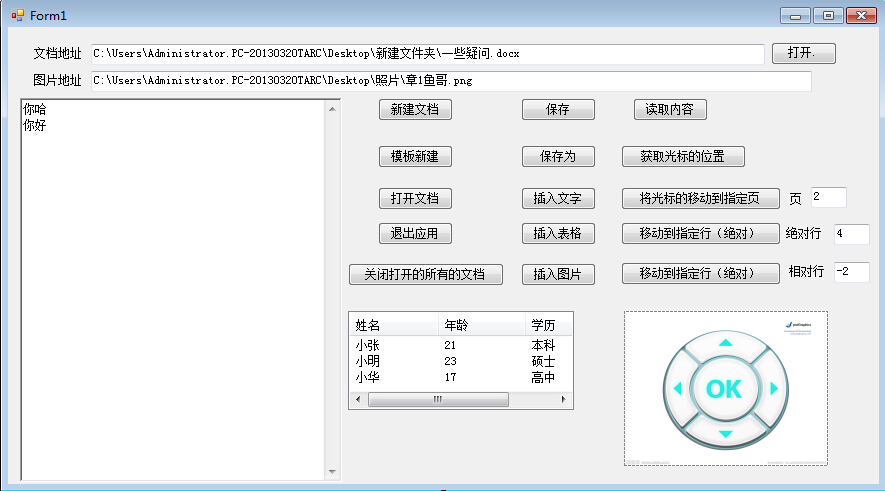
 '作者:章鱼哥,QQ:3107073263 群:309816713

 '如有疑问或好的建议请联系我,大家一起进步

 '*********************************************************************

 Imports Microsoft.Office.Interop

 Public Class Form1

     Dim Array_Word As New ArrayList

     Private Sub Form1_Load(ByVal sender As System.Object, ByVal e As System.EventArgs) Handles MyBase.Load

         RichTextBox1.Text = "章鱼哥出品VB.NET"

     End Sub

     '新建一个Word文档

     Private Sub But_NewWord_Click(ByVal sender As System.Object, ByVal e As System.EventArgs) Handles But_NewWord.Click

         Dim My_word As New Class_Word1

         My_word.NewDocument()

         Array_Word.Add(My_word)

     End Sub

     '以模板新建

     Private Sub But_ModuleNewWord_Click(ByVal sender As System.Object, ByVal e As System.EventArgs) Handles But_ModuleNewWord.Click

         Dim My_word As New Class_Word1

         My_word.ModulNewDocument(TextBox1.Text)

         Array_Word.Add(My_word)

     End Sub

     '打开一个文档

     Private Sub But_OpenWord_Click(ByVal sender As System.Object, ByVal e As System.EventArgs) Handles But_OpenWord.Click

         Dim My_word As New Class_Word1

         My_word.OpenWordDocument(TextBox1.Text, False)

         Array_Word.Add(My_word)

     End Sub

     '关闭当前打开的所有文档

     Private Sub But_CloseAllDocument_Click(ByVal sender As System.Object, ByVal e As System.EventArgs) Handles But_CloseAllDocument.Click

         For Each Word_Class As Class_Word1 In Array_Word

             Word_Class.CloseWordDocument()

         Next

         Array_Word.Clear()

     End Sub

     '保存文档

     Private Sub But_Save_Click(ByVal sender As System.Object, ByVal e As System.EventArgs) Handles But_Save.Click

         For Each Word_Class As Class_Word1 In Array_Word

             Word_Class.Save()

         Next

     End Sub

     '另存为

     Private Sub But_SaveAs_Click(ByVal sender As System.Object, ByVal e As System.EventArgs) Handles But_SaveAs.Click

         For Each Word_Class As Class_Word1 In Array_Word

             Word_Class.SaveAs(TextBox1.Text)

         Next

     End Sub

     '插入文本

     Private Sub But_Insert_Click(ByVal sender As System.Object, ByVal e As System.EventArgs) Handles But_Insert.Click

         For Each Word_Class As Class_Word1 In Array_Word

             Word_Class.InsertText(RichTextBox1.Text)

         Next

     End Sub

     '插入表格

     Private Sub But_InsertTabel_Click(ByVal sender As System.Object, ByVal e As System.EventArgs) Handles But_InsertTabel.Click

         Dim tabel As DataTable = GetTabel(ListView1)

         For Each Word_Class As Class_Word1 In Array_Word

             Word_Class.InsertTabel(GetTabel(ListView1))

         Next

     End Sub

     '从listview 中读取数据生成DataTable

     Private Function GetTabel(ByVal lis As ListView) As DataTable

         Dim Tabel As New DataTable()

         '加表头

         For i =  To lis.Columns.Count -

             Tabel.Columns.Add(lis.Columns(i).Text.ToString)

         Next

         For i =  To lis.Items.Count -

             Dim row As DataRow = Tabel.NewRow

             For j =  To lis.Columns.Count -

                 row.Item(j) = lis.Items(i).SubItems(j).Text

             Next

             Tabel.Rows.Add(row)

         Next

         Return Tabel

     End Function

     '插入图片

     Private Sub But_InsertPic_Click(ByVal sender As System.Object, ByVal e As System.EventArgs) Handles But_InsertPic.Click

         For Each Word_Class As Class_Word1 In Array_Word

             Word_Class.InsertPic(TextBox2.Text)

         Next

     End Sub

     '读取文档的内容

     Private Sub But_ReadText_Click(ByVal sender As System.Object, ByVal e As System.EventArgs) Handles But_ReadText.Click

         For Each Word_Class As Class_Word1 In Array_Word

             Word_Class.ReadText()

             RichTextBox1.Paste()

         Next

     End Sub

 <pre name="code" class="vb">'*********************************************************************

  '获取文档路径

     Private Sub But_GetAdrress_Click(ByVal sender As System.Object, ByVal e As System.EventArgs) Handles But_GetAdrress.Click

         Dim opendialog As New OpenFileDialog

         If opendialog.ShowDialog = DialogResult.OK Then

             TextBox1.Text = opendialog.FileName

         End If

     End Sub

     '获取当前鼠标的位置

     Private Sub But_GetCursor_Click(ByVal sender As System.Object, ByVal e As System.EventArgs) Handles But_GetCursor.Click

         For Each Word_Class As Class_Word1 In Array_Word

             Dim Cursor As ArrayList = Word_Class.GetCursor()

             If Cursor IsNot Nothing Then

                 For i =  To Cursor.Count -

                     RichTextBox1.Text &= "  " & Cursor(i)

                 Next

             End If

         Next

     End Sub

     '将光标移动到指定页

     Private Sub But_GoTo_Page_Click(ByVal sender As System.Object, ByVal e As System.EventArgs) Handles But_GoTo_Page.Click

         For Each Word_Class As Class_Word1 In Array_Word

             Word_Class.GoToPage(Tex_Page.Text)

         Next

     End Sub

     '光标移动到指定行(绝对)

     Private Sub But_GotoAbsoultRow_Click(ByVal sender As System.Object, ByVal e As System.EventArgs) Handles But_GotoAbsoultRow.Click

         For Each Word_Class As Class_Word1 In Array_Word

             Word_Class.GoToAbsolutLine(Tex_Row_Absoult.Text)

         Next

     End Sub

     '光标移动到指定行(相对)

     Private Sub But_GotoOppsitRow_Click(ByVal sender As System.Object, ByVal e As System.EventArgs) Handles But_GotoOppsitRow.Click

         For Each Word_Class As Class_Word1 In Array_Word

             Word_Class.GoToOppsiteLine(Tex_Row_Oppsit.Text)

         Next

     End Sub

     '上下左右按钮,点击按钮一次移动一位

     Private Sub PictureBox1_MouseUp(ByVal sender As System.Object, ByVal e As System.Windows.Forms.MouseEventArgs) Handles PictureBox1.MouseUp

         'MsgBox("X:" & e.X & "Y:" & e.Y)

         Dim x As Integer = e.X

         Dim y As Integer = e.Y

         'RichTextBox1.Text &= "|" & e.X & ":" & e.Y

         For Each Word_Class As Class_Word1 In Array_Word

             If x >  And x <  Then

                 If y >  And y <  Then

                     Word_Class.MoveUp()

                 ElseIf y >  And y <  Then

                     Word_Class.MoveDown()

                 End If

             End If

             If y >  And y <  Then

                 If x >  And x <  Then

                     Word_Class.MoveLeft()

                 ElseIf x >  And y <  Then

                     Word_Class.MoveRight()

                 End If

             End If

         Next

     End Sub

 End Class
转:VB.NET Office操作之Word的更多相关文章
- JAVA Asponse.Word Office 操作神器,借助 word 模板生成 word 文档,并转化为 pdf,png 等多种格式的文件
一,由于该 jar 包不是免费的, maven 仓库一般不会有,需要我们去官网下载并安装到本地 maven 仓库 1,用地址 https://www-evget-com/product/564 ...
- .NET通过调用Office组件导出Word文档
.NET通过调用Office组件导出Word文档 最近做项目需要实现一个客户端下载word表格的功能,该功能是用户点击"下载表格",服务端将该用户的数据查询出来并生成数据到Word ...
- Spire.Office for .NET(Word、Excel、PPT、PDF等)
使用Spire.Office for .NET(Word.Excel.PPT.PDF等)的初步感受 前言 本文大部分内容来自http://www.codeproject.com/Articles/71 ...
- Java操作Microsoft Word之jacob
转自: 现在我们一起来看看,用Java如何操作Microsoft Word. jacob,官网是http://danadler.com/jacob 这是一个开源的工具.最新版本1.7 官方 ...
- Aspose office (Excel,Word,PPT),PDF 在线预览
前文: 做个备份,拿的是试用版的 Aspose,功能见标题 代码: /// <summary> /// Aspose office (Excel,Word,PPT),PDF 在线预览 // ...
- open office操作word文档
前段时间工作需要使用open office往word中写文件,写图片,以及向footer也就是页尾中插入图片,已经封装成了类,直接调用即可,代码如下: package com.test.common. ...
- 用DELPHI操作EXCEL Word
用DELPHI操作EXCEL 在DELPHI中显示EXCEL文件,可用以下简单代码做到.但要实用,则需进一步完善. var Form1: TForm1; EApp:variant;implemen ...
- 老牌开源Office操作组件NPOI现已支持.NET Core
昨天在微信群里听到老牌Excel开发利器NPOI的作者瞿总说4.6.1版本的NPOI已经支持.NET Standard 2.0了,这也就意味着你可以在.NET Core中使用NPOI了. 作者:依乐祝 ...
- 跟着未名学Office - 熟练使用WORD
目录 第一章.Word之编辑篇. 1 第一节 页面布局... 1 第二节 格式编辑... 1 第三节 表.图.域... 5 第四节 审阅.保护... 7 第五节 *插入对像... 9 第二章.Word ...
随机推荐
- 学习Spring中遇到关于BeanFactory及测试类的问题
最近在学习Spring,使用的是Spring 5.0.1 学习书本中使用的是4.0 学习书本中使用以下来加载配置文件及设置 Resource resource = new ClassPathResou ...
- pyCharm django 中新加app
1.在manage.py@djangotest中输入命令: 1.startapp realnameauth ---新建一个app,名字为realnameauth 2.在 django 项目中的 ...
- s21day15 python笔记
s21day15 python笔记 一.内容回顾及补充 回顾 补充 range / xrange(python2与python3的区别六) python2: xrange:不会在内存中立即创建,而是在 ...
- react抛物线小球实现
.ballFather{ position: absolute; width: 15px; height: 15px; border-radius: 50%; transition: all 0.5s ...
- Qt学习--信号与槽(多窗口的实现)
按照helloword的创建过程 创建一个新的项目(项目名:window) 之后进行多窗口的实现过程: (参考:http://www.qter.org/portal.php?mod=view& ...
- git 入门教程
git 入门教程之协同开发 前面我们已经介绍过远程仓库的相关概念,不过那时并没有深入探讨,只是讲解了如何创建远程仓库以及推送最新工作成果到远程仓库,实际上远程仓库对于团队协同开发很重要,不仅仅是团队协 ...
- install MariaDB 10.2 on Ubuntu 18
Here are the commands to run to install MariaDB 10.2 from the MariaDB repository on your Ubuntu syst ...
- 从零开始在iPhone上运行视频流实时预测模型应用,只需10步
1、买一台苹果电脑,建议MacBook Pro. 2、安装Xcode. 3、克隆TensorFlow:https://github.com/tensorflow/tensorflow.git 4、下载 ...
- Python 找零问题
#coding = utf-8 def Change_Money(money): print('总金额:'+str(money)+'元') loop=True tmp=[] # 面值列表 单位:元 t ...
- vim编辑器学习记录
i:在光标所在字符前开始插入 a:在光标所在字符后开始插入 o:在光标所在行的下面另起一新行插入 s:删除光标所在的字符并开始插入 I:在光标所在行的行首开始插入 如果行首有空格则在空格之后插入 A: ...