
Android 底部导航栏实现一 Fragment-replace
【效果】(这里下载的软件收费的试用有水印)

【推荐】这里推荐一个图标网http://iconfont.cn/。以上图标来自此图标网
【项目结构】

【步骤】
①创建布局文件,写底部导航栏
 <?xml version="1.0" encoding="utf-8"?>

 <LinearLayout xmlns:android="http://schemas.android.com/apk/res/android"

     xmlns:app="http://schemas.android.com/apk/res-auto"

     xmlns:tools="http://schemas.android.com/tools"

     android:layout_width="match_parent"

     android:layout_height="match_parent"

     tools:context=".MainActivity"

     android:orientation="vertical">

     <RelativeLayout

         android:id="@+id/rl_content"

         android:layout_width="match_parent"

         android:layout_height="0dp"

         android:layout_weight="1">

        <!--这里设置权重weight为1, 下面不设置权重。-->

         <!--意思是,剩余的位置全都是RelativeLayout的-->

     </RelativeLayout>

     <TextView

         android:layout_width="match_parent"

         android:layout_height="1dp"

         android:background="#797878"/>

     <LinearLayout

         android:layout_width="match_parent"

         android:layout_height="80dp"

         android:orientation="horizontal">

         <LinearLayout

             android:id="@+id/item1"

             android:layout_width="0dp"

             android:layout_weight="1"

             android:layout_height="match_parent"

             android:orientation="vertical">

             <ImageView

                 android:id="@+id/item1_iv"

                 android:layout_width="match_parent"

                 android:layout_height="0dp"

                 android:layout_weight="3"

                 android:layout_margin="3dp"

                 android:scaleType="fitCenter"

                 android:src="@drawable/wxb"

                 android:padding="1dp"/>

             <TextView

                 android:id="@+id/item1_tv"

                 android:text="女王"

                 android:textSize="16sp"

                 android:layout_width="match_parent"

                 android:layout_height="0dp"

                 android:layout_weight="1"

                 android:gravity="center"/>

         </LinearLayout>

         <LinearLayout

             android:id="@+id/item2"

             android:layout_width="0dp"

             android:layout_weight="1"

             android:layout_height="match_parent"

             android:orientation="vertical">

             <ImageView

                 android:id="@+id/item2_iv"

                 android:layout_width="match_parent"

                 android:layout_height="0dp"

                 android:layout_weight="3"

                 android:layout_margin="3dp"

                 android:scaleType="fitCenter"

                 android:src="@drawable/meizhuang"

                 android:padding="4dp"/>

             <TextView

                 android:id="@+id/item2_tv"

                 android:text="美妆"

                 android:textSize="16sp"

                 android:layout_width="match_parent"

                 android:layout_height="0dp"

                 android:layout_weight="1"

                 android:gravity="center"/>

         </LinearLayout>

         <LinearLayout

             android:id="@+id/item3"

             android:layout_width="0dp"

             android:layout_weight="1"

             android:layout_height="match_parent"

             android:orientation="vertical">

             <ImageView

                 android:id="@+id/item3_iv"

                 android:layout_width="match_parent"

                 android:layout_height="0dp"

                 android:layout_weight="3"

                 android:layout_margin="3dp"

                 android:scaleType="fitCenter"

                 android:src="@drawable/fuzhuang"

                 android:padding="5dp"/>

             <TextView

                 android:id="@+id/item3_tv"

                 android:text="衣帽"

                 android:textSize="16sp"

                 android:layout_width="match_parent"

                 android:layout_height="0dp"

                 android:layout_weight="1"

                 android:gravity="center" />

         </LinearLayout>

         <LinearLayout

             android:id="@+id/item4"

             android:layout_width="0dp"

             android:layout_weight="1"

             android:layout_height="match_parent"

             android:orientation="vertical">

             <ImageView

                 android:id="@+id/item4_iv"

                 android:layout_width="match_parent"

                 android:layout_height="0dp"

                 android:layout_weight="3"

                 android:layout_margin="3dp"

                 android:scaleType="fitCenter"

                 android:src="@drawable/xiebaopeishi"

                 android:padding="3dp"/>

             <TextView

                 android:id="@+id/item4_tv"

                 android:text="鞋包"

                 android:textSize="16sp"

                 android:layout_width="match_parent"

                 android:layout_height="0dp"

                 android:layout_weight="1"

                 android:gravity="center" />

         </LinearLayout>

     </LinearLayout>

 </LinearLayout>
②定义Fragment
【提示】可以通过下图方式创建
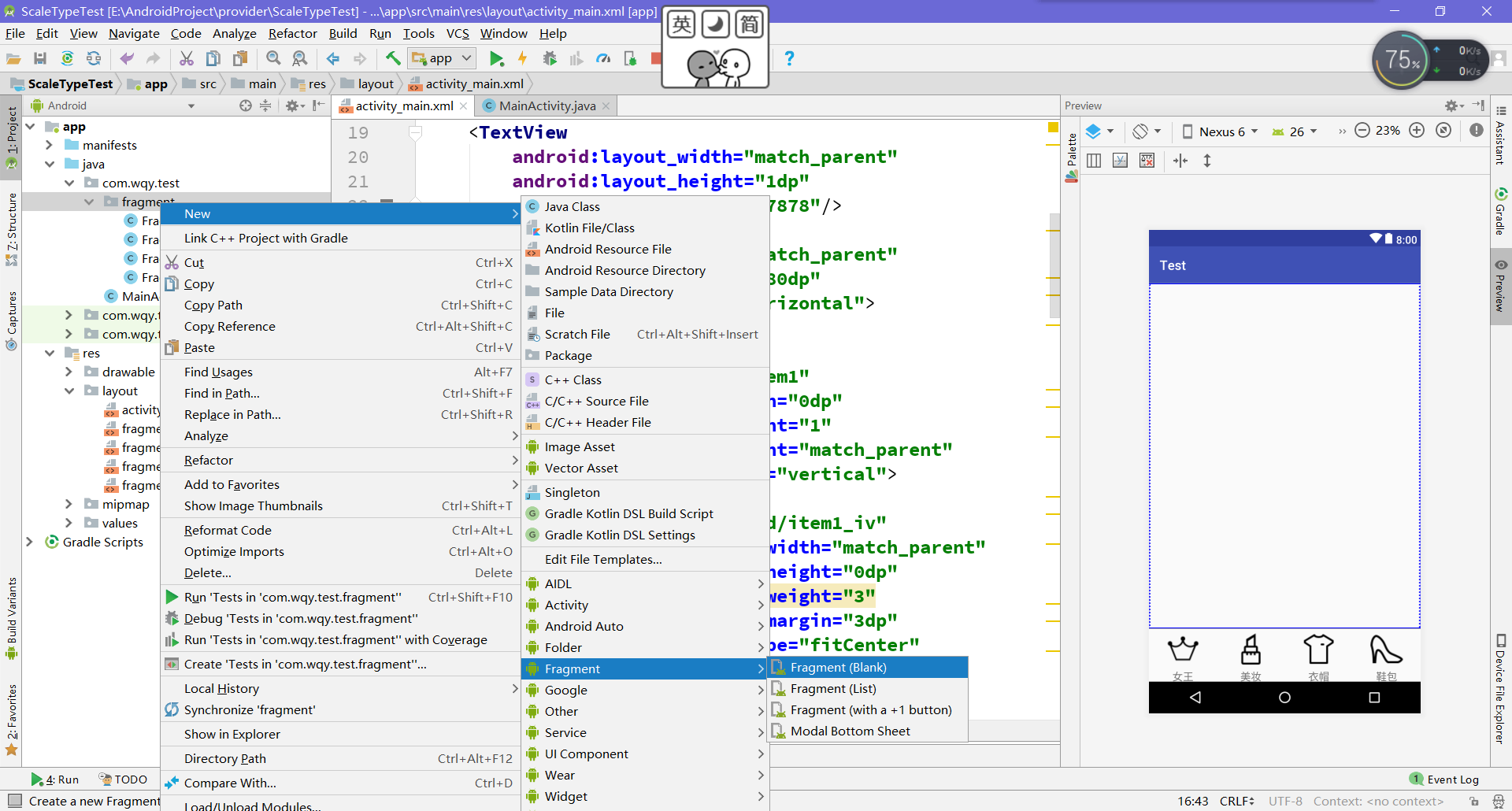
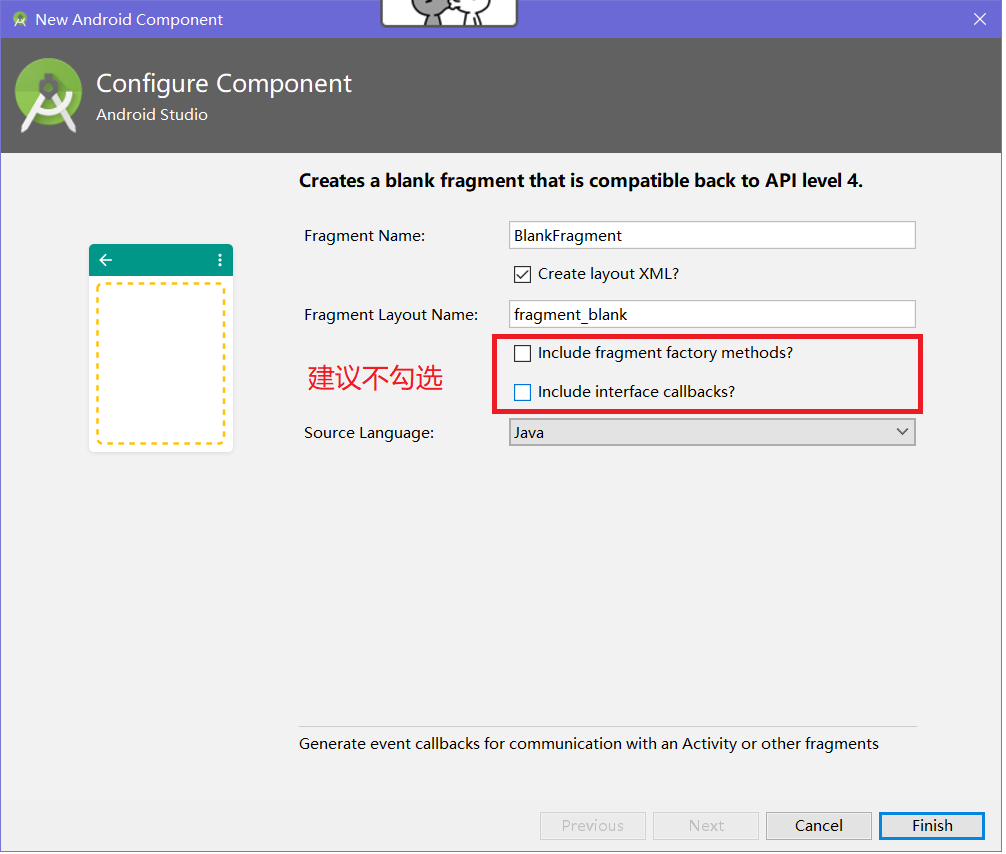
 public class FragmentA extends Fragment {

     public FragmentA() {

         // Required empty public constructor

     }

     @Override

     public View onCreateView(LayoutInflater inflater, ViewGroup container,

                              Bundle savedInstanceState) {

         // Inflate the layout for this fragment

         return inflater.inflate(R.layout.fragment_a, container, false);

     }

 }
对于生成的Fragment不用作修改,对应的布局中设置一个背景颜色便于观察。
③MainActivity代码的编写
 public class MainActivity extends AppCompatActivity implements View.OnClickListener{

     private FragmentManager fragmentManager;

     private RelativeLayout rl_content;

     private ImageView item1_iv,item2_iv,item3_iv,item4_iv;

     private TextView item1_tv,item2_tv,item3_tv,item4_tv;

     private LinearLayout item1,item2,item3,item4;

     private ImageView[] ivs;

     private TextView[] tvs;

     @Override

     protected void onCreate(Bundle savedInstanceState) {

         super.onCreate(savedInstanceState);

         setContentView(R.layout.activity_main);

         initView();

         fragmentManager = getSupportFragmentManager();

         initListener();

     }

     private void initListener() {

         item1.setOnClickListener(this);

         item2.setOnClickListener(this);

         item3.setOnClickListener(this);

         item4.setOnClickListener(this);

     }

     private void initView() {

         rl_content = (RelativeLayout) findViewById(R.id.rl_content);

         item1_iv = (ImageView) findViewById(R.id.item1_iv);

         item1_tv = (TextView) findViewById(R.id.item1_tv);

         item1 = (LinearLayout) findViewById(R.id.item1);

         item2_iv = (ImageView) findViewById(R.id.item2_iv);

         item2_tv = (TextView) findViewById(R.id.item2_tv);

         item2 = (LinearLayout) findViewById(R.id.item2);

         item3_iv = (ImageView) findViewById(R.id.item3_iv);

         item3_tv = (TextView) findViewById(R.id.item3_tv);

         item3 = (LinearLayout) findViewById(R.id.item3);

         item4_iv = (ImageView) findViewById(R.id.item4_iv);

         item4_tv = (TextView) findViewById(R.id.item4_tv);

         item4 = (LinearLayout) findViewById(R.id.item4);

         ivs = new ImageView[]{item1_iv,item2_iv,item3_iv,item4_iv};

         tvs = new TextView[]{item1_tv,item2_tv,item3_tv,item4_tv};

     }

     @Override

     public void onClick(View view) {

         switch (view.getId()){

             case R.id.item1: {

                 FragmentTransaction transaction = fragmentManager.beginTransaction();//创建一个事务

                 transaction.replace(R.id.rl_content,new FragmentA());

                 transaction.commit();//事务一定要提交,replace才会有效

                 setCheck(0);//自定义方法

                 break;

             }

             case R.id.item2: {

                 FragmentTransaction transaction = fragmentManager.beginTransaction();

                 transaction.replace(R.id.rl_content,new FragmentB());

                 transaction.commit();

                 setCheck(1);

                 break;

             }

             case R.id.item3: {

                 FragmentTransaction transaction = fragmentManager.beginTransaction();

                 transaction.replace(R.id.rl_content,new FragmentC());

                 transaction.commit();

                 setCheck(2);

                 break;

             }

             case R.id.item4: {

                 FragmentTransaction transaction = fragmentManager.beginTransaction();

                 transaction.replace(R.id.rl_content,new FragmentD());

                 transaction.commit();

                 setCheck(3);

                 break;

             }

             default:break;

         }

     }

     public void setCheck(int itemId){

         //这个方法设置底部导航栏选中时的效果

         for (int i = 0; i < 4; i++) {

             ivs[i].setColorFilter(Color.parseColor("#0f0f0f"));

             tvs[i].setTextColor(Color.parseColor("#0f0f0f"));

         }

         ivs[itemId].setColorFilter(Color.GREEN);

         tvs[itemId].setTextColor(Color.GREEN);

     }

 }
【提示】①这里的点击事件是通过Activity实现Onclick接口的方式
②getSupportFragmentManager()是v4包中的,兼容效果好,如果用getFragmentManager()可能会崩掉
③FragmentManager只需要获取一次,但是事务FragmentTransaction要重新开启。最后事务一定要提交commit。
④方法setCheck是为了设置导航的被选中效果。
Android 底部导航栏实现一 Fragment-replace的更多相关文章
- Android底部导航栏——FrameLayout + RadioGroup
原创文章,转载请注明出处http://www.cnblogs.com/baipengzhan/p/6285881.html Android底部导航栏有多种实现方式,本文详细介绍FrameLayout ...
- AndroidStudio制作底部导航栏以及用Fragment实现切换功能
前言 大家好,给大家带来AndroidStudio制作底部导航栏以及用Fragment实现切换功能的概述,希望你们喜欢 学习目标 AndroidStudio制作底部导航栏以及用Fragment实现切换 ...
- Android底部导航栏创建——ViewPager + RadioGroup
原创文章,引用请注明出处:http://www.cnblogs.com/baipengzhan/p/6270201.html Android底部导航栏有多种实现方式,本文详解其中的ViewPager ...
- Android底部导航栏
Android底部导航栏 今天简单写了一个底部导航栏,封装了一个库,用法比较简单 效果图 Github地址:https://github.com/kongqw/KqwBottomNavigation ...
- android底部导航栏实现
第一种用radiobutton实现 https://wizardforcel.gitbooks.io/w3school-android/content/75.html 布局文件,使用radiogrou ...
- Android底部导航栏(可滑动)----TabLayout+viewPager
[TabLayout] ①TabLayout是选项卡,在屏幕空间有限的情况下,对不同的空间进行分组.属于android support design,更多的用于新闻上,如果放在底部也可做底部导航栏 ② ...
- android底部导航栏小结
android自带的有TabHost,但好像无法满足要求, 本文只记录使用 TabLayout + Fragment 和 android 自带的 BottomNavigationView + Fra ...
- Android 底部导航栏的xml
<?xml version="1.0" encoding="utf-8"?> <RelativeLayout xmlns:android=&q ...
- Android 五种方式实现Android底部导航栏
https://segmentfault.com/a/1190000007697941
随机推荐
- 关于 Abp 替换了 DryIoc 框架之后的问题
在之前有些过一篇文章 <使用 DryIoc 替换 Abp 的 DI 框架> ,在该文章里面我尝试通过以替换 IocManager 内部的 IContainer 来实现使用我们自己的 DI ...
- 项目总结二:人脸识别项目(Face Recognition for the Happy House)
一.人脸验证问题(face verification)与人脸识别问题(face recognition) 1.人脸验证问题(face verification): 输入 ...
- 如何配置React Native真机调试-iOS
说在前面,本教程是建立在项目已经成功在模拟器上运行的基础上,如果你是还未配置好环境的新手,建议先从官网快速入门开始:官网英文版 . 中文版 ok, 切入正题,当你已经完成好环境配置,在模拟器上成功的运 ...
- IdentityServer4(1)- 特性一览
本地应用只本地客户端应用,例如QQ.微信 IdentityServer4是ASP.NET Core 2的OpenID Connect和OAuth 2.0框架.它可以在您的应用程序中提供以下功能: 它使 ...
- Kubernetes 中的核心组件与基本对象概述
Kubernetes 是 Google 基于 Borg 开源的容器编排调度,用于管理容器集群自动化部署.扩容以及运维的开源平台.作为云原生计算基金会 CNCF(Cloud Native Computi ...
- Analyzing .net core application with SonarQube Scanner for MSBuild
SonarQube是管理代码质量一个开放平台,省略安装过程,下面介绍下如何使用sonarqube去扫描c# 代码. 前提:下载SonarQube Scanner for MSBuild.https:/ ...
- Parquet 格式文件,查看Schema
需要社区工具:parquet-tools-1.6.0rc3-SNAPSHOT.jar git project: https://github.com/apache/p ...
- 线程池ThreadPool及Task调度死锁分析
近1年,偶尔发生应用系统启动时某些操作超时的问题,特别在使用4核心Surface以后.笔记本和台式机比较少遇到,服务器则基本上没有遇到过. 这些年,我写的应用都有一个习惯,就是启动时异步做很多准备工作 ...
- win32线程
win32线程 一丶什么是线程 在windows中常听到的就是线程.多线程.啊什么的. 这里介绍一下什么是线程. 1.线程是附属在进程中的一个执行实体.简而言之就是执行代码的. 2.每个进程至少有一个 ...
- Redis主从复制、多实例、高可用(三)--技术流ken
Redis主从复制 在开始实现redis的高可用之前,首先来学习一下如何实现redis的主从复制,毕竟高可用也会依赖主从复制的技术. Redis的主从复制,可以实现一个主节点master可以有多个从节 ...