
Intercepting a 404 in IIS 7 and up
Lately I've been working on a system that needs to serve flat files, which is what IIS is very good at. However, when a file does not exist (i.e. a 404 error occurs) there are several options:
- The file never existed: propagate the 404.
- The file did exist, but has been permanently removed: return a 410 (Gone).
- The file did exist, but a newer version is available. In our system a different version always gets a new identifier and as such a new URL, so this is a common scenario for us: redirect the user to the new version.
So the question is: How do we intercept the 404 error for any file?
The answer: With an IIS HttpModule, which is pretty much the same as an ASP.NET HttpModule, as the code below demonstrates.
using System;
using System.Net;
using System.Web;
namespace IisModule
{
public class DemoModule : System.Web.IHttpModule
{
public void Dispose()
{
}
public void Init(System.Web.HttpApplication context)
{
context.EndRequest += new EventHandler(context_EndRequest);
}
void context_EndRequest(object sender, EventArgs e)
{
var context = (HttpApplication)sender;
if(context.Response.StatusCode == (int)HttpStatusCode.NotFound)
{
context.Response.Redirect("http://michiel.vanotegem.nl/");
}
}
}
}
The only place where you can check for a 404 error is at EndRequest. Other events get bypassed, including the Error event. However, as you can see in the code, getting the response code is easy. And after checking it you can do a redirect or change the response and response code (don't forget to clear the response stream). You need to add this code to a Class Library project in Visual Studio, to which you will have to add a reference to the System.Web assembly. Also, this does not work with .NET 4.0 and up (except in Windows Server 2012), so you'll need to configure the project to target the .NET 2.0 runtime, which is the case for .NET 2.0 through 3.5, as is shown below.

Configuring IIS
First you have to create a /bin folder in the website you want the module to work in, and copy the DLL to the bin folder. If you want this on the Default Web Site, you need to add this to C:\inetpub\wwwroot (assumming C is your OS drive), as shown below.

Second, you need to fire up IIS Manager to add the Managed Module to the Web Site. Select the Website (in my case Default Web Site) and select Modules, as highlighted below.

Now click Add Managed Module… as highlighted below.

Finally, give the new module a name, so you can recognize it in the list of modules active for the website, and select the module in the dropdown, as shown below, and click OK.

That's it! Now every 404 will redirect the user to the root of my blog.
Configuring IIS for all sites
If you don't want to have a /bin folder in your site, and all sites hosted on the system require the same behavior, you can also sign the assemly, place it in the GAC, and configure the Module at server level.
From: http://michiel.vanotegem.nl/2012/11/intercepting-a-404-in-iis-7-and-up/
注:
用此文的方法可以截获所有响应的StatusCode,如果只想捕获ASP.NET或者managed handlers,勾上下面的选项即可。

如果要处理其他的StatusCode, 只需要修改这里的代码即可。
|
if(context.Response.StatusCode == (int)HttpStatusCode.NotFound) { context.Response.Redirect("http://michiel.vanotegem.nl/"); } |
比如除了200以外都让它转向,只需要这样:
|
if(context.Response.StatusCode != (int)HttpStatusCode.OK) { context.Response.Redirect("http://michiel.vanotegem.nl/"); } |
还需要注意的是,为了让它生效,还需要移掉web.config里面custom errors里面设置的转向( web.config custom errors的级别比我们这个级别高,会优先用,但是custom errors设置不能截获所有的StatusCode),另外还需要移掉站点里面的.net Error Pages里面的设置(这个和custom errors一样,比我们这个级别高,会优先用,但是不能截获所有的StatusCode)。
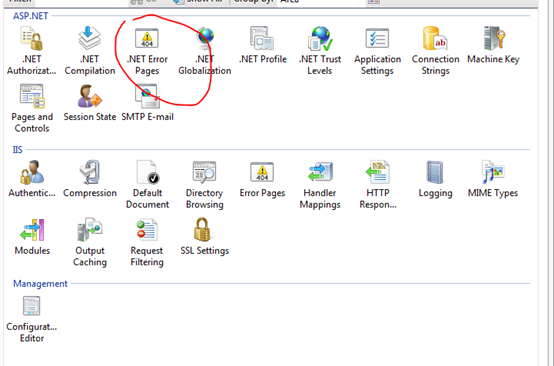
下面这个貌似不用改,不会影响我们的。
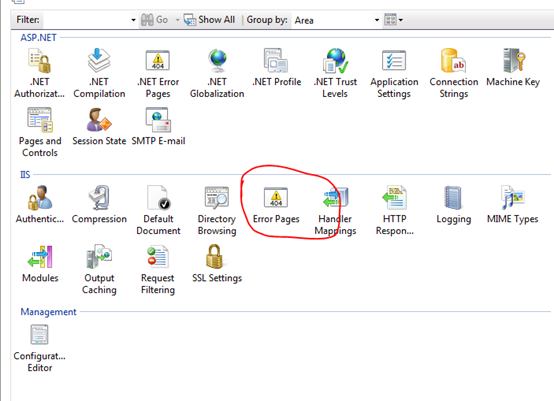
Intercepting a 404 in IIS 7 and up的更多相关文章
- 解决Web部署 svg/woff/woff2字体 404错误 iis 解决Web部署 svg/woff/woff2字体 404错误
问题:最近在IIS上部署web项目的时候,发现浏览器总是报找不到woff.woff2字体的错误.导致浏览器加载字体报404错误,白白消耗了100-200毫秒的加载时间. 原因:因为服务器IIS不认SV ...
- IIS7 404 模块 IIS Web Core 通知 MapRequestHandler 处理程序 StaticFile 错误代码 0x80070002
<system.webServer> <!--添加--> <modules runAllManagedModulesForAllRequests="true&q ...
- IIS 404设置
想给自己做的的网站自定义一个404页面,开始 双击红框提示的错误页图标 双击上图红框提示的所示404行 修改上图红框提示的内容如下:我是直接在根目录放了一个自己做的404.html,实际情况要填写你自 ...
- NGINX 配置404错误页面转向
什么是404页面 如果碰巧网站出了问题,或者用户试图访问一个并不存在的页面时,此时服务器会返回代码为404的错误信息,此时对应页面就是404页面.404页面的默认内容和具体的服务器有关.如果后台用的是 ...
- NGINX 配置404错误页面转向
什么是404页面 如果碰巧网站出了问题,或者用户试图访问一个并不存在的页面时,此时服务器会返回代码为404的错误信息,此时对应页面就是404页面.404页面的默认内容和具体的服务器有关.如果后台用的是 ...
- nginx中配置404错误页面的教程
什么是404页面如果网站出了问题,或者用户试图访问一个并不存在的页面时,此时服务器会返回代码为404的错误信息,此时对应页面就是404页面.404页面的默认内容和具体的服务器有关.如果后台用的是NGI ...
- nginx 404重定向到自定义页面
在访问时遇到上面这样的404错误页面,我想99%(未经调查,估计数据)的用户会把页面关掉,用户就这样悄悄的流失了.如果此时能有一个漂亮的页面能够引导用户去他想去的地方必然可以留住用户.因此,每一个网站 ...
- NGINX下如何自定义404页面
什么是404页面 如果碰巧网站出了问题,或者用户试图访问一个并不存在的页面时,此时服务器会返回代码为404的错误信息,此时对应页面就是404页面.404页面的默认内容和具体的服务器有关.如果后台用的是 ...
- 完美解决iis下JWplayer提示Error loading media: File could not be played错误
最近开发项目需要使用JWplayer插件播放视频,但是无论换那个版本.换什么样的视频总是提示Error loading media: File could not be played错误,废了好大的劲 ...
随机推荐
- 关于bootstrap的treeview不显示多选(复选框)的问题,以及联动选择的问题,外加多选后取值
最近做项目用到了treeview.因为涉及到多选的问题,很是棘手,于是乎,我决定查看原生JS,探个究竟.需要引用官方的bootstrap-treeview.js都知道吧,对于所需要引用的,我就不多说了 ...
- ios 向sqlite数据库插入和读取图片数据
向sqlite数据库插入和读取图片数据 (for ios) 假定数据库中存在表 test_table(name,image), 下面代码将图片文件test.png的二进制数据写到sqlite数据库: ...
- 下载java生成PDF
/** * 下载打印PDF * @param request * @param response * @throws ServletException * @throws IOException * ...
- js alert换行
<script type="text/javascript"> alert("hello \n world!"); </script>
- 查看Linux进程CPU过高具体的线程堆栈(不中断程序)
转自:http://blog.csdn.net/mergerly/article/details/47731305 1.TOP命令,找到占用CPU最高的进程 $ top top - 20:11:45 ...
- 推荐ThinkJS
之前在学习node.js时,写过一些例子和demo,偶尔也会有人发email问我node.js的一些问题.因为是二三年前写的东西,当时使用的第三方库和node.js的版本跟最新的可能有所不同甚至比较大 ...
- android之Android中的SQL查询语句LIKE绑定参数问题解决办法(sqlite数据库)
由于考虑到数据库的安全性,不被轻易SQL注入,执行查询语句时,一般不使用直接拼接的语句,而是使用参数传递的方法.然后在使用参数传递的方法中时,发现当使用like方式查询数据时,很容易出现一个问题. 错 ...
- ntp测试
cmd下 w32tm /stripchart /computer:time1.aliyun.com linux ntpdate ntp1.aliyun.com
- 带标签的 break 和 continue (Java)
2002年12月发于 CCW-I2006年9月搬至 CSDN,略作修改 Java 中有 goto 关键字,但这个关键字没有任何作用,换句话说,我们不能使用 goto 来进行跳转到某行.实际上,结构化程 ...
- sqlserver 中WITH NOLOCK、HOLDLOCK、UPDLOCK、TABLOCK、TABLOCKX
https://www.cnblogs.com/sthinker/p/5922967.html SqlServer查询语句中用到的锁 作者: wokofo 前段时间**公司DBA来我们这培训.讲了一大 ...