
Intercepting a 404 in IIS 7 and up
Lately I've been working on a system that needs to serve flat files, which is what IIS is very good at. However, when a file does not exist (i.e. a 404 error occurs) there are several options:
- The file never existed: propagate the 404.
- The file did exist, but has been permanently removed: return a 410 (Gone).
- The file did exist, but a newer version is available. In our system a different version always gets a new identifier and as such a new URL, so this is a common scenario for us: redirect the user to the new version.
So the question is: How do we intercept the 404 error for any file?
The answer: With an IIS HttpModule, which is pretty much the same as an ASP.NET HttpModule, as the code below demonstrates.
using System;
using System.Net;
using System.Web;
namespace IisModule
{
public class DemoModule : System.Web.IHttpModule
{
public void Dispose()
{
}
public void Init(System.Web.HttpApplication context)
{
context.EndRequest += new EventHandler(context_EndRequest);
}
void context_EndRequest(object sender, EventArgs e)
{
var context = (HttpApplication)sender;
if(context.Response.StatusCode == (int)HttpStatusCode.NotFound)
{
context.Response.Redirect("http://michiel.vanotegem.nl/");
}
}
}
}
The only place where you can check for a 404 error is at EndRequest. Other events get bypassed, including the Error event. However, as you can see in the code, getting the response code is easy. And after checking it you can do a redirect or change the response and response code (don't forget to clear the response stream). You need to add this code to a Class Library project in Visual Studio, to which you will have to add a reference to the System.Web assembly. Also, this does not work with .NET 4.0 and up (except in Windows Server 2012), so you'll need to configure the project to target the .NET 2.0 runtime, which is the case for .NET 2.0 through 3.5, as is shown below.

Configuring IIS
First you have to create a /bin folder in the website you want the module to work in, and copy the DLL to the bin folder. If you want this on the Default Web Site, you need to add this to C:\inetpub\wwwroot (assumming C is your OS drive), as shown below.

Second, you need to fire up IIS Manager to add the Managed Module to the Web Site. Select the Website (in my case Default Web Site) and select Modules, as highlighted below.

Now click Add Managed Module… as highlighted below.

Finally, give the new module a name, so you can recognize it in the list of modules active for the website, and select the module in the dropdown, as shown below, and click OK.

That's it! Now every 404 will redirect the user to the root of my blog.
Configuring IIS for all sites
If you don't want to have a /bin folder in your site, and all sites hosted on the system require the same behavior, you can also sign the assemly, place it in the GAC, and configure the Module at server level.
From: http://michiel.vanotegem.nl/2012/11/intercepting-a-404-in-iis-7-and-up/
注:
用此文的方法可以截获所有响应的StatusCode,如果只想捕获ASP.NET或者managed handlers,勾上下面的选项即可。

如果要处理其他的StatusCode, 只需要修改这里的代码即可。
|
if(context.Response.StatusCode == (int)HttpStatusCode.NotFound) { context.Response.Redirect("http://michiel.vanotegem.nl/"); } |
比如除了200以外都让它转向,只需要这样:
|
if(context.Response.StatusCode != (int)HttpStatusCode.OK) { context.Response.Redirect("http://michiel.vanotegem.nl/"); } |
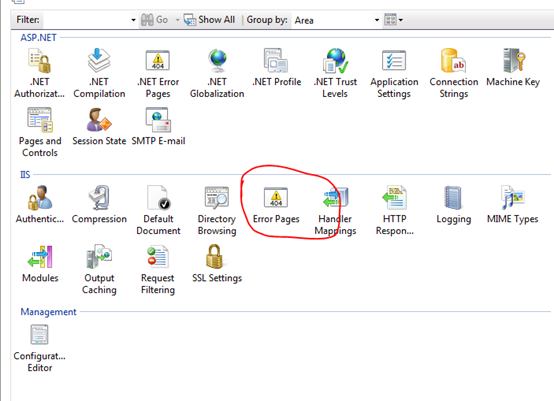
还需要注意的是,为了让它生效,还需要移掉web.config里面custom errors里面设置的转向( web.config custom errors的级别比我们这个级别高,会优先用,但是custom errors设置不能截获所有的StatusCode),另外还需要移掉站点里面的.net Error Pages里面的设置(这个和custom errors一样,比我们这个级别高,会优先用,但是不能截获所有的StatusCode)。
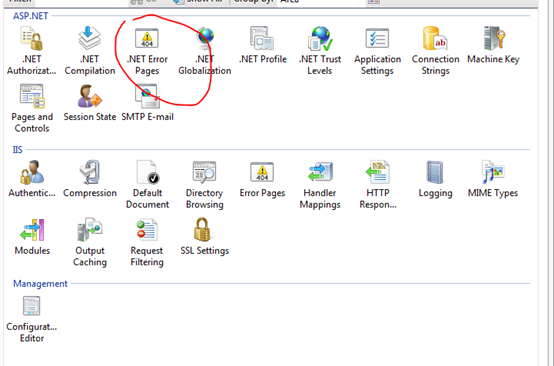
下面这个貌似不用改,不会影响我们的。
Intercepting a 404 in IIS 7 and up的更多相关文章
- 解决Web部署 svg/woff/woff2字体 404错误 iis 解决Web部署 svg/woff/woff2字体 404错误
问题:最近在IIS上部署web项目的时候,发现浏览器总是报找不到woff.woff2字体的错误.导致浏览器加载字体报404错误,白白消耗了100-200毫秒的加载时间. 原因:因为服务器IIS不认SV ...
- IIS7 404 模块 IIS Web Core 通知 MapRequestHandler 处理程序 StaticFile 错误代码 0x80070002
<system.webServer> <!--添加--> <modules runAllManagedModulesForAllRequests="true&q ...
- IIS 404设置
想给自己做的的网站自定义一个404页面,开始 双击红框提示的错误页图标 双击上图红框提示的所示404行 修改上图红框提示的内容如下:我是直接在根目录放了一个自己做的404.html,实际情况要填写你自 ...
- NGINX 配置404错误页面转向
什么是404页面 如果碰巧网站出了问题,或者用户试图访问一个并不存在的页面时,此时服务器会返回代码为404的错误信息,此时对应页面就是404页面.404页面的默认内容和具体的服务器有关.如果后台用的是 ...
- NGINX 配置404错误页面转向
什么是404页面 如果碰巧网站出了问题,或者用户试图访问一个并不存在的页面时,此时服务器会返回代码为404的错误信息,此时对应页面就是404页面.404页面的默认内容和具体的服务器有关.如果后台用的是 ...
- nginx中配置404错误页面的教程
什么是404页面如果网站出了问题,或者用户试图访问一个并不存在的页面时,此时服务器会返回代码为404的错误信息,此时对应页面就是404页面.404页面的默认内容和具体的服务器有关.如果后台用的是NGI ...
- nginx 404重定向到自定义页面
在访问时遇到上面这样的404错误页面,我想99%(未经调查,估计数据)的用户会把页面关掉,用户就这样悄悄的流失了.如果此时能有一个漂亮的页面能够引导用户去他想去的地方必然可以留住用户.因此,每一个网站 ...
- NGINX下如何自定义404页面
什么是404页面 如果碰巧网站出了问题,或者用户试图访问一个并不存在的页面时,此时服务器会返回代码为404的错误信息,此时对应页面就是404页面.404页面的默认内容和具体的服务器有关.如果后台用的是 ...
- 完美解决iis下JWplayer提示Error loading media: File could not be played错误
最近开发项目需要使用JWplayer插件播放视频,但是无论换那个版本.换什么样的视频总是提示Error loading media: File could not be played错误,废了好大的劲 ...
随机推荐
- ARM Cortex Design Considerations for Debug
JTAG was the traditional mechanism for debug connections for ARM7/9 parts, but with the Cortex-M fam ...
- Introduction to Cortex Serial Wire Debugging
Serial Wire Debug (SWD) provides a debug port for severely pin limited packages, often the case for ...
- 修復 “Failed to bring up eth0″ in Ubuntu virtualbox
参考文献: 修復 “Failed to bring up eth0″ in Ubuntu VMWare ubuntu下smokeping安装配置 背景 从同事那边拷贝了一个virtualbox虚拟机过 ...
- ElasticSearch-.net平台下c#操作ElasticSearch详解
ElasticSearch系列学习 ElasticSearch第一步-环境配置 ElasticSearch第二步-CRUD之Sense ElasticSearch第三步-中文分词 ElasticSea ...
- 记录Linux启动流程的工具bootchart
/********************************************************************* * Author : Samson * Date ...
- LAMP学习路线图
站点开发概述 LAMP开发概述 HTML基础 CSS基础 DIV+CSS Javascript Jquery(Ajax) WAMP 环境搭建 PHP基本的语法,变量.数据类型,表达式,常量,流程控制, ...
- windows操作系统查看占用端口的进程
在开发中有时我们需要确定哪个占用了8080端口,在windows命令行窗口下执行: netstat -aon|findstr 命令执行后打印出来的结果如下所示:
- mac 刻录ISO系统盘
今天本本系统坏了,手头上又没有U盘PE工具,只有MAC和光驱,只好在MAC上下载系统ISO刻录,我是直接点ISO文件,右键刻录到光盘,刻录好之后放到本本上发现不能引导,再把光盘放回MAC上一看,光盘里 ...
- 打开IPHONE的sms.db短信文件 方法
先将导出的sms.db文件改名为sms.sqlite再下载个火狐浏览器<IGNORE_JS_OP style="WIDOWS: 2; TEXT-TRANSFORM: none; BAC ...
- 【linux】find命令仅返回文件名 不用返回完整的文件路径
正常查询 find /apps/swapping -name '*swapping*.jar' 在/apps/swapping 目录下 查找 文件名为 '包含swapping的并且以.java结尾的文 ...