
HighCharts设置图表背景透明
其实就一句话:
backgroundColor: 'rgba(0,0,0,0)'
完整示例:
$(function () {

        $('#container').highcharts({

            chart: {

                type: 'column',

                backgroundColor: 'rgba(0,0,0,0)'

            },

            title: {

                text: 'Stacked column chart'

            },

            xAxis: {

                categories: ['Apples', 'Oranges', 'Pears', 'Grapes', 'Bananas']

            },

            yAxis: {

                min: 0,

                title: {

                    text: 'Total fruit consumption'

                },

                stackLabels: {

                    enabled: true,

                    style: {

                        fontWeight: 'bold',

                        color: (Highcharts.theme && Highcharts.theme.textColor) || 'gray'

                    }

                }

            },

            legend: {

                align: 'right',

                x: -70,

                verticalAlign: 'top',

                y: 20,

                floating: true,

                backgroundColor: (Highcharts.theme && Highcharts.theme.legendBackgroundColorSolid) || 'white',

                borderColor: '#CCC',

                borderWidth: 1,

                shadow: false

            },

            tooltip: {

                formatter: function() {

                    return '<b>'+ this.x +'</b><br/>'+

                        this.series.name +': '+ this.y +'<br/>'+

                        'Total: '+ this.point.stackTotal;

                }

            },

            plotOptions: {

                column: {

                    stacking: 'normal',

                    dataLabels: {

                        enabled: true,

                        color: (Highcharts.theme && Highcharts.theme.dataLabelsColor) || 'white'

                    }

                }

            },

            series: [{

                name: 'John',

                data: [5, 3, 4, 7, 2]

            }, {

                name: 'Jane',

                data: [2, 2, 3, 2, 1]

            }, {

                name: 'Joe',

                data: [3, 4, 4, 2, 5]

            }]

        });

    });
还有另外一个属性,plotBackgroundColor: null
这个属性的意思是指图表部分,不含标题、说明信息,x轴y轴上的提示信息等部分的背景色,例如: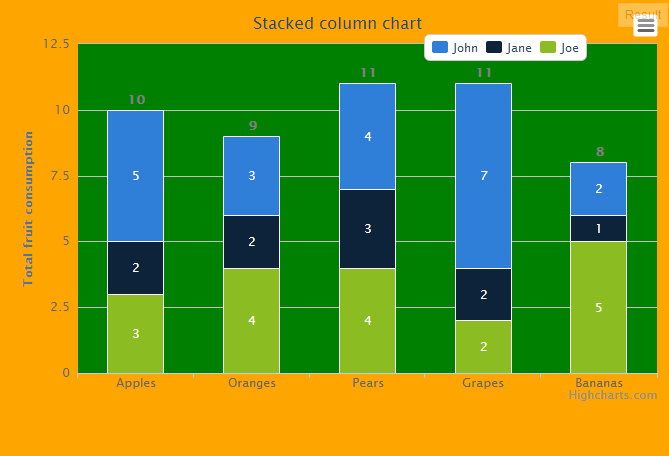
HighCharts设置图表背景透明的更多相关文章
- 设置UITableView背景透明/监听cell左边的删除按钮的点击事件
_tableView = [[UITableView alloc] init]; _tableView.delegate = self; _tableView.dataSource = self; _ ...
- 设置div背景透明的两种方法
实现div背景透明的两种方法 1.使用opacity属性 background-color:#000; opacity: 0.5; 这样做可以设置div内部所以区域的透明度,但是也会影响里面的文字,效 ...
- 设置div背景透明的CSS样式
div背景透明样式: 样式代码: .alert{filter:alpha(opacity=100); /* IE */ -moz-opacity:1.0; /* Moz + FF */ opacity ...
- Android 设置按钮背景透明与半透明_图片背景透明
Button或者ImageButton的背景设为透明或者半透明 半透明<Button android:background="#e0000000" ... /> 透明 ...
- 使用rgba设置输入框背景透明
项目中遇到要求输入框的背景设置透明度,但文字不受影响,如下图 输入框使用input标签 <input ref="searchText" type="search&q ...
- Duilib + wke 设置wke背景透明
WkeWebKit.cpp 新增 wkeSetTransparent(m_pWebView, true); void CWkeWebkitUI::DoInit() { CControlUI::DoIn ...
- Android 代码设置Activity 背景透明
当指定Activity 样式 Them.Dialog 时候 又不同意用XML 设置 Activity 的背景颜色的时候 用代码 this.getWindow().getDecorView().setB ...
- 设置groupBox背景透明
步骤:属性-BackColor-WEB面板-Transparent
- 设置iframe背景透明
<iframe allowtransparency="true" src="page.htm" frameborder="0" > ...
随机推荐
- oracle定时任务的编写及查看删除
declare jobno number; begin dbms_job.submit( jobno,--定时器ID,系统自动获得 'PRC_INSERT;', --what执行的过程名 sysdat ...
- SRM 449 DIV 1 总结(550p标记下,下次做)
今天的250p搞得有点久了,500p是个类似铺瓷砖的dp题,这样先占个坑,给个poj的这类题列表,下次刷完了回来做! POJ 相关DP列表 http://blog.csdn.net/jayye1994 ...
- Android开发:仿美团下拉列表菜单,帮助类,复用简单
近期在项目中须要用到下拉菜单.公司比較推崇美团的下拉菜单,于是要实现该功能.想着.这个功能应该是一个常常会用到的.于是何不写一个帮助类,仅仅要往这个类里面传入特定的參数,既能够实现下来菜单,并且还能够 ...
- uistatusBar 详解
成功的方法: 方法1.隐藏应用程序内所有的StatusBar 第一步:在Info.plist,然后添加一个新的row,"View controller-based status bar ap ...
- Android Initializing a Build Environment
from://https://source.android.com/source/initializing.html#next-download-the-source Initializing a B ...
- WordPress主题开发:优化标题
页面使用: <!DOCTYPE html> <html lang="en"> <head> <meta charset="UTF ...
- [转]有关Apache alias的一点问题
转自:http://www.thinkphp.cn/topic/11973.html Apache 的Alias 指令映射URL到文件系统的特定区域 一个简单的例子: Alias /mytest /w ...
- 本地git库gitlab库链接服务器库 idea git 配置 gitlab 配置 git生成ssh公钥
下载git https://git-scm.com/ 安装以后会右键菜单出现Git Base Here 点击Git Base Here 输入 cd ~ 进入你的用户根目录 创建文件夹 mkdir ...
- 图解 MongoDB 地理位置索引的实现原理(转)
原文链接:图解 MongoDB 地理位置索引的实现原理 地理位置索引支持是MongoDB的一大亮点,这也是全球最流行的LBS服务foursquare 选择MongoDB的原因之一.我们知道,通常的数据 ...
- ASP.NET Razor 简介
ylbtech-.NET: ASP.NET Razor 简介 Razor 不是一种编程语言.它是服务器端的标记语言. 1. 什么是 Razor?返回顶部 Razor 是一种标记语法,可以让您将基于服务 ...