
Vue.js使用-组件示例(实现数据的CRUD)
1.业务场景
用户(姓名,年龄,性别)的增删改查
2.数据格式
定义字段,name:字段名称,iskey:是否主键(添加,修改数据标志),dataSource:可选列表(下拉框选项)
columns: [{name: 'name', iskey: true}, {name: 'age'},{name: 'sex', dataSource:['Male', 'Female']}],
定义数据,用户信息列表
peoples: [{name: 'shijingjing', age: 30, sex:'Male'},{name: 'renjiangfeng', age:29, sex:'Female'}]
3.组件定义
我们需要定义两个组件,表格显示组件,信息维护组件。
4.表格显示组件
<!DOCTYPE html>

<html lang="en">

<head>

    <meta charset="UTF-8">

    <title>Title</title>

    <link rel="stylesheet" href="styles/index.css">

</head>

<body>

    <div id="app">

        <div class="container">

            <simple-grid v-bind:columns="columns" v-bind:peoples="peoples"></simple-grid>

        </div>

    </div>

    <template id="grid-template">

        <table>

            <tr>

                <th v-for="column in columns">{{ column.name | capitalize }}</th>

                <th>Delete</th>

            </tr>

            <tr v-for="people in peoples">

                <td v-for="column in columns">

                    <span>{{ people[column.name] }}</span>

                </td>

                <td style="text-align: center"><button class="btn-delete" v-on:click="deleteItem(people)">delete</button></td>

            </tr>

        </table>

    </template>

</body>

<script src="js/vue.js"></script>

<script>

    Vue.component(

        'simple-grid',{

            template: '#grid-template',

            props: ['peoples', 'columns'],

            methods: {

                deleteItem: function (people) {

                    for(var i=0;i<this.peoples.length;i++){

                        if(this.peoples[i] == people){

                            this.peoples.splice(i, 1);

                            return

                        }

                    }

                }

            }

        }

    )

    new Vue({

        el: '#app',

        data: {

            columns: [{name: 'name', iskey: true}, {name: 'age'},{name: 'sex', dataSource:['Male', 'Female']}],

            peoples: [{name: 'shijingjing', age: 30, sex:'Male'},{name: 'renjiangfeng', age:29, sex:'Female'}]

        }

    })

</script>

</html>
运行结果:

定义了一个simple-grid组件,将Vue对象中的columns,peoples属性值绑定到组件,表头使用columns属性值,数据列使用peoples属性值。
deleteItem方法,用来删除peoples对应的元素。
5.信息维护组件
表格组件实现了数据的查询和删除,添加和修改要通过信息维护组件来实现。
把信息维护组件作为表格组件的子组件,来实现表格和弹窗数据的交互,事件的传递。
1)新增
<!DOCTYPE html>

<html lang="en">

<head>

    <meta charset="UTF-8">

    <title>Title</title>

    <link rel="stylesheet" href="styles/index.css">

</head>

<body>

    <div id="app">

        <div class="container">

            <simple-grid v-bind:columns="columns" v-bind:peoples="peoples"></simple-grid>

        </div>

    </div>

    <template id="grid-template">

        <table>

            <tr>

                <th v-for="column in columns">{{ column.name | capitalize }}</th>

                <th>Delete</th>

            </tr>

            <tr v-for="people in peoples">

                <td v-for="column in columns">

                    <span>{{ people[column.name] }}</span>

                </td>

                <td style="text-align: center"><button class="btn-delete" v-on:click="deleteItem(people)">delete</button></td>

            </tr>

        </table>

        <div class="container">

            <button v-on:click="openItemDialog('创建')">创建</button>

        </div>

        <modal-dialog v-bind:mode="mode" v-bind:title="title" v-bind:item="item" v-bind:fields="columns" v-on:create_item="createItem"></modal-dialog>

    </template>

    <template id="dialog-template">

        <div class="dialog" v-bind:class="{'dialog-active':show}">

                <div class="dialog-header">{{ title }}</div>

                <div class="dialog-body">

                    <div v-for="field in fields" class="form-group">

                        <label>{{ field.name }}</label>

                        <input type="text" v-model="item[field.name]">

                    </div>

                </div>

                <div class="dialog-footer">

                    <div class="form-group">

                        <label></label>

                        <button class="btn-save" v-on:click="save">保存</button>

                        <button class="btn-close" v-on:click="close">关闭</button>

                    </div>

                </div>

        </div>

        <div class="dialog-overlay"></div>

    </template>

</body>

<script src="js/vue.js"></script>

<script>

    Vue.component(

        'simple-grid',{

            template: '#grid-template',

            data: function () {

                return{

                    mode: 0,

                    title: '',

                    item: {},

                }

            },

            props: ['peoples', 'columns', 'search'],

            methods: {

                openItemDialog:function (title) {

                    this.title = title;

                    this.mode = 1;

                    this.item = {};

                    this.$broadcast('showDialog', true);

                },

                deleteItem: function (people) {

                    for(var i=0;i<this.peoples.length;i++){

                        if(this.peoples[i] == people){

                            this.peoples.splice(i, 1);

                            return

                        }

                    }

                },

                createItem: function () {

                    this.peoples.push(this.item);

                    this.$broadcast("showDialog", false);

                    this.item = {};

                }

            },

            components:{

                'modal-dialog':{

                    template: '#dialog-template',

                    data: function () {

                        return {

                            show: false

                        }

                    },

                    props: ['mode', 'fields', 'item', 'title'],

                    methods:{

                        close:function () {

                            this.show = false;

                        },

                        save:function () {

                            if(this.mode ==1){

                                this.$dispatch('create_item');

                            }

                        }

                    },

                    events:{

                        'showDialog': function (show) {

                            this.show = show

                        }

                    }

                }

            }

        }

    )

    new Vue({

        el: '#app',

        data: {

            columns: [{name: 'name'}, {name: 'age'}],

            peoples: [{name: 'shijingjing', age: 30},{name: 'renjiangfeng', age:29}]

        }

    })

</script>

</html>
运行结果:
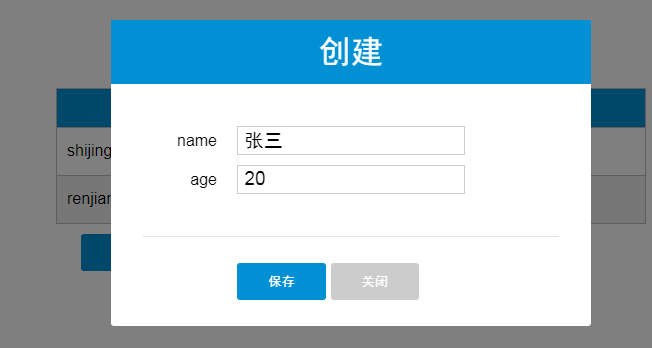
弹窗组件modal-dialog定义了一个show属性,v-bind:class="{'dialog-active':show},show为false时隐藏,true显示弹窗。
子组件使用了父组件的mode,fields,item,title四个属性。
mode:1-新增,2-修改
fields:父组件的columns属性,用来显示需要维护的字段
item:新添加的数据对象
title:弹窗title(新增or修改)
点击父组件创建按钮openItemDialog时,会将showDialog事件broadcast到子组件。
events:{

    'showDialog': function (show) {

        this.show = show

    }

}
showDialog完成弹窗的显示隐藏
modal-dialog组件的template,#dialog-template绑定了新数据对象item,维护完毕,点击保存按钮时,触发save方法,将保存事件派发到父组件处理。
save:function () {

    if(this.mode ==1){

        this.$dispatch('create_item');

    }

}
create_item绑定了父组件的createItem方法
v-on:create_item="createItem"
createItem中将新的数据对象添加到数据列表,广播showDialog事件到子组件,关闭弹窗,添加数据完毕。
createItem: function () {

    this.peoples.push(this.item);

    this.$broadcast("showDialog", false);

    this.item = {};

}
2)修改
<!DOCTYPE html>

<html lang="en">

<head>

    <meta charset="UTF-8">

    <title>Title</title>

    <link rel="stylesheet" href="styles/index.css">

</head>

<body>

    <div id="app">

        <div class="container">

            <simple-grid v-bind:columns="columns" v-bind:peoples="peoples"></simple-grid>

        </div>

    </div>

    <template id="grid-template">

        <table>

            <tr>

                <th v-for="column in columns">{{ column.name | capitalize }}</th>

                <th>Delete</th>

            </tr>

            <tr v-for="people in peoples | filterBy search">

                <td v-for="column in columns">

                    <span v-if="column.iskey">

                        <a href="javascript:void(0)" v-on:click="editItemDialog(people[column.name])">{{ people[column.name] }}</a>

                    </span>

                    <span v-else>{{ people[column.name] }}</span>

                </td>

                <td style="text-align: center"><button class="btn-delete" v-on:click="deleteItem(people)">delete</button></td>

            </tr>

        </table>

        <modal-dialog v-bind:mode="mode" v-bind:title="title" v-bind:item="item" v-bind:fields="columns" v-on:create_item="createItem" v-on:update_item="updateItem"></modal-dialog>

    </template>

    <template id="dialog-template">

        <div class="dialog" v-bind:class="{'dialog-active':show}">

                <div class="dialog-header">{{ title }}</div>

                <div class="dialog-body">

                    <div v-for="field in fields" class="form-group">

                        <label>{{ field.name }}</label>

                        <input type="text" v-model="item[field.name]" v-bind:disabled="mode ==2 && field.iskey">

                    </div>

                </div>

                <div class="dialog-footer">

                    <div class="form-group">

                        <label></label>

                        <button class="btn-save" v-on:click="save">保存</button>

                        <button class="btn-close" v-on:click="close">关闭</button>

                    </div>

                </div>

        </div>

        <div class="dialog-overlay"></div>

    </template>

</body>

<script src="js/vue.js"></script>

<script>

    Vue.component(

        'simple-grid',{

            template: '#grid-template',

            data: function () {

                return{

                    mode: 0,

                    title: '',

                    item: {},

                    keyColumn: ''

                }

            },

            ready: function () {

                for(var i=0;i<this.columns.length;i++){

                    if(this.columns[i].iskey){

                        this.keyColumn = this.columns[i].name;

                        break;

                    }

                }

            },

            props: ['peoples', 'columns', 'search'],

            methods: {

                editItemDialog: function (key) {

                    this.title ='修改-' + key;

                    this.mode = 2;

                    var currItem = this.findItemByKey(key);

                    console.log(currItem)

                    this.item = currItem;

                    this.$broadcast('showDialog', true);

                },

                deleteItem: function (people) {

                    for(var i=0;i<this.peoples.length;i++){

                        if(this.peoples[i] == people){

                            this.peoples.splice(i, 1);

                            return

                        }

                    }

                },

                updateItem: function () {

                  for(var i=0;i<this.peoples.length;i++){

                      if(this.peoples[i][this.keyColumn] == this.item[this.keyColumn]){

                          for(var key in this.item){

                              this.peoples[i][key] = this.item[key];

                          }

                          break;

                      }

                  }

                  this.$broadcast('showDialog', false);

                  this.item = {};

                },

                findItemByKey: function (key) {

                    for(var i=0; i<this.peoples.length;i++){

                        if(this.peoples[i].name == key){

                            return this.peoples[i];

                        }

                    }

                }

            },

            components:{

                'modal-dialog':{

                    template: '#dialog-template',

                    data: function () {

                        return {

                            show: false

                        }

                    },

                    props: ['mode', 'fields', 'item', 'title'],

                    methods:{

                        close:function () {

                            this.show = false;

                        },

                        save:function () {

                            if(this.mode ==1){

                                this.$dispatch('create_item');

                            }

                            else if(this.mode == 2){

                                this.$dispatch('update_item');

                            }

                        }

                    },

                    events:{

                        'showDialog': function (show) {

                            this.show = show

                        }

                    }

                }

            }

        }

    )

    new Vue({

        el: '#app',

        data: {

            columns: [{name: 'name', iskey: true}, {name: 'age'}],

            peoples: [{name: 'shijingjing', age: 30},{name: 'renjiangfeng', age:29}]

        }

    })

</script>

</html>
运行结果:

数据使用iskey标志主键,更新时,editItemDialog中使用findItemByKey根据主键找到要修改的数据,赋给item属性(供子组件使用),
然后broadcast广播showDialog事件,子组件接收到showDialog通知后,显示弹窗。
点击保存按钮时,调用save方法,将update_item事件派发到父组件
save:function () {

    if(this.mode ==1){

        this.$dispatch('create_item');

    }

    else if(this.mode == 2){

        this.$dispatch('update_item');

    }

}
父组件中将item更新到数据列表peoples,需要注意的是,在findItemByKey方法时,需要使用深度拷贝,将数据对象赋给item,而不是直接将数据对象的引用赋给item,
这样当子组件中model属性值更新时,无论是否点击保存按钮,表格组件中对应的值都会变化。或者使用单次绑定v-bind:name.once。
updateItem: function () {

  for(var i=0;i<this.peoples.length;i++){

      if(this.peoples[i][this.keyColumn] == this.item[this.keyColumn]){

          for(var key in this.item){

              this.peoples[i][key] = this.item[key];

          }

          break;

      }

  }

  this.$broadcast('showDialog', false);

  this.item = {};

},
6.其他
源码地址如下:
https://github.com/shijingjing07/vue_demo
还实现了根据关键字查找,防止主键重复等功能。
Vue.js使用-组件示例(实现数据的CRUD)的更多相关文章
- Vue.js 父子组件相互传递数据
父传子 : 子组件接收变量名=父组件传递的数据 如::f-cmsg="fmsg" 注意驼峰问题 子传父:@子组件关联的方法名 = 父组件接受的方法名 如:@func=" ...
- vue.js 父子组件间 props 数据同步处理
常见的场景: 在一个vue组件A中,使用另外一个组件B.A将自己的数据通过B组件的Props属性(propX)传递到B组件实例内部,B组件内部会修改该Props属性(propX)的值,此时在A组件内部 ...
- 【Vue课堂】Vue.js 父子组件之间通信的十种方式
这篇文章介绍了Vue.js 父子组件之间通信的十种方式,不管是初学者还是已经在用 Vue 的开发者都会有所收获.无可否认,现在无论大厂还是小厂都已经用上了 Vue.js 框架,简单易上手不说,教程详尽 ...
- 【Vue.js实战案例】- Vue.js递归组件实现组织架构树和选人功能
大家好!先上图看看本次案例的整体效果. 浪奔,浪流,万里涛涛江水永不休.如果在jq时代来实这个功能简直有些噩梦了,但是自从前端思想发展到现在的以MVVM为主流的大背景下,来实现一个这样繁杂的功能简直不 ...
- Vue.js之组件传值
Vue.js之组件传值 属性传值可以从父组件到子组件,也可以从子组件到父组件. 这里讲一下从父组件到子组件的传值 还以上次的demo为例,demo里有APP.vue是父组件,Header.vue,Us ...
- Vue.js多重组件嵌套
Vue.js多重组件嵌套 Vue.js中提供了非常棒的组件化思想,组件提高了代码的复用性.今天我们来实现一个形如 <app> <app-header></app-head ...
- Vue.js之组件嵌套小demo
Vue.js之组件嵌套的小demo项目 第一步:初始化一个wabpack项目,这里不在复述.第二步:在components文件夹下新建Header.vue Footer.vue和Users.vue三个 ...
- Vue.js之组件嵌套
Vue.js中组件嵌套有两种方式 第一种:注册全局组件 例如在components文件夹下新建一个User.vue组件,然后在main.js文件中注册全局组件 //注册全局组件 Vue.compone ...
- vue.js 同级组件之间的值传递方法(uni-app通用)
vue.js 兄弟组件之间的值传递方法 https://blog.csdn.net/jingtian678/article/details/81634149
随机推荐
- Android 仿知乎创意广告
代码地址如下:http://www.demodashi.com/demo/14904.html 一.概述 貌似前段时间刷知乎看到的一种非常有特色的广告展现方式,即在列表页,某一个Item显示背后部分广 ...
- JAVA微信扫码支付模式二功能实现完整例子
概述 本例子实现微信扫码支付模式二的支付功能,应用场景是,web网站微信扫码支付.实现从点击付费按钮.到弹出二维码.到用户用手机微信扫码支付.到手机上用户付费成功.web网页再自动调整到支付成功后的页 ...
- \u Unicode和汉字转化
介绍 \uxxxx这种格式是Unicode写法,表示一个字符,其中xxxx表示一个16进制数字,范围所0-65535. Unicode十六进制数只能包含数字0-9.大写字母A-F或者小写字母A-F.需 ...
- SoapUI利用Groovy把外部数据加载到request中
默认已经用Groovy把外部数据给读取出来了,关键是读取出来后,如何加载到request中去?这里提供了两种方法:1.该Groovy脚本的名称是"setUp" def num = ...
- Python学习笔记(七)—— 循环
一.for ... in ... 循环 1.语法 names = ['Michael', 'Bob', 'Tracy'] for name in names: print(name) (1)需要有冒号 ...
- MVC几种找不到资源的解决方式
在MVC中,controller中的Action和View中的.cshtml文件名称有一个对应的关系. 当不对应时,有以下几种情况发生: 一.找不到视图的错误 请求URL:http://localho ...
- 【Spring】SpringMVC之拦截器
Spring的HandlerMapping处理器支持拦截器应用.当需要为某些请求提供特殊功能时,例如实现对用户进行身份认证.登录检查等功能. 拦截器必须实现HandlerInterceptor接口,实 ...
- EasyUI DataGrid Checkbox 多选 获取选中行中的内容
<table id='grid' class='easyui-datagrid' style='width:950px;height:405px' url='Ajax-index.php?mod ...
- HTML <video> 标签
http://www.w3school.com.cn/tags/tag_video.asp <%@ Page Language="VB" AutoEventWireup=&q ...
- Java Nashorn--Part 4
Nashorn 和 javax.script 包 Nashorn 并不是第一个在 Java 平台上运行的脚本语言.在Java 6 就提供了 javax.script java 包,它为脚本语言引擎提供 ...