
WSGI简介
当我们实现一个Web应用(application)的时候,通常不会考虑如何接受HTTP请求、解析HTTP请求、发送HTTP响应等等,我们只关心处理逻辑,而不用去关心HTTP规范的细节。
之所以有这层透明,是因为Web Server和Web Application之间有一套规范的接口,这套接口帮我们隐藏了很多HTTP相关的细节。这套接口规范就是WSGI(Web Server Gateway Interface)。
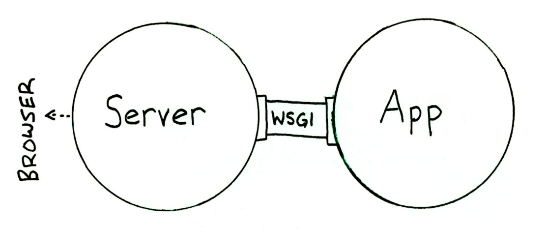
Web Server和Web Application都实现WSGI规范,然后各司其职:
- Web Server:接收来自客户端的HTTP,然后将请求交给Web Application
- Web Application:根据请求来调用相应的处理逻辑,生成response;通过Web Server把response发送给客户端
下面就一步步看下WSGI规范的更多内容。
Application Interface
上面了解到,Web Server和Web Application端都要遵守WSGI规范。对于实现WSGI的Web Application端,必须是一个callable的对象(类,函数,方法等等,实现__call__魔术方法的对象),这个callable对象需要满足下面两个条件:
- 包含两个参数
- 一个dict对象,Web Server会将HTTP请求相关的信息添加到这个字典中,供Web application使用
- 一个callback函数,Web application通过这个函数将HTTP status code和headers发送给Web Server
- 以字符串的形式返回response,并且包含在可迭代的list中
下面就是一个实现Application Interface的一个application函数:
# This is an application object. It could have any name, except when using mod_wsgi where it must be "application"

# The application object accepts two arguments

# This is an application object. It could have any name, except when using mod_wsgi where it must be "application"

# The application object accepts two arguments

def application(

        # environ points to a dictionary containing CGI like environment variables

        # which is filled by the server for each received request from the client

        environ,

        # start_response is a callback function supplied by the server

        # which will be used to send the HTTP status and headers to the server

        start_response):

    # build the response body possibly using the environ dictionary

    response_body = 'The request method was %s' % environ['REQUEST_METHOD']

    # HTTP response code and message

    status = '200 OK'

    # These are HTTP headers expected by the client.

    # They must be wrapped as a list of tupled pairs:

    # [(Header name, Header value)].

    response_headers = [('Content-Type', 'text/plain'), ('Content-Length', str(len(response_body)))]

    # Send them to the server using the supplied function

    start_response(status, response_headers)

    # Return the response body.

    # Notice it is wrapped in a list although it could be any iterable.

    return [response_body]
看看Environment dict
在Python中就有一个WSGI server,我们可以直接使用。
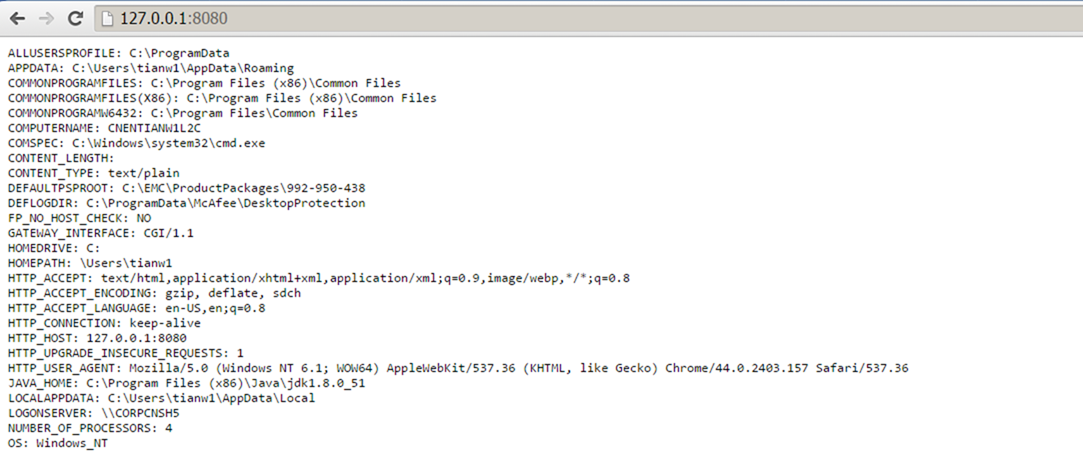
在下面的这个例子中,WSGI server监听了"localhost:8080",并绑定了一个支持WSGI规范的application对象;application对象就会处理来自8080端口,并将"Environment dict"的内容生产response传给WSGI server。
# WSGI server in Python

from wsgiref.simple_server import make_server

def application(environ, start_response):

    # Sorting and stringifying the environment key, value pairs

    response_body = ['%s: %s' % (key, value)

                    for key, value in sorted(environ.items())]

    response_body = '\n'.join(response_body)

    status = '200 OK'

    response_headers = [('Content-Type', 'text/plain'),

                ('Content-Length', str(len(response_body)))]

    start_response(status, response_headers)

    return [response_body]

# Instantiate the WSGI server.

# It will receive the request, pass it to the application

# and send the application's response to the client

httpd = make_server(

    'localhost', # The host name.

    8080, # A port number where to wait for the request.

    application # Our application object name, in this case a function.

    )

# Wait for a single request, serve it and quit.

httpd.handle_request()

# Keep the server always alive with serve_forever()

# httpd.serve_forever()
注意,在application对象返回的时候,我们使用的是"return [response_body]",当我们改成"return response_body"之后,一样可以工作,但是效率会很低,因为返回的时候会去迭代response字符串中的每一个字符。所以,当处理response字符串的时候,最好是将它包在一个可迭代对象中,例如list。
通过浏览器访问后,就可以得到"Environment dict"的内容,这些都是WSGI server提供的信息,包括了HTTP请求的相关信息。
处理GET请求
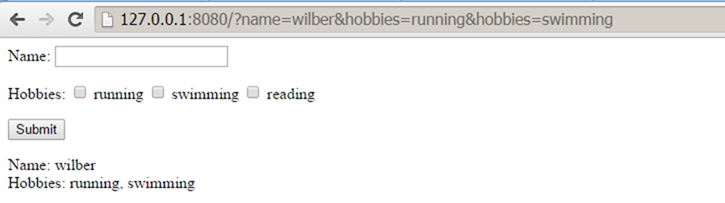
当我们执行一个如下的GET请求:
http://127.0.0.1:8080/?name=wilber&hobbies=software
QUERY_STRING(URL中"?"之后的部分)和REQUEST_METHOD这些信息会包含在"Environment dict",从application中可以很方便的得到这些信息。
在application中,可以使用cgi模块中的parse_qs函数得到一个由QUERY_STRING生成的字典,方便我们取出请求的变量信息。
同时,为了避免客户端的输入可能存在的脚本注入,可以使用cgi模块中的escape函数对输入进行一次过滤。
下面直接看例子:
from wsgiref.simple_server import make_server

from cgi import parse_qs, escape

html = """

<html>

<body>

   <form method="get" action="/">

      <p>

         Name: <input type="text" name="name">

         </p>

      <p>

         Hobbies:

         <input name="hobbies" type="checkbox" value="running"> running

         <input name="hobbies" type="checkbox" value="swimming"> swimming

         <input name="hobbies" type="checkbox" value="reading"> reading

         </p>

      <p>

         <input type="submit" value="Submit">

         </p>

      </form>

   <p>

      Name: %s<br>

      Hobbies: %s

      </p>

   </body>

</html>"""

def application(environ, start_response):

    print "QUERY_STRING: %s" %environ['QUERY_STRING']

    print "REQUEST_METHOD: %s" %environ['REQUEST_METHOD']

    # Returns a dictionary containing lists as values.

    d = parse_qs(environ['QUERY_STRING'])

    # In this idiom you must issue a list containing a default value.

    name = d.get('name', [''])[0] # Returns the first name value.

    hobbies = d.get('hobbies', []) # Returns a list of hobbies.

    # Always escape user input to avoid script injection

    name = escape(name)

    hobbies = [escape(hobby) for hobby in hobbies]

    response_body = html % (name or 'Empty',

                ', '.join(hobbies or ['No Hobbies']))

    status = '200 OK'

    # Now content type is text/html

    response_headers = [('Content-Type', 'text/html'),

                ('Content-Length', str(len(response_body)))]

    start_response(status, response_headers)

    return [response_body]

httpd = make_server('localhost', 8080, application)

# Now it is serve_forever() in instead of handle_request().

# In Windows you can kill it in the Task Manager (python.exe).

# In Linux a Ctrl-C will do it.

httpd.serve_forever()
从结果中可以看到,请求URL中的QUERY_STRING被WSGI server填入了"Environment dict"中。

处理POST请求
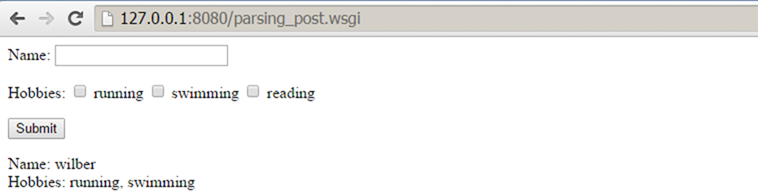
当执行一个POST请求的时候,query string是不会出现在URL里面的,而是会包含在request body中。
对于WSGI server,request body存放在"Environment dict"中(environ['wsgi.input']),environ['wsgi.input']对应的是一个file object,可以通过读取文件的方式读取request body。同时,environ.get('CONTENT_LENGTH', 0)中存放着request body的size,我们可以根据这个值来读取适当长度的request body。
看下面的例子:
from wsgiref.simple_server import make_server

from cgi import parse_qs, escape

html = """

<html>

<body>

   <form method="post" action="parsing_post.wsgi">

      <p>

         Name: <input type="text" name="name">

         </p>

      <p>

         Hobbies:

         <input name="hobbies" type="checkbox" value="running"> running

         <input name="hobbies" type="checkbox" value="swimming"> swimming

         <input name="hobbies" type="checkbox" value="reading"> reading

         </p>

      <p>

         <input type="submit" value="Submit">

         </p>

      </form>

   <p>

      Name: %s<br>

      Hobbies: %s

      </p>

   </body>

</html>

"""

def application(environ, start_response):

    # the environment variable CONTENT_LENGTH may be empty or missing

    try:

        request_body_size = int(environ.get('CONTENT_LENGTH', 0))

    except (ValueError):

        request_body_size = 0

    # When the method is POST the query string will be sent

    # in the HTTP request body which is passed by the WSGI server

    # in the file like wsgi.input environment variable.

    request_body = environ['wsgi.input'].read(request_body_size)

    d = parse_qs(request_body)

    print "wsgi.input %s" %environ['wsgi.input']

    print "request_body_size %s" %environ.get('CONTENT_LENGTH', 0)

    print "request_body %s" %request_body

    name = d.get('name', [''])[0] # Returns the first name value.

    hobbies = d.get('hobbies', []) # Returns a list of hobbies.

    # Always escape user input to avoid script injection

    name = escape(name)

    hobbies = [escape(hobby) for hobby in hobbies]

    response_body = html % (name or 'Empty',

                ', '.join(hobbies or ['No Hobbies']))

    status = '200 OK'

    response_headers = [('Content-Type', 'text/html'),

                ('Content-Length', str(len(response_body)))]

    start_response(status, response_headers)

    return [response_body]

httpd = make_server('localhost', 8080, application)

httpd.serve_forever()
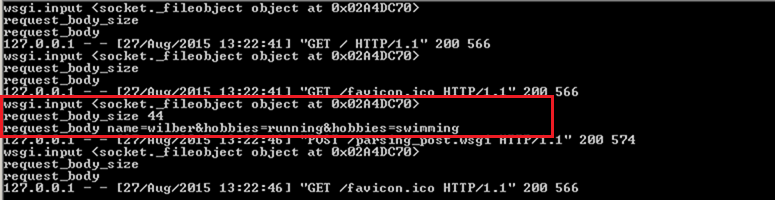
通过结果,我们可以看到environ字典中对应的"wsgi.input"和"CONTENT_LENGTH",以及读取出来的"request body"。
总结
本文介绍了WSGI的一些基本内容,以及如何解析GET和POST请求中的参数。
通过WSGI这个规范,Web application的开发人员可以不用关心HTTP协议中的细节问题。
WSGI简介的更多相关文章
- WSGI 简介(使用python描述)
WSGI 简介 背景 Python Web 开发中,服务端程序可以分为两个部分,一是服务器程序,二是应用程序.前者负责把客户端请求接收,整理,后者负责具体的逻辑处理.为了方便应用程序的开发,我们把常用 ...
- python wsgi 简介
wsgi全称是"Web Server Gateway Interfacfe",web服务器网关接口,wsgi在python2.5中加入,是web服务器和web应用的标准接口,任何实 ...
- uwsgi/uWSGI/WSGI简介
参考文章 uWSGI是一个Web服务器,它实现了WSGI协议.uwsgi.http等协议.Nginx中HttpUwsgiModule的作用是与uWSGI服务器进行交换.z WSGI是一种Web服务器网 ...
- wsgi 简介
原文博客地址 http://blog.csdn.net/on_1y/article/details/18803563
- Python Web开发中的WSGI协议简介
在Python Web开发中,我们一般使用Flask.Django等web框架来开发应用程序,生产环境中将应用部署到Apache.Nginx等web服务器时,还需要uWSGI或者Gunicorn.一个 ...
- nova创建虚拟机源码系列分析之二 wsgi模型
openstack nova启动时首先通过命令行或者dashborad填写创建信息,然后通过restful api的方式调用openstack服务去创建虚拟机.数据信息从客户端到达openstack服 ...
- Django 00-socket、wsgi及初始django学习心得
HTTP基本原理1.http简述:http协议永远都是客户端发起请求,服务端回送请求.客户端和服务端本质上是一个socket客户端和服务端,http协议可以说是基于socket的再上层封装2.http ...
- Python的Web编程[1] -> Web服务器[0] -> Web 服务器与 CGI / WSGI
Web服务器 / Web Server 对于Web来说,需要建立一个Web服务器,必须建立一个基本的服务器和一个处理程序, 基本服务器的主要作用是,在客户端和服务器端完成必要的HTTP交互, 处理程序 ...
- Linux 集群概念 , wsgi , Nginx负载均衡实验 , 部署CRM(Django+uwsgi+nginx), 部署学城项目(vue+uwsgi+nginx)
Linux 集群概念 , wsgi , Nginx负载均衡实验 , 部署CRM(Django+uwsgi+nginx), 部署学城项目(vue+uwsgi+nginx) 一丶集群和Nginx反向代理 ...
随机推荐
- 在springmvc中无法使用@value()注解
折腾了一下午,试了很多解决办法,就是死活不能扫描到properties文件.本来打算使用软编码的,尝试更改了全部jar包版本,还是无法解决. 后面想到了,spring和springmvc容器的加载顺序 ...
- jce_policy安装【java密码扩展无限制权限策略文件安装】
下载与JDK或JRE对应版本的jce文件包,当前机器的jdk为1.8,所以下载jce_policy-8.zip. 下载地址:http://www.oracle.com/technetwork/java ...
- 微信小程序——video使用总结
关于小程序video的一些基本使用方法,可点击这里稍作了解. 需求: 1.默认显示封面: 2.一个视频播放的时候,其他视频停止播放,并显示封面. 解决问题思路: 1.通过wx:if判断当前视频是否是播 ...
- Java关键字instanceof
深入Java关键字instanceof instanceof关键字用于判断一个引用类型变量所指向的对象是否是一个类(或接口.抽象类.父类)的实例. 举个例子: public interfa ...
- 解决同时共用MOB公司的shareSDK和SMSSDK的冲突问题
现在mob的SDK版本升级到3.0,跟之前的版本不兼容,尤其是在 同时使用shareSDK和SMSSDK的时候会发生冲突,报NoSuchMethodException的错误. 只需要将所有的jar包和 ...
- 实验二 C#程序设计 总结
通过本次实验,我按照书上的例子,一个例子一个例子地写下来,前七点感觉和C语言差不多,除了语法稍稍不同外,大体上是一样的.到了第八点,对异常的处理,另我十分印象深刻.因为我做例3.21的时候,按照例子要 ...
- tensorflow模型量化压缩
参考 https://blog.csdn.net/xygl2009/article/details/80596392 https://blog.csdn.net/xsfl1234/article/de ...
- SpringBoot系列三:SpringBoot基本概念(统一父 pom 管理、SpringBoot 代码测试、启动注解分析、配置访问路径、使用内置对象、项目打包发布)
声明:本文来源于MLDN培训视频的课堂笔记,写在这里只是为了方便查阅. 1.了解SpringBoot的基本概念 2.具体内容 在之前所建立的 SpringBoot 项目只是根据官方文档实现的一个基础程 ...
- unity3d-----Collider 组件参考
Collider 组件参考 点击 属性检查器 下面的 添加组件 按钮,然后从 添加碰撞组件 中选择需要的 Collider 组件,即可添加 Collider组件到节点上. Collider 组件属性 ...
- springboot-mybatis-plus基本项目框架
此仅仅为web最基本框架, 统一异常管理.接口统一日志管理. 项目结构: 注: 修改为如下图,作用是sql打印输出. 源码下载:https://files.cnblogs.com/files/007s ...