
Open-sourcing sso, the way we secure services at BuzzFeed
文章来源: https://tech.buzzfeed.com/unleashing-the-a6a1a5da39d6
说明: 设计有好多地方值得借鉴,粘贴过来的排版不好
Today we are open-sourcingsso, our single-sign-on authentication proxy — known internally as the S.S. Octopus — used to secure access to internal services at BuzzFeed. This post will cover an overview of the history of authentication at BuzzFeed, why we wrote sso, and a little bit about how it works.
We think sso is a useful solution to a problem that many organizations face. Because we’ve benefited so much from the open source community, we’re excited to give back by making it available for anyone to use!

Why sso?
BuzzFeed’s software ecosystem is comprised of hundreds of microservices that interact with each other in a variety of ways. A subset of those services are applications exposed on the public internet which must only be accessible to privileged users.
As BuzzFeed’s global employee base grew, the need to expose tools to the internet for internal use became more apparent, which created an equally growing need to secure those applications with user authentication. To establish a single source of truth for identity, we standardized on how we protect each of those applications by using Bitly’s open source oauth2_proxyservice, which is a reverse proxy that uses third party OAuth2 providers (Google, GitHub, and others) to authenticate and authorize requests.
Google’s identity aware proxy, which embodies their Beyond Corp philosophy, was an inspiration for us. It’s a generally effective pattern for microservices because it allows the developers to focus on their services’ primary functionality instead of reimplementing authentication every time. BuzzFeed’s use of oauth2_proxy allowed developers to rapidly grow the number of internal applications deployed on the platform.
For a while, using oauth2_proxy in front of services was an easy drop-in solution for developers creating services; however, as the number of services grew more rapidly over the years, the solution was not as scalable as we had hoped.

As operators, managing the proliferation of boilerplate auth proxy services proved difficult. Critical security fixes required 100+ patches and deploys, since each protected microservice had its own auth proxy service to go with it. Auditing and controlling access across those services was also an ongoing challenge.
Scalability issues were not exclusive to the operators and developers. End users were required to sign into each application separately, which could be frustrating and confusing. These separate logins also prevented the development of seamless workflows between related tools. Finally, this had the unintended side effect of training users to blindly click through the OAuth2 login flow, instilling bad security habits.

Our solution to these pain points is sso, which allowed us to replace every individual oauth2_proxy service with a single system providing a seamless and secure single sign-on experience, easy auditing, rich instrumentation, and a painless developer experience.
How does sso work?
sso is an OAuth2-friendly adaptation of the Central Authentication Service protocol (CAS). The CAS protocol uses a “federated” approach, where all authentication is handled by a centralized service, instead of individual applications.
Our implementation is comprised of two services, sso-auth and sso-proxy, that cooperate to perform a nested authentication flow and proxy requests:
sso-authis the central authentication service, which directs a user through an OAuth flow with a third-party provider (e.g. Google).sso-proxyensures all requests are authenticated and authorized according tosso-authbefore proxying them to upstream services, and signs requests to allow verification that the requests originate fromsso-proxy- Both
sso-authandsso-proxystore user session information in long-lived, encrypted cookies, butsso-proxytransparently re-validates the user’s session withsso-authon a short, configurable interval to ensure quick propagation of authentication/authorization changes.

Setting up sso
- When an organization would like to secure their services behind sso, they create a wildcard DNS entry
*.sso.pacworld.comwhich points at their deployment ofsso-proxy* - They want to use
ssoto secure their service, which is deployed atghost-land-internal.pacworld.com - So, they add
ghost-landto theirsso-proxyconfiguration** file:
- service: ghost-land
  default:
    from: ghost-land.sso.pacworld.com
    to: ghost-land-internal.pacworld.com
  allowed_groups:
    - ghosts@pacworld.com
4. Now, their employees can securely access Ghost Land at ghost-land.sso.pacworld.com
* In practice, we usually create a more user-friendly domain like
ghost-land.pacworld.comthat points toghost-land.sso.pacworld.com.
** sso upstreams are defined using a static config file, and ‘service discovery’ is handled by DNS.
The user experience
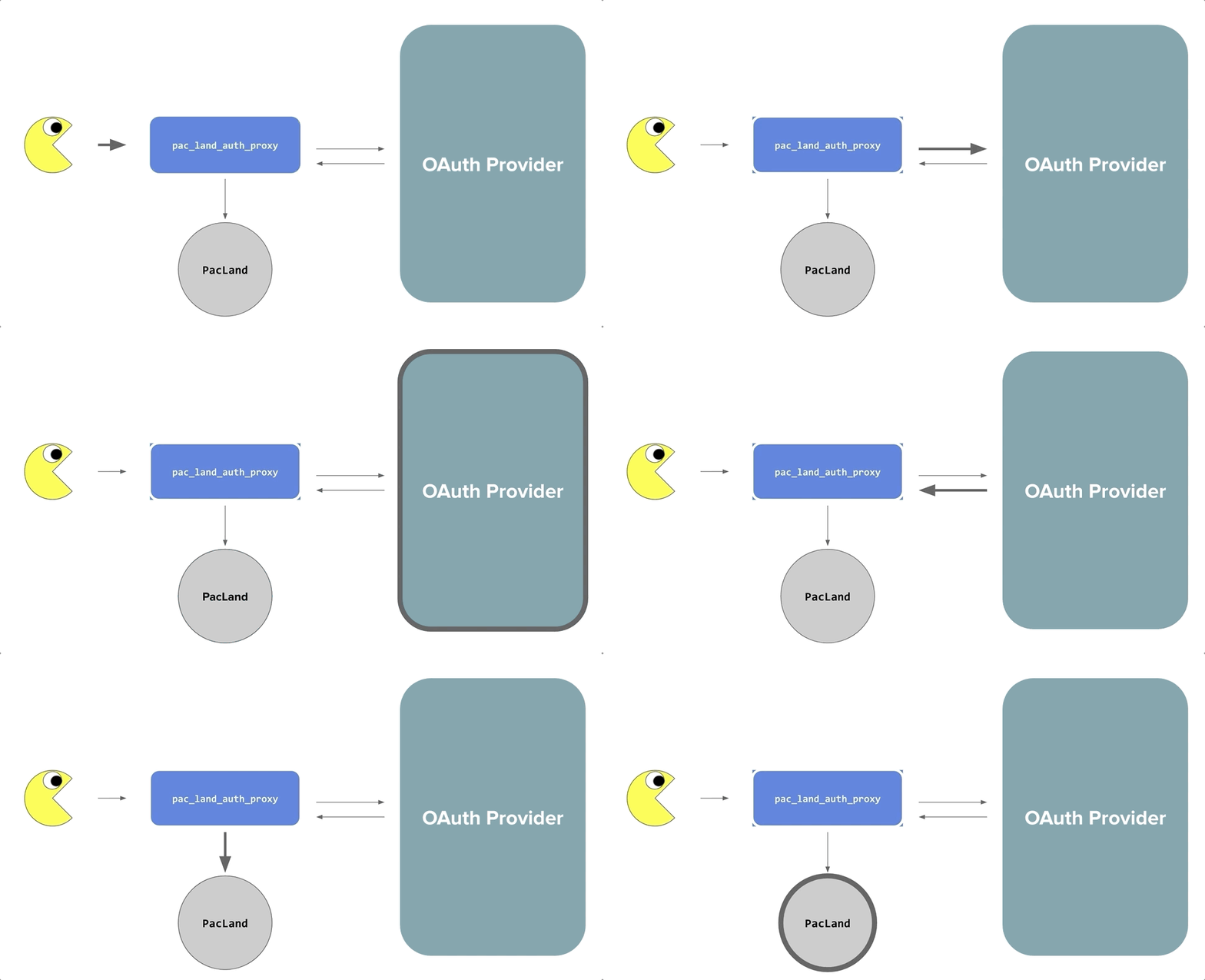
When a user visits an sso-protected site for the first time, they are redirected to sso-auth and prompted to authenticate with an authoritative third party provider (Google) before proceeding to their destination.
When Pinky visits a different sso-protected site for the first time, their browser will be redirected to sso-auth, and will immediately be redirected back to sso-proxy because they have already authenticated, logging them in automatically and transparently.
Every step along the way, sso-auth ensures that the user is authenticated against the authoritative third party OAuth provider, and sso-proxy ensures that the user is authorized to access each specific upstream based on their email address and group membership.
sso in practice
With sso, the process for adding authentication to service is now much more straightforward — just a simple configuration change. Maintaining the security of our services is also much simpler; a security bug fix now only needs to made in one place, rather than 100. Users love it too — they only have to login once to be able to access all of the services behind sso, rather than having to login many times!
We have clear visibility into sso because of the rich instrumentation baked into the system, including statsd metrics and structured logging, that allows us to have a better understanding of our internal services.

Detailed instrumentation gives us great visibility into the usage and performance of our internal applications
We’d love your feedback!
As mentioned above, sso is built on top of Bitly’s open source oauth2_proxy, which has been community verified and hardened. Throughout its development at BuzzFeed we have made sso a priority target for penetration testing by researchers on our bug bounty program — we’ve paid bounties for a number of reported issues!
In preparation for open sourcing we also engaged with Security Innovation, a widely respected agency who count Microsoft, Symantec, and Amazon as clients, to do a more in-depth, week long assessment, with full access to source code and design documents. This found no major issues, which gives us the confidence to open source sso today. However, being mindful that the security landscape changes rapidly, we will continue to make sso available for BuzzFeed’s bug bounty program and encourage responsible disclosure of any security issues there!
Here is the link to the GitHub repo and quickstart guide. We’d love your feedback, so please try it out and open some issues (or pull requests)!
Shoutouts!
First of all, this project would not exist if it weren’t for Justin Hines, who developed the central ideas and helped bring it to life with our original founding team, Michael Hansen, Will McCutchen, and myself. We’d also like to thank Andrew Mulholland, Dan Katz, Dan Meruelo, Eleanor Saitta, Logan McDonald, Lystra Batchoo, and Matt Reiferson, for their work on open sourcing this project. Thanks to Kelsey Scherer for our amazing octoboi logo, which we love very much. Finally, we extend a huge thank you to the BuzzFeed organization as a whole for valuing open source work and supporting our team throughout this process, especially the Infrastructure squads!
<wiz_tmp_tag id="wiz-table-range-border" contenteditable="false" style="display: none;">
Open-sourcing sso, the way we secure services at BuzzFeed的更多相关文章
- Secure services with TLS ---Docker配置https
官方文档:https://docs.docker.com/ee/ucp/interlock/usage/tls/
- 基于IdentityServer4的OIDC实现单点登录(SSO)原理简析
写着前面 IdentityServer4的学习断断续续,兜兜转转,走了不少弯路,也花了不少时间.可能是因为没有阅读源码,也没有特别系统的学习资料,相关文章很多园子里的大佬都有涉及,有系列文章,比如: ...
- Azure Site to Site VPN 配置手册
目录 1 Azure Site to Site VPN配置前的准备 1 1.1 设备兼容 1 1.2 网络要求和注意事项 1 2 配置Azure site t ...
- cacert.pem
## ## Bundle of CA Root Certificates ## ## Certificate data from Mozilla as of: Wed Sep 14 03:12:05 ...
- squid ACL 大全
Access Controls in Squid Contents Access Controls in Squid The Basics: How the parts fit together AC ...
- 单点登录CAS使用记(一):前期准备以及为CAS-Server配置SSL协议
知识点: SSO:单点登录(Single Sign On),是目前比较流行的企业业务整合的解决方案之一.SSO的定义是在多个应用系统中,用户只需要登录一次就可以访问所有相互信任的应用系统. CAS:耶 ...
- kerberos环境storm配置:Running Apache Storm Securely
Running Apache Storm Securely Apache Storm offers a range of configuration options when trying to se ...
- Service Mesh服务网格清单
Service Mesh服务网格清单 Istio Istio官网 Istio中文官网 Istio开源 无需太多介绍Service Mesh明日之星,扛把子,截止2019.11还有太多问题没解决 复杂性 ...
- CAS+SSO原理浅谈
http://www.cnblogs.com/yonsin/archive/2009/08/29/1556423.htmlSSO 是一个非常大的主题,我对这个主题有着深深的感受,自从广州 UserGr ...
随机推荐
- python-day30--粘包
一. 什么是粘包 1.须知:只有TCP有粘包现象,UDP永远不会粘包 2.所谓粘包问题主要还是因为接收方不知道消息之间的界限,不知道一次性提取多少字节的数据所造成的. 二.两种情况下会发生粘包. 1. ...
- linux进程原语之fork()
一.用法解析: fork()这个函数,可以说是名如其人了,众所周知fork这个单词本意为叉子,老外取学术名字的时候总会有一些象形的想法,于是就有了下图~ fork()函数是计算机程序设计中的分叉函数. ...
- OC ARC之循环引用问题(代码分析)
// // main.m // 03-arc-循环引用 // // Created by apple on 13-8-11. // Copyright (c) 2013年 itcast. All ri ...
- 快速切题 sgu118. Digital Root 秦九韶公式
118. Digital Root time limit per test: 0.25 sec. memory limit per test: 4096 KB Let f(n) be a sum of ...
- 快速切题 poj1068
Parencodings Time Limit: 1000MS Memory Limit: 10000K Total Submissions: 19716 Accepted: 11910 De ...
- Flash Player离线安装包下载指南
在机房里装软件,没网是正常现象,有些老师要装Firefox/Chrome浏览器要有Flash,网上搜来搜去都是在线安装包一日在V2EX闲逛时发现了一位大神给出了Flash的离线安装包下载方式,在此立个 ...
- Prism 4 文档 ---第11章 部署Prism应用程序
要成功移动Prism应用到生产中,需要对部署计划为应用程序的设计过程的一部分.本章介绍了注意事项和你需要采取的准备以部署应用程序,以及你要在用户手中获得部署程序所需要采取的行动. Si ...
- ehlib 如何用代码,选中checkbox呢?
TDBGridEh = class(TCustomDBGridEh) public property Col; property Row; property Canvas; // property G ...
- INTEL NUC下一代计算机 怎么进bios,进不去bios
手上有个 英特尔® NUC 套件 DE3815TYKHE 玩具一样,200大洋收来的,配置不高,配了个4G内存,加上以前的2.5笔记本硬盘. 放家里当个小服务器玩吧,挺省电的. BIOS 开启fast ...
- Translating Skills(1)
本文是参加公司英语翻译培训的课程.做此记录,以防忘记. ------------------------------------------------------------------------ ...