
andriod创建用户界面(1)
一.UI知识Activity
将UI放在一个Activity上面,可以在Activity的onCreate方法中添加UI。
@Override
public void onCreate(Bundle savedInstanceState) {
super.onCreate(savedInstanceState);
setContentView(R.layout.main);
}
如果想得到UI上的控件,可以通过findViewById方法查找,例如:
ListView myListView = (ListView)findViewById(R.id.my_list_view);
二、UI布局
布局是对ViewGroup类的扩展,ViewGroup是对View的扩展。
下面是常见的布局类:
FrameLayout:通常是从左上角开始布局,不过如果多个子视图在同一个FrameLayout时,可能会出现重叠。
LinearLayout:按水平或垂直对齐每个子视图。有些像StackPanel。
RelativeLayout:定义子视图与其他视图或者屏幕边界的相对位置。
GridLayout:行列布局,在4.0引入。
2.1定义布局
实例LinearLayout:
<LinearLayout xmlns:android="http://schemas.android.com/apk/res/android"
android:orientation="vertical"
android:layout_width="match_parent"
android:layout_height="match_parent">
<fragment android:name="com.paad.todolist.NewItemFragment"
android:id="@+id/NewItemFragment"
android:layout_width="match_parent"
android:layout_height="wrap_content"
/>
<fragment android:name="com.paad.todolist.ToDoListFragment"
android:id="@+id/TodoListFragment"
android:layout_width="match_parent"
android:layout_height="wrap_content"
/>
</LinearLayout>
match_parent:显示内容所需最小尺度,如字体的高度。
wrap_content:使其充满,
三.To-Do-List实例
主要代码
//找到ListView以便使用Adapter,
//找到TextView以便监听其事件。
ListView myListView = (ListView)findViewById(R.id.myListView);
final EditText myEditText = (EditText)findViewById(R.id.myEditText);
// Create the Array List of to do items
final ArrayList<String> todoItems = new ArrayList<String>();
// Create the Array Adapter to bind the array to the List View
final ArrayAdapter<String> aa;
//使用系统的list_item作为ArrayAdapter的item项
aa = new ArrayAdapter<String>(this,
android.R.layout.simple_list_item_1,
todoItems);
// Bind the Array Adapter to the List View
myListView.setAdapter(aa);
myEditText.setOnKeyListener(new View.OnKeyListener() {
public boolean onKey(View v, int keyCode, KeyEvent event) {
if (event.getAction() == KeyEvent.ACTION_DOWN)
if ((keyCode == KeyEvent.KEYCODE_DPAD_CENTER) ||
(keyCode == KeyEvent.KEYCODE_ENTER)) {
todoItems.add(0, myEditText.getText().toString());
aa.notifyDataSetChanged();
myEditText.setText("");
return true;
}
return false;
}
});
四、Fragment
其灵活的特点,可以让Fragment达到复用,多个Activity使用同一个Fragment。同时一个Activity可以有多个Fragment组成。
如果想在1.6以下版本,Activity必须继承FragmentActivity。
1.Fragment的生命周期
依赖于Activity。
下面给出所有事件
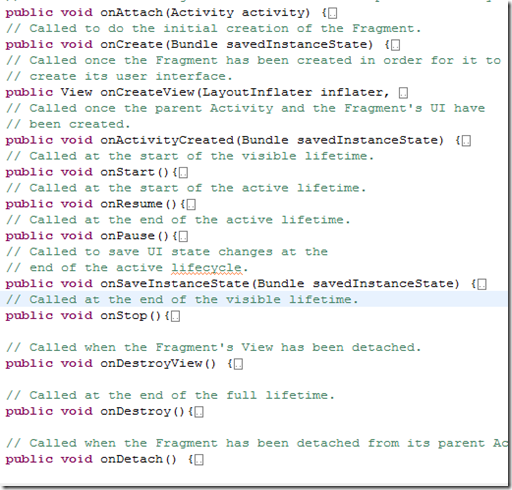
onAttach()方法获取Activity,onCreate()初始化Fragment,onCreateView()设置Fragment的布局。当Activity和Fragment创建完了激发onActivityCreated()方法。onStart()方法生命周期算是正式开始,像小孩子长成大人了一样。onResume()当活动生命周期时触发,比如结婚的时间触发。onPause()方法活动生命周期结束时,像结婚后要度蜜月一样 。onSaveInstanceState()在活动结束后要记录一下状态。以便回来继续处理。
onStop()方法,可见生命周期结束时调用。 onDestroyView()当Fragment的View分离时触发。onDestroy() 在生命周期结束时触发。onDetach是Fragment从Activity分离时发生。

2.FragmentManager
每个Activity都包括一个FragmentManager。用来访问Activity上面的Fragment,可以通过FragmentTransaction来添加替换。删除。
3、FragmentTransaction可通过FragmentManager.BeginTransaction()获取。
然后可以通过Transaction来将Fragment添加到Activity容器中。
xml代码:
<LinearLayout xmlns:android="http://schemas.android.com/apk/res/android"
android:orientation="horizontal"
android:layout_width="match_parent"
android:layout_height="match_parent">
<FrameLayout
android:id="@+id/ui_container"
android:layout_width="match_parent"
android:layout_height="match_parent"
android:layout_weight="1"
/>
<FrameLayout
android:id="@+id/details_container"
android:layout_width="match_parent"
android:layout_height="match_parent"
android:layout_weight="3"
/>
</LinearLayout>
java代码:
public class MyFragmentActivity extends Activity {
public void onCreate(Bundle savedInstanceState) {
super.onCreate(savedInstanceState);
// Inflate the layout containing the Fragment containers
setContentView(R.layout.fragment_container_layout);
FragmentManager fm = getFragmentManager();
// Check to see if the Fragment back stack has been populated
// If not, create and populate the layout.
DetailsFragment detailsFragment =
(DetailsFragment)fm.findFragmentById(R.id.details_container);
if (detailsFragment == null) {
FragmentTransaction ft = fm.beginTransaction();
ft.add(R.id.details_container, new DetailsFragment());
ft.add(R.id.ui_container, new MyListFragment());
ft.commit();
}
}
}
注意以上划红线的部分是先在Activity中添加两个View——FrameLayout。后面通过代码把Fragment放入到View中的。
4、查找Fragment
FragmentManager manager=getFragmentManager();
manager.findFragmentById(id);通常在有UI视图的情况适用
manager.findFragmentByTag(string);,在没哟UI视图的情况适用。
通常是把Fragment添加后有个id,然后才可以通过findFragmentById。
manager.beginTransaction().add(fragment, tag);
通常和后台Fragment使用。
5.添加到BackStack,当按back键时。会回滚操作。
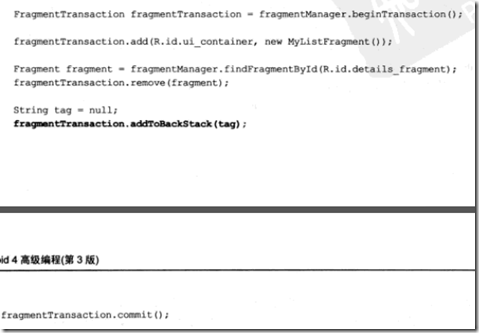
6.设置动画
manager.beginTransaction().setCustomAnimations(enter, exit)();
7.Fragment和Activity之间的接口
可以通过Fragment的onAttach()来获得Activity的引用。也可以getActivity() 来获取Activity。
通常获得Activity是为了让Fragment属性变化时,来调用Activity的一些方法。所以可以在Fragment中定义指定的接口,然后让Activity来调用接口即可。
ListFragment的例子:
public class ToDoListFragment extends ListFragment {
}
FragmentManager fm = getFragmentManager();
ToDoListFragment todoListFragment =
(ToDoListFragment)fm.findFragmentById(R.id.TodoListFragment);
// Create the array list of to do items
todoItems = new ArrayList<String>();
// Create the array adapter to bind the array to the listview
aa = new ArrayAdapter<String>(this,
android.R.layout.simple_list_item_1,
todoItems);
// Bind the array adapter to the listview.
todoListFragment.setListAdapter(aa);
andriod创建用户界面(1)的更多相关文章
- 【翻译】利用Qt设计师窗体在运行时创建用户界面(Creating a user interface from a Qt Designer form at run-time)
利用Qt设计师窗体在运行时创建用户界面 我们利用Calculator窗体例子中创建的窗体(Form)来展示当一个应用(application)已经生成后,是可以在其运行时产生与例子中相同的用户界面. ...
- 腾讯发布 Omix 1.0 - 用 JSX 或 hyperscript 创建用户界面
腾讯发布 Omix 1.0 - 用 JSX 或 hyperscript 创建用户界面 今天,腾讯正式开源发布 Omix 1.0, 让开发者使用 JSX 或 hyperscript 创建用户界面. Gi ...
- Python 创建用户界面之 PyQt5 的使用
之前给大伙介绍了下 tkinter,有朋友希望小帅b对其它的 Python GUI 框架也说道说道,那么今天就来说说 PyQt5 如何创建用户界面. 很多人学习python,不知道从何学起.很多 ...
- matlab中uicontrol创建用户界面控件
来源:https://ww2.mathworks.cn/help/matlab/ref/uicontrol.html?searchHighlight=uicontrol&s_tid=doc_s ...
- Python Django框架笔记(三):django工作方式简单说明和创建用户界面
(一) 说明 简单说明下django的工作方式,并举2个例子. (二) Django工作方式 假定我们有下面这些文件 ,这里在前2篇的基础上增加了 templates目录(存放html文件) 和s ...
- Andriod - 创建自定义控件
控件和布局的继承结构: 可以看到,我们所用的所有控件都是直接或间接继承自 View的,所用的所有布局都是直接或间接继承自 ViewGroup 的.View 是 Android 中一种最基本的 UI 组 ...
- 在 ASP.NET 中创建数据访问和业务逻辑层(转)
.NET Framework 4 当在 ASP.NET 中处理数据时,可从使用通用软件模式中受益.其中一种模式是将数据访问代码与控制数据访问或提供其他业务规则的业务逻辑代码分开.在此模式中,这两个层均 ...
- 十大开源的.NET用户界面框架 让GUI设计不再犯难
选择一款合适的GUI框架是.NET开发中比较重要但又很棘手的问题,因为用户界面相当于一款应用的"门面",直接面向用户.好的UI更能吸引用户,有时甚至成为决定一款应用成败的关键.下面 ...
- [译] 用 Swift 创建自定义的键盘
本文翻译自 How to make a custom keyboard in iOS 8 using Swift 我将讲解一些关于键盘扩展的基本知识,然后使用iOS 8 提供的新应用扩展API来创建一 ...
随机推荐
- 替换SQL字段中的换行符,回车符
替换SQL字段中的换行符,回车符: 在富文本内容中通常会出现回车.换行内容.在sql数据库中这些回车.换行符,输出html后,表现为空格. 这里是在数据导出.导入中发现的,通常把回车.换行符找出来,用 ...
- python学习笔记——爬虫学习中的重要库urllib
1 urllib概述 1.1 urllib库中的模块类型 urllib是python内置的http请求库 其提供了如下功能: (1)error 异常处理模块 (2)parse url解析模块 (3)r ...
- CTreeCtrl获得鼠标点击时的节点
原文链接: http://blog.csdn.net/lcalqf/article/details/21321923 1.添加图标 HICON icon[10]; icon[0]=AfxGetApp( ...
- [转]PostgreSQL 逻辑结构 和 权限体系 介绍
摘要: 本文旨在帮助用户理解PostgreSQL的逻辑结构和权限体系,帮助用户快速的理解和管理数据库的权限. 逻辑结构 最上层是实例,实例中允许创建多个数据库,每个数据库中可以创建多个schema,每 ...
- [转]IC行业的牛人
转载的: 说来惭愧,我所了解的牛人也只是大学教授,工业界的高手了解的还太少,虽然我对教育界的牛人了解的也不多,但这里也要牢骚几句,论坛上的人好像只是认识Gray,Razavi,Allen,Lee, ...
- uefi+GPT分区安装ubuntu[zz]
现状:1.预装win8的笔记本几乎都是uefi启动模式,配合GPT磁盘分区,于是遇到了“麻烦”不会装了,或者说按照老教程安装,结果失败了.而且有很多人在问怎么解决,其实网上就有嘛,关键词就是“uefi ...
- centos7 安装后需要做的事情
安装centos 7 系统之后要做的几件事 #修改主机名 hostnamectl --static set-hostname xd-1 vim /etc/hosts127.0.0.1 xd-1x.x. ...
- php7+apache2.4 (Windows7下)安装
条件: ( 电脑必须win7 sp1, .netframework4 ) 一.下载php7和apache2.4 首先下载php7的windows压缩包,到这里下载http://windows.php. ...
- Atitit 面试问题总结
Atitit 面试问题总结 1. 面试约人阶段可以预先1俩分钟大概问下情况1 2. 自我介绍阶段1 3. 技术方面2 3.1. 界面方面2 3.2. Java 本身 了解spring mybati ...
- ios获取文件的MD5值
一般我们在使用http或者socket上传或者下载文件的时候,经常会在完成之后经行一次MD5值得校验(尤其是在断点续传的时候用的更 多),校验MD5值是为了防止在传输的过程当中丢包或者数据包被篡改,在 ...