
[转载]C#中MessageBox.Show用法以及VB.NET中MsgBox用法
一、C#中MessageBox.Show用法
MessageBox.Show (String) 显示具有指定文本的消息框。 由 .NET Compact Framework 支持。
MessageBox.Show (IWin32Window, String) 在指定对象的前面显示具有指定文本的消息框。
MessageBox.Show (String, String) 显示具有指定文本和标题的消息框。由 .NET Compact Framework 支持。
MessageBox.Show (IWin32Window, String, String) 在指定对象的前面显示具有指定文本和标题的消息框。
MessageBox.Show (String, String, MessageBoxButtons) 显示具有指定文本、标题和按钮的消息框。
MessageBox.Show (IWin32Window, String, String, MessageBoxButtons) 在指定对象的前面显示具有指定文本、标题和按钮的消息框。
MessageBox.Show (String, String, MessageBoxButtons, MessageBoxIcon) 显示具有指定文本、标题、按钮和图标的消息框。
MessageBox.Show (IWin32Window, String, String, MessageBoxButtons, MessageBoxIcon) 在指定对象的前面显示具有指定文本、标题、按钮和图标的消息框。
MessageBox.Show (String, String, MessageBoxButtons, MessageBoxIcon, MessageBoxDefaultButton) 显示具有指定文本、标题、按钮、图标和默认按钮的消息框。 由 .NET Compact Framework 支持。
MessageBox.Show (IWin32Window, String, String, MessageBoxButtons, MessageBoxIcon, MessageBoxDefaultButton) 在指定对象的前面显示具有指定文本、标题、按钮、图标和默认按钮的消息框。
MessageBox.Show (String, String, MessageBoxButtons, MessageBoxIcon, MessageBoxDefaultButton, MessageBoxOptions) 显示具有指定文本、标题、按钮、图标、默认按钮和选项的消息框。
MessageBox.Show (IWin32Window, String, String, MessageBoxButtons, MessageBoxIcon, MessageBoxDefaultButton, MessageBoxOptions) 在指定对象的前面显示具有指定文本、标题、按钮、图标、默认按钮和选项的消息框。
MessageBox.Show (String, String, MessageBoxButtons, MessageBoxIcon, MessageBoxDefaultButton, MessageBoxOptions, Boolean) 显示一个具有指定文本、标题、按钮、图标、默认按钮、选项和"帮助"按钮的消息框。
MessageBox.Show (String, String, MessageBoxButtons, MessageBoxIcon, MessageBoxDefaultButton, MessageBoxOptions, String) 使用指定的帮助文件显示一个具有指定文本、标题、按钮、图标、默认按钮、选项和"帮助"按钮的消息框。
MessageBox.Show (IWin32Window, String, String, MessageBoxButtons, MessageBoxIcon, MessageBoxDefaultButton, MessageBoxOptions, String) 使用指定的帮助文件显示一个具有指定文本、标题、按钮、图标、默认按钮、选项和"帮助"按钮的消息框。
MessageBox.Show (String, String, MessageBoxButtons, MessageBoxIcon, MessageBoxDefaultButton, MessageBoxOptions, String, HelpNavigator) 使用指定的帮助文件和 HelpNavigator 显示一个具有指定文本、标题、按钮、图标、默认按钮、选项和"帮助"按钮的消息框。
MessageBox.Show (String, String, MessageBoxButtons, MessageBoxIcon, MessageBoxDefaultButton, MessageBoxOptions, String, String) 使用指定的帮助文件和帮助关键字[guan jian zi]显示一个具有指定文本、标题、按钮、图标、默认按钮、选项和"帮助"按钮的消息框。
MessageBox.Show (IWin32Window, String, String, MessageBoxButtons, MessageBoxIcon, MessageBoxDefaultButton, MessageBoxOptions, String, HelpNavigator) 使用指定的帮助文件和 HelpNavigator 显示一个具有指定文本、标题、按钮、图标、默认按钮、选项和"帮助"按钮的消息框。
MessageBox.Show (IWin32Window, String, String, MessageBoxButtons, MessageBoxIcon, MessageBoxDefaultButton, MessageBoxOptions, String, String) 使用指定的帮助文件和帮助关键字[guan jian zi]显示一个具有指定文本、标题、按钮、图标、默认按钮、选项和"帮助"按钮的消息框。
MessageBox.Show (String, String, MessageBoxButtons, MessageBoxIcon, MessageBoxDefaultButton, MessageBoxOptions, String, HelpNavigator, Object) 使用指定的帮助文件、HelpNavigator 和帮助主题显示一个具有指定文本、标题、按钮、图标、默认按钮、选项和"帮助"按钮的消息框。
MessageBox.Show (IWin32Window, String, String, MessageBoxButtons, MessageBoxIcon, MessageBoxDefaultButton, MessageBoxOptions, String, HelpNavigator, Object) 使用指定的帮助文件、HelpNavigator 和帮助主题显示一个具有指定文本、标题、按钮、图标、默认按钮、选项和"帮助"按钮的消息框。
用法如:
DialogResult ret =MessageBox.Show( "确定要删除[shan chu]记录么?" , "删除[shan chu]", MessageBoxButtons.OKCancel, MessageBoxIcon.Question);
MessageBox.Show( "提示[ti shi]信息", " 信息标题", MessageBoxButtons.OK);
MessageBox.Show( "提示[ti shi]信息", " 信息标题", MessageBoxButtons.OK, MessageBoxIcon.Error);
我们在程序中经常会用到MessageBox。
MessageBox.Show()共有21中重载[zhong zai]方法。现将其常见用法总结如下:
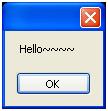
1. MessageBox .Show( "Hello~~~~" );
最简单的,只显示提示[ti shi]信息。
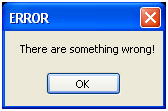
2. MessageBox .Show( "There are something wrong!" , "ERROR" );
可以给消息框加上标[shang biao]题。
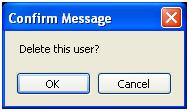
3. if ( MessageBox .Show( "Delete this user?" , "Confirm Message" , MessageBoxButtons .OKCancel) == DialogResult .OK)
{
//delete
}
询问是否删除[shan chu]时会用到这个。
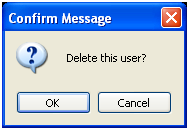
4. if ( MessageBox .Show( "Delete this user?" , "Confirm Message" , MessageBoxButtons .OKCancel, MessageBoxIcon .Question) == DialogResult .OK)
{
//delete
}
可以给MessageBox加上一个Icon,.net提供常见的Icon共选择[xuan ze]。
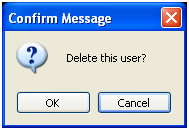
5. if ( MessageBox .Show( "Delete this user?" , "Confirm Message" , MessageBoxButtons .OKCancel, MessageBoxIcon .Question, MessageBoxDefaultButton .Button2) == DialogResult .OK)
{
//delete
}
可以改变MessageBox的默认焦点,如下:
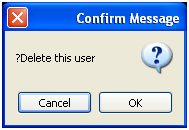
6. if ( MessageBox .Show( "Delete this user?" , "Confirm Message" , MessageBoxButtons .OKCancel, MessageBoxIcon .Question, MessageBoxDefaultButton .Button2, MessageBoxOptions .RtlReading) == DialogResult .OK)
{
//delete
}
反向显示:
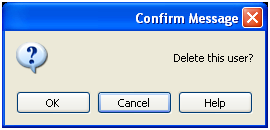
7. if ( MessageBox .Show( "Delete this user?" , "Confirm Message" , MessageBoxButtons .OKCancel, MessageBoxIcon .Question, MessageBoxDefaultButton .Button2, MessageBoxOptions .RightAlign, true ) == DialogResult .OK)
{
//delete
}
添加Help按钮:
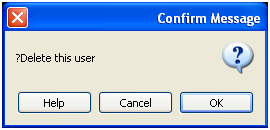
8. if ( MessageBox .Show( "Delete this user?" , "Confirm Message" , MessageBoxButtons .OKCancel, MessageBoxIcon .Question, MessageBoxDefaultButton .Button1, MessageBoxOptions .RtlReading, @"/folder/file.htm" ) == DialogResult .OK)
{
//delete
}
指定帮助文件的路径[lu jing],点击即可打开该路径[lu jing]下的帮助文件。
9. //HelpNavigator 指定常数来指示[zhi shi]要显示的帮助文件元素。 Find 帮助文件将打开到搜索[sou suo]页。
if ( MessageBox .Show( "Delete this user?" , "Confirm Message" , MessageBoxButtons .OKCancel, MessageBoxIcon .Question, MessageBoxDefaultButton .Button1, MessageBoxOptions .RtlReading, @"/folder/file.htm" , HelpNavigator .Find) == DialogResult .OK)
{
//delete
}
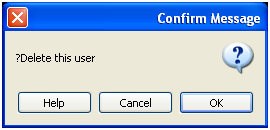
还有一些用法,不是太实用这里就不一一介绍了,有兴趣的朋友可以参考下这里: MSDN 的MessageBox类。
二、VB.NET中MsgBox用法
MsgBox: Prompts a dialog box that displays a message.
Examples:
MsgBox ("Thank You for the Help!")
Information from the MSDN: MsgBox Function
Parameters
- Prompt
- Required. String expression displayed as the message in the dialog box. The maximum length of Prompt is approximately 1024 characters, depending on the width of the characters used. If Prompt consists of more than one line, you can separate the lines using a carriage return character (Chr(13)), a linefeed character (Chr(10)), or a carriage return/linefeed character combination (Chr(13) & Chr(10)) between each line.
- Buttons
- Optional. Numeric expression that is the sum of values specifying the number and type of buttons to display, the icon style to use, the identity of the default button, and the modality of the message box. If you omit Buttons, the default value is zero.
- Title
- Optional. String expression displayed in the title bar of the dialog box. If you omit Title, the application name is placed in the title bar.
Settings
The MsgBoxStyle enumeration values are listed in the following table.
| Enumeration | Value | Description |
|---|---|---|
| OKOnly |
0
|
Displays OK button only. |
| OKCancel |
1
|
Displays OK and Cancel buttons. |
| AbortRetryIgnore |
2
|
Displays Abort, Retry, and Ignore buttons. |
| YesNoCancel |
3
|
Displays Yes, No, and Cancel buttons. |
| YesNo |
4
|
Displays Yes and No buttons. |
| RetryCancel |
5
|
Displays Retry and Cancel buttons. |
| Critical |
16
|
Displays Critical Message icon. |
| Question |
32
|
Displays Warning Query icon. |
| Exclamation |
48
|
Displays Warning Message icon. |
| Information |
64
|
Displays Information Message icon. |
| DefaultButton1 |
0
|
First button is default. |
| DefaultButton2 |
256
|
Second button is default. |
| DefaultButton3 |
512
|
Third button is default. |
| ApplicationModal |
0
|
Application is modal. The user must respond to the message box before continuing work in the current application. |
| SystemModal |
4096
|
System is modal. All applications are suspended until the user responds to the message box. |
| MsgBoxSetForeground |
65536
|
Specifies the message box window as the foreground window. |
| MsgBoxRight |
524288
|
Text is right-aligned. |
| MsgBoxRtlReading |
1048576
|
Specifies text should appear as right-to-left reading on Hebrew and Arabic systems. |
The first group of values (0–5) describes the number and type of buttons displayed in the dialog box; the second group (16, 32, 48, 64) describes the icon style; the third group (0, 256, 512) determines which button is the default; the fourth group (0, 4096) determines the modality of the message box, and the fifth group specifies whether or not the message box window is the foreground window, along with the alignment and direction of the text. When adding numbers to create a final value for the Buttons argument, use only one number from each group.
Return Values
|
Constant
|
Value
|
|---|---|
|
OK
|
1
|
|
Cancel
|
2
|
|
Abort
|
3
|
|
Retry
|
4
|
|
Ignore
|
5
|
|
Yes
|
6
|
|
No
|
7
|
Exceptions/Errors
|
Exception type
|
Error number | Condition |
|---|---|---|
|
ArgumentException
|
5
|
Prompt is not a String expression, or Titleis invalid. |
|
InvalidOperationException
|
5
|
Process is not running in User Interactive mode. |
|
InvalidEnumArgumentException
|
5
|
One or more parameters not a member ofMsgBoxResult or MsgBoxStyleenumerations. |
Remarks
If the dialog box displays a Cancel button, pressing the ESC key has the same effect as clicking Cancel. If the dialog box contains a Help button, context-sensitive Help is provided for the dialog box. However, no value is returned until one of the other buttons is clicked.
Note To specify more than the first argument, you must use the MsgBox function in an expression. If you omit any positional arguments, you must retain the corresponding comma delimiter.
Example
This example uses the MsgBox function to display a critical-error message in a dialog box with Yes and No buttons. The No button is specified as the default response. This is done by combining the MsgBox constant values into one numeric expression. In this case, adding 4 (the Yes/No button combination) and 16 (the Critical Message window) and 256 (the second button as default button) gives a total of 276. The value returned by the MsgBox function depends on the button chosen by the user: Yes returns a value of 6; No returns a value of 7.
Dim msg As String
Dim title As String
Dim style As MsgBoxStyle
Dim response As MsgBoxResult
msg = "Do you want to continue?" ' Define message.
style = MsgBoxStyle.DefaultButton2 Or _
MsgBoxStyle.Critical Or MsgBoxStyle.YesNo
title = "MsgBox Demonstration" ' Define title.
' Display message.
response =MsgBox(msg, style, title)' or MsgBox(msg, MsgBoxStyle.YesNo, title)
If response = MsgBoxResult.Yes Then ' User chose Yes.
' Perform some action.
Else
' Perform some other action.
End If
原文出处
链接①:http://blog.csdn.net/fan158/article/details/5891780
链接②:http://www.lob.cn/jq/kfjq/570.shtml
[转载]C#中MessageBox.Show用法以及VB.NET中MsgBox用法的更多相关文章
- VB6中的引用传递 与 VB.NET中的引用传递的区别
首先注意一点,在VB6中缺省参数传递的方式是:引用传递,而在VB.NET中缺省参数传递的方式是:值传递. 然后我们看下面VB6中的引用传递与VB.NET中的引用传递的对比. VB6中的引用传递 Pri ...
- 【转】VC中MessageBox与AfxMessageBox用法与区别
原文网址:http://blog.csdn.net/holybin/article/details/28403109 一.MessageBox()用法 1.函数原型 Messagebox函数在Win3 ...
- VC中MessageBox与AfxMessageBox用法与区别
一.MessageBox()用法 1.函数原型 Messagebox函数在Win32 API和MFC里的定义有区别. Win32 API的定义如下: int WINAPI MessageBox( ...
- 转:VC中MessageBox的常见用法
一.关于MessageBox 消息框是个很常用的控件,属性比较多,本文列出了它的一些常用方法,及指出了它的一些应用场合. 1.MessageBox("这是一个最简单的 ...
- VC中MessageBox的常见用法
一.关于MessageBox 消息框是个很常用的控件,属性比较多,本文列出了它的一些常用方法,及指出了它的一些应用场合. 1.MessageBox("这是一个最简单的 ...
- C++Builder中MessageBox的基本用法
C++Builder中MessageBox的基本用法 返回值:IDYES=Application->MessageBox("","",MBYESNO) i ...
- C#中MessageBox用法大全(转)
我们在程序中经常会用到MessageBox. MessageBox.Show()共有21中重载方法.现将其常见用法总结如下: 1.MessageBox.Show("Hello~~~~&quo ...
- VC++中MessageBox的常见用法详解
消息框是个很常用的控件,属性比较多,本文列出了它的一些常用方法,及指出了它的一些应用场合. 1.MessageBox("这是一个最简单的消息框!"); ...
- Delphi中MessageBox用法
消息框是个很常用的控件,属性比较多,本文列出了它的一些常用方法,及指出了它的一些应用场合. 1.最简单用法,不带图形 MessageBox(0,'不同意','提示',MB_OK); MessageBo ...
随机推荐
- 异常处理汇总 ~ 修正果带着你的Net飞奔吧!
经验库开源地址:https://github.com/dunitian/LoTDotNet 异常处理汇总-服 务 器 http://www.cnblogs.com/dunitian/p/4522983 ...
- Word/Excel 在线预览
前言 近日项目中做到一个功能,需要上传附件后能够在线预览.之前也没做过这类似的,于是乎就查找了相关资料,.net实现Office文件预览大概有这几种方式: ① 使用Microsoft的Office组件 ...
- const,static,extern 简介
const,static,extern 简介 一.const与宏的区别: const简介:之前常用的字符串常量,一般是抽成宏,但是苹果不推荐我们抽成宏,推荐我们使用const常量. 执行时刻:宏是预编 ...
- 前端学HTTP之web攻击技术
前面的话 简单的HTTP协议本身并不存在安全性问题,因此协议本身几乎不会成为攻击的对象.应用HTTP协议的服务器和客户端,以及运行在服务器上的Web应用等资源才是攻击目标.本文将详细介绍攻击web站点 ...
- C#多线程之线程同步篇2
在上一篇C#多线程之线程同步篇1中,我们主要学习了执行基本的原子操作.使用Mutex构造以及SemaphoreSlim构造,在这一篇中我们主要学习如何使用AutoResetEvent构造.Manual ...
- 玩转spring boot——结合JPA入门
参考官方例子:https://spring.io/guides/gs/accessing-data-jpa/ 接着上篇内容 一.小试牛刀 创建maven项目后,修改pom.xml文件 <proj ...
- [原]分享一下我和MongoDB与Redis那些事
缘起:来自于我在近期一个项目上遇到的问题,在Segmentfault上发表了提问 知识背景: 对不是很熟悉MongoDB和Redis的同学做一下介绍. 1.MongoDB数组查询:MongoDB自带L ...
- Ubuntu设置root用户登录图形界面
Ubuntu默认的是root用户不能登录图形界面的,只能以其他用户登录图形界面.这样就很麻烦,因为权限的问题,不能随意复制删除文件,用gedit编辑文件时经常不能保存,只能用vim去编辑. 解决的办法 ...
- FineReport如何部署Tomcat服务器集群
环境准备 Tomcat服务器集群中需要进行环境准备: Apache:Apache是http服务器,利用其对Tomcat进行负载均衡,这里使用的版本是Apache HTTP Server2.0.64: ...
- 我的MYSQL学习心得(九) 索引
我的MYSQL学习心得(九) 索引 我的MYSQL学习心得(一) 简单语法 我的MYSQL学习心得(二) 数据类型宽度 我的MYSQL学习心得(三) 查看字段长度 我的MYSQL学习心得(四) 数据类 ...