
Enabling Cross-Origin Requests in ASP.NET Web API 2
Introduction
This tutorial demonstrates CORS support in ASP.NET Web API. We’ll start by creating two ASP.NET projects – one called “WebService”, which hosts a Web API controller, and the other called “WebClient”, which calls WebService. Because the two applications are hosted at different domains, an AJAX request from WebClient to WebService is a cross-origin request.

What is "Same Origin"?
Two URLs have the same origin if they have identical schemes, hosts, and ports. (RFC 6454)
These two URLs have the same origin:
http://example.com/foo.htmlhttp://example.com/bar.html
These URLs have different origins than the previous two:
http://example.net- Different domainhttp://example.com:9000/foo.html- Different porthttps://example.com/foo.html- Different schemehttp://www.example.com/foo.html- Different subdomain
Internet Explorer does not consider the port when comparing origins.
Create the WebService Project
This section assumes you already know how to create Web API projects. If not, see Getting Started with ASP.NET Web API.
Start Visual Studio and create a new ASP.NET Web Application project. Select the Empty project template. Under “Add folders and core references for”, select the Web API checkbox. Optionally, select the "Host in Cloud" option to deploy the app to Mircosoft Azure. Microsoft offers free web hosting for up to 10 websites in a free Azure trial account.
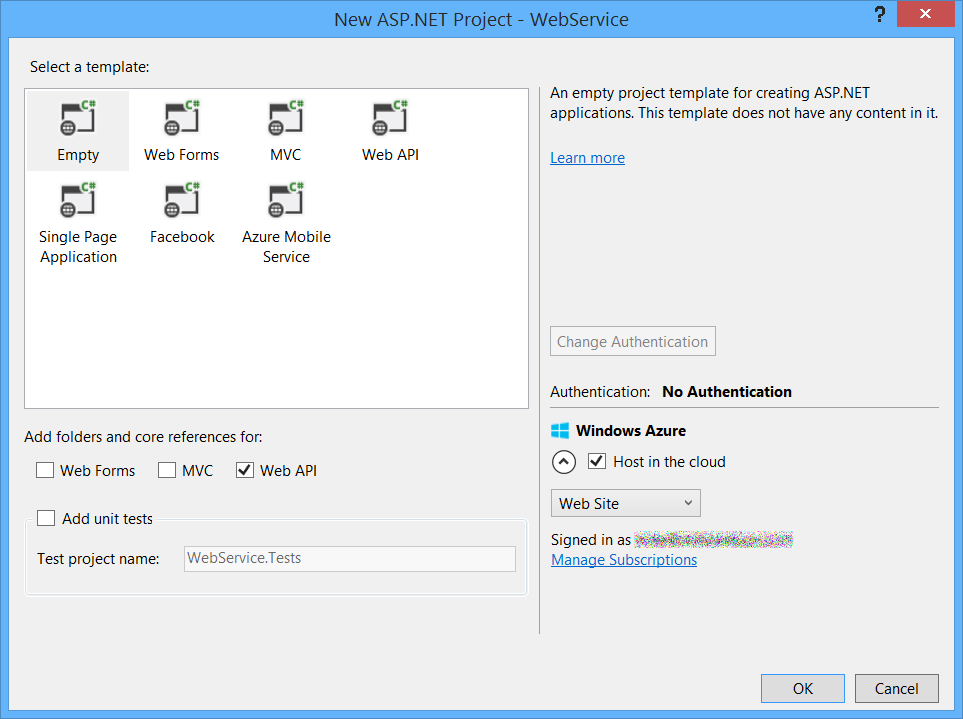
Add a Web API controller named TestController with the following code:
using System.Net.Http;

using System.Web.Http;

namespace WebService.Controllers

{

    public class TestController : ApiController

    {

        public HttpResponseMessage Get()

        {

            return new HttpResponseMessage()

            {

                Content = new StringContent("GET: Test message")

            };

        }

        public HttpResponseMessage Post()

        {

            return new HttpResponseMessage()

            {

                Content = new StringContent("POST: Test message")

            };

        }

        public HttpResponseMessage Put()

        {

            return new HttpResponseMessage()

            {

                Content = new StringContent("PUT: Test message")

            };

        }

    }

}
You can run the application locally or deploy to Azure. (For the screenshots in this tutorial, I deployed to Azure App Service Web Apps.) To verify that the web API is working, navigate to http://hostname/api/test/, where hostname is the domain where you deployed the application. You should see the response text, "GET: Test Message".

Create the WebClient Project
Create another ASP.NET Web Application project and select the MVC project template. Optionally, select Change Authentication > No Authentication. You don't need authentication for this tutorial.

In Solution Explorer, open the file Views/Home/Index.cshtml. Replace the code in this file with the following:
<div>

    <select id="method">

        <option value="get">GET</option>

        <option value="post">POST</option>

        <option value="put">PUT</option>

    </select>

    <input type="button" value="Try it" onclick="sendRequest()" />

    <span id='value1'>(Result)</span>

</div>

@section scripts {

<script>

    // TODO: Replace with the URL of your WebService app

    var serviceUrl = 'http://mywebservice/api/test';

    function sendRequest() {

        var method = $('#method').val();

        $.ajax({

            type: method,

            url: serviceUrl

        }).done(function (data) {

            $('#value1').text(data);

        }).error(function (jqXHR, textStatus, errorThrown) {

            $('#value1').text(jqXHR.responseText || textStatus);

        });

    }

</script>

}
For the serviceUrl variable, use the URI of the WebService app. Now run the WebClient app locally or publish it to another website.
Clicking the “Try It” button submits an AJAX request to the WebService app, using the HTTP method listed in the dropdown box (GET, POST, or PUT). This lets us examine different cross-origin requests. Right now, the WebService app does not support CORS, so if you click the button, you will get an error.
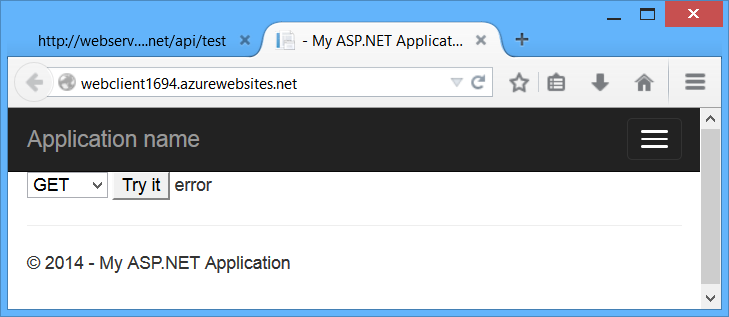
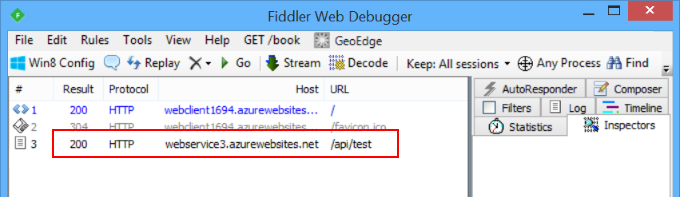
If you watch the HTTP traffic in a tool like Fiddler, you will see that the browser does send the GET request, and the request succeeds, but the AJAX call returns an error. It’s important to understand that same-origin policy does not prevent the browser from sending the request. Instead, it prevents the application from seeing the response.
Enable CORS
Now let's enable CORS in the WebService app. First, add the CORS NuGet package. In Visual Studio, from the Tools menu, select Library Package Manager, then select Package Manager Console. In the Package Manager Console window, type the following command:
Install-Package Microsoft.AspNet.WebApi.Cors
This command installs the latest package and updates all dependencies, including the core Web API libraries. User the -Version flag to target a specific version. The CORS package requires Web API 2.0 or later.
Open the file App_Start/WebApiConfig.cs. Add the following code to the WebApiConfig.Register method.
using System.Web.Http;

namespace WebService

{

    public static class WebApiConfig

    {

        public static void Register(HttpConfiguration config)

        {

            // New code

            config.EnableCors();

            config.Routes.MapHttpRoute(

                name: "DefaultApi",

                routeTemplate: "api/{controller}/{id}",

                defaults: new { id = RouteParameter.Optional }

            );

        }

    }

}
Next, add the [EnableCors] attribute to the TestController class:
using System.Net.Http;

using System.Web.Http;

using System.Web.Http.Cors;

namespace WebService.Controllers

{

    [EnableCors(origins: "http://mywebclient.azurewebsites.net", headers: "*", methods: "*")]

    public class TestController : ApiController

    {

        // Controller methods not shown...

    }

}
For the origins parameter, use the URI where you deployed the WebClient application. This allows cross-origin requests from WebClient, while still disallowing all other cross-domain requests. Later, I’ll describe the parameters for [EnableCors] in more detail.
Do not include a forward slash at the end of the origins URL.
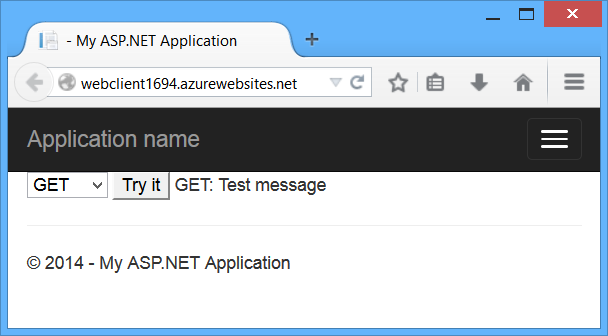
Redeploy the updated WebService application. You don't need to update WebClient. Now the AJAX request from WebClient should succeed. The GET, PUT, and POST methods are all allowed.
How CORS Works
This section describes what happens in a CORS request, at the level of the HTTP messages. It’s important to understand how CORS works, so that you can configure the [EnableCors] attribute correctly, and troubleshoot if things don’t work as you expect.
The CORS specification introduces several new HTTP headers that enable cross-origin requests. If a browser supports CORS, it sets these headers automatically for cross-origin requests; you don’t need to do anything special in your JavaScript code.
Here is an example of a cross-origin request. The “Origin” header gives the domain of the site that is making the request.
GET http://myservice.azurewebsites.net/api/test HTTP/1.1

Referer: http://myclient.azurewebsites.net/

Accept: */*

Accept-Language: en-US

Origin: http://myclient.azurewebsites.net

Accept-Encoding: gzip, deflate

User-Agent: Mozilla/5.0 (compatible; MSIE 10.0; Windows NT 6.2; WOW64; Trident/6.0)

Host: myservice.azurewebsites.net
If the server allows the request, it sets the Access-Control-Allow-Origin header. The value of this header either matches the Origin header, or is the wildcard value “*”, meaning that any origin is allowed.
HTTP/1.1 200 OK

Cache-Control: no-cache

Pragma: no-cache

Content-Type: text/plain; charset=utf-8

Access-Control-Allow-Origin: http://myclient.azurewebsites.net

Date: Wed, 05 Jun 2013 06:27:30 GMT

Content-Length: 17

GET: Test message
If the response does not include the Access-Control-Allow-Origin header, the AJAX request fails. Specifically, the browser disallows the request. Even if the server returns a successful response, the browser does not make the response available to the client application.
Preflight Requests
For some CORS requests, the browser sends an additional request, called a “preflight request”, before it sends the actual request for the resource.
The browser can skip the preflight request if the following conditions are true:
- The request method is GET, HEAD, or POST, and
- The application does not set any request headers other than Accept, Accept-Language, Content-Language, Content-Type, or Last-Event-ID, and
- The Content-Type header (if set) is one of the following:
- application/x-www-form-urlencoded
- multipart/form-data
- text/plain
The rule about request headers applies to headers that the application sets by calling setRequestHeader on the XMLHttpRequest object. (The CORS specification calls these “author request headers”.) The rule does not apply to headers the browser can set, such as User-Agent, Host, or Content-Length.
Here is an example of a preflight request:
OPTIONS http://myservice.azurewebsites.net/api/test HTTP/1.1

Accept: */*

Origin: http://myclient.azurewebsites.net

Access-Control-Request-Method: PUT

Access-Control-Request-Headers: accept, x-my-custom-header

Accept-Encoding: gzip, deflate

User-Agent: Mozilla/5.0 (compatible; MSIE 10.0; Windows NT 6.2; WOW64; Trident/6.0)

Host: myservice.azurewebsites.net

Content-Length: 0
The pre-flight request uses the HTTP OPTIONS method. It includes two special headers:
- Access-Control-Request-Method: The HTTP method that will be used for the actual request.
- Access-Control-Request-Headers: A list of request headers that the application set on the actual request. (Again, this does not include headers that the browser sets.)
Here is an example response, assuming that the server allows the request:
HTTP/1.1 200 OK

Cache-Control: no-cache

Pragma: no-cache

Content-Length: 0

Access-Control-Allow-Origin: http://myclient.azurewebsites.net

Access-Control-Allow-Headers: x-my-custom-header

Access-Control-Allow-Methods: PUT

Date: Wed, 05 Jun 2013 06:33:22 GMT
The response includes an Access-Control-Allow-Methods header that lists the allowed methods, and optionally an Access-Control-Allow-Headers header, which lists the allowed headers. If the preflight request succeeds, the browser sends the actual request, as described earlier.
Scope Rules for [EnableCors]
You can enable CORS per action, per controller, or globally for all Web API controllers in your application.
Per Action
To enable CORS for a single action, set the [EnableCors] attribute on the action method. The following example enables CORS for the GetItemmethod only.
public class ItemsController : ApiController

{

    public HttpResponseMessage GetAll() { ... }

    [EnableCors(origins: "http://www.example.com", headers: "*", methods: "*")]

    public HttpResponseMessage GetItem(int id) { ... }

    public HttpResponseMessage Post() { ... }

    public HttpResponseMessage PutItem(int id) { ... }

}
Per Controller
If you set [EnableCors] on the controller class, it applies to all the actions on the controller. To disable CORS for an action, add the[DisableCors] attribute to the action. The following example enables CORS for every method except PutItem.
[EnableCors(origins: "http://www.example.com", headers: "*", methods: "*")]

public class ItemsController : ApiController

{

    public HttpResponseMessage GetAll() { ... }

    public HttpResponseMessage GetItem(int id) { ... }

    public HttpResponseMessage Post() { ... }

    [DisableCors]

    public HttpResponseMessage PutItem(int id) { ... }

}
Globally
To enable CORS for all Web API controllers in your application, pass an EnableCorsAttribute instance to the EnableCors method:
public static class WebApiConfig

{

    public static void Register(HttpConfiguration config)

    {

        var cors = new EnableCorsAttribute("www.example.com", "*", "*");

        config.EnableCors(cors);

        // ...

    }

}
If you set the attribute at more than one scope, the order of precedence is:
- Action
- Controller
- Global
Set the Allowed Origins
The origins parameter of the [EnableCors] attribute specifies which origins are allowed to access the resource. The value is a comma-separated list of the allowed origins.
[EnableCors(origins: "http://www.contoso.com,http://www.example.com",

    headers: "*", methods: "*")]
You can also use the wildcard value “*” to allow requests from any origins.
Consider carefully before allowing requests from any origin. It means that literally any website can make AJAX calls to your web API.
// Allow CORS for all origins. (Caution!)

[EnableCors(origins: "*", headers: "*", methods: "*")]
Set the Allowed HTTP Methods
The methods parameter of the [EnableCors] attribute specifies which HTTP methods are allowed to access the resource. To allow all methods, use the wildcard value “*”. The following example allows only GET and POST requests.
[EnableCors(origins: "http://www.example.com", headers: "*", methods: "get,post")]

public class TestController : ApiController

{

    public HttpResponseMessage Get() { ... }

    public HttpResponseMessage Post() { ... }

    public HttpResponseMessage Put() { ... }

}
Set the Allowed Request Headers
Earlier I described how a preflight request might include an Access-Control-Request-Headers header, listing the HTTP headers set by the application (the so-called “author request headers”). The headers parameter of the [EnableCors] attribute specifies which author request headers are allowed. To allow any headers, set headers to “*”. To whitelist specific headers, set headers to a comma-separated list of the allowed headers:
[EnableCors(origins: "http://example.com",

    headers: "accept,content-type,origin,x-my-header", methods: "*")]
However, browsers are not entirely consistent in how they set Access-Control-Request-Headers. For example, Chrome currently includes “origin”; while FireFox does not include standard headers such as “Accept”, even when the application sets them in script.
If you set headers to anything other than “*”, you should include at least “accept”, “content-type”, and “origin”, plus any custom headers that you want to support.
Set the Allowed Response Headers
By default, the browser does not expose all of the response headers to the application. The response headers that are available by default are:
- Cache-Control
- Content-Language
- Content-Type
- Expires
- Last-Modified
- Pragma
The CORS spec calls these simple response headers. To make other headers available to the application, set the exposedHeaders parameter of[EnableCors].
In the following example, the controller’s Get method sets a custom header named ‘X-Custom-Header’. By default, the browser will not expose this header in a cross-origin request. To make the header available, include ‘X-Custom-Header’ in exposedHeaders.
[EnableCors(origins: "*", headers: "*", methods: "*", exposedHeaders: "X-Custom-Header")]

public class TestController : ApiController

{

    public HttpResponseMessage Get()

    {

        var resp = new HttpResponseMessage()

        {

            Content = new StringContent("GET: Test message")

        };

        resp.Headers.Add("X-Custom-Header", "hello");

        return resp;

    }

}
Passing Credentials in Cross-Origin Requests
Credentials require special handling in a CORS request. By default, the browser does not send any credentials with a cross-origin request. Credentials include cookies as well as HTTP authentication schemes. To send credentials with a cross-origin request, the client must setXMLHttpRequest.withCredentials to true.
Using XMLHttpRequest directly:
var xhr = new XMLHttpRequest();

xhr.open('get', 'http://www.example.com/api/test');

xhr.withCredentials = true;
In jQuery:
$.ajax({

    type: 'get',

    url: 'http://www.example.com/api/test',

    xhrFields: {

        withCredentials: true

    }
In addition, the server must allow the credentials. To allow cross-origin credentials in Web API, set the SupportsCredentials property to true on the [EnableCors] attribute:
[EnableCors(origins: "http://myclient.azurewebsites.net", headers: "*",

    methods: "*", SupportsCredentials = true)]
If this property is true, the HTTP response will include an Access-Control-Allow-Credentials header. This header tells the browser that the server allows credentials for a cross-origin request.
If the browser sends credentials, but the response does not include a valid Access-Control-Allow-Credentials header, the browser will not expose the response to the application, and the AJAX request fails.
Be very careful about setting SupportsCredentials to true, because it means a website at another domain can send a logged-in user’s credentials to your Web API on the user’s behalf, without the user being aware. The CORS spec also states that setting origins to "*" is invalid ifSupportsCredentials is true.
Custom CORS Policy Providers
The [EnableCors] attribute implements the ICorsPolicyProvider interface. You can provide your own implementation by creating a class that derives from Attribute and implements ICorsProlicyProvider.
[AttributeUsage(AttributeTargets.Method | AttributeTargets.Class, AllowMultiple = false)]

public class MyCorsPolicyAttribute : Attribute, ICorsPolicyProvider

{

    private CorsPolicy _policy;

    public MyCorsPolicyAttribute()

    {

        // Create a CORS policy.

        _policy = new CorsPolicy

        {

            AllowAnyMethod = true,

            AllowAnyHeader = true

        };

        // Add allowed origins.

        _policy.Origins.Add("http://myclient.azurewebsites.net");

        _policy.Origins.Add("http://www.contoso.com");

    }

    public Task<CorsPolicy> GetCorsPolicyAsync(HttpRequestMessage request)

    {

        return Task.FromResult(_policy);

    }

}
Now you can apply the attribute any place that you would put [EnableCors].
[MyCorsPolicy]

public class TestController : ApiController

{

    .. //
For example, a custom CORS policy provider could read the settings from a configuration file.
As an alternative to using attributes, you can register an ICorsPolicyProviderFactory object that creates ICorsPolicyProvider objects.
public class CorsPolicyFactory : ICorsPolicyProviderFactory

{

    ICorsPolicyProvider _provider = new MyCorsPolicyProvider();

    public ICorsPolicyProvider GetCorsPolicyProvider(HttpRequestMessage request)

    {

        return _provider;

    }

}
To set the ICorsPolicyProviderFactory, call the SetCorsPolicyProviderFactory extension method at startup, as follows:
public static class WebApiConfig

{

    public static void Register(HttpConfiguration config)

    {

        config.SetCorsPolicyProviderFactory(new CorsPolicyFactory());

        config.EnableCors();

        // ...

    }

}
Browser Support
The Web API CORS package is a server-side technology. The user's browser also needs to support CORS. Fortunately, the current versions of all major browsers include support for CORS.
Internet Explorer 8 and Internet Explorer 9 have partial support for CORS, using the legacy XDomainRequest object instead of XMLHttpRequest. For more information, see XDomainRequest - Restrictions, Limitations and Workarounds.
Enabling Cross-Origin Requests in ASP.NET Web API 2的更多相关文章
- jQueryMobile 網頁使用 ASP.NET Web API 服務
微軟的 ASP.NET Web API 框架,能以 RESTful 輕量級的架構風格,建立 HTTP 服務,讓多種不同的用戶端,如: 手機.平板.電腦(PC),透過 HTTP 的 GET.POST.P ...
- Ajax本地跨域问题 Cross origin requests are only supported for HTTP
问题:打开本地html文件时,报错如下 Cross origin requests are only supported for protocol schemes: http, data,chrome ...
- jquery读取本地文件,Windows上报错。XMLHttpRequest cannot load xxx. Cross origin requests are only supported for protocol schemes: http, data, chrome, chrome-extension, https, chrome-extension-resource.k.cors.a.c
问题: 测试报告,使用本地的json.txt文件,结果文件读取失败,报错如下: XMLHttpRequest cannot load xxx. Cross origin requests are on ...
- [转]Enabling CRUD Operations in ASP.NET Web API 1
本文转自:https://docs.microsoft.com/en-us/aspnet/web-api/overview/older-versions/creating-a-web-api-that ...
- nodejs报错 XMLHttpRequest cannot load localhost:3000/test_date/. Cross origin requests are only supported for protocol schemes: http, data, chrome, chrome-extension, https.
z在请求本地的时候 如果ajax的URL 前面没有http的话 就会报错 jq.js:2 XMLHttpRequest cannot load localhost:3000/test_date/. ...
- Cross origin requests are only supported for protocol schemes: http, data, chrome,chrome-extension的问题
Cross origin requests are only supported for protocol schemes: http, data, chrome,chrome-extension的问 ...
- 用临时用户数据目录启动Chrome,关闭安全检查等(解决Cross origin requests are only supported for HTTP?)
Cross origin requests are only supported for HTTP? 参考:https://www.zhihu.com/question/20948649 批处理: s ...
- 【chrome错误】Cross origin requests are only supported for protocol schemes: http, data,chrome-extension, https, chrome-extension-reso
使用ajax请求本地文件,chrome会报跨域错误. XMLHttpRequest cannot loadfile:///C:/Users/Li/Desktop/images/alist.json.C ...
- 利用 pyhon 解决 Cross Origin Requests
在学习 ajax 时遇到了一个问题 XMLHttpRequest cannot load file:xxxxxxxx . Cross origin requests are only supporte ...
随机推荐
- Android QQ群:343816731 欢迎大家加入探讨
Android QQ群:343816731 欢迎大家加入探讨.
- rabbitmq connection/channel/consumer/queue的数量关系详细分析
最近,MQ经常有丢包的现象,看各connection/channel/consumer/queue的组成情况,发现差别比较大. channel与消费者: [root@iZ23nn1p4mjZ bin] ...
- Java IO 装饰者模式
装饰模式(Decorator) 装饰模式又名包装(Wrapper)模式. 装饰模式以对客户端透明的方式扩展对象的功能,是继承关系的一个替代方案. 装饰模式通过创建一个包装对象,也就是装饰,来包裹真实的 ...
- 【NodeJS 学习笔记02】入门资源很重要
前言 在我映像中,异步最早出现与ajax,当时我还在搞.net,然后.net居然出了一个异步的控件...... 虽然我最后知道了他不是异步的......然后,前端异步用得特别多,如果不是异步的程序,你 ...
- 我们的动机(Our motivation)
我们的动机(Our motivation) There are many PHP frameworks nowadays, but none of them is like Phalcon (Real ...
- [deviceone开发]-纳豆项目源码开源
一.简介 已上线的纳豆项目开源.这个App做的非常好,细节处理的很流畅,使用了很多小的动画效果,极力推荐,很多功能可以从这个应用中获取代码和灵感. 二.效果图 三.相关下载 androi ...
- Web安全之CSRF攻击
CSRF是什么? CSRF(Cross Site Request Forgery),中文是跨站点请求伪造.CSRF攻击者在用户已经登录目标网站之后,诱使用户访问一个攻击页面,利用目标网站对用户的信任, ...
- Tomcat部署记事
1.导入证书到jdk里 keytool -import -alias 证书名称 -file 证书地址 -keystore 导入位置 例:keytool -import -alias co3 -file ...
- javascript --- 实时监听输入框值的变化
实时监听文本框值变化是非常常见的功能,通常最简单的办法就是用keyup,keydown来实现,但是这种方法有两个问题,一个是当直接复制粘贴的时候没法监听到事件,另外一个问题是在移动端,使用删除键删除输 ...
- 强大的JavaScript动画图形库mo.js
最近在学习前端动画方面知识时发现了挺有趣的一个动画的图形库mo.js,页面效果真是酷炫,有兴趣的同学可以研究下:). 酷炫的效果: 以下是官方的demo效果,更多详情请查看 mo.js http:// ...