
splitFile2SmallFile
1. split file into several files
 """

 this is aa customizable version of the standard unix split command-line

 utility;because it is written in python,it also works on windows and can be

 easily modifyed;because it export a function,its logic can also be imported

 and resued in other applications

 """

 import sys,os

 kilobytes =1024

 megabytes = kilobytes*1000

 chunksize = int(1.4* megabytes)                  #default roughtly a floppy

 def split(fromfile,todir,chunksize=chunksize):

     if not os.path.exists(todir):                 # caller handlers errors

         os.mkdir(todir)                          #make dir,read/write parts

     else:

         for fname in os.listdir(todir):

             os.remove(os.path.join(todir,fname))  #delete any exiting files

     partnum =0

     input = open(fromfile,'rb')

     while True:

         chunk = input.read(chunksize)

         if not chunk:break

         partnum +=1

         filename = os.path.join(todir,('part%04d' % partnum))

         fileobj = open(filename,'wb')

         fileobj.write(chunk)

         fileobj.close()

     input.close()

     assert partnum<=9999

     return partnum

 if __name__ =='__main__':

     if len(sys.argv) == 2 and sys.argv[1]== '-help':

         print('use:split.py [file to split target-dir [chunksize]]')

     else:

         if len(sys.argv) <3:

             interactive =True

             fromfile =input('File to be split?')

             todir = input('directory to store part files?')

         else:

             interactive = False

             fromfile,todir = sys.argv[1:3]

             if len(sys.argv) == 4:chunksize =int(sys.argv[3])

         absfrom,absto = map(os.path.abspath,[fromfile,todir])

         print('splitting',absfrom,'to',absto,'by',chunksize)

         try:

             parts = split(fromfile,todir,chunksize)

         except:

             print('error during split:')

             print(sys.exc_info()[0],sys.exc_info()[1])

         else:

             print('split finished:',parts,'parts are in ',absto)

         if interactive:

             input('press enter key')  #pause if clicked


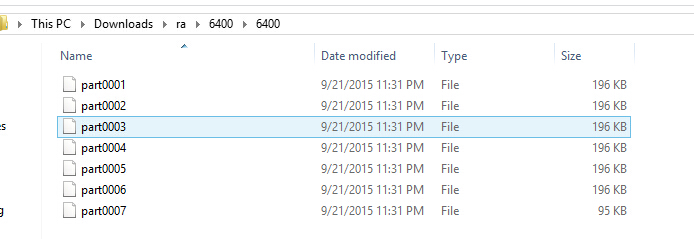
split to 200k

2.CopyAllFiles:
 """

 Usage: 'python cpall.py dirFrom dirTo'

 recursive copy of a directory tree. works like a 'cp -r dirFrom/* dirTo'

 unix command,and assumes that dirFrom and dirTo are both directory.

 was written to get around fatal error messages under windows drag-and-drop

 copies(the first bad file ends the entire copy operation immediately).

 but also allows for coding more customized copy operations in python

 """

 import os,sys

 maxfileload =100000

 blksize =1024*500

 def copyfile(pathFrom,pathTo,maxfileload =maxfileload):

     """

     copy one file pathFrom to pathTo,byte for byte;

     use binary file mode to supress unicde decode and endline transform

     """

     if os.path.getsize(pathFrom) <=maxfileload:

         bytesFrom = open(pathFrom,'rb').read()

         open(pathTo,'wb').write(bytesFrom)

     else:

         fileFrom = open(pathFrom,'rb')

         fileTo = open(pathTo,'wb')

         while True:

             bytesFrom = fileFrom.read(blksize)

             if not bytesFrom:

                 break

             fileTo.write(bytesFrom)

 def copytree(dirFrom,dirTo,verbose=0):

     """

     copy contents of dirFrom and below to dirTo ,return(files,dirs) counts;

     may need to use bytes for dirnames if undecodable on other platforms;

     may need to do more file type checking on unix:skip links,fifos,etc;

     """

     fcount = dcount =0

     for filename in os.listdir(dirFrom):

         pathFrom = os.path.join(dirFrom,filename)

         pathTo = os.path.join(dirTo,filename)

         if not os.path.isdir(pathFrom):

             try:

                 if verbose >1:

                     print('copying',pathFrom,'to',pathTo)

                 copyfile(pathFrom,pathTo)

                 fcount +=1

             except:

                 print('error copying',pathFrom,'to',pathTo,'--skipped')

                 print(sys.exc_info()[0],sys.exc_info()[1])

         else:

             if verbose:

                 print('copying dir',pathFrom,'to',pathTo)

             try:

                 os.mkdir(pathTo)

                 below = copytree(pathFrom,pathTo)

                 fcount += below[0]

                 dcount += below[1]

                 dcount+=1

             except:

                 print('error creating',pathTo,'--skipped')

                 print(sys.exc_info()[0],sys.exc_info()[1])

     return (fcount,dcount)

 def getargs():

     """

     get and verify directory name arguments ,return default none on errors

     """

     try:

         dirFrom,dirTo = sys.argv[1:]

     except:

         print('usage error:cpall.py dirFrom dirTo')

     else:

         if not os.path.isdir(dirFrom):

             print('error:dirFrom is not a dir')

         elif not os.path.exists(dirTo):

             os.mkdir(dirTo)

             print('note:dirTo was created')

             return (dirfrom,dirTo)

         else:

             print('warning:dirto already xists')

             if hasattr(os.path,'samefile'):

                 same = os.path.samefile(dirFrom,dirTo)

             else:

                 same = os.path.abspath(dirFrom) == os.path.abspath(dirTo)

             if same:

                 print('error :dirfrom same as dirTo')

             else:

                 return (dirFrom,dirTo)

 if __name__ =='__main__':

     import time

     distuple =getargs()

     if distuple:

         print('copying...')

         start = time.clock()

         fcount,dcount = copytree(*distuple)

         print('copied',fcount,'files,',dcount,'directories')

         print('in ',time.clock()-start,' seconds')

3. compare directory and list all files if not same
 """

 ############################################################################

 usage :python dirdiff.py dir1-path dir2-path

 compare two directories to find files that exist in one but not the other

 this version uses the os.listdir function and list difference. note that

 this script checks only filenames,not file contents --see diffall.py for an

 extension that does the latter by comparing .read() results

 #############################################################################

 """

 import os,sys

 def reportdiffs(unique1,unique2,dir1,dir2):

     """

     generate diffs report for one dir: part of comparedirs output

     """

     if not (unique1 or unique2):

         print('directory lists are identical')

     else:

         if unique1:

             print('files unique to',dir1)

             for file in unique1:

                 print('......',file)

         if unique2:

             print('files unique to',dir2)

             for file in unique2:

                 print('......',file)

 def difference(seq1,seq2):

     """

     return all items in seq1 only

     a set(seq1) - set(seq2) would work too,but sets are randomly

     ordered,so any platform-depent directory order would be lost

     """

     return [item for item in seq1 if item not in seq2]

 def comparedirs(dir1,dir2,files1=None,files2=None):

     """

     compare directory contents,but not actual files;

     may need bytes listdir arg for undecodable filenames on some platforms

     """

     print('comparing',dir1,'to',dir2)

     files1 = os.listdir(dir1) if files1 is None else files1

     files2 = os.listdir(dir2) if files2 is None else files2

     unique1 = difference(files1,files2)

     unique2 = difference(files2,files1)

     reportdiffs(unique1,unique2,dir1,dir2)

     return not (unique1,unique2)

 def getargs():

     "args for command line mode"

     try:

         dir1,dir2 = sys.argv[1:]

     except:

         print('usage:dirdiff.py dir1 dir2')

         sys.exit(1)

     else:

         return dir1,dir2

 if __name__=='__main__':

     dir1,dir2 = getargs()

     comparedirs(dir1,dir2)

splitFile2SmallFile的更多相关文章
随机推荐
- Why do we live in this world?
Why do we live in this world? It seems to me there is nothing but two reasons, - to live the livabil ...
- ZeroMQ接口函数之 :zmq_sendmsg – 从一个socket上发送一个消息帧
ZeroMQ 官方地址 :http://api.zeromq.org/4-1:zmq-sendmsg zmq_sendmsg(3) ØMQ Manual - ØMQ/4.1.0 Name ...
- 使用功能强大的插件FastReport.Net打印报表实例
我第一次使用FastReport插件做的功能是打印一个十分复杂的excel表格,有几百个字段都需要绑定数据,至少需要4个数据源,而且用到横向.竖向合并单元格. 我不是直接连接数据库,而是使用Regis ...
- UVa #11582 Colossal Fibonacci Numbers!
巨大的斐波那契数 The i'th Fibonacci number f (i) is recursively defined in the following way: f (0) = 0 and ...
- html5新增标签和属性
结构性标签:<header>头部</header><nav>导航</nav><section>用于表达书的一章或一部分</sectio ...
- php+ajax 登录注册页面
主要是登录注册功能,前端后台验证没有什么,这个大家可以自己加上去,比如过滤啊,正则啊等 还是先放图吧 这是登录及注册界面 点击注册切换到注册界面,点击登录切换到登录界面 <!DOCTYPE h ...
- wordpress 安装 "Table Prefix" must not be empty.
时隔一年了,一年没有写代码了.又重拾代码,心情无法言表啊.互联网还是有机会的. 安装wordpress怎么装 setp2了就 报 "Table Prefix" must not b ...
- javascript学习之时间组件
写了一个时间组件,哪里需要哪里调(菜鸟级别,大牛路过就Ok了): 先有一个HTML文件: <!doctype> <html> <head> <title> ...
- 连连看final发布视频
组名:天天向上 组长:王森 组员:张政.张金生.林莉.胡丽娜 代码地址:HTTPS:https://git.coding.net/jx8zjs/llk.git SSH:git@git.coding.n ...
- iOS9 适配(杂七杂八)
1.iOS9 以后,table cell 在旋转的时候会自动调整视图内容的布局,设置以下的属性,课禁止该行为. if (runTimeOSVersion >= 9.0f) { _listTabl ...