
Gradle与Gatling脚本集成
Gatling作为次时代的性能测试工具,由于其API简洁明了、性能出众,越来越受欢迎。但是运行Gatling脚本却有诸多不便,其提供的默认方式不是很方便。考虑到Gatling脚本本质上是Scala类,运行的时候还是使用的是java虚拟机,我们可以将其脚本的运行与Gradle结合起来。这样子就可以通过Gradle来运行Gatling脚本了。
废话少说,接下来就讲述下如何来进行配置。
创建一个标准的maven结构的工程目录,如下图所示。
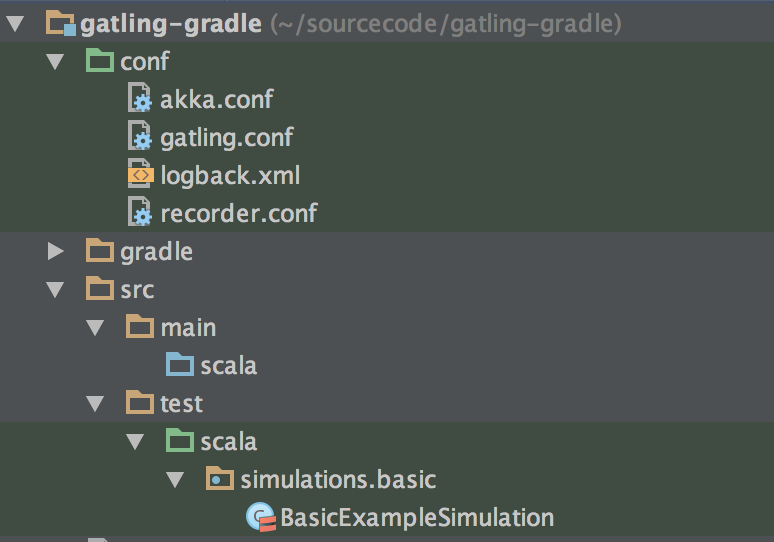
conf目录存放Gatling的基本配置文件。
Gatling的脚本文件存放在src/test/scala/simulations包里面。可以自行在此包下对脚本文件再分类。
在build.gradle文件中引入scala插件。
1 |
|
然后引入有gatling库的maven repo。
1 |
|
再加入scala和gatling的依赖项。
1 |
|
把conf文件夹作为test的source文件。
1 |
|
创建一个名为gatling的task,目的是运行所有的gatling脚本。
1 |
|
这是借助于Gatling的command line运行功能来实现的。具体参数指定官网上有,这里贴出原文。
Command Line Options #
Gatling can be started with several options listed below:
- -nr (–no-reports): Runs simulation but does not generate reports
- -ro (–reports-only ): Generates the reports for the simulation log file located in /results/
- -df (–data-folder ): Uses as the folder where feeders are stored
- -rf (–results-folder ): Uses as the folder where results are stored
- -bf (–request-bodies-folder ): Uses as the folder where request bodies are stored
- -sf (–simulations-folder ): Uses as the folder where simulations are stored
- -sbf (–simulations-binaries-folder ): Uses as the folder where simulation binaries are stored
- -s (–simulation ): Uses as the name of the simulation to be run
- -sd (–simulation-description ): Uses as simulation description
我在github上创建了一个示例项目,请参见https://github.com/huangbowen521/gatling-gradle
Gradle与Gatling脚本集成的更多相关文章
- 【原】Gradle调用shell脚本和python脚本并传参
最近由于项目自动化构建的需要,研究了下gradle调用脚本并传参的用法,在此作个总结. Pre build.gradle中定义了$jenkinsJobName $jenkinsBuild两个Jenki ...
- Gatling脚本编写技巧篇(二)
脚本示例: import io.gatling.core.Predef._ import io.gatling.http.Predef._ import scala.concurrent.durati ...
- Gatling脚本编写技巧篇(一)
一.公共类抽取 熟悉Gatling的同学都知道Gatling脚本的同学都知道,Gatling的脚本包含三大部分: http head配置 Scenario 执行细节 setUp 组装 那么针对三部分我 ...
- 用Jenkins+Gradle+Jetty实现持续集成、测试、部署
自动集成有很多种方案,本例用到的工具是Jenkins(前身Hudson)+Gradle+Jetty,关于Gradle可参考上一篇,Gradle常见问题. 本例项目名称: WAP Jetty 安装Jen ...
- 基于Jenkins+Git+Gradle的Android持续集成
本文参考了: http://my.oschina.net/uboluo/blog/157483 http://java.dzone.com/articles/automating-continuous ...
- java~springboot~gradle里的docker集成
在springboot里,我们的task任务可以添加docker构建的功能,在gradle集成环境里,直接可以实现编译,测试,打包镜像的流水线作业,很是方便! 下面分享给大家,在gradle里添加do ...
- Gradle:构建脚本概要
一.构建块 1.每一个构建块都包括三个基本构建块:project.task和property: 2.每一个构建块包括至少一个project,进而又包括一个或多个task: 3.project和task ...
- gradle多模块构建集成swagger
1.首先说一下软件的版本:springboot:1.5.2:springcloud:D-SR1:swaager2:2.6.0:gradle:4.5.工程模块是分开的单独的entity,api,mapp ...
- postman(九):postman接口测试脚本集成到jenkins
本篇的目的是实现使用jenkins远程执行postman接口测试脚本 准备工作:一台linux服务器(可以用虚拟机搭建一个),linux服务器上安装好node.js.newman,部署好jenkins ...
随机推荐
- android sdk镜像站点
http://android-mirror.bugly.qq.com:8080/include/usage.html Windows A. 打开Android SDK Manager B. 设置代理 ...
- angular.js中插值语法和ng-bind以及ng-model的区别
首先呢,插值语法也就是{{}}和ng-bind基本上是没有区别的. 主要区别在于,使用花括号语法时,在AngularJS使用数据替换模板中的花括号时,第一个加载的页面,通常是应用中的index.htm ...
- JavaScript拼接字符串传递多个参数
var ftOpreat = function (value,rows){ var v = rows.Version; var preview = "<a href=\"#\ ...
- redis连接超时报错
应用程序连接redis超时,报错如下: ERROR DubboServerHandler-xxx.xx.xx.52:20880-thread-172 2016-12-21 15:25:20,429 c ...
- VMware克隆虚拟机,克隆机网卡启动不了解决方案
Shutting down loopback interface: [ OK ] Bringing up loopback interface: [ OK ] Bringing up interfac ...
- 如何获取URL中的参数
获取URL中的某个参数或者所有参数以便我们后续去修改这个地址,在程序中是非常必要的.网上有很多这样的代码片段,为了以后查阅方便,顺便整理思路,下面使用2种方法来获取URL中的某个参数. 方法一 ,sp ...
- 最小和(min)
题目描述: N 个数排成一排,你可以任意选择连续的若干个数,算出它们的和.问该如何选择才能 使得和的绝对值最小. 如:N=8 时,8个数如下: 1 2 3 4 5 6 ...
- web前端防治重复提交
web前端开发中防治重复提交 web前端数据请求或者表单提交往往通过对dom的点击事件来操作,但是往往因为认为点击过快(少年手速挺快的嘛),或者因为响应等待使得用户误人为没操作而重复很多次点击,造成表 ...
- OPC的理解Open Packaging Conventions
Open Packaging Conventions (OPC) 博客地址:www.cnblogs.com/icmzn OPC是一个文件容器技术.被微软创建,用来存储XML或者非XML文件结合起来的规 ...
- 【C-运算符】
一.基本运算符 (1)赋值运算符:= a=2002; //将值2002赋给变量a,动作从右到左 赋值运算左边必须指向一个存储位置(变量名——指针) (2)加法.减法运算符:+.—(二元或双目运算 ...