
yeoman(转)
前言
有一种技术可以提高我们的工作效率,可以让我们专心做我们擅长的事,可以屏蔽复杂性,可以规范我们的架构和我们的代码,可以让我们的享受编程的乐趣。Yeoman可以做到。
很多年以前,rails刚刚出世,伴随着一个新的名词“脚手架(scaffolding)”出现了。脚手架是一种提高开发效率的工具的代名词。随后,各种编程语言都开始实现自己的“脚手架”工具。Maven重新构造了Java的世界,改变了几千万的开发者对于Java项目构建的认识。Yeoman在Javascript领域正做着同样的事情。
看着各种工具,各种语言,都在飞跃式的进化。做为一个开发者,我每天都在为变化而惊喜!
目录
- Yeoman介绍
- Yeoman工具包yo命令
- Yeoman工具包yo – 快速构建一个web项目
- Yeoman工具包bower,grunt的组合用法
1. Yeoman介绍
Yeoman是Google的团队和外部贡献者团队合作开发的,他的目标是通过Grunt(一个用于开发任务自动化的命令行工具)和Bower(一个HTML、CSS、Javascript和图片等前端资源的包管理器)的包装为开发者创建一个易用的工作流。
Yeoman主要有三部分组成:yo(脚手架工具)、grunt(构建工具)、bower(包管理器)。这三个工具是分别独立开发的,但是需要配合使用,来实现我们高效的工作流模式。
- yo:在本文中第二节会讲到
- grunt:请参考,grunt让Nodejs规范起来
- bower:请参考,bower解决js的依赖管理
2. Yeoman工具包yo命令
yo插件都是通过npm, Node.js包管理器安装和管理的.
我的系统环境
- win7 64bit
- Nodejs:v0.10.5
- Npm:1.2.19
~ D:\workspace\javascript>node -v

v0.10.5

~ D:\workspace\javascript>npm -v

1.2.19
在系统中,我们已经安装好了Nodejs和npm。win7安装nodejs请参考文章:Nodejs开发框架Express3.0开发手记–从零开始
全局安装yo
~ D:\workspace\javascript>npm install -g yo如果你还没有安装grunt,bower,也需要一起安装
~ D:\workspace\javascript>npm install -g grunt-cli bower接下我们看一下yo命令行操作
1). 通过help查看帮助
~ D:\workspace\javascript>yo --help

Yeoman is a mask worn by the following members of the open-source community:

  Paul Irish, Addy Osmani, Mickael Daniel, Sindre Sorhus, Eric Bidelman,

  Frederick Ros, Brian Ford, Pascal Hartig, Stephen Sawchuk, and countless

  other contributors.

Usage: yo GENERATOR [args] [options]

General options:

  -h, --help     # Print generator's options and usage

  -f, --force    # Overwrite files that already exist

Please choose a generator below.

Angular

  angular:app

  angular:common

  angular:constant

  angular:controller

  angular:decorator

  angular:directive

  angular:factory

  angular:filter

  angular:main

  angular:provider

  angular:route

  angular:service

  angular:value

  angular:view

Karma

  karma:app

Mocha

  mocha:app

  mocha:generator

Webapp

  webapp:app
yo的命令很简单:yo GENERATOR,例如:yo webapp, yo angular
Please choose a generator below: 下面列出了我的系统中,已经安装的generator的库,例如:Angular,Karma,Mocha,Webapp
2). 查询yo的支持库
~ D:\workspace\javascript>yo

Yeoman is a mask worn by the following members of the open-source community:

  Paul Irish, Addy Osmani, Mickael Daniel, Sindre Sorhus, Eric Bidelman,

  Frederick Ros, Brian Ford, Pascal Hartig, Stephen Sawchuk, and countless

  other contributors.

[?] What would you like to do? (Use arrow keys)

 > Install a generator

   Find some help

   Get me out of here!
命令行会提示,我们想要的操作。这里选择”Install a generator”
[?] What would you like to do? Install a generator

[?] Search NPM for generators:web
系统继续提示,我们要查找的包,我们输入web
3). 安装generator-webapp库
[?] Here's what I found. Install one? (Use arrow keys)

 > generator-armadillo

   generator-bones

   generator-btapp

   generator-fe

   generator-flight

   generator-hazdev-webapp

   generator-hbswebapp

   generator-html5-site

   generator-jing

   generator-lessapp

   generator-nodestrap

   generator-sails

   generator-server-configs

   generator-starter

   generator-starttter

   generator-ultimate

   generator-webapp

   generator-webapp-bfytw

   generator-webapp-fintan

   generator-weblog

   generator-website

   Search again

   Return home
yo列出了,所有在官方已经注册的,web关键字相关的包,我们选择“generator-webapp”
yo通过npm开始下载generator-webapp安装包
[?] What would you like to do? Install a generator

[?] Search NPM for generators: web

[?] Here's what I found. Install one? generator-webapp

generator-webapp@0.2.7 D:\toolkit\nodejs\node_modules\generator-webapp

├── cheerio@0.12.1 (entities@0.3.0, underscore@1.4.4, htmlparser2@3.1.4, cheerio-select@0.0.3)

└── yeoman-generator@0.12.3 (dargs@0.1.0, diff@1.0.5, debug@0.7.2, async@0.2.9, mime@1.2.11, mkdirp@0.3.5, isbinaryfi

le@0.1.9, underscore.string@2.3.3, shelljs@0.1.4, iconv-lite@0.2.11, lodash@1.3.1, rimraf@2.1.4, nopt@2.1.2, cli-table@0

.2.0, tar@0.1.18, glob@3.2.6, inquirer@0.2.4, request@2.21.0)

I just installed your generator by running:

    npm install -g generator-webapp
然后,我们退出yo命令行,选择“Get me out of here!”
[?] What would you like to do? Get me out of here!

Bye from us! Chat soon.

            Addy Osmani

          Sindre Sorhus

        Brian Ford

     Eric Bidelman

              Paul Irish

     Mickael Daniel

          Pasca1 Hartig

      Stephen S.wchuk

    Frederick R0s
上面的退出的文字是开发者的名字,很有意思一点是,竖着看最中间一行的文字排列是,yeoman1.0,也就是yeoman这个项目的得名了。
4). 注:上面的过程,也可以直接用命令
npm install -g generator-webapp3. Yeoman工具包yo – 快速构建一个web项目
当我们安装了generator-webapp后,我们就可以,以非常优雅的方式来构建工程了。
1). 创建nodejs-yo目录,并构建webapp工程
~ D:\workspace\javascript>mkdir nodejs-yo

~ D:\workspace\javascript>cd nodejs-yo

~ D:\workspace\javascript\nodejs-yo>yo webapp

     _-----_

    |       |

    |--(o)--|   .--------------------------.

   `---------´  |    Welcome to Yeoman,    |

    ( _´U`_ )   |   ladies and gentlemen!  |

    /___A___\   '__________________________'

     |  ~  |

   __'.___.'__

 ´   `  |° ´ Y `

Out of the box I include HTML5 Boilerplate, jQuery and Modernizr.

[?] What more would you like?

  [ ] Twitter Bootstrap for Sass

 >[X] RequireJS

  [X] Autoprefixer for your CSS
对选项的解释:
- Twitter Bootstrap for Sass:SASS是一种CSS的开发工具,提供了许多便利的写法,大大节省了设计者的时间,使得CSS的开发,变得简单和可维护。
- RequireJS 可以帮助用户异步按需的加载 JavaScript 代码,并解决 JavaScript 模块间的依赖关系,提升了前端代码的整体质量和性能。
- Autoprefixer解析CSS文件并且添加浏览器前缀到CSS规则里,使用Can I Use的数据来决定哪些前缀是需要的。
上面3个选择,由于Sass是基于Ruby的,我本机没有安装ruby,取消Twitter Bootstrap for Sass的勾选。
2). 查看安装日志:
Out of the box I include HTML5 Boilerplate, jQuery and Modernizr.

[?] What more would you like? RequireJS, Autoprefixer for your CSS

   create Gruntfile.js

   create package.json

   create .gitignore

   create .gitattributes

   create .bowerrc

   create bower.json

   create .jshintrc

   create .editorconfig

   create app/favicon.ico

   create app/404.html

   create app/robots.txt

   create app/.htaccess

   create app/styles/main.css

   create app/scripts/app.js

   create app/scripts/main.js

   create app/index.html

   create app/scripts/hello.coffee

   invoke   mocha:app

   create     test\index.html

   create     test\lib\chai.js

   create     test\lib\expect.js

   create     test\lib\mocha\mocha.css

   create     test\lib\mocha\mocha.js

   create     test\spec\test.js

I'm all done. Running bower install & npm install for you to install the required dependencies. If this fails, try running the command yourself.
项目骨架已经建好了。还包括了很多的配置文件.gitignore,bower.json,Gruntfile.js,favicon.ico, robots.txt, .htaccess。太神奇了,Cool!!
一下子装备都齐全了,打仗的事就交给我们自己吧。
4. Yeoman工具包bower,grunt的组合用法
有关bower的介绍,请参考:bower解决js的依赖管理
有关grunt的介绍,请参考:grunt让Nodejs规范起来
1). 使用bower命令查看项目依赖:
~ D:\workspace\javascript\nodejs-yo>bower list

bower check-new     Checking for new versions of the project dependencies..

nodejs-yo#0.0.0 D:\workspace\javascript\nodejs-yo

├── jquery#1.9.1 (latest is 2.0.3)

├── modernizr#2.6.2

└── requirejs#2.1.8
我们发现生成的webapp中,有4个依赖库,jquery,modernizr,requirejs。
2). 使用grunt命令执行单元测试
D:\workspace\javascript\nodejs-yo>grunt test

Running "clean:server" (clean) task

Cleaning ".tmp"...OK

Running "concurrent:test" (concurrent) task

Running "copy:styles" (copy) task

Running "coffee:dist" (coffee) task

Running "autoprefixer:dist" (autoprefixer) task

File ".tmp/styles/main.css" created.

Running "connect:test" (connect) task

Starting connect web server on localhost:9000.

Running "mocha:all" (mocha) task

Testing: http://localhost:9000/index.html

  .

  1 test complete (107 ms)

>> 1 passed! (0.11s)

Done, without errors.
3). 使用grunt命令启动一个node服务器
~ D:\workspace\javascript\nodejs-yo>grunt server

Running "server" task

Running "clean:server" (clean) task

Running "concurrent:server" (concurrent) task

    Warning: Running "compass:dist" (compass) task

Warning: You need to have Ruby and Compass installed and in your system PATH for this task to work. More info: https://g

ithub.com/gruntjs/grunt-contrib-compass Use --force to continue. Use --force to continue.

    Aborted due to warnings.
启动时,我们发现报错了。由于我没有装Ruby的环境,所以compass:dist的命令不能运行。
强制启动grunt
~ D:\workspace\javascript\nodejs-yo>grunt server --force

D:\workspace\javascript\nodejs-yo>grunt server --force

Running "server" task

Running "clean:server" (clean) task

Cleaning ".tmp"...OK

Running "concurrent:server" (concurrent) task

Running "coffee:dist" (coffee) task

    Warning: Running "compass:dist" (compass) task

Warning: You need to have Ruby and Compass installed and in your system PATH for this task to work. More info: https://

ithub.com/gruntjs/grunt-contrib-compass Use --force to continue. Used --force, continuing.

Running "compass:dist" (compass) task

Warning: You need to have Ruby and Compass installed and in your system PATH for this task to work. More info: https://

ithub.com/gruntjs/grunt-contrib-compass Use --force to continue.

Running "copy:styles" (copy) task

Running "autoprefixer:dist" (autoprefixer) task

File ".tmp/styles/main.css" created.

Running "connect:livereload" (connect) task

Starting connect web server on localhost:9000.

Running "open:server" (open) task

Running "watch" task

Waiting...
后台日志显示了“watch”的task,说明代码文件被监控着,如有修改网页会自动更新。
浏览器被自动打开,http://localhost:9000/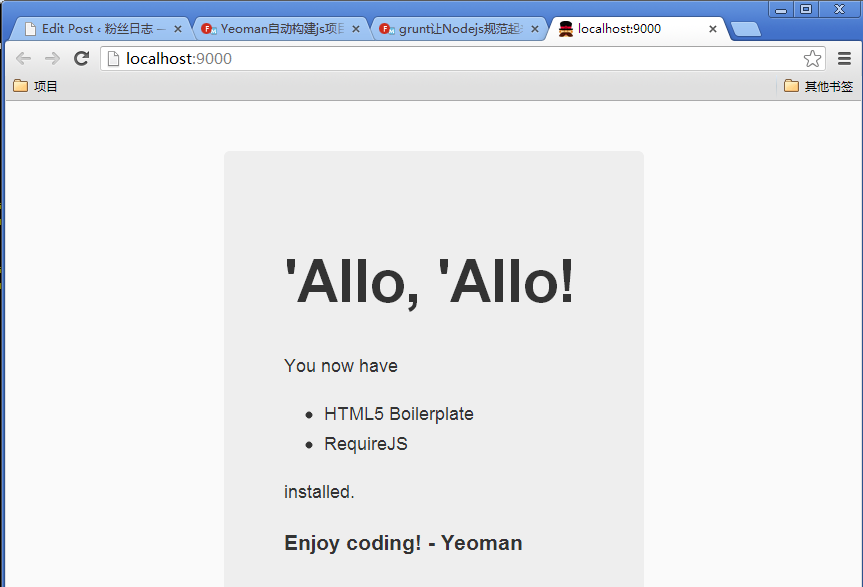
4). 修改app/index.html代码,增加对canvas的检查。
~ vi app/index.html

<script>

window.onload = function () {

if (canvasSupported()) {

alert('canvas supported');

}

};

function canvasSupported() {

var canvas = document.createElement('canvas');

return (canvas.getContext && canvas.getContext('2d'));

}

</script>
浏览器显示: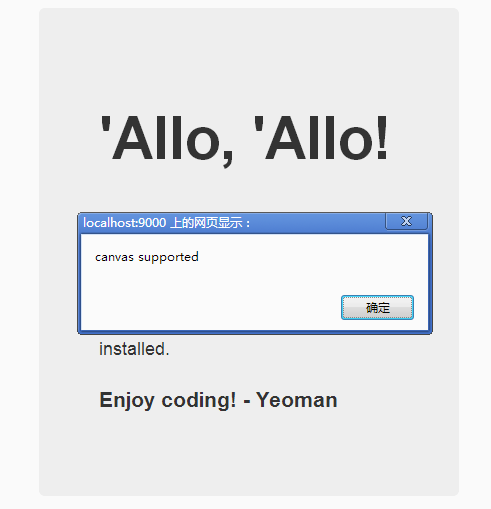
5). 通过bower增加库jquery-pjax
~ D:\workspace\javascript\nodejs-yo>bower install jquery-pjax

bower jquery-pjax#*         not-cached git://github.com/defunkt/jquery-pjax.git#*

bower jquery-pjax#*            resolve git://github.com/defunkt/jquery-pjax.git#*

bower jquery-pjax#*           download https://github.com/defunkt/jquery-pjax/archive/v1.7.3.tar.gz

bower jquery-pjax#*            extract archive.tar.gz

bower jquery-pjax#*           resolved git://github.com/defunkt/jquery-pjax.git#1.7.3

bower jquery#>=1.8              cached git://github.com/components/jquery.git#2.0.3

bower jquery#>=1.8            validate 2.0.3 against git://github.com/components/jquery.git#>=1.8

bower jquery-pjax#~1.7.3       install jquery-pjax#1.7.3

jquery-pjax#1.7.3 app\bower_components\jquery-pjax

└── jquery#2.0.3

~ D:\workspace\javascript\nodejs-yo>bower list

bower check-new     Checking for new versions of the project dependencies..

nodejs-yo#0.0.0 D:\workspace\javascript\nodejs-yo

├── jquery#1.9.1 (latest is 2.0.3)

├─┬ jquery-pjax#1.7.3 extraneous

│ └── jquery#1.9.1 (2.0.3 available)

├── modernizr#2.6.2

└── requirejs#2.1.8
Yeoman已经成功地帮助我们打造出一个项目的原型了,接下来我们可以针对自己的项目,自己熟悉的框架组合,构建一个属于自己的骨架模板,并发布到Yeoman的generator库中。
yeoman(转)的更多相关文章
- Yeoman 官网教学案例:使用 Yeoman 构建 WebApp
STEP 1:设置开发环境 与yeoman的所有交互都是通过命令行.Mac系统使用terminal.app,Linux系统使用shell,windows系统可以使用cmder/PowerShell/c ...
- Yeoman 学习笔记
yoeman 简介:http://www.infoq.com/cn/news/2012/09/yeoman yeoman 官网: http://yeoman.io/ yeoman 是快速创建骨架应用程 ...
- 开发属于自己的yeoman脚手架(generator-reactpackage)
自从前后端开始分离之后,前端项目工程化也显得越来越重要了,之前写过一篇搭建基于Angular+Requirejs+Grunt的前端项目教程,有兴趣的可以点这里去看 但是有些项目可以使用这种方式,但有些 ...
- 利用yeoman快速搭建React+webpack+es6脚手架
自从前后端开始分离之后,前端项目工程化也显得越来越重要了,之前写过一篇搭建基于Angular+Requirejs+Grunt的前端项目教程,有兴趣的可以点这里去看 但是有些项目可以使用这种方式,但有些 ...
- 与你相遇好幸运,制作自己的Yeoman Generator
使用别人写好的生成器: npm install -g yonpm install -g generator-angularyo angular 如何自己制作符合自己心仪的生成器呢: https://g ...
- Windows 使用 Yeoman generators 创建 ASP.NET 应用程序
上一篇:<Windows 搭建 .NET 跨平台环境并运行应用程序> 阅读目录: Install Node.js Install yeoman-generators Create ASP. ...
- 前端项目构建之yeoman
各位好啊,我又和大家见面了,也许你已经不记得大明湖畔的容嬷嬷,但是只要记得博客园中的我就好,希望我的博客能像一股清风,为你驱散炎热的酷暑,好了,废话不多说,开始上干货,我今天带给大家的是前端工程化开发 ...
- 在Mac上开发使用yeoman构建Asp.net core项目并且实现分层引用
1.Yeoman? yeoman是一个自动化脚手架工具.它提供很多generator,generator相当于VisualStudio的模板,用来初始化项目.更多的就不多说了,写一遍都写不完,自己看吧 ...
- 安装Yeoman,遇到的问题
在安装Yeoman遇到了一些报错,具体的步骤就不多说了,直接上码,具体的两处报错的地方. 第一个,创建webapp,直接报权限的错误,这时才留意到在它之前还有一个错误. [root@iZ289zd8c ...
- 编写自定义Yeoman生成器
转载自JSCON-简时空:<自定义Yeoman生成器> 1.Getting Started 1.1.设置Node模块 Yeoman提供了generator-generator方便快速编写自 ...
随机推荐
- Maven Archetype
1. 从project创建archetype 在项目根目录下,运行 mvn archetype:create-from-project 创建的archetype工程在app_folder/target ...
- Java 字符串拼接 五种方法的性能比较分析 从执行100次到90万次
[请尊重原创版权,如需引用,请注明来源及地址] > 字符串拼接一般使用“+”,但是“+”不能满足大批量数据的处理,Java中有以下五种方法处理字符串拼接,各有优缺点,程序开发应选择合适的方法实现 ...
- iOS中UITableView使用总结
链接:http://www.open-open.com/lib/view/open1430008922468.html
- Hibernate SQL查询 addScalar()或addEntity()
本文完全引用自: http://www.cnblogs.com/chenyixue/p/5601285.html Hibernate除了支持HQL查询外,还支持原生SQL查询. 对原 ...
- NAT技术
该文摘自百度百科"NAT"中的一部分 NAT(Network Address Translation,网络地址转换)是1994年提出的.当在专用网内部的一些主机本来已经分配到了本地 ...
- MongoDB学习:(二)MongoDB简单使用
MongoDB学习:(二)MongoDB简单使用 MongoDB使用: 执行mongodb的操作之前,我们需要运行命令,来进入操作命令界面 >mongo 提示该错误,说明我们系统缺少一个补丁,该 ...
- 获取IMap上绘制的Element的区域范围
运行环境:开发环境:Windows7旗舰版64bit.VisualStudio2008 With SP1.ArcEngine10.0.NetFrameWork4.0.IIS7和C#开发语言. 问题描述 ...
- 小程序de 一些经验1
尝试着写微信的小程序,一个简单的表单验证.一开始就花了大把的时间尝试如何开始小程序的准备工作. 鼓捣半天,AppId是没有的,于是用了不用appId的模拟版.其实只要下载一个小程序版的微信开发工具. ...
- Nginx-->基础-->理论-->001:Nginx基本介绍
一.nginx基本介绍 传统上基于进程或者线程模型架构的web服务通过每进程或者每线程处理并发连接请求,这势必毁在网络和I/O操作时产生阻塞,其另外一个必然结果则是对内存和CPU的利用率低下,产生一个 ...
- Android开发学习笔记:浅谈显示Intent和隐式Intent
原创作品,允许转载,转载时请务必以超链接形式标明文章 原始出处 .作者信息和本声明.否则将追究法律责任.http://liangruijun.blog.51cto.com/3061169/655132 ...