
Custom Web Servic In MOSS 2007
Tools: Visual Studio 2008,Visual Studio 2008 Command Prompt, Sharepoint Server 2007
- Generate .disco and .wsdl files through Visual Studio 2008 Command Prompt in Visual Studio Tools

Run command:
Disco http://sp2007:14908/_vti_bin/PSWebService.asmx
<%@ WebService Language="C#" Class="NameSpace.PSWebService, NameSpace, Version=1.0.0.0, Culture=neutral, PublicKeyToken=0c8763d1ab14ce97" %>
Error occurred as below.
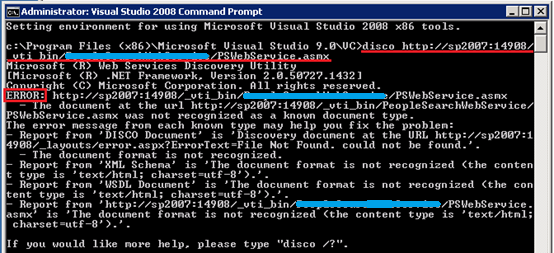
Solution: Please move PSWebService.asmx into layouts folder and try it again. It works fine. Correct screen is as below.

Two files(pswebservice.disco and pswebservice.wsdl) are stored in the path ‘C:\Temp\aa’
Note: You have to rename these two files(pswebservicedisco.aspx and pswebservicewsdl.aspx). You have to move these three files into ISAPI folder. The structure is below.

- These two files are not able to use and you have to change parts of content.
For pswebservicedisco.aspx, substitute below original for current code
Original Code 1:
|
<?xml version="1.0" encoding="utf-8"?> |
Current Code 1:
|
<%@ Page Language="C#" Inherits="System.Web.UI.Page" %> <%@ Assembly Name="Microsoft.SharePoint, Version=12.0.0.0, Culture=neutral, PublicKeyToken=71e9bce111e9429c" %> <%@ Import Namespace="Microsoft.SharePoint.Utilities" %> <%@ Import Namespace="Microsoft.SharePoint" %> <% Response.ContentType = "text/xml"; %> |
Original Code 2:
|
<contractRef ref="http://sp2007:14908/_layouts/pswebservice.asmx?wsdl" docRef="http://sp2007:14908/_layouts/pswebservice.asmx" xmlns="http://schemas.xmlsoap.org/disco/scl/" /> <soap address="http://sp2007:14908/_layouts/pswebservice.asmx" xmlns:q1="http://tempuri.org/" binding="q1:PSWebServiceSoap" xmlns="http://schemas.xmlsoap.org/disco/soap/" /> <soap address="http://sp2007:14908/_layouts/pswebservice.asmx" xmlns:q2="http://tempuri.org/" binding="q2:PSWebServiceSoap12" xmlns="http://schemas.xmlsoap.org/disco/soap/" /> |
Current Code 2:
|
<contractRef ref=<% SPHttpUtility.AddQuote(SPHttpUtility.HtmlEncode(SPWeb.OriginalBaseUrl(Request) + "?wsdl"),Response.Output); %> docRef=<% SPHttpUtility.AddQuote(SPHttpUtility.HtmlEncode(SPWeb.OriginalBaseUrl(Request)),Response.Output); %> xmlns="http://schemas.xmlsoap.org/disco/scl/" /> <soap address=<% SPHttpUtility.AddQuote(SPHttpUtility.HtmlEncode(SPWeb.OriginalBaseUrl(Request)),Response.Output); %> xmlns:q1="http://schemas.microsoft.com/sharepoint/soap/2002/1/alerts/" binding="q1: PSWebServiceSoap" xmlns="http://schemas.xmlsoap.org/disco/soap/" /> <soap address=<% SPHttpUtility.AddQuote(SPHttpUtility.HtmlEncode(SPWeb.OriginalBaseUrl(Request)),Response.Output); %> xmlns:q2="http://schemas.microsoft.com/sharepoint/soap/2002/1/alerts/" binding="q2:PSWebServiceSoap12" xmlns="http://schemas.xmlsoap.org/disco/soap/" /> |
Note: You are able to copy current code from alertsdisco file below.

For pswebservicewsdl.aspx, substitute below original for current code
Original Code 1:
|
<?xml version="1.0" encoding="utf-8"?> |
Current Code 1:
|
<%@ Page Language="C#" Inherits="System.Web.UI.Page" %> <%@ Assembly Name="Microsoft.SharePoint, Version=12.0.0.0, Culture=neutral, PublicKeyToken=71e9bce111e9429c" %> <%@ Import Namespace="Microsoft.SharePoint.Utilities" %> <%@ Import Namespace="Microsoft.SharePoint" %> <% Response.ContentType = "text/xml"; %> |
Original Code 2:
|
<soap:address location="http://sp2007:14908/_layouts/pswebservice.asmx" /> |
Current Code 2:
|
<soap:address location=<% SPHttpUtility.AddQuote(SPHttpUtility.HtmlEncode(SPWeb.OriginalBaseUrl(Request)),Response.Output); %> /> |
Original Code 3:
|
<soap12:address location="http://sp2007:14908/_layouts/pswebservice.asmx" /> |
Current Code 3:
|
<soap12:address location=<% SPHttpUtility.AddQuote(SPHttpUtility.HtmlEncode(SPWeb.OriginalBaseUrl(Request)),Response.Output); %> /> |
Note: You are able to copy current code from alertswsdl file below.
Then you are able to deploy pswebservice web service, once done. You have to modify spdisco.aspx file that is located in %ProgramFiles%\Common Files\Microsoft Shared\web server extensions\12\ISAPI and add the following code, specifying the .asmx file for your Web service.
|
<contractRef ref=<% SPHttpUtility.AddQuote(SPHttpUtility.HtmlEncode(spWeb.Url + "/_vti_bin/AWebService/PSWebService.asmx?wsdl"), Response.Output); %> docRef=<% SPHttpUtility.AddQuote(SPHttpUtility.HtmlEncode(spWeb.Url + "/_vti_bin/AWebService/PSWebService.asmx"), Response.Output); %> xmlns=" http://schemas.xmlsoap.org/disco/scl/ " /> <discoveryRef ref=<% SPHttpUtility.AddQuote(SPHttpUtility.HtmlEncode(spWeb.Url + "/_vti_bin/AWebService/PSWebService.asmx?disco"),Response.Output); %> xmlns="http://schemas.xmlsoap.org/disco/" /> |
Your web service is able to be used till now.
Custom Web Servic In MOSS 2007的更多相关文章
- Create and Install Timer Job in MOSS 2007
Excute Timerjob public class TriggerLoadCacheTimerJob : SPJobDefinition { string ExceptionFlag = str ...
- sharepoint custom web service
创建自定义 ASP.NET Web 服务 http://msdn.microsoft.com/zh-cn/library/ms464040.aspx
- Web Servic和Web API的区别
Web Service:1.它是基于SOAP协议的,数据格式是XML2.只支持HTTP协议3.它不是开源的,但可以被任意一个了解XML的人使用4.它只能部署在IIS上Web API:1.这是一个简单的 ...
- How to upgrade workflow assembly in MOSS 2007
This problem generally start when you are having an existing custom workflow and there are instances ...
- MOSS 2007 错误0x80040E14解决
今天公司内网莫名的出现错误,只能新建列表条目,不能创建网站,到后来列表条目也不能创建了,一直报0x80040E14错误.于是Google一把,搜索这个错误号,然后在apearce 的Blog找到了原因 ...
- SharePoint 2007 页面定制(一)
转:http://www.nanmu.net/SharePoint-MOSS-WSS-Silverlight/Lists/Posts/Post.aspx?ID=74 本文主要包括以下几方面内容: 1. ...
- Add custom and listview web part to a page in wiki page using powershell
As we know, Adding list view web part is different from custom web part using powershell, what's mor ...
- Developing a Custom Membership Provider from the scratch, and using it in the FBA (Form Based Authentication) in SharePoint 2010
//http://blog.sharedove.com/adisjugo/index.php/2011/01/05/writing-a-custom-membership-provider-and-u ...
- SharePoint每日小贴士Web部件
SharePoint每日小贴士Web部件 项目描写叙述 此Web部件从指定SP自己定义列表或一个选定的 RSS源选择一个随机项目.并显示一张图片.标题和一个Tip. 适 ...
随机推荐
- IOS OC数据类型
1.只有浮点型数据除以0.0才能得到+-无穷大的数,而整形或char型数据会得到边界值 2.BOOL的实际类型是signed char,他的底层只占一个字节(只有八位),如果将一个较大的非零整数值赋给 ...
- Material Design学习
前言: 最为一个用习惯了bootstrap的前端小菜,今天偶然听闻material design 这个从未听闻的前端框架,带着好奇开始了新的尝试,并将bootstrap跟material design ...
- SeleniumIDE从0到1 (Selenium IDE 回放)
录制完脚本后可以对录制的脚本进行回放操作. 简介一: 调回放进度(快/慢),点击按钮即可自动进行回放操作.
- Jenkins 在windows下的安装与配置
1. 安装Jenkins war包安装:启动Jenkins命令,打开cmd至Jenkins安装目录下,运行命令 java -jar jenkins.war 如果改变默认端口,则指定端口例如端口号108 ...
- jquery插件 - 学习笔记 (插件参数及函数的调用)
今天研究的是jquery插件的基本写法: 比如我打算写一个名为 ImageZoom 的插件 前台调用: <script src="ImageZoom.js"></ ...
- 跨站请求伪造 CSRF / XSRF<二:应用>
防御的方法主要有两种<java示例> 1.检查Referer字段 HTTP头中有一个Referer字段,这个字段用以标明请求来源于哪个地址.在处理敏感数据请求时,通常来说,Referer字 ...
- Java多线程初探
多线程 单线程的程序只有一个顺序执行流.多个顺序流之间互不干扰. 多线程的创建 定义Thread类的子类,重写该类的run()方法. 创建Thread子类的实例. 调用线程对象的start()方法来启 ...
- 推荐相关学习 & 典型算法、典型特征、典型推荐系统框架
总的来说,信息爆炸,产生了信息过载.解决的方法主要有两类:检索和推荐.检索是主动的有目的的.意图明确,推荐是非主动的.意图不明确. 推荐方面最经典的,就是协同过滤推荐了.我博客这里有两篇,一篇偏理论, ...
- 初学js/jquery 心得
1.多个对象操作的时候可以放在一起,eg: $('.send_message, .friends_increment').blur(function() {}); 2.三元表达式与if else,eg ...
- App分类
目前主流应用程序大体分为三类:Web App.Hybrid App. Native App.web app(网页应用)hybrid app(混合应用)native app(原生应用) 淘宝天猫这样的超 ...