
lighttools batchmode 批处理vb程序代码
完成后的图示,选择需要模拟的lighttools后,直接进行运行,点击开始模拟,即可逐个模拟完成
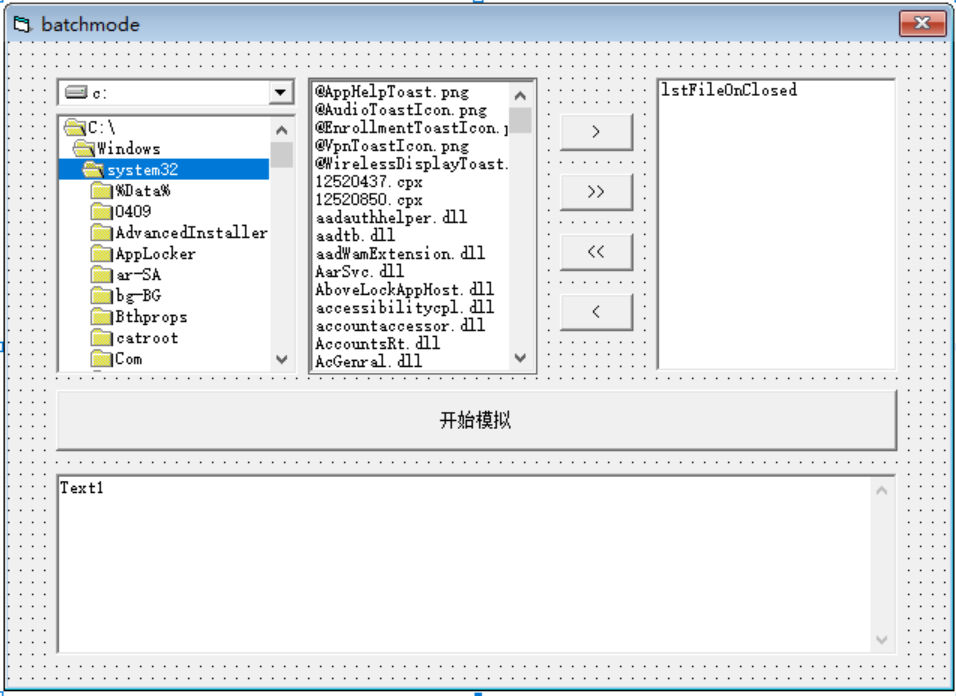
lighttools 连接代码:
 1 Private m_ltServer As LTAPI

 2

 3

 4

 5 Public Function getLTAPIServer() As LTAPI

 6 If m_ltServer Is Nothing Then

 7     Dim lt As IUnknown

 8     Dim ltLoc As Locator

 9     Dim cmd As String

10     Set ltLoc = CreateObject("LTLocator.Locator")

11     ' to get a LightTools Server pointer, you need to know

12     ' the calling server process ID

13     ' if it is passed to this application via command line

14     ' in a shape of "-LTPID1234" (AddIn standard)

15     ' (1234 being hypothetical LightTools Process ID), do this

16     cmd = Command ' get command line

17     ' if command line is in the form of "-LTPID1234" you can

18     ' directly pass it to Locator

19     Set lt = ltLoc.GetLTAPIFromString(cmd)

20     'if the client code knows LT PID somehow, it could use the

21     ' GetLTAPI(pidNumber) interface

22     Set m_ltServer = lt

23     Set ltLoc = Nothing

24 End If

25

26 Set getLTAPIServer = m_ltServer

27 End Function

28 Sub test2()

29 Dim lt As LTAPI

30

31 Set lt = getLTAPIServer()

32 lt.Message ("Correct way of connecting to LightTools")

33 End Sub
窗体代码:
Option Explicit

Dim i As Integer

Dim j As Integer

Dim exist As Boolean

Private Sub cmdAddAll_Click()

'添加所有对象至Listbox

On Error Resume Next

For i = 0 To filList.ListCount - 1

    exist = False

    ' 排除重复对象

    For j = 0 To lstFileOnClosed.ListCount - 1

        If lstFileOnClosed.List(j) = DirList.Path & "\" & filList.List(i) Then

            exist = True

            Exit For

        End If

    Next j

    If exist = False Then

        lstFileOnClosed.AddItem DirList.Path & "\" & filList.List(i)

    End If

Next i

End Sub

Private Sub cmdAddSelect_Click()

'添加选择的对象至Listbox

On Error Resume Next

For i = 0 To filList.ListCount - 1

    exist = False

     ' 排除重复对象

    If filList.Selected(i) = True Then '判断对象是否被选中

        For j = 0 To lstFileOnClosed.ListCount - 1

            If lstFileOnClosed.List(j) = DirList.Path & "\" & filList.List(i) Then

                exist = True

                Exit For

            End If

        Next j

        If exist = False Then

            lstFileOnClosed.AddItem DirList.Path & "\" & filList.List(i)

        End If

    End If

Next i

End Sub

Private Sub cmdRemoveAll_Click()

'从listbox中移出所有的对象

  lstFileOnClosed.Clear

End Sub

Private Sub cmdRemoveSelect_Click()

'从listbox中移出选择的对象

On Error Resume Next

For i = 0 To lstFileOnClosed.ListCount - 1

  If lstFileOnClosed.Selected(i) = True Then

    lstFileOnClosed.RemoveItem (i)

  End If

Next i

End Sub

Private Sub Command1_Click()

'Debug.Print lstFileOnClosed.List(0)

'Debug.Print DirList.Path

Dim i As Integer

Dim sumok As Integer

Dim sumng As Integer

Dim datebegin As Date

Dim dateend As Date

Dim usetime As Date

sumok = 0

sumng = 0

App.OleRequestPendingMsgText = "模拟中,请等待!" '设置程序等待msg

App.OleServerBusyTimeout = 36000000 '设置程序等待时间单位ms,目前未10h

'排除未选择模拟文件的情况

If batchmode.lstFileOnClosed.ListCount = 0 Then

    batchmode.Text1.Text = "请选择要模拟的文件" & vbCrLf

    Exit Sub

End If

batchmode.Text1.Text = "模拟过程中请不要点击此窗体" & vbCrLf

For i = 0 To batchmode.lstFileOnClosed.ListCount - 1

    Dim lt As New LTAPI

    Dim FName As String

    Dim status As String

    datebegin = Now

    FName = batchmode.lstFileOnClosed.List(i)

    lt.SetOption "ShowDialogs", 0

    lt.SetOption "ShowFileDialogBox", 0

    lt.cmd "\VConsole" 'Note that this is case sensitive!

    lt.cmd "Open " & lt.Str(FName)

    lt.SetOption "ShowDialogs", 1

    lt.SetOption "ShowFileDialogBox", 1

    lt.cmd "\V3D"

    status = lt.cmd("BeginAllSimulations")

    dateend = Now

    usetime = dateend - datebegin

    If status = 0 Then

        batchmode.Text1.Text = batchmode.Text1.Text + " sim OK 用时" & usetime & " " & FName & vbCrLf

        sumok = sumok + 1

    Else

        batchmode.Text1.Text = batchmode.Text1.Text + " sim NG;错误代码:" & status & "用时" & usetime & " " & FName & vbCrLf

        sumng = sumng + 1

    End If

    lt.cmd "save"

    lt.cmd "close"

Next i

batchmode.Text1.Text = batchmode.Text1.Text + "所有模拟已经完成,其中" & sumok & "个模拟OK;其中" & sumng & "个模拟NG。"

End Sub

Private Sub DirList_Change()

'  更新文件列表框,使它与目录列表框保持同步。

    filList.Path = DirList.Path

End Sub

Private Sub DirList_LostFocus()

    DirList.Path = DirList.List(DirList.ListIndex)

End Sub

Private Sub DrvList_Change()

    On Error GoTo DriveHandler

    DirList.Path = DrvList.Drive

    Exit Sub

DriveHandler:

   DrvList.Drive = DirList.Path

    Exit Sub

  End Sub

Private Sub Form_Load()

'初始化FileListbox的格式及Drivelistbox的驱动盘

  filList.Pattern = "*.lts"

  DrvList.Drive = App.Path

  batchmode.Text1.Text = "欢迎使用此插件!" & vbCrLf

End Sub
然后生成为EXE格式,就可以进行使用。
lighttools batchmode 批处理vb程序代码的更多相关文章
- VB程序架构分析
在08年,我曾经写过VB程序.前面也将该VB程序的架构剥离出来并发出来共享了(具体见http://www.cnblogs.com/lzhdim/archive/2012/03/08/2385028.h ...
- 反编译工具 使用.NET JustDecompile来反编译你的程序代码
原文地址:http://www.it165.net/pro/html/201310/7383.html 前言 在项目的进行中有时会碰到需要去了解由第三方所开发的程序代码或者因为年久已经遗失原始码的程序 ...
- OD学习笔记10:一个VB程序的加密和解密思路
前边,我们的例子中既有VC++开发的程序,也有Delphi开发的程序,今天我们给大家分析一个VB程序的加密和解密思路. Virtual BASIC是由早期DOS时代的BASIC语言发展而来的可视化编程 ...
- 学习笔记第六课 VB程序
VB程序的特殊地方在于: 前几课学的破解方法,诸如设置API断点,修改关键CALL的返回值,MESSAGEBOX断点等,这些对于VB程序都是无效的. 这节课是设置VB的API断点,绕过报错弹窗来破解. ...
- 如何:在 DHTML 代码和客户端应用程序代码之间实现双向通信
https://msdn.microsoft.com/zh-cn/library/a0746166 可以使用 WebBrowser 控件向 Windows 窗体客户端应用程序添加现有的动态 HTML ...
- 使用.NET JustDecompile来反编译你的程序代码
前言 在项目的进行中有时会碰到需要去了解由第三方所开发的程序代码或者因为年久已经遗失原始码的程序,由于因为是别人写的所以我们并没有原始码可以直接阅读,碰到这种情况我们就需要去反编译这些程序及 DLL ...
- VB程序逆向反汇编常见的函数(修改版)
VB程序逆向常用的函数 1) 数据类型转换: a) __vbaI2Str 将一个字符串转为8 位(1个字节)的数值形式(范围在 0 至 255 之间) 或2 个字节的数值形式(范围在 -32,7 ...
- 开发指南~小程序代码构成~JSON配置
2.1 JSON 配置 JSON 是一种数据格式,并不是编程语言,在小程序中,JSON扮演的静态配置的角色. 2.1.1 一个例子 先看一个例子,打开开发工具的编辑器,在根目录下可以找到 app.j ...
- VB程序去nag
VB程序去nag 我遇到的vb的nag情况是程序一开始就跳出一个nag,汇编代码如下 push AfKayAs_.004067D4 call <jmp.&MSVBVM50.#100> ...
- C# 读取Word文本框中的文本、图片和表格(附VB.NET代码)
[概述] Word中可插入文本框,在文本框中可添加文本.图片.表格等内容.本篇文章通过C#程序代码介绍如何来读取文本框中的文本.图片和表格等内容.附VB.NET代码,有需要可作参考. [程序环境] 程 ...
随机推荐
- flutter-修改Android包名
- Asp.Net Core3.0 微信转账到零钱
参考文档: 微信付款到零钱开发文档:https://pay.weixin.qq.com/wiki/doc/api/tools/mch_pay.php?chapter=14_2 用于向微信用户个人付款, ...
- 泰山派设备控制(RGB)
泰山派设备系统控制(RGB) 1.进入设备系统 cd /sys/class 2.进入RGB灯子系统 cd /sys/class/leds/ 罗列可操作的设备,可以看到三个设备,"rgb-le ...
- Typecho如何添加微博表情包
自从添加了蛆音娘表情包就想着去爬点其他地方的表情包- 使用教程跟蛆音娘一样 :点我查看 #表情包代码: "微博":{ "type": "usr&quo ...
- 刷入Magisk错误:1教程
面具是目前使用最多的授权APP了,兼容主流安卓版本,基本上已彻底的替代的之前的supersu授权,面具magisk不仅支持给APP进行授权ROOT,还支持隐藏root功能magiskhide,使得手机 ...
- TV盒子常用的影视APP和直播软件分享合集
最近自己也在倒腾机顶盒,少不了直播.影视APP,当然只会收集无广告和无会员的版本,文章介绍部分APP,链接里面我会放目前收集的合集,一直会更新. 本文资源下载: 2025.2.18号更新: 包含直播. ...
- Processing多窗口程序范例(二)
多窗口范例(二),做一个划线生成图像的应用,最后结果: 子窗口划线,主窗口复制多个画布叠加并添加了旋转动画. 范例程序 主程序: package syf.demo.multiwindow2; impo ...
- 使用 SK 进行向量操作
先祝大家 2025 新年好. 在 2024 年落地的 LLM 应用来看,基本上都是结合 RAG 技术来使用的.因为绝大多数人跟公司是没有 fine-turning 的能力的.不管是在难度还是成本的角度 ...
- 近1000 star,Forest 1.5.0 正式版发布
简介 Forest是一个高层的.极简的轻量级HTTP调用API框架. 相比于直接使用Httpclient您不再用写一大堆重复的代码了,而是像调用本地方法一样去发送HTTP请求. 不需要调用HTTP底层 ...
- 前端解析excel表格实现
1. 背景:在做react项目时,遇到一个解析excel的需求变更,把从原来后端解析变更为前端解析. 1.1 由于后端解析excel文件有安全隐患,因为项目中后端不允许上传文件,当然后端解析对前端来说 ...