
lighttools batchmode 批处理vb程序代码
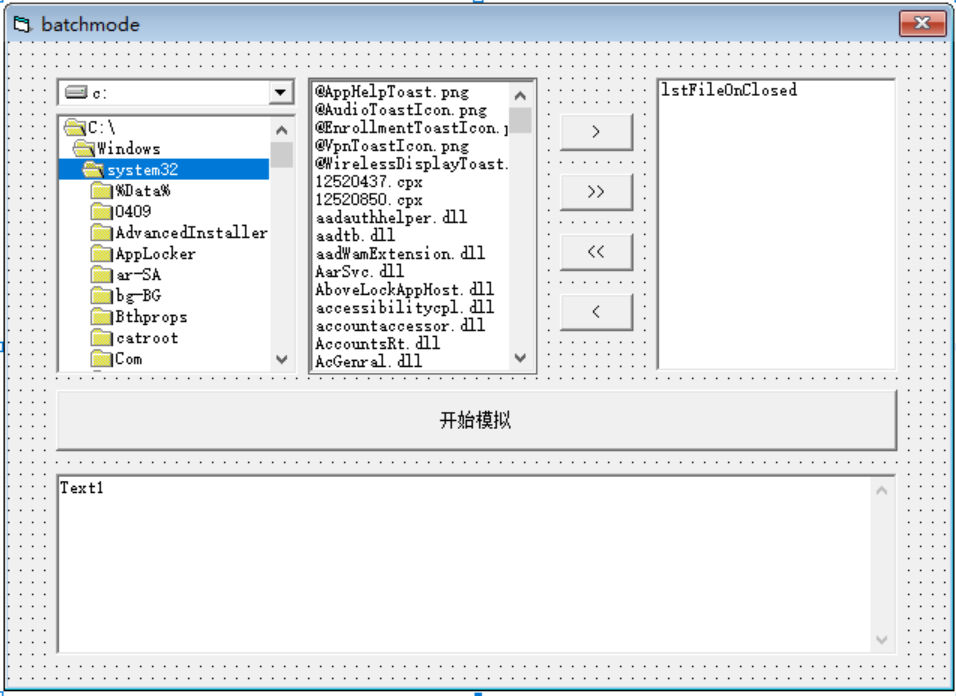
完成后的图示,选择需要模拟的lighttools后,直接进行运行,点击开始模拟,即可逐个模拟完成
lighttools 连接代码:
 1 Private m_ltServer As LTAPI

 2

 3

 4

 5 Public Function getLTAPIServer() As LTAPI

 6 If m_ltServer Is Nothing Then

 7     Dim lt As IUnknown

 8     Dim ltLoc As Locator

 9     Dim cmd As String

10     Set ltLoc = CreateObject("LTLocator.Locator")

11     ' to get a LightTools Server pointer, you need to know

12     ' the calling server process ID

13     ' if it is passed to this application via command line

14     ' in a shape of "-LTPID1234" (AddIn standard)

15     ' (1234 being hypothetical LightTools Process ID), do this

16     cmd = Command ' get command line

17     ' if command line is in the form of "-LTPID1234" you can

18     ' directly pass it to Locator

19     Set lt = ltLoc.GetLTAPIFromString(cmd)

20     'if the client code knows LT PID somehow, it could use the

21     ' GetLTAPI(pidNumber) interface

22     Set m_ltServer = lt

23     Set ltLoc = Nothing

24 End If

25

26 Set getLTAPIServer = m_ltServer

27 End Function

28 Sub test2()

29 Dim lt As LTAPI

30

31 Set lt = getLTAPIServer()

32 lt.Message ("Correct way of connecting to LightTools")

33 End Sub
窗体代码:
Option Explicit

Dim i As Integer

Dim j As Integer

Dim exist As Boolean

Private Sub cmdAddAll_Click()

'添加所有对象至Listbox

On Error Resume Next

For i = 0 To filList.ListCount - 1

    exist = False

    ' 排除重复对象

    For j = 0 To lstFileOnClosed.ListCount - 1

        If lstFileOnClosed.List(j) = DirList.Path & "\" & filList.List(i) Then

            exist = True

            Exit For

        End If

    Next j

    If exist = False Then

        lstFileOnClosed.AddItem DirList.Path & "\" & filList.List(i)

    End If

Next i

End Sub

Private Sub cmdAddSelect_Click()

'添加选择的对象至Listbox

On Error Resume Next

For i = 0 To filList.ListCount - 1

    exist = False

     ' 排除重复对象

    If filList.Selected(i) = True Then '判断对象是否被选中

        For j = 0 To lstFileOnClosed.ListCount - 1

            If lstFileOnClosed.List(j) = DirList.Path & "\" & filList.List(i) Then

                exist = True

                Exit For

            End If

        Next j

        If exist = False Then

            lstFileOnClosed.AddItem DirList.Path & "\" & filList.List(i)

        End If

    End If

Next i

End Sub

Private Sub cmdRemoveAll_Click()

'从listbox中移出所有的对象

  lstFileOnClosed.Clear

End Sub

Private Sub cmdRemoveSelect_Click()

'从listbox中移出选择的对象

On Error Resume Next

For i = 0 To lstFileOnClosed.ListCount - 1

  If lstFileOnClosed.Selected(i) = True Then

    lstFileOnClosed.RemoveItem (i)

  End If

Next i

End Sub

Private Sub Command1_Click()

'Debug.Print lstFileOnClosed.List(0)

'Debug.Print DirList.Path

Dim i As Integer

Dim sumok As Integer

Dim sumng As Integer

Dim datebegin As Date

Dim dateend As Date

Dim usetime As Date

sumok = 0

sumng = 0

App.OleRequestPendingMsgText = "模拟中,请等待!" '设置程序等待msg

App.OleServerBusyTimeout = 36000000 '设置程序等待时间单位ms,目前未10h

'排除未选择模拟文件的情况

If batchmode.lstFileOnClosed.ListCount = 0 Then

    batchmode.Text1.Text = "请选择要模拟的文件" & vbCrLf

    Exit Sub

End If

batchmode.Text1.Text = "模拟过程中请不要点击此窗体" & vbCrLf

For i = 0 To batchmode.lstFileOnClosed.ListCount - 1

    Dim lt As New LTAPI

    Dim FName As String

    Dim status As String

    datebegin = Now

    FName = batchmode.lstFileOnClosed.List(i)

    lt.SetOption "ShowDialogs", 0

    lt.SetOption "ShowFileDialogBox", 0

    lt.cmd "\VConsole" 'Note that this is case sensitive!

    lt.cmd "Open " & lt.Str(FName)

    lt.SetOption "ShowDialogs", 1

    lt.SetOption "ShowFileDialogBox", 1

    lt.cmd "\V3D"

    status = lt.cmd("BeginAllSimulations")

    dateend = Now

    usetime = dateend - datebegin

    If status = 0 Then

        batchmode.Text1.Text = batchmode.Text1.Text + " sim OK 用时" & usetime & " " & FName & vbCrLf

        sumok = sumok + 1

    Else

        batchmode.Text1.Text = batchmode.Text1.Text + " sim NG;错误代码:" & status & "用时" & usetime & " " & FName & vbCrLf

        sumng = sumng + 1

    End If

    lt.cmd "save"

    lt.cmd "close"

Next i

batchmode.Text1.Text = batchmode.Text1.Text + "所有模拟已经完成,其中" & sumok & "个模拟OK;其中" & sumng & "个模拟NG。"

End Sub

Private Sub DirList_Change()

'  更新文件列表框,使它与目录列表框保持同步。

    filList.Path = DirList.Path

End Sub

Private Sub DirList_LostFocus()

    DirList.Path = DirList.List(DirList.ListIndex)

End Sub

Private Sub DrvList_Change()

    On Error GoTo DriveHandler

    DirList.Path = DrvList.Drive

    Exit Sub

DriveHandler:

   DrvList.Drive = DirList.Path

    Exit Sub

  End Sub

Private Sub Form_Load()

'初始化FileListbox的格式及Drivelistbox的驱动盘

  filList.Pattern = "*.lts"

  DrvList.Drive = App.Path

  batchmode.Text1.Text = "欢迎使用此插件!" & vbCrLf

End Sub
然后生成为EXE格式,就可以进行使用。
lighttools batchmode 批处理vb程序代码的更多相关文章
- VB程序架构分析
在08年,我曾经写过VB程序.前面也将该VB程序的架构剥离出来并发出来共享了(具体见http://www.cnblogs.com/lzhdim/archive/2012/03/08/2385028.h ...
- 反编译工具 使用.NET JustDecompile来反编译你的程序代码
原文地址:http://www.it165.net/pro/html/201310/7383.html 前言 在项目的进行中有时会碰到需要去了解由第三方所开发的程序代码或者因为年久已经遗失原始码的程序 ...
- OD学习笔记10:一个VB程序的加密和解密思路
前边,我们的例子中既有VC++开发的程序,也有Delphi开发的程序,今天我们给大家分析一个VB程序的加密和解密思路. Virtual BASIC是由早期DOS时代的BASIC语言发展而来的可视化编程 ...
- 学习笔记第六课 VB程序
VB程序的特殊地方在于: 前几课学的破解方法,诸如设置API断点,修改关键CALL的返回值,MESSAGEBOX断点等,这些对于VB程序都是无效的. 这节课是设置VB的API断点,绕过报错弹窗来破解. ...
- 如何:在 DHTML 代码和客户端应用程序代码之间实现双向通信
https://msdn.microsoft.com/zh-cn/library/a0746166 可以使用 WebBrowser 控件向 Windows 窗体客户端应用程序添加现有的动态 HTML ...
- 使用.NET JustDecompile来反编译你的程序代码
前言 在项目的进行中有时会碰到需要去了解由第三方所开发的程序代码或者因为年久已经遗失原始码的程序,由于因为是别人写的所以我们并没有原始码可以直接阅读,碰到这种情况我们就需要去反编译这些程序及 DLL ...
- VB程序逆向反汇编常见的函数(修改版)
VB程序逆向常用的函数 1) 数据类型转换: a) __vbaI2Str 将一个字符串转为8 位(1个字节)的数值形式(范围在 0 至 255 之间) 或2 个字节的数值形式(范围在 -32,7 ...
- 开发指南~小程序代码构成~JSON配置
2.1 JSON 配置 JSON 是一种数据格式,并不是编程语言,在小程序中,JSON扮演的静态配置的角色. 2.1.1 一个例子 先看一个例子,打开开发工具的编辑器,在根目录下可以找到 app.j ...
- VB程序去nag
VB程序去nag 我遇到的vb的nag情况是程序一开始就跳出一个nag,汇编代码如下 push AfKayAs_.004067D4 call <jmp.&MSVBVM50.#100> ...
- C# 读取Word文本框中的文本、图片和表格(附VB.NET代码)
[概述] Word中可插入文本框,在文本框中可添加文本.图片.表格等内容.本篇文章通过C#程序代码介绍如何来读取文本框中的文本.图片和表格等内容.附VB.NET代码,有需要可作参考. [程序环境] 程 ...
随机推荐
- 解决ECharts官网打开缓慢的问题
本章我们将解决在Windows系统中打开ECharts官网缓慢的问题. 1.问题描述 正常情况下,我们在Windows环境中打开ECharts官网可能会遇到非常缓慢的情况,一直处于加载中,甚至打不开, ...
- 利用Python开发Exporter,集成Prometheus和Grafana对进程监控
利用Python开发Exporter,集成Prometheus和Grafana对进程监控 在现代软件开发和运维中,监控是确保系统稳定运行和快速响应问题的重要手段.Prometheus和Grafana的 ...
- 本地部署DeepSeek-R1并使用自定义的知识库AnythingLLM
一.基础信息 1.概述 以下是私有化部署方案的优势: 性能卓越:提供媲美商业模型的对话交互体验 环境隔离:完全离线运行,杜绝数据外泄风险 数据可控:完全掌控数据资产,符合合规要求 2.硬件环境 CPU ...
- SpringBoot利用@Async注解实现异步调用
前言:异步编程是让程序并发运行的一种手段,使用异步编程可以大大提高我们程序的吞吐量,减少用户的等待时间.在Java并发编程中实现异步功能,一般是需要使用线程或者线程池.而实现一个线程,要么继承Thre ...
- StarUML画流程图
一.新建流程图 1.1 新建流程图 1.2 左侧操作符介绍 Flow:顾名思义就是流,用来从一个操作流向下一个操作. Process: 过程 Terminator:用在结束的时候. Dicision: ...
- ABB机器人IO板DSQC651维修检查方法
ABB机器人作为工业自动化的重要设备,其稳定性和可靠性对于生产线的持续运行至关重要.然而,在实际使用中,由于各种原因,可能会出现ABB机器人IO板DSQC651故障,影响机器人的正常运行. 一.ABB ...
- 使用browser-use进行数据爬取实战记录
前言 前面的文章介绍了browser-use的基本使用,今天带来的分享是使用browser-use进行一次数据爬取的实战(不过还是demo级别的). 使用到的三个玩法分别是使用自己的浏览器.定义输出结 ...
- 替换JSONObject某个对象的值
有时候我们只想替换JSONObject某个对象的值,不想把所有对象的值都列出来.那就用for循环把所有的值重新赋值一遍.再单独给需要赋值的对象重新赋值 JSONObject itemObject = ...
- 针对N=p^rq分解之初探
针对N=p^r*q分解之初探 论文地址:https://eprint.iacr.org/2015/399.pdf 题目:https://www.nssctf.cn/problem/2016 from ...
- C/C++ GOTO妙用
目录 GOTO 语句 跳出多层循环 循环首次部分跳过 GOTO 语句 C/C++ 的 goto 语句用来在一个函数内进行任意跳转,用起来也是很方便.示例如下: int a() { int x = 0, ...