
Spring 配置文件加密
前文
在某些场景下,使用 Spring 作为开发组件时,不可避免地需要使用到配置文件,然而,对于配置文件中的某些敏感数据(如密码等信息字段),如果使用明文的方式,则可能在一定程度上导致信息泄露。为此,需要一种有效的方式来对这些字段进行加密处理,当前主流的一种加密方式就是 Jasypt
基本使用
对于主流的 Spring 应用程序,现在基本上都是采用 Spring-Boot 的方式进行开发,因此我们可以很方便地以 starter 的方式引入 Jasypt 对应的 starter 依赖
<dependency>

    <groupId>com.github.ulisesbocchio</groupId>

    <artifactId>jasypt-spring-boot-starter</artifactId>

    <version>3.0.5</version> <!-- 具体以 Maven 仓库的为准 -->

</dependency>
然后,需要在对应的应用程序配置文件中配置 Jasypt 的相关配置属性:
jasypt:

  encryptor:

    # 解密时需要用到的对称密码

    password: 1234567

    # 解密时使用的解密算法,具体可以查看 com.sun.crypto.provider.PBEKeyFactory 的相关子类

    algorithm: PBEWithHmacSHA224AndAES_128

    # 一些通用的配置属性,如过滤字段是否需要解密、需要解密的字段的格式等

    property:

      # 如果字段需要解密,则这个字段的值的开始前缀

      prefix: ENC(

      # 如果字段需要解密,则这个字段的值的后缀

      suffix: )

    # 加密时的重 Hash 次数

    key-obtention-iterations: 1000
然而,对于需要解密的字段,需要按照解密的规则对其进行加密处理,Jasypt 已经提供了现有的工具类,只需要传入我们需要的参数进行加密即可:
import org.jasypt.encryption.pbe.StandardPBEStringEncryptor;

import org.jasypt.encryption.pbe.config.EnvironmentStringPBEConfig;

import org.jasypt.iv.RandomIvGenerator;

import org.jasypt.salt.RandomSaltGenerator;

import org.junit.Test;

import org.slf4j.Logger;

import org.slf4j.LoggerFactory;

import org.springframework.boot.test.context.SpringBootTest;

import javax.crypto.SecretKeyFactory;

import java.security.NoSuchAlgorithmException;

import java.security.Provider;

import java.security.Security;

@SpringBootTest(classes = {DemoApplication.class})

public class SimpleEncryptTest {

    private final static Logger log = LoggerFactory.getLogger(SimpleEncryptTest.class);

    // 注意,这里的 Config 必须与上文配置文件中的一致,否则会导致解密结果与最初值不一致

    private static EnvironmentStringPBEConfig pbeConfig() {

        String password = "1234567"; // 这里的密码需要与配置文件里的相对应

        final EnvironmentStringPBEConfig config = new EnvironmentStringPBEConfig();

        config.setPassword(password); // 当前对称加密算法需要的基本密码,而不是需要转换的文本

        /*

            具体对称加密算法,目前系统提供了 com.sun.crypto.provider.PBEKeyFactory 子类相关的算法

         */

        config.setAlgorithm("PBEWithHmacSHA224AndAES_128");

        /*

            迭代计算次数,通过增加这个值可以提高加密效果的强度

         */

        config.setKeyObtentionIterations(1000); // 如果配置文件不做配置,则默认 1000 次

        config.setSaltGenerator(new RandomSaltGenerator()); // 具体的盐值生成器,未配置时默认使用 RandomSaltGenerator

        /*

            如果需要设置自定义的对称加密算法,那么这里可能需要设置成对应的算法提供对象,

            在一般情况下,系统提供的加密算法已经足够满足需求,因此可以设置为 null

         */

        config.setProvider(null);

        config.setStringOutputType("Base64"); // 处理时的字节表示形式

        config.setIvGenerator(new RandomIvGenerator()); // 某些算法可能需要使用到的初始向量生成器,默认为 RandomIvGenerator

        return config;

    }

    @Test

    public void encryptTest() {

        String message = "123"; // 当前需要被加密的密码

        final EnvironmentStringPBEConfig config = pbeConfig();

        final StandardPBEStringEncryptor encryptor = new StandardPBEStringEncryptor();

        encryptor.setConfig(config);

        log.info("{}", encryptor.encrypt(message)); // 这里得到的就是加密后的结果

    }

}
现在,将加密后的密码配置到我们系统的配置文件中,使用 jasypt 配置中定义的前后缀进行包装,以 Druid 配置为例,通过上文的加密算法,我将密码 "123" 加密后得到了 对应的加密文本 "354GiF5aGOgfrpisxVAw+y1fCNQ43Hv4vaHd9GVp8YZi86e0igV8sS6zyF1N14AP",现在将它配置到 Druid 的登录密码中:
spring:

  datasource:

    druid:

      stat-view-servlet:

        enabled: true

        login-username: admin

        login-password: ENC(354GiF5aGOgfrpisxVAw+y1fCNQ43Hv4vaHd9GVp8YZi86e0igV8sS6zyF1N14AP)
之后,如果希望登录 Druid 监视界面,只需要输入用户名为 admin 并且密码 123 即可完成登录
组件配置
一般情况下,Jasypt 默认的配置已经足够满足大部分的应用场景,然而,如果希望能够自定义相关的配置,Jasypt 也提供了相应的配置选项,主要包括 "过滤器"、"解码器" 以及 "检测器",这些组件在 com.ulisesbocchio.jasyptspringboot.properties.JasyptEncryptorConfigurationProperties.PropertyConfigurationProperties 有具体的描述
过滤器
过滤器的目的为了过滤那些需要进行解码的属性,默认情况下是对所有的配置属性都进行拦截处理,如果需要进行相关配置,可以在配置文件中加入相关的过滤属性字段:
jasypt:

  encryptor:

    property:

      filter:

      	# 需要传入全限定名称,以过滤这些不需要解密的字段

        exclude-names: ["spring.datasource.druid.stat-view-servlet.login-password"]
显然,如果需要过滤的字段太多,一个一个配置比较麻烦,因此我们可以自定顶一个过滤器来完成相关的过滤操作,具体的实现以 com.ulisesbocchio.jasyptspringboot.EncryptablePropertyFilter 定义的为准:
import com.ulisesbocchio.jasyptspringboot.EncryptablePropertyFilter;

import com.ulisesbocchio.jasyptspringboot.properties.JasyptEncryptorConfigurationProperties;

import org.springframework.beans.factory.annotation.Autowired;

import org.springframework.core.env.ConfigurableEnvironment;

import org.springframework.core.env.PropertySource;

import org.springframework.stereotype.Component;

import java.util.HashSet;

import java.util.Set;

// 设置过滤器 Bean 名称,使得能够被加载到 Jasypt 的配置中

@Component("jasyptPropertiesFilter")

public class PropertiesFilter

        implements EncryptablePropertyFilter {

    private final Set<String> excludeSet = new HashSet<>();

    @Autowired

    public PropertiesFilter(ConfigurableEnvironment env) {

        // 复用 Jasypt 的过滤器配置属性

        JasyptEncryptorConfigurationProperties props = JasyptEncryptorConfigurationProperties.bindConfigProps(env);

        JasyptEncryptorConfigurationProperties.PropertyConfigurationProperties.FilterConfigurationProperties filterProps = props.getProperty().getFilter();

        excludeSet.addAll(filterProps.getExcludeNames());

    }

    @Override

    public boolean shouldInclude(PropertySource<?> source, String name) {

        // 如果是开发环境,则不需要对字段进行加密处理

        if (source.getName().endsWith("dev.yml")) {

            return true;

        }

        // 如果前缀与配置的匹配,则不进行加密处理

        for (String excludeName : excludeSet) {

            if (excludeName.startsWith(name)) {

                return false;

            }

        }

        return true;

    }

}
同时,需要将编写好的过滤器替换到原有的过滤器,可以通过配置如下属性来完成:
jasypt:

  encryptor:

    property:

      filter:

      	# 通过我们自定的过滤器,就不再需要写全限定名称了,只需要写对应的不匹配前缀即可

        exclude-names: ["spring.datasource.druid"]

      filter-bean: jasyptPropertiesFilter
检测器
检测器的目的是为了检查配置的属性是否是被加密的,效果与过滤器类似,区别在于过滤器的效果会先于检测器,默认的检测器实现是通过配置的前后缀值来进行判断的,即配置的 ENC()。如果希望改变这个行为(虽然基本不会改变 ),也可以自定编写检测器来替换现有的行为,具体的实现需要以 com.ulisesbocchio.jasyptspringboot.EncryptablePropertyDetector 定位为准:
import com.ulisesbocchio.jasyptspringboot.EncryptablePropertyDetector;

import com.ulisesbocchio.jasyptspringboot.detector.DefaultPropertyDetector;

import org.apache.commons.codec.binary.Base64;

import org.springframework.stereotype.Component;

@Component("jasyptPropertiesDetector")

public class PropertiesDetector

        extends DefaultPropertyDetector

        implements EncryptablePropertyDetector {

    private String prefix = "ENC(";

    public PropertiesDetector() {

        super();

    }

    public PropertiesDetector(String prefix, String suffix) {

        super(prefix, suffix);

        this.prefix = prefix;

    }

    @Override

    public boolean isEncrypted(String property) {

        if (super.isEncrypted(property)) {

            return true;

        }

        // 如果是以 Base64 的方式进行的编码,则我们认为它是被加密的

		return property.length() >= 64 && Base64.isBase64(property);

    }

    @Override

    public String unwrapEncryptedValue(String property) {

        if (property.contains(prefix)) {

            return super.unwrapEncryptedValue(property);

        }

        return property;

    }

}
同样,需要将其配置到对应的配置文件中,替换默认的检测器使得其生效:
jasypt:

  encryptor:

    property:

      detector-bean: jasyptPropertiesDetector
解码器
解码器是真正完成解码工作的组件,如果希望配置一些额外的加密选项(如加盐、替换向量生成器,使用自定义的解密算法等),都可以通过重写该组件来完成。
具体的解码器需要按照 com.ulisesbocchio.jasyptspringboot.EncryptablePropertyResolver 来实现:
import com.ulisesbocchio.jasyptspringboot.EncryptablePropertyDetector;

import com.ulisesbocchio.jasyptspringboot.EncryptablePropertyResolver;

import com.ulisesbocchio.jasyptspringboot.exception.DecryptionException;

import com.ulisesbocchio.jasyptspringboot.properties.JasyptEncryptorConfigurationProperties;

import org.jasypt.encryption.pbe.PooledPBEStringEncryptor;

import org.jasypt.encryption.pbe.config.SimpleStringPBEConfig;

import org.jasypt.exceptions.EncryptionOperationNotPossibleException;

import org.jasypt.iv.StringFixedIvGenerator;

import org.jasypt.salt.StringFixedSaltGenerator;

import org.slf4j.Logger;

import org.slf4j.LoggerFactory;

import org.springframework.beans.factory.annotation.Autowired;

import org.springframework.beans.factory.annotation.Qualifier;

import org.springframework.core.env.ConfigurableEnvironment;

import org.springframework.core.env.Environment;

import org.springframework.stereotype.Component;

import java.util.Optional;

@Component("jasyptPropertiesPropertyResolver")

public class PropertiesPropertyResolver

        implements EncryptablePropertyResolver {

    private final static Logger log = LoggerFactory.getLogger(PropertiesPropertyResolver.class);

    private final static String IV_GEN_TEXT = "这是一个向量生成器";

    private final static String SALT_TEXT = "我能够吞下玻璃而不伤身体";

    private final Environment environment;

    private final PooledPBEStringEncryptor encryptor;

    private final EncryptablePropertyDetector detector;

    @Autowired

    public PropertiesPropertyResolver(ConfigurableEnvironment env,

                                      @Qualifier("jasyptPropertiesDetector") EncryptablePropertyDetector detector) {

        this.environment = env;

        this.encryptor = new PooledPBEStringEncryptor();

        this.detector = detector;

        // 复用原有 Jasypt 的配置属性

        JasyptEncryptorConfigurationProperties props = JasyptEncryptorConfigurationProperties.bindConfigProps(env);

        String password = props.getPassword();

        // 这里的配置将会覆盖原有配置文件中的相关配置,因为配置文件中的配置并不能显示地支持配置对象的设置

        SimpleStringPBEConfig config = new SimpleStringPBEConfig();

        config.setPasswordCharArray(password.toCharArray());

        config.setAlgorithm("PBEWITHHMACSHA512ANDAES_256");

        config.setKeyObtentionIterations("1000");

        config.setPoolSize(1);

        config.setProviderName("SunJCE");

        config.setSaltGenerator(new StringFixedSaltGenerator(SALT_TEXT)); // 替换默认的盐值生成器

        config.setIvGenerator(new StringFixedIvGenerator(IV_GEN_TEXT)); // 替换默认的向量生成器

        config.setStringOutputType("base64");

        this.encryptor.setConfig(config);

    }

    @Override

    public String resolvePropertyValue(String value) {

        return Optional.ofNullable(value)

                .map(environment::resolvePlaceholders)

                .filter(detector::isEncrypted)

                .map(resolvedValue -> {

                    try {

                        String unwrappedProperty = detector.unwrapEncryptedValue(resolvedValue.trim());

                        String resolvedProperty = environment.resolvePlaceholders(unwrappedProperty);

                        String decrypt = encryptor.decrypt(resolvedProperty);

                        log.info("from {} to {}", resolvedProperty, decrypt);

                        return decrypt;

                    } catch (EncryptionOperationNotPossibleException e) {

                        throw new DecryptionException("Unable to decrypt property: "

                                + value + " resolved to: " + resolvedValue + ". Decryption of Properties failed,  make sure encryption/decryption " +

                                "passwords match", e);

                    }

                })

                .orElse(value);

    }

}
同样地,也需要在配置文件中进行配置以替换默认的解码器:
jasypt:

  encryptor:

    property:

      resolver-bean: jasyptPropertiesPropertyResolver
实现原理
一般来讲,在 SpringBoot 项目中引入 starter 来实现自动装配 功能,基本上都是通过加载 META/spring.factories 文件中的自动配置项来实现的,对于 Jassypt 的 starter 来讲,对应的 spring.factories 文件如下:
org.springframework.boot.autoconfigure.EnableAutoConfiguration=com.ulisesbocchio.jasyptspringbootstarter.JasyptSpringBootAutoConfiguration

org.springframework.cloud.bootstrap.BootstrapConfiguration=com.ulisesbocchio.jasyptspringbootstarter.JasyptSpringCloudBootstrapConfiguration
SpringBoot 的加载接口从 EnableAutoConfiguration 配置引入,对应的配置项为 com.ulisesbocchio.jasyptspringbootstarter.JasyptSpringBootAutoConfiguration:
import com.ulisesbocchio.jasyptspringboot.configuration.EnableEncryptablePropertiesConfiguration;

import org.springframework.context.annotation.Configuration;

import org.springframework.context.annotation.Import;

@Configuration

@Import(EnableEncryptablePropertiesConfiguration.class)

public class JasyptSpringBootAutoConfiguration {

}
实际上这个类并没有实际的配置操作,而是通过导入 EnableEncryptablePropertiesConfiguration 来间接实现的:
import com.ulisesbocchio.jasyptspringboot.EncryptablePropertySourceConverter;

import org.jasypt.encryption.StringEncryptor;

import org.jasypt.encryption.pbe.config.StringPBEConfig;

import org.springframework.beans.factory.config.BeanFactoryPostProcessor;

import org.springframework.context.annotation.Bean;

import org.springframework.context.annotation.Configuration;

import org.springframework.context.annotation.Import;

import org.springframework.core.env.ConfigurableEnvironment;

import org.springframework.core.env.Environment;

import org.springframework.core.env.PropertySource;

@Configuration

/*

	EncryptablePropertyResolverConfiguration 这个配置类为上文的 "解码器" 等相关组件的配置类,也就是

	实际完成解码工作的组件类

*/

@Import({EncryptablePropertyResolverConfiguration.class, CachingConfiguration.class})

public class EnableEncryptablePropertiesConfiguration {

    @Bean

    public static EnableEncryptablePropertiesBeanFactoryPostProcessor enableEncryptablePropertySourcesPostProcessor(final ConfigurableEnvironment environment, EncryptablePropertySourceConverter converter) {

        return new EnableEncryptablePropertiesBeanFactoryPostProcessor(environment, converter);

    }

}
对于内置的 EnableEncryptablePropertiesBeanFactoryPostProcessor Bean,Spring 会在初始化 BeanFactory 时调用这些 BeanPostProcessor 的 postProcessBeanFactory 方法,以实现对 BeanFactory 的配置处理。具体 EnableEncryptablePropertiesBeanFactoryPostProcessor 的处理如下:
import com.ulisesbocchio.jasyptspringboot.EncryptablePropertyResolver;

import com.ulisesbocchio.jasyptspringboot.EncryptablePropertySourceConverter;

import lombok.extern.slf4j.Slf4j;

import org.springframework.beans.BeansException;

import org.springframework.beans.factory.config.BeanFactoryPostProcessor;

import org.springframework.beans.factory.config.ConfigurableListableBeanFactory;

import org.springframework.core.Ordered;

import org.springframework.core.env.ConfigurableEnvironment;

import org.springframework.core.env.MutablePropertySources;

public class EnableEncryptablePropertiesBeanFactoryPostProcessor

    implements BeanFactoryPostProcessor, Ordered {

    private final ConfigurableEnvironment environment;

    private final EncryptablePropertySourceConverter converter;

    public EnableEncryptablePropertiesBeanFactoryPostProcessor(ConfigurableEnvironment environment, EncryptablePropertySourceConverter converter) {

        this.environment = environment;

        this.converter = converter;

    }

    @Override

    public void postProcessBeanFactory(ConfigurableListableBeanFactory beanFactory) throws BeansException {

        log.info("Post-processing PropertySource instances");

        /*

        	这里的作用是加载系统中存在的配置文件,包括系统自带的 System、BootStrap 以及 application 等配置文件

        */

        MutablePropertySources propSources = environment.getPropertySources();

        /*

        	替换原有的配置文件对象,以改变获取配置属性值的相关行为

        */

        converter.convertPropertySources(propSources);

    }

    // 省略部分代码

}
关键的部分在于对 propSources 的替换处理,具体的源码如下:
public class EncryptablePropertySourceConverter {

    public void convertPropertySources(MutablePropertySources propSources) {

        propSources.stream()

                .filter(ps -> !(ps instanceof EncryptablePropertySource))

                .map(this::makeEncryptable)

                .collect(toList())

                .forEach(ps -> propSources.replace(ps.getName(), ps));

    }

    public <T> PropertySource<T> makeEncryptable(PropertySource<T> propertySource) {

        // 省略部分代码。。。。

        PropertySource<T> encryptablePropertySource = convertPropertySource(propertySource);

        return encryptablePropertySource;

    }

    private <T> PropertySource<T> convertPropertySource(PropertySource<T> propertySource) {

        // 默认不是代理模式,因此走 instantiatePropertySource 方法

        return interceptionMode == InterceptionMode.PROXY

                ? proxyPropertySource(propertySource) : instantiatePropertySource(propertySource);

    }

    private <T> PropertySource<T> instantiatePropertySource(PropertySource<T> propertySource) {

        PropertySource<T> encryptablePropertySource;

        if (needsProxyAnyway(propertySource)) {

            encryptablePropertySource = proxyPropertySource(propertySource);

        } else if (propertySource instanceof SystemEnvironmentPropertySource) {

            encryptablePropertySource = (PropertySource<T>) new EncryptableSystemEnvironmentPropertySourceWrapper((SystemEnvironmentPropertySource) propertySource, propertyResolver, propertyFilter);

        } else if (propertySource instanceof MapPropertySource) {

            /*

            	应用程序的配置文件对应的类型为 MapPropertySource,因此走这里,

            	即:将原有应用程序配置文件对应的属性配置对象替换成了 EncryptableMapPropertySourceWrapper 类型

            */

            encryptablePropertySource = (PropertySource<T>) new EncryptableMapPropertySourceWrapper((MapPropertySource) propertySource, propertyResolver, propertyFilter);

        } else if (propertySource instanceof EnumerablePropertySource) {

            encryptablePropertySource = new EncryptableEnumerablePropertySourceWrapper<>((EnumerablePropertySource) propertySource, propertyResolver, propertyFilter);

        } else {

            encryptablePropertySource = new EncryptablePropertySourceWrapper<>(propertySource, propertyResolver, propertyFilter);

        }

        return encryptablePropertySource;

    }

}
继续查看 EncryptableMapPropertySourceWrapper对应的源码:
import com.ulisesbocchio.jasyptspringboot.caching.CachingDelegateEncryptablePropertySource;

import com.ulisesbocchio.jasyptspringboot.EncryptablePropertyFilter;

import com.ulisesbocchio.jasyptspringboot.EncryptablePropertyResolver;

import com.ulisesbocchio.jasyptspringboot.EncryptablePropertySource;

import org.springframework.boot.origin.Origin;

import org.springframework.boot.origin.OriginLookup;

import org.springframework.boot.origin.OriginTrackedValue;

import org.springframework.core.env.MapPropertySource;

import org.springframework.core.env.PropertySource;

import java.util.Map;

public class EncryptableMapPropertySourceWrapper extends MapPropertySource implements EncryptablePropertySource<Map<String, Object>> {

    private final CachingDelegateEncryptablePropertySource<Map<String, Object>> encryptableDelegate;

    public EncryptableMapPropertySourceWrapper(MapPropertySource delegate, EncryptablePropertyResolver resolver, EncryptablePropertyFilter filter) {

        super(delegate.getName(), delegate.getSource());

        encryptableDelegate = new CachingDelegateEncryptablePropertySource<>(delegate, resolver, filter);

    }

    /*

    	重点在于对于获取属性时的特殊处理,具体是由 CachingDelegateEncryptablePropertySource 完成的实际处理

    */

    @Override

    public Object getProperty(String name) {

        return encryptableDelegate.getProperty(name);

    }

    @Override

    public PropertySource<Map<String, Object>> getDelegate() {

        return encryptableDelegate;

    }

}
继续查看 CachingDelegateEncryptablePropertySource :
import com.ulisesbocchio.jasyptspringboot.EncryptablePropertyFilter;

import com.ulisesbocchio.jasyptspringboot.EncryptablePropertyResolver;

import com.ulisesbocchio.jasyptspringboot.EncryptablePropertySource;

import java.util.Map;

import java.util.Objects;

import java.util.concurrent.ConcurrentHashMap;

import lombok.AllArgsConstructor;

import org.springframework.core.env.PropertySource;

import org.springframework.util.Assert;

public class CachingDelegateEncryptablePropertySource<T> extends PropertySource<T> implements EncryptablePropertySource<T> {

    private final PropertySource<T> delegate; // 原有的配置属性对象

    private final EncryptablePropertyResolver resolver; // 解码器

    private final EncryptablePropertyFilter filter; // 过滤器

    private final Map<String, CachedValue> cache; // 缓存,不重要

    public CachingDelegateEncryptablePropertySource(PropertySource<T> delegate, EncryptablePropertyResolver resolver, EncryptablePropertyFilter filter) {

        super(delegate.getName(), delegate.getSource());

        Assert.notNull(delegate, "PropertySource delegate cannot be null");

        Assert.notNull(resolver, "EncryptablePropertyResolver cannot be null");

        Assert.notNull(filter, "EncryptablePropertyFilter cannot be null");

        this.delegate = delegate;

        this.resolver = resolver;

        this.filter = filter;

        this.cache = new ConcurrentHashMap<>();

    }

    // 省略部分源码。。。。

    @Override

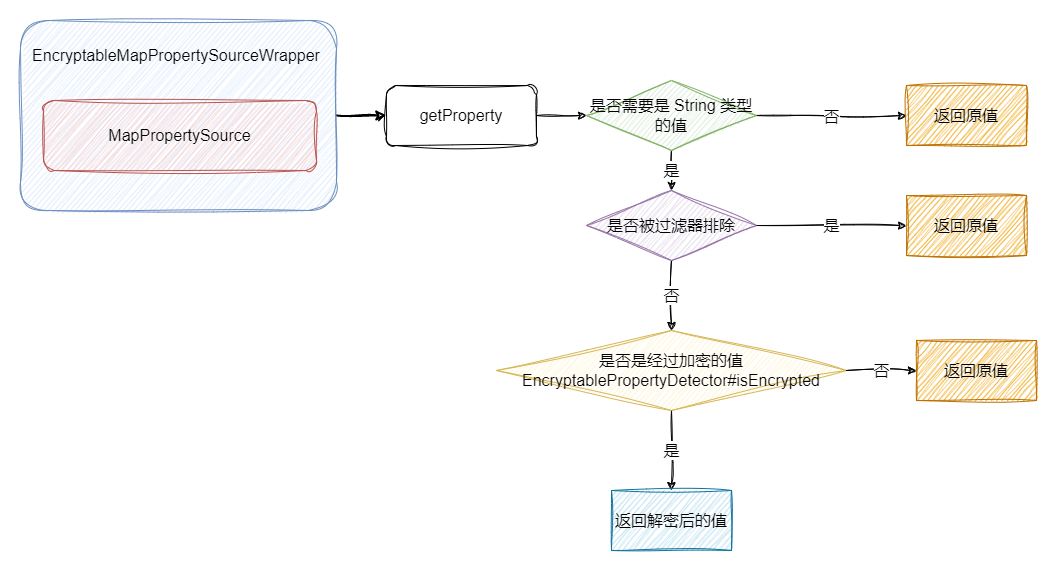
    public Object getProperty(String name) {

        Object originValue = delegate.getProperty(name);

        if (!(originValue instanceof String)) {

            /*

            	由于实际的解码器只能支持对 String 类型的解码,因此如果不是 String 类型的值则不做处理

            */

            return originValue;

        }

        // 省略缓存的有关处理

        // 如果该字段不在过滤器的排除选项中,则进一步考虑解密的处理

        if (filter.shouldInclude(delegate, name)) {

            String originStringValue = (String) originValue;

            /*

            	解码器的实际解码处理,至此,完成了对加密字段的解密获取处理

            */

            String resolved = resolver.resolvePropertyValue(originStringValue);

            // 省略缓存的有关处理

            return resolved;

        }

        return originValue;

    }

    // 省略部分源码。。。。

}
具体结构图如下所示:
Spring 配置文件加密的更多相关文章
- spring配置文件加密
原文:http://www.open-open.com/code/view/1453520072183 spring框架在一些对安全性要求较高的生产环境下,配置文件不允许出现明文用户名密码配置,如数据 ...
- Spring cloud config配置文件加密解密
Spring cloud config配置文件加密解密 学习了:http://blog.csdn.net/u010475041/article/details/78110349 学习了:<Spr ...
- spring读取加密配置信息
描述&背景Spring框架配置数据库等连接等属性时,都是交由 PopertyPlaceholderConfigurer进行读取.properties文件的,但如果项目不允许在配置文件中明文保存 ...
- spring 配置文件 获取变量(PropertyPlaceholderConfigurer)
转自:https://hbiao68.iteye.com/blog/2031006 1.Spring的框架中,org.springframework.beans.factory.config.Prop ...
- 使用Jasypt对SpringBoot配置文件加密
# **前言** 在日前安全形势越来越严重的情况下,让我意识到在项目中存在一个我们经常忽略的漏洞,那就是我们的项目的配置文件中配置信息的安全,尤其是数据库连接的用户名和密码的安全.所以这里我们就需要对 ...
- SpringBoot进阶教程(六十三)Jasypt配置文件加密
数据库密码直接明文写在配置中,对安全来说,是一个很大的挑战.一旦密码泄漏,将会带来很大的安全隐患.尤其在一些企业对安全性要求很高,因此我们就考虑如何对密码进行加密.本文着重介绍Jasypt对Sprin ...
- 你不知道的Spring配置文件
Spring配置文件是用于指导Spring工厂进行Bean生产.依赖关系注入(装配)及Bean实例分发的"图纸".Java EE程序员必须学会并灵活应用这份"图纸&quo ...
- Spring配置文件详解
转自: http://book.51cto.com/art/201004/193743.htm 此处详细的为我们讲解了spring2.5的实现原理,感觉非常有用 spring配置文件是用于指导Sp ...
- Hibernate SQL方言 (hibernate.dialect) Spring配置文件applicationContext.xml
转自:http://www.cnblogs.com/wj-wangjun/archive/2009/10/21/1587624.html Hibernate SQL方言 (hibernate.dial ...
- Spring配置文件详解 - applicationContext.xml文件路径
spring的配置文件applicationContext.xml的默认地址在WEB-INF下,只要在web.xml中加入代码 org.springframework.web.context.Cont ...
随机推荐
- kubernetes配置glusterfs动态存储
GlusterFS分布式文件系统 一.简单介绍 分布式存储按其存储接口分为三种:文件存储.块存储.对象存储 文件存储 通常支持POSIX接口(如glusterFS,但GFS.HDFS是非POSIX接口 ...
- DotNetCore 提示 系统不支持“big5”编码。System does not support 'big5' encoding.
C# .NET Core 以 Big 5 (大五碼)編碼格式讀取檔案 (ruyut.com) C# .NET Core 以 Big 5 (大五碼)編碼格式讀取檔案 日期: 4月 27, 2022 之前 ...
- Python库积累之Selenium(一)-Seleniun基础
Selenium是一个用电脑模拟人操作浏览器网页,支持多平台,多浏览器和多种编程语言,广泛应用于自动化,测试,爬虫等场景中. 官方文档:https://www.selenium.dev/seleniu ...
- 【6】LCA学习笔记
前言 WFLS 2023 暑假集训 Day 2 Day 3 做完一部分老师的 LCA 题单后,我觉得人都要升华了.教练说前几年正是考这个玩意的时候,所以出的题目弯弯绕绕.我的评价:不如字符串. LCA ...
- 简单dp 二维
转载问题 http://www.cnblogs.com/moqitianliang/p/4798882.html 简要 概括动态规划 就是求原子问题,把一个问题分解成一个原子问题. 二维数组的简单 ...
- 使用类似于raspberry的方式登录ubuntu20.04--vnc
简介 我看过最好的教程是 https://www.digitalocean.com/community/tutorials/how-to-install-and-configure-vnc-on-ub ...
- 试用完几十款ETL工具后的经验总结,ETL工具用这三款就足够了
1.ETL选型前言 市面上ETL工具国内外加起来估计得有30种之多,其中近20款工具都花时间试用过,现在把试用后总结出来的经验分享一下,目前很多企业在选择ETL工具时不知道怎么选择适合自己的工具也不可 ...
- SciTech-EECS-Circuits-Power Electrics(功率器件): 电离效应(正负极+数控脉冲放电时间 实现 电解/电镀/电子显微、显像/电火花切割) + WEDM(电火花线切割): 快走丝、中走丝、慢走丝总结 + CNC:计算机网络控制制造
电离效应 + 极性加工 为什么电极丝(钼丝/铜丝)没有熔化 而 被加工件(同为金属料)却熔化汽化? 因为电离效应 + 极性加工: 前提是: 精确控制正负极上的交/直流电在最合适状态, 电压/电流/频率 ...
- SciTech-BigDataAIML-Tensorflow-Introduction to graphs and tf.function
Graphs are data structures that contain: a set of tf.Operation objects, which representing units of ...
- SciTech-Mathmatics-Calculus: Derivative导数 + Deferentiation微分 + Integration积分
SciTech-Mathmatics-Calculus: Derivative导数 Deferentiation微分 Integration积分