
Try..Finally..相信自己的眼睛
问题提出
       try

       {

         return x;

       }

       finally

       {

         x = null;

       }
上面这段代码到底怎么执行的?
try..catch..finally 介绍
在MSDN中,try..catch..finally 的介绍如下:
- finally 块用于清除 try 块中分配的任何资源,以及运行任何即使在发生异常时也必须执行的代码。 控制总是传递给 finally 块,与 try 块的退出方式无关。
- catch 用于处理语句块中出现的异常,而 finally 用于保证代码语句块的执行,与前面的 try 块的退出方式无关。
- catch 和 finally 一起使用的常见方式是:在 try 块中获取并使用资源,在 catch 块中处理异常情况,并在 finally 块中释放资源。
典型用法:
     void ReadFile(int index)

     {

       string path = @"c:\users\public\test.txt";

       char[] buffer = new char[];

       StreamReader file = new StreamReader(path);

       try

       {

         file.ReadBlock(buffer, index, buffer.Length);

       }

       catch (IOException e)

       {

         Console.WriteLine("Error reading from {0}. Message = {1}", path, e.Message);

       }

       finally

       {

         if (file != null)

         {

           file.Close();

         }

       }

     }
通常 finally 中的代码只负责清理资源。
那么,如果 finally 中包含业务逻辑,try..finally..的执行顺序会对业务逻辑有怎样的影响呢?
try..finally 的执行顺序
回到问题,
    void Main()

    {

      Console.WriteLine(TestTryFinally());

    }

    public string TestTryFinally()

    {

      string x = "init";

      try

      {

        x = "try";

        return x;

      }

      finally

      {

        x = "finally";

      }

    }
这里的执行顺序是:
- 执行 return 之前的代码
- 对 return 语句求值
- 执行 finally 中的代码
- 在第 2 步中的求值结果被返回
所以,具体是否对返回值有影响,得看 x 变量的类型。如果是不可变类型,则 finally 中的代码对 return 的求值结果没有任何影响。而如果是可变类型,则 finally 中的代码会改变 return 求值结果的内容。
上述代码,在 x 类型为 string 时,返回值为 "try"。
查看 IL 代码,
 IL_0000:  ldarg.

 IL_0001:  call        UserQuery.TestTryFinally

 IL_0006:  call        System.Console.WriteLine

 TestTryFinally:

 IL_0000:  ldstr       "init"

 IL_0005:  stloc.     // x

 IL_0006:  ldstr       "try"

 IL_000B:  stloc.     // x

 IL_000C:  ldloc.     // x

 IL_000D:  stloc.     // CS$1$0000

 IL_000E:  leave.s     IL_0017

 IL_0010:  ldstr       "finally"

 IL_0015:  stloc.     // x

 IL_0016:  endfinally

 IL_0017:  ldloc.     // CS$1$0000

 IL_0018:  ret
发现在 stloc.1 处会创建 CS$1$0000 临时变量来存储 return 返回值。
从程序集反编译代码查看结果,程序已经被优化。
 // ConsoleApplication11_TryFinallyTest.Program

 public string TestTryFinally()

 {

     string result;

     try

     {

         string x = "try";

         result = x;

     }

     finally

     {

     }

     return result;

 }
更多测试结果
 using System;

 using System.Text;

 namespace ConsoleApplication11_TryFinallyTest

 {

   class Program

   {

     static void Main(string[] args)

     {

       Console.WriteLine(MethodA());

       Console.WriteLine(a);

       Console.WriteLine(MethodB().ToString());

       Console.WriteLine(b.ToString());

       Console.WriteLine(MethodC());

       Console.WriteLine(c);

       Console.WriteLine(MethodD().ToString());

       Console.WriteLine(d.ToString());

       Console.WriteLine(MethodE().ToString());

       Console.WriteLine(e.ToString());

       Console.ReadKey();

     }

     static string a;

     static string MethodA()

     {

       try

       {

         a = "tryA";

         return a;

       }

       finally

       {

         a = "finallyA";

       }

     }

     static StringBuilder b = new StringBuilder();

     static StringBuilder MethodB()

     {

       try

       {

         b.Append("tryB");

         return b;

       }

       finally

       {

         b.Append("finallyB");

       }

     }

     static int c;

     static int MethodC()

     {

       try

       {

         c = ;

         return c;

       }

       finally

       {

         c = ;

       }

     }

     static Person d;

     static Person MethodD()

     {

       try

       {

         d = new Person() { Name = "tryD" };

         return d;

       }

       finally

       {

         d = new Person() { Name = "finallyD" };

       }

     }

     static Person e;

     static Person MethodE()

     {

       e = new Person() { Name = "E" };

       try

       {

         e.Name = "tryE";

         return e;

       }

       finally

       {

         e.Name = "finallyE";

       }

     }

     class Person

     {

       public string Name { get; set; }

       public override string ToString()

       {

         return Name;

       }

     }

   }

 }
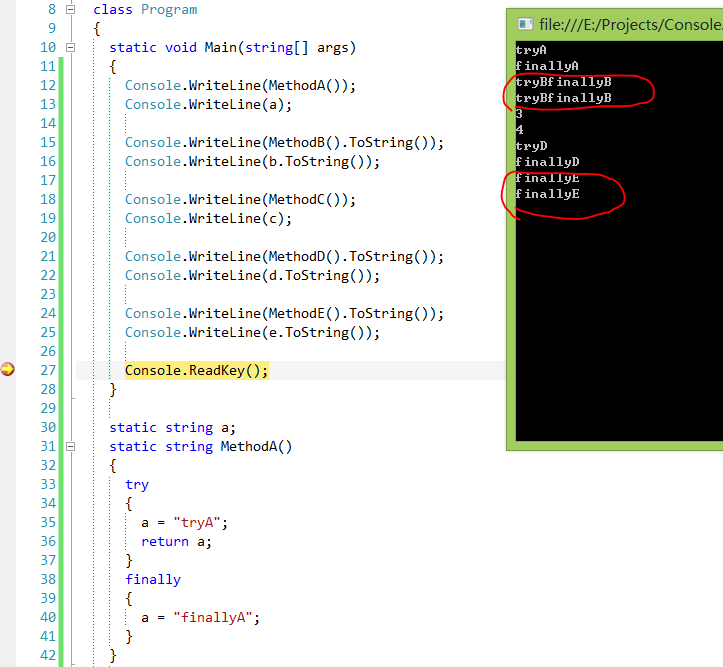
参考资料
- try-catch-finally(C# 参考)
- What really happens in a try { return x; } finally { x = null; } statement?
Try..Finally..相信自己的眼睛的更多相关文章
- [No0000A3]护眼谎言大揭秘,选择正确的方式保护眼睛!
当眼睛因为过度劳累而状况频出的时候,许多人没有选择极目远眺.眼保健操.充分睡眠等简单易行的养眼方式,而是求助于各种护眼工具.于是,在视疲劳成为常见眼病之后,护眼市场产品层出不穷:护眼灯.眼贴.眼保仪. ...
- 取消ie浏览器edge浏览器输入框右边的叉和眼睛
在ie高版本浏览器和edge浏览器里type为text和password的input框在输入时右边会出现×和眼睛,如果需要清除,方法如下: 首先在页面头部声明兼容性模式 <meta http-e ...
- 你的眼睛背叛你的心:解决 .NET Core 中 GetHostAddressesAsync 引起的 EnyimMemcached 死锁问题
在我们将站点从 ASP.NET + Windows 迁移至 ASP.NET Core + Linux 的过程中,目前遇到的最大障碍就是 —— 没有可用的支持 .NET Core 的 memcached ...
- HTML5 Canvas眨眼睛动画
效果请看: http://keleyi.com/a/bjad/p9exlcwi.htm 请使用支持HTML5的浏览器查看效果. 以下是代码: <html> <body> < ...
- 保护眼睛(ubuntu 和 chrome)
chrome 安插件https://chrome.google.com/webstore/detail/%E4%BF%9D%E6%8A%A4%E7%9C%BC%E7%9D%9B/fgadnbmmoln ...
- [转]保护眼睛的Windows和IE、Firefox、谷歌等浏览器颜色设置
保护眼睛的Windows和IE.Firefox.谷歌等浏览器颜色设置 长时间在电脑前工作,窗口和网页上的白色十分刺眼,眼睛很容易疲劳,也容易引起头痛,其实我们可以通过设置Windows窗口和软件的颜 ...
- 保护眼睛,把常用软件的背景设置成Dark
每天长时间使用电脑,很多软件的背景都是白色,久看对眼睛不好. 1)Google Chrome,WebDev/看新闻/看邮件/写博客.使用Stylish插件和Global Dark Style,效果相当 ...
- [python]计算机使用过程中,眼睛强制休息
前言 现在的电脑族们,在使用电脑的过程中,常常忘记了时间的流逝,要么忙碌在电视剧的观看中,要么忙碌在工作中,要么忙碌在游戏中,往往忽视了对眼睛的正常保护,让眼睛能够在空闲的时候获得足够的休息时间. 我 ...
- NodeJs爬虫—“眼睛好看是一种什么样的体验?”
逛知乎的时候经常看见有好多的福利贴(钓鱼贴),这不最近又让我发现了一个——眼睛好看是一种什么样的体验是一种怎么样的体验呢?我决定把答案里的照片都下到我的电脑里好好体验一下,怎么做呢,一张一张下好麻烦, ...
- Win7下如何设置护眼的电脑豆沙绿界面?保护眼睛的颜色设置教程
关爱心灵的窗户——眼睛! 随着科技发展,使用电脑的人越来越多,由于使用电脑时间过长,我们的眼睛也越发容易疲劳,干燥.如何才能使电脑对人眼的伤害减小到最 小. 小编建议大家可以把窗口背景色设置成护眼色. ...
随机推荐
- jstl <c:forEach> 介绍
varStatus是<c:forEach>jstl循环标签的一个属性,varStatus属性.就拿varStatus="status"来说,事实上定义了一个status ...
- xfire webServeic 例子
xfire webServeic 例子,参考网上众多例子,自己写得完成了,给大家分享 大家只要按这个目录去建文件就可以了,然后运行,至于其中原理慢慢理会吧 环境:myeclipse 10 +xfire ...
- union all 里面的order by
例1: SELECT 1 order2 FROM dual union all SELECT 3 order2 FROM dual union all SELECT 2 order1 FROM dua ...
- 如何异步创建文件夹(node)
模块fs作为node的核心模块之一,支持本地文件操作的接口,几乎对于所有的操作都提供同步和异步两种方案.例如,创建文件夹有mkdir和mkdirSync.不论对于mkdir还是mkdirSync,都需 ...
- POJ 3281 Dining
Dining Description Cows are such finicky eaters. Each cow has a preference for certain foods and dri ...
- ZT 理解 Android 上的安全性
理解 Android 上的安全性 http://www.ibm.com/developerworks/cn/xml/x-androidsecurity/ 利用沙箱.应用程序签名和权限增强应用程序安全性 ...
- PHP对自己I/O流访问的封装(转)
php://stdin:访问PHP进程相应的输入流,比如用在获取cli执行脚本时的键盘输入. php://stdout:访问PHP进程相应的输出流. php://stderr:访问PHP进程相应的错误 ...
- [转] linux虚拟带库操作笔记
原文来自:“王旺的书房” ---- http://blog.itpub.net/271063/viewspace-1059840/ 分类: Linux 查看设备[root@node1 ~]# lssc ...
- JSP中setattribute与setParameter的区别
HttpServletRequest类既有getAttribute()方法,也由getParameter()方法,这两个方法有以下区别: (1)HttpServletRequest类有setAttri ...
- Maven学习之 仓库镜像
使用仓库镜像 仓库可以声明在项目中,但有时,你可能想要使用某个仓库的镜像,而不去修改项目文件. 使用镜像的原因: 有一个同步镜像,且速度更快. 想使用你自己控制的内部仓库. 想运行repository ...