
task mysqld:26208 blocked for more than 120 seconds
早上10点左右,某台线上ECS服务器突然没响应。
查看日志,发现如下信息:
Aug 14 03:26:01 localhost rsyslogd: [origin software="rsyslogd" swVersion="5.8.10" x-pid="861" x-info="http://www.rsyslog.com"] rsyslogd was HUPed
Aug 16 09:54:19 localhost kernel: INFO: task mysqld:26208 blocked for more than 120 seconds.
Aug 16 09:54:29 localhost kernel: Not tainted 2.6.32-431.23.3.el6.x86_64 #1
Aug 16 09:54:29 localhost kernel: "echo 0 > /proc/sys/kernel/hung_task_timeout_secs" disables this message.
Aug 16 09:54:29 localhost kernel: mysqld D 0000000000000003 0 26208 25840 0x00000000
Aug 16 09:54:29 localhost kernel: ffff8802097d1cc8 0000000000000082 0000000000000000 ffffffff8114a2e9
Aug 16 09:54:29 localhost kernel: 00000001de00c025 0000000000000000 0000000000000000 ffffea00071a1df0
Aug 16 09:54:29 localhost kernel: ffff88020963daf8 ffff8802097d1fd8 000000000000fbc8 ffff88020963daf8
Aug 16 09:54:29 localhost kernel: Call Trace:
Aug 16 09:54:29 localhost kernel: [<ffffffff8114a2e9>] ? __do_fault+0x469/0x530
Aug 16 09:54:29 localhost kernel: [<ffffffff8111f7e0>] ? sync_page+0x0/0x50
Aug 16 09:54:29 localhost kernel: [<ffffffff81529393>] io_schedule+0x73/0xc0
Aug 16 09:54:29 localhost kernel: [<ffffffff8111f81d>] sync_page+0x3d/0x50
Aug 16 09:54:29 localhost kernel: [<ffffffff81529e5f>] __wait_on_bit+0x5f/0x90
经查,是linux自身的一个限制所致:
By default Linux uses up to 40% of the available memory for file system caching. After this mark has been reached the file system flushes all outstanding data to disk causing all following IOs going synchronous. For flushing out this data to disk this there is a time limit of 120 seconds by default. In the case here the IO subsystem is not fast enough to flush the data withing 120 seconds.
看了下sar -r内存历史,如下:
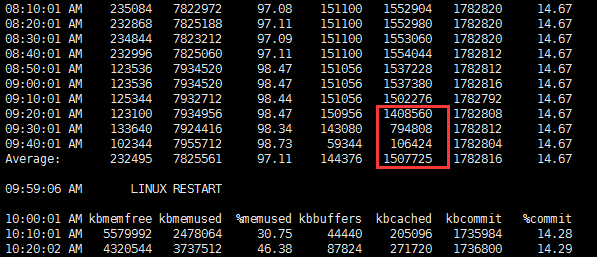
基本上可以认为确实为此问题导致。
缓解此问题的方法:
vim /etc/sysctrl.conf
vm.dirty_background_ratio = 5
vm.dirty_ratio = 10
因为是专用mysql服务器,故方法是适用的。
这个问题在实体机发生的概率应该是非常低的,在虚拟机中概率估计大大增加。
task mysqld:26208 blocked for more than 120 seconds的更多相关文章
- INFO: task java:27465 blocked for more than 120 seconds不一定是cache太大的问题
这几天,老有几个环境在中午收盘后者下午收盘后那一会儿,系统打不开,然后过了一会儿,进程就消失不见了,查看了下/var/log/message,有如下信息: Dec 12 11:35:38 iZ23nn ...
- kernel: INFO: task sadc:14833 blocked for more than 120 seconds.
早上一到,发现oracle连不上. 到主机上,发现只有oracleora11g一个进程,其他进程全没了. Nov 14 23:33:30 hs-test-10-20-30-15 kernel: INF ...
- linux 出错 “INFO: task xxxxxx: 634 blocked for more than 120 seconds.”的3种解决方案(转)
linux 出错 “INFO: task xxxxxx: 634 blocked for more than 120 seconds.”的3种解决方案 1 问题描述 服务器内存满了,ssh登录失败 , ...
- linux 出错 “INFO: task java: xxx blocked for more than 120 seconds.” 的3种解决方案
1 问题描述 最近搭建的一个linux最小系统在运行到241秒时在控制台自动打印如下图信息,并且以后每隔120秒打印一次. 仔细阅读打印信息发现关键信息是“hung_task_timeout_secs ...
- linux 出错 “INFO: task xxxxxx: 634 blocked for more than 120 seconds.”的3种解决方案
https://blog.csdn.net/electrocrazy/article/details/79377214
- Linux 日志报错 xxx blocked for more than 120 seconds
监控作业发现一台服务器(Red Hat Enterprise Linux Server release 5.7)从凌晨1:32开始,有一小段时间无法响应,数据库也连接不上,后面又正常了.早上检查了监听 ...
- Linux系统出现hung_task_timeout_secs和blocked for more than 120 seconds的解决方法
Linux系统出现系统没有响应. 在/var/log/message日志中出现大量的 “echo 0 > /proc/sys/kernel/hung_task_timeout_secs" ...
- 服务器卡死,重启报错: INFO: task blocked for more than 120 seconds
问题:服务器负载很高,但是CPU利用率不高.服务器经常夯住,网站打不开,SSH连接非常不稳定,输入命令夯住. 重启服务器报错: INFO: task blocked for more than 120 ...
- hung_task_timeout_secs 和 blocked for more than 120 seconds
https://help.aliyun.com/knowledge_detail/41544.html 问题现象 云服务器 ECS Linux 系统出现系统没有响应. 在/var/log/messag ...
随机推荐
- WinForm 批量设置指定控件中的控件状态
在开发中常遇到当点击某个按钮的时候,禁用文本框或按钮的的状态,以防止误操作,下面的代码是我已批量设置指定控件中的按钮状态的代码,同理可以延伸出很多操作. /// <summary> /// ...
- 数据人员Sql必会——行转列
今天被问到列转行的问题,竟然没有回答上来,回想自己也是数据开发人员,平时的积累真是不到位,下面总结一下列转行. 假设咱们有一个学生得分数据表:student_score CREATE TABLE st ...
- angularjs, nodejs, express, gulp, karma, jasmine 前端方案整合
今年转向做前端开发,主要是做angularjs开发,期间接触了nodejs平台,从此一发不可收拾. npm丰富的插件库,express 开发框架, grunt, gulp构建工具,karma测试管理工 ...
- 自动化测试管理平台ATMS(V2.0.1_8.12)下载
自动化测试管理平台ATMS(V2.0.1_8.12)下载: http://automationqa.com/forum.php?mod=viewthread&tid=2701&from ...
- 用对 gitignore
使用 git 做代码管理工具时,设置 gitignore 是必不可少的流程,一些系统或者 IDE 会在目录下生成与项目不相关的文件,而这些文件我们不期望被提交到仓库之中.理解 gitignore 的 ...
- Raspberry Pi 3 Model B 安装 OSMC
Raspberry Pi 3 Model B 自身搭载 WIFI 芯片,可直接连接无线网络. 准备 NOOBS 你可以购买预装有 NOOBS 的 SD 卡,或者从树莓派官网 下载 NOOBS.zip ...
- js中的执行上下文,菜鸟入门基础。
console.log(a); //Uncaught ReferenceError: a is not defined 因为没有定义a所以报错了. var a = 52; console.log(a) ...
- webpack多页面开发与懒加载hash解决方案
之前讨论了webpack的hash与chunkhash的区别以及各自的应用场景,如果是常规单页面应用的话,上篇文章提供的方案是没有问题的.但是前端项目复杂多变,应对复杂多页面项目时,我们不得不继续踩w ...
- 【转载】shell中 dd 命令
转载自:http://blog.chinaunix.net/uid-24958038-id-3416169.html dd if=/dev/zero of=的含义是什么? 一.dd命令的解释 dd:用 ...
- Android学习笔记之BitmapFactory.Options实现图片资源的加载...
PS:小项目总算是做完了...历经20多天...素材,设计,以及实现全由自己完成...心力憔悴啊...该写写博客记录一下学习到的东西了... 学习内容: 1.使用BitmapFactory.Optio ...