
【nginx】关于fastcgi_cache
一、简介
Nginx版本从0.7.48开始,支持了类似Squid的缓存功能。这个缓存是把URL及相关组合当做Key,用Md5算法对Key进行哈希,得到硬盘上对应的哈希目录路径,从而将缓存内容保存在该目录内。
Nginx Web 缓存服务只能为指定URL或状态码设置过期时间,不支持类似Squid的PURGE指令手动清除缓存;但是我们可以通过Nginx的模块ngx_cache_purge清除指定URL的缓存。
- proxy_cache:缓存后端服务器的内容,可能是任何内容,包括静态的和动态,减少了nginx与后端通信的次数,节省了传输时间和后端宽带
- fastcgi_cache:缓存fastcgi生成的内容,很多情况是php生成的动态的内容,少了nginx与php的通信的次数,更减轻了php和数据库(mysql)的压力,这比用memcached之类的缓存要轻松得多
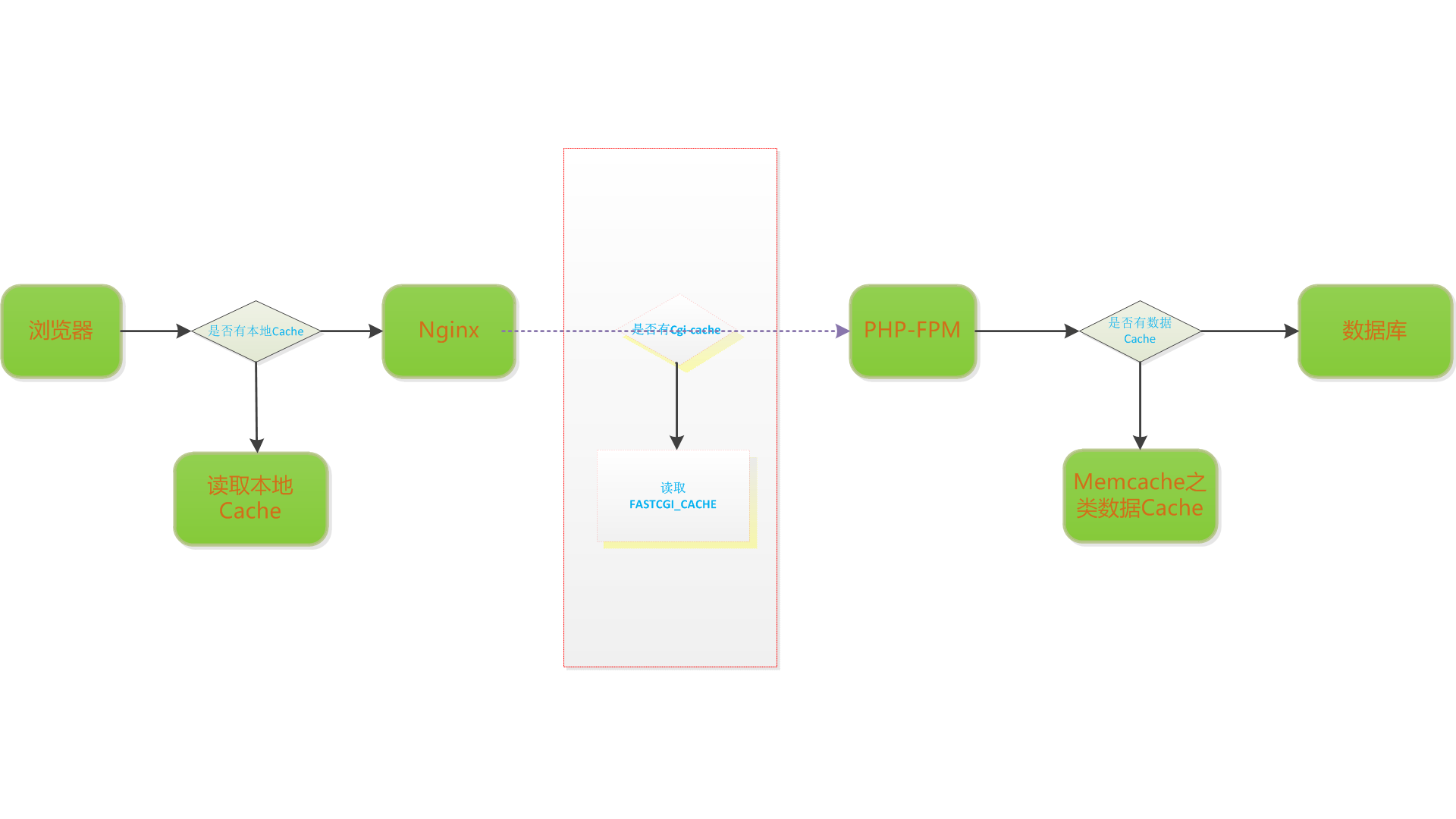
图片来自网络
二、配置
nginx.conf
fastcgi_cache_path /var/run/nginx-cache levels=1:2 keys_zone=WORDPRESS:100m inactive=60m;

fastcgi_cache_key "$scheme$request_method$host$request_uri";

fastcgi_cache_use_stale error timeout invalid_header http_500;

fastcgi_ignore_headers Cache-Control Expires Set-Cookie;

fastcgi_temp_path  /tmp/nginx/fcgi/temp;
vhost配置
server {

	server_name example.com www.example.com;

	access_log   /var/log/nginx/example.com.access.log;

	error_log    /var/log/nginx/example.com.error.log;

	root /var/www/example.com/htdocs;

	index index.php;

	set $skip_cache 0;

	# POST requests and urls with a query string should always go to PHP

	if ($request_method = POST) {

		set $skip_cache 1;

	}

	if ($query_string != "") {

		set $skip_cache 1;

	}

	# Don't cache uris containing the following segments

	if ($request_uri ~* "/wp-admin/|/xmlrpc.php|wp-.*.php|/feed/|index.php|sitemap(_index)?.xml") {

		set $skip_cache 1;

	}

	# Don't use the cache for logged in users or recent commenters

	if ($http_cookie ~* "comment_author|wordpress_[a-f0-9]+|wp-postpass|wordpress_no_cache|wordpress_logged_in") {

		set $skip_cache 1;

	}

	location / {

		try_files $uri $uri/ /index.php?$args;

	}

	location ~ \.php($|/) {

		try_files $uri =404;

		include fastcgi_params;

		fastcgi_split_path_info         ^(.+\.php)(/.+)$;

		fastcgi_param PATH_INFO         $fastcgi_path_info;

		fastcgi_param SCRIPT_FILENAME   $document_root$fastcgi_script_name;

		fastcgi_pass unix:/dev/shm/php-socket;

		fastcgi_cache_bypass $skip_cache;

		fastcgi_no_cache $skip_cache;

		fastcgi_cache WORDPRESS;

		include fcgi_cache_params;

	}

	location ~ /purge(/.*) {

	    fastcgi_cache_purge WORDPRESS "$scheme$request_method$host$1";

	}

	location ~* ^.+\.(ogg|ogv|svg|svgz|eot|otf|woff|mp4|ttf|rss|atom|jpg|jpeg|gif|png|ico|zip|tgz|gz|rar|bz2|doc|xls|exe|ppt|tar|mid|midi|wav|bmp|rtf)$ {

		access_log off;	log_not_found off; expires max;

	}

	location = /robots.txt { access_log off; log_not_found off; }

	location ~ /\. { deny  all; access_log off; log_not_found off; }

}
fcgi_cache_params配置
#include fcgi_cache_params;

#fastcgi_cache_valid 200 302 1s;

### fcgi-cache

fastcgi_cache fcgi;

fastcgi_cache_valid 200 302 1s;

fastcgi_cache_valid 404 500 502 503 504 0s;

fastcgi_cache_valid any 1m;

fastcgi_cache_min_uses 1;

fastcgi_cache_use_stale error timeout invalid_header http_500 http_503 updating;

fastcgi_ignore_headers Cache-Control Expires Set-Cookie;

#add_header X-Cache "$upstream_cache_status - $upstream_response_time";

fastcgi_cache_key "$scheme$request_method$host$request_uri"
大概解释下各个参数的含义:
fastcgi_cache 该指令用于设置哪个缓存区将被使用,zone_name的值为fastcgi_cache_path指令创建的缓存名称
fastcgi_cache_path 作用域:http
fastcgi_cache_path path

[levels=levels] [use_temp_path=on|off] keys_zone=name:size [inactive=time]

[max_size=size] [loader_files=number] [loader_sleep=time] [loader_threshold=time]

[purger=on|off] [purger_files=number] [purger_sleep=time] [purger_threshold=time];
该指令用于设置缓存文件的存放路径,示例如下:fastcgi_cache_path /data/nginx/cache levels=1:2 keys_zone=cache_one:100M inactive=1d max_size=10g;
a、levels:指定了该缓存空间有两层hash目录,设置缓存目录层数,levels=1:2,表示创建两层目录缓存,最多创建三层。第一层目录名取fastcgi_cache_key md5的最后一个字符,第二层目录名取倒数2-3字符,如:fastcgi_cache_key md5为b7f54b2df7773722d382f4809d65029c,则:
levels=1:2为/data/nginx/cache/c/29/b7f54b2df7773722d382f4809d65029c

levels=1:2:3为/data/nginx/cache/c/29/650/b7f54b2df7773722d382f4809d65029c
b、keys_zone为这个缓存区起名为zone_name,500m指代缓存空间为500MB;
c、inactive=1d 代表如果缓存文件一天内没有被访问,则删除;
d、max_size=30g代表硬盘缓存最大为30G;
设置缓存多个磁盘
fastcgi_cache_path /path/to/hdd1 levels=1:2 keys_zone=my_cache_hdd1:10m max_size=10g  inactive=60m use_temp_path=off;

fastcgi_cache_path /path/to/hdd2 levels=1:2 keys_zone=my_cache_hdd2:10m max_size=10g  inactive=60m use_temp_path=off;

split_clients $request_uri $my_cache {

              50%          "my_cache_hdd1";

              50%          "my_cache_hdd2";

}

server {

    ...

    location / {

       fastcgi_cache $my_cache;

    }

}
将缓存文件放入内存中
编辑/etc/fstab 或者 放入 /dev/shm
tmpfs /etc/nginx/cache tmpfs defaults,size=100M 0 0

mount -a

df -ah | grep tmpfs
需要注意的是fastcgi_cache缓存是先写在fastcgi_temp_path再移到fastcgi_cache_path,所以这两个目录最好在同一个分区,从0.8.9之后可以在不同的分区,不过还是建议放同一分区
fastcgi_cache_methods 该指令用于设置缓存哪些HTTP方法,默认缓存HTTP GET/HEAD方法。
fastcgi_cache_min_uses URL经过多少次请求将被缓存
fastcgi_cache_valid reply_code [reply_code ... ] time
该指令用于对不同返回状态码的URL设置不同的缓存时间,例如:
fastcgi_cache_valid 200 302 10m;

fastcgi_cache_valid 404      1m;
设置202 302状态URL缓存10分钟,404状态的URL缓存1分钟。
注意:如果不指定状态码,直接指定缓存时间,则只有200,301,302状态码会进行缓存。
fastcgi_cache_valid 5m;
any 可以指定缓存任何响应码
fastcgi_cache_valid 200 302 10m;

fastcgi_cache_valid 301      1h;

fastcgi_cache_valid any      1m;
缓存的参数也可以在响应头直接设置。这些的优先级高于缓存时间设定使用该指令
- The “X-Accel-Expires” header field sets caching time of a response in seconds. The zero value disables caching for a response. If the value starts with the
@prefix, it sets an absolute time in seconds since Epoch, up to which the response may be cached. - If the header does not include the “X-Accel-Expires” field, parameters of caching may be set in the header fields “Expires” or “Cache-Control”.
- If the header includes the “Set-Cookie” field, such a response will not be cached.
- If the header includes the “Vary” field with the special value “
*”, such a response will not be cached (1.7.7). If the header includes the “Vary” field with another value, such a response will be cached taking into account the corresponding request header fields (1.7.7).
fastcgi_cache_key
该指令用来设置Web缓存的Key值,Nginx根据Key值MD5缓存。一般根据$host(域名),$request_uri(请求的路径)等变量组合成fastcgi_cache_key。
例如:fastcgi_cache_key "$scheme$request_method$host$request_uri";
定义fastcgi_cache的key,示例中就以请求的URI作为缓存的key,Nginx会取这个key的md5作为缓存文件,如果设置了缓存哈希目录,Nginx会从后往前取相应的位数做为目录。
注意一定要加上$request_method作为cache key,否则如果HEAD类型的先请求会导致后面的GET请求返回为空
fastcgi_temp_path path [level1 [level2 [level3]]]; 默认为 fastcgi_temp;
该指令用来设置fastcgi_cache临时文件目录
fastcgi_temp_path /spool/nginx/fastcgi_temp 1 2;
a temporary file might look like this:
/spool/nginx/fastcgi_temp/7/45/00000123457
fastcgi_cache_use_stale : fastcgi_cache_use_stale error | timeout | invalid_header | updating | http_500 | http_503 | http_403 | http_404 | off ...;
定义哪些情况下用过期缓存
x-cache头,用于调试
$upstream_response_time为过期时间
$upstream_cache_status 变量表示此请求响应来自cache的状态,几种状态分别为:
- MISS – The response was not found in the cache and so was fetched from an origin server. The response might then have been cached.
- BYPASS – The response was fetched from the origin server instead of served from the cache because the request matched a proxy_cache_bypass directive (see Can I Punch a Hole Through My Cache? below.) The response might then have been cached.
- EXPIRED – The entry in the cache has expired. The response contains fresh content from the origin server.
- STALE – The content is stale because the origin server is not responding correctly, and proxy_cache_use_stale was configured.
- UPDATING – The content is stale because the entry is currently being updated in response to a previous request, and proxy_cache_use_stale updating is configured.
- REVALIDATED – The proxy_cache_revalidate directive was enabled and NGINX verified that the current cached content was still valid (If-Modified-Since or If-None-Match).
- HIT – The response contains valid, fresh content direct from the cache.
有一些情况会影响到cache的命中 这里需要特别注意
- Nginx fastcgi_cache在缓存后端fastcgi响应时,当响应里包含“set-cookie”时,不缓存;
- 当响应头包含Expires时,如果过期时间大于当前服务器时间,则nginx_cache会缓存该响应,否则,则不缓存;
- 当响应头包含Cache-Control时,如果Cache-Control参数值为no-cache、no-store、private中任意一个时,则不缓存,如果Cache-Control参数值为max-age时,会被缓存,且nginx设置的cache的过期时间,就是系统当前时间 + mag-age的值。
header("Expires: ".gmdate("D, d M Y H:i:s", time()+10000).' GMT');

header("Expires: ".gmdate("D, d M Y H:i:s", time()-99999).' GMT');

header("X-Accel-Expires:5"); // 5s

header("Cache-Control: no-cache"); //no cache

header("Cache-Control: no-store"); //no cache

header("Cache-Control: private"); //no cache

header("Cache-Control: max-age=10"); //cache 10s

setcookie('hello',"testaaaa"); //no cache
注意session使用的时候有坑,可以用下面来设置
session_cache_limiter("none");

session_start();

echo date("Y-m-d H:i:s",time());
可以看一下PHP源代码中的头信息 Expires等
//ext/session/session.c  line:1190 左右

// ...

CACHE_LIMITER_FUNC(private) /* {{{ */

{

    ADD_HEADER("Expires: Thu, 19 Nov 1981 08:52:00 GMT");

    CACHE_LIMITER(private_no_expire)(TSRMLS_C);

}

/* }}} */

//再到这里3 或者上面几个 ##默认是nocache

CACHE_LIMITER_FUNC(nocache) /* {{{ */

{

    ADD_HEADER("Expires: Thu, 19 Nov 1981 08:52:00 GMT");

    /* For HTTP/1.1 conforming clients and the rest (MSIE 5) */

    ADD_HEADER("Cache-Control: no-store, no-cache, must-revalidate, post-check=0, pre-check=0");

    /* For HTTP/1.0 conforming clients */

    ADD_HEADER("Pragma: no-cache");

}

/* }}} */

//这里2

static php_session_cache_limiter_t php_session_cache_limiters[] = {

    CACHE_LIMITER_ENTRY(public)

    CACHE_LIMITER_ENTRY(private)

    CACHE_LIMITER_ENTRY(private_no_expire)

    CACHE_LIMITER_ENTRY(nocache)

    {0}

};

static int php_session_cache_limiter(TSRMLS_D) /* {{{ */

{

    php_session_cache_limiter_t *lim;

    if (PS(cache_limiter)[0] == '\0') return 0;

    if (SG(headers_sent)) {

        const char *output_start_filename = php_output_get_start_filename(TSRMLS_C);

        int output_start_lineno = php_output_get_start_lineno(TSRMLS_C);

        if (output_start_filename) {

            php_error_docref(NULL TSRMLS_CC, E_WARNING, "Cannot send session cache limiter - headers already sent (output started at %s:%d)", output_start_filename, output_start_lineno);

        } else {

            php_error_docref(NULL TSRMLS_CC, E_WARNING, "Cannot send session cache limiter - headers already sent");

        }

        return -2;

    }

    for (lim = php_session_cache_limiters; lim->name; lim++) {

        if (!strcasecmp(lim->name, PS(cache_limiter))) {

            lim->func(TSRMLS_C);   //这里1

            return 0;

        }

    }

    return -1;

}
三、清除缓存
NGINX只在商业版中支持proxy_cache_purge指令清除缓存,开源的ngx_cache_purge模块只支持单一key的缓存清除。为了实现按目录清除缓存只能自己开发。
NGINX作为Cache服务器时将资源内容以文件形式进行缓存,缓存元信息存储于共享内存中,组织成一棵红黑树。红黑树中的每个节点代表一个Cache元信息。NGINX将Cache Key的HASH值作为红黑树节点的KEY。内容缓存文件以该HASH值作为文件名存储在磁盘上。
NGINX的处理流程简化描述是这样的:当请求到达时,根据Cache Key的HASH值在红黑树中进行查找。如果找到,并查看相关信息,如果Cache可用,返回相应的Cache文件。否则,则回源抓取。
因为元信息是以Cache Key的HASH值作为Key存储的,因而红黑树中并不能保留Cache Key中有层级关系. 如”/uri/foo”和”/uri/bar”在元信息红黑树中完全没有关系。要实现按照目录清除缓存,需要将Cache Key中层次关系存储起来。
可以这样做,在共享内存中建立一棵目录树来存储层级关系。将Cache Key类比于文件系统中的路径, 每级路径存储为树中的一个节点。当需要清除某一目录下的所有缓存时,将该节点子树的中的所有缓存清除即可。
安装Purge模块
Purge模块被用来清除缓存
wget http://labs.frickle.com/files/ngx_cache_purge-1.2.tar.gz

tar -zxvf ngx_cache_purge-1.2.tar.gz
编译
./configure \

…… \

--with-http_geoip_module \

--add-module=/usr/local/ngx_cache_purge-1.2
四、需要注意的一些问题
设置了之后重启nginx就可以生效了,这个时候再访问php的页面的话,就会被缓存了,可以查看/var/logs/nginx/fastcgi_cache_dir这个目录下面是有缓存文件的。最后再说明一点,如果更改了缓存目录的路径,一定要把缓存的名称也改掉,后端调用的名称也同步改掉,如果只改掉了缓存目录,不改缓存名称的话,缓存的时候还是会缓存到之前的路径下面去,但是调用的时候调用的是新的路径,这个时候就会出现找不到的情况
参考文章
http://www.nginxtips.com/configure-nginx-fastcgi-cache/
http://www.haidx.com/fastcgi-cache-details.html
http://www.just4coding.com/blog/2014/11/01/nginx-purge-directory/
http://weizhifeng.net/nginx-proxy-cache.html
https://www.nginx.com/blog/nginx-caching-guide/#gs.6PdbraI
http://nginx.org/en/docs/http/ngx_http_fastcgi_module.html#fastcgi_cache
https://www.cnxct.com/several-reminder-in-nginx-fastcgi_cache-and-php-session_cache_limiter/
https://rtcamp.com/wordpress-nginx/tutorials/single-site/fastcgi-cache-with-purging/
http://nginx.org/en/docs/http/ngx_http_fastcgi_module.html#fastcgi_cache
【nginx】关于fastcgi_cache的更多相关文章
- Nginx模块fastcgi_cache的几个注意点 转
Nginx模块fastcgi_cache的几个注意点 去年年底,我对nginx的fastcgi_cache进行摸索使用.在我的测试过程中,发现一些wiki以及网络上没被提到的注意点,这里分享一下. ...
- Nginx的fastcgi_cache
nginx的proxy_cache是缓存后端内容,而fastcgi_cache则是缓存Nginx+php的fastcgi,即缓存php动态内容. fastcgi_cache默认已包含在nginx0.7 ...
- 【摘自张宴的"实战:Nginx"】使用nginx的fastcgi_cache缓存php输出的内容
亲自测试发现,fastcgi_cache虽然可以缓存生成的php输出的文件,但是有个弊端,在缓存的失效时间之内,你继续访问这个地址,输出的内容没有发生变化,即使数据库新增了数据或者删除了数据,所以不适 ...
- 利用nginx的fastcgi_cache模块来做缓存
nginx不仅有个大家很熟悉的缓存代理后端内容的proxy_cache,还有个被很多人忽视的fastcgi_cache. proxy_cache的作用是缓存后端服务器的内容,可能是任何内容,包括静态的 ...
- nginx利用fastcgi_cache模块缓存
nginx不仅有个大家很熟悉的缓存代理后端内容的proxy_cache,还有个被很多人忽视的fastcgi_cache.proxy_cache的作用是缓存后端服务器的内容,可能是任何内容,包括静态的和 ...
- Nginx模块fastcgi_cache的几个注意点
fastcgi响应http请求的结果中,响应头包括Expires、Cache-Control、Set-Cookie三个,都会可能不被cache. thinkphp3.0禁止session自动启动 co ...
- 使用fastcgi_cache加速你的Nginx网站
很久以前在TW上挖了个坑,说nginx的fastcgi_cache是被大家忽视的一大金矿,今天把这个坑填上. 对于变化不太频繁的数据,大家都比较喜欢存Memcached以减少数据库的读取,但还是会有语 ...
- RedHat7配置Nginx实现多域名虚拟主机的SSL/TLS认证(实现单IP以不同证书服务于不同域名)
以RedHat7(64bit)平台为例 如果RedHat源没法用,可以使用EPEL源 # rpm -Uvh https://dl.fedoraproject.org/pub/epel/epel-rel ...
- Nginx fastcgi_cache权威指南
一.简介 Nginx版本从0.7.48开始,支持了类似Squid的缓存功能.这个缓存是把URL及相关组合当做Key,用Md5算法对Key进行哈希,得到硬盘上对应的哈希目录路径,从而将缓存内容保存在该目 ...
随机推荐
- 我写的一个ExcelHelper通用类,可用于读取或生成数据
读取或生成EXCEL数据的方法有很多,一般常见的有: 1.通过OFFICE EXCEL组件,优点:读取与生成EXCEL文件方便,缺点:服务器上必须安装OFFICE软件,且进程无法及时释放 2.通过第三 ...
- UINavigationItem和UItabBarItem的区别详解
一.UINavigationItem 1> 获得方式 self.navigationItem // self是指控制器 2> 作用 可以用来设置当前控制器顶部导航栏的内容 // 设置导航栏 ...
- SQL Server存储过程复习(一)
--存储过程学习篇 --.简单存储过程不带参数的学习 IF OBJECT_ID('Orders_GetAllOrders','P') IS NOT NULL DROP PROCEDURE Orders ...
- 字符串 --- KMP Eentend-Kmp 自动机 trie图 trie树 后缀树 后缀数组
涉及到字符串的问题,无外乎这样一些算法和数据结构:自动机 KMP算法 Extend-KMP 后缀树 后缀数组 trie树 trie图及其应用.当然这些都是比较高级的数据结构和算法,而这里面最常用和最熟 ...
- Hyperion Business Modeling for Microsoft Windows (32-bit)
介质包搜索 常见问题 说明 复查 许可证列表 以确定需要下载的产品程序包. 请选择产品程序包和平台,然后单击“查找”. 如果只有一项结果,则可以看到下载页.如果有多个结果,请选择一个,然后单 ...
- ADO.NET完整增删改
完整增添 删除 修改 运用中间变量运用.bool has=false 1增加 需要使用cmd.Parameters这个集合 占位符: @key 代表这个位置用这个占位符占住了 SqlConnectio ...
- .Net Oauth2.0 第三方登录开发(Facebook ,LinkedIn )
需求:OAuth2实现第三方网站授权并获取其相关数据来实现登录等功能 暂时支持Facebook ,LinkedIn ,基本大同小异,只是返回时的数据不同,需根据具体返回类型进行相应处理 1.OAuth ...
- 运用Microsoft.DirectX.DirectSound和Microsoft.DirectX实现简单的录音功能
1.首先要使用Microsoft.DirectX.DirectSound和Microsoft.DirectX这两个dll进行录音,需要先安装microsoft directx 9.0cz这个组件, 百 ...
- ActiveReports 报表应用教程 (4)---分栏报表
在 ActiveReports 中可以实现分栏报表布局样式,可以设置横向分栏.纵向分栏,同时进行分栏和分组设置,统计分栏分组的小计.合计等.在商业报表系统中常见的分栏报表有商品标签.员工工卡.条码打印 ...
- java之Class类详解
测试中需要用到的代码 InterfaceA代码: package jichu; interface InterfaceA { String s1 = "this is s1 in Inter ...