
HTTP 笔记与总结(5)socket 编程:使用 HTTP 协议模拟登录并发帖
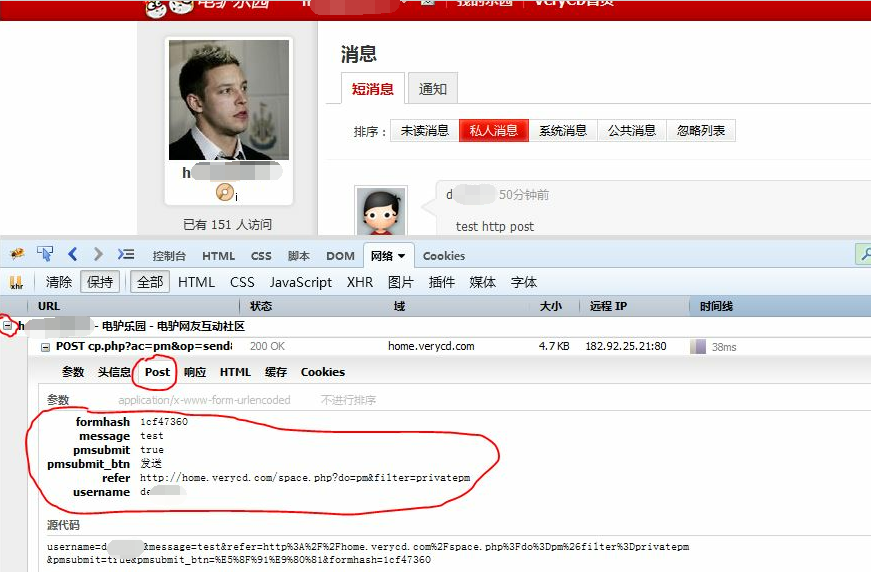
在 VeryCD 上注册两个帐号,发送和接收站内信,观察 POST 请求时发送的参数(h****2 发送给 d***2)。(最好用 FireFox 的 FireBug 工具,发送站内信之前选中 “保持” 以保证站内信发送完毕页面跳转后还能查看到之前发送的 POST 请求时的参数。找到 http://home.verycd.com/cp.php?ac=pm&op=send&touid=0&pmid=0,选中 “POST”,查看参数如下:
| formhash | 1cf47360 |
| message | test |
| pmsubmit | true |
| pmsubmit_btn | 发送 |
| refer | http://home.verycd.com/space.php?do=pm&filter=privatepm |
| username | d***2 |
),如下图所示:

新建文件 msg.php,用来模拟 POST 请求。首先测试 POST 主体信息的拼接:
<?php

require './http.class.php';

$http = new Http('http://home.verycd.com/cp.php?ac=pm&op=send&touid=0&pmid=0');

$body = array(

		'formhash'=>'1cf47360',

		'message'=>	'test',

		'pmsubmit'=>'true',

		'pmsubmit_btn'=>'发送',

		'refer'=>'http://home.verycd.com/space.php?do=pm&filter=privatepm',

		'username'=>'d***2'

	);

file_put_contents('./res.html', $http->post($body));
同时修改 http.class.php,修改 setLine() 方法,在请求行的请求地址处加上参数 $this->url['query']:
<?php

/*

	PHP + socket 编程

	@发送 HTTP 请求

	@模拟下载

	@实现注册、登录、批量发帖

*/

//http 请求类的接口

interface Proto{

	//连接 url

	function conn($url);

	//发送 GET 请求

	function get();

	//发送 POST 请求

	function post();

	//关闭连接

	function close();

}

class Http implements Proto{

	//换行符

	const CRLF = "\r\n";

	//fsocket 的错误号与错误描述

	protected $errno = -1;

	protected $errstr = '';

	//响应内容

	protected $response = '';

	protected $url = null;

	protected $version = 'HTTP/1.1';

	protected $fh = null;

	protected $line = array();

	protected $header = array();

	protected $body = array();

	public function __construct($url){

		$this->conn($url);

		$this->setHeader('Host:' . $this->url['host']);

	}

	//写请求行

	protected function setLine($method){

		$this->line[0] = $method . ' ' . $this->url['path'] . '?' . $this->url['query'] . '  ' . $this->version;

	}

	//写头信息

	protected function setHeader($headerline){

		$this->header[] = $headerline;

	}

	//写主体信息

	protected function setBody($body){

		//构造 body 的字符串

		$this->body[] = http_build_query($body);

	}

	//连接 url

	public function conn($url){

		$this->url = parse_url($url);

		//判断端口

		if(!isset($this->url['port'])){

			$this->url['port'] = 80;

		}

		$this->fh = fsockopen($this->url['host'], $this->url['port'], $this->errno, $this->errstr, 3);

	}

	//构造 GET 请求的数据

	public function get(){

		$this->setLine('GET');

		//发送请求

		$this->request();

		return $this->response;

	}

	//构造 POST 请求的数据

	public function post($body = array()){

		//构造请求行

		$this->setLine('POST');

		//设置 Content-type 和 Content-length

		$this->setHeader('Content-type: application/x-www-form-urlencoded');

		//构造主体信息, 和 GET 请求不一样的地方

		$this->setBody($body);

		$this->setHeader('Content-length: ' . strlen($this->body[0]));

		//发送请求

		$this->request();

		return $this->response;

	}

	//发送请求

	public function request(){

		//把请求行、头信息、主体信息拼接起来

		$req = array_merge($this->line, $this->header, array(''), $this->body, array(''));

		$req = implode(self::CRLF, $req);

		echo $req;exit;

		fwrite($this->fh, $req);

		while(!feof($this->fh)){

			$this->response .= fread($this->fh, 1024);

		}

		//关闭连接

		$this->close();

	}

	//关闭连接

	public function close(){

		fclose($this->fh);

	}

}
执行 msg.php,页面的源代码显示:
POST /cp.php?ac=pm&op=send&touid=0&pmid=0  HTTP/1.1

Host:home.verycd.com

Content-type: application/x-www-form-urlencoded

Content-length: 171

formhash=1cf47360&message=test&pmsubmit=true&pmsubmit_btn=%E5%8F%91%E9%80%81&refer=http%3A%2F%2Fhome.verycd.com%2Fspace.php%3Fdo%3Dpm%26filter%3Dprivatepm&username=d***2
主体信息没有问题。注释 http.class.php line:106,运行 msg.php,由于直接发送 POST 请求会因为没有登录而发生页面跳转而无法很好的观察和调试,所以把返回的数据写入日志文件(res.html),在 msg.php 文件中:
file_put_contents('./res.html', $http->post($body));
res.html 中能清楚的显示:

也就是说需要登录才能发送 POST 请求。
通过 HTTP 请求分析 Cookie
在 setcookie.php 中设置 cookie:
<?php

header('Content-type:text/html; charset=utf-8');

setcookie('user', 'dee');

echo '<a href="readcookie.php">跳转</a>';
运行,通过 FireFox 的 Firebug 工具查看请求头信息:

点击 “跳转”;
在 readcookie.php 中读取 cookie:
<?php

header('Content-type:text/html; charset=utf-8');

echo 'I Know U are '.$_COOKIE['user'];
页面输出:

响应头信息中有 Cookie user=dee
同样可以使用 telnet 发送带 cookie 的 HTTP 请求:

要模拟 VeryCD 的 POST 请求,就要知道 POST 请求时所带的 Cookie 信息,否则只会出现没有登录的提示。

另外需要注意的是,Cookie 和其他头信息是有可能关联的(Cookie 防伪),比如 Referer,User-Agent,因此要把所有的头信息都放入请求头信息:修改 msg.php
<?php

require './http.class.php';

$http = new Http('http://home.verycd.com/cp.php?ac=pm&op=send&touid=0&pmid=0');

$http->setHeader('Accept: http://home.verycd.com/cp.php?ac=pmtext/html,application/xhtml+xml,application/xml;q=0.9,*/*;q=0.8');

$http->setHeader('Accept-Encoding: gzip, deflate');

$http->setHeader('Accept-Language: zh-CN,zh;q=0.8,en-US;q=0.5,en;q=0.3');

$http->setHeader('Connection: keep-alive');

$http->setHeader('Cookie: Hm_lvt_c7849bb40e146a37d411700cb7696e46=1436679571,1436789767,1436791505,1436795485; member_id=3***** ; member_name=h******2; mgroupId=93; pass_hash=649ca21c97da98c3d183192240099369; rememberme=true; uchome_auth=b992hkSzDMnvjuKlyf%2BmE8U%2Fbt2GlJbLGC5FID5izJw5eDOK0egZ5hnPjsPbeVJOPWuQd2qYN0zTysI2zMMCpPhkrMOb ; uchome_loginuser=h******2; CNZZDATA1479=cnzz_eid%3D34351862-1436678182-http%253A%252F%252Fwww.verycd .com%252F%26ntime%3D1436798382; __utma=248211998.1001521947.1436679596.1436798878.1436801507.4; __utmz =248211998.1436798878.3.2.utmcsr=verycd.com|utmccn=(referral)|utmcmd=referral|utmcct=/; sid=dd9375417f28d09be9b80dc3b462adf093a00e71 ; BAIDU_DUP_lcr=http://www.baidu.com/link?url=BlvZ-TX3pY_kRvw_pHazRyRsX-fNXNqXsSfSwEt1fjq&wd=&eqid=ecf1add60000205d0000000255a3bfc7 ; Hm_lpvt_c7849bb40e146a37d411700cb7696e46=1436795485; __utmc=248211998; uchome_sendmail=1; uchome_checkpm =1; __utmb=248211998.1.10.1436801507; __utmt=1; dcm=1');

$http->setHeader('Referer: http://home.verycd.com/cp.php?ac=pm');

$http->setHeader('User-Agent: Mozilla/5.0 (Windows NT 6.1; rv:39.0) Gecko/20100101 Firefox/39.0');

$body = array(

		'formhash'=>'1cf47360',

		'message'=>	'test send msg',

		'pmsubmit'=>'true',

		'pmsubmit_btn'=>'发送',

		'refer'=>'http://home.verycd.com/space.php?do=pm&filter=newpm',

		'username'=>'d****2'

	);

file_put_contents('./res.html', $http->post($body));

echo 'complete';
修改 http.class.php line:55,protected ---> puclic,因为 setHeader 方法在 msg.php 中被外部调用:
<?php

/*

	PHP + socket 编程

	@发送 HTTP 请求

	@模拟下载

	@实现注册、登录、批量发帖

*/

//http 请求类的接口

interface Proto{

	//连接 url

	function conn($url);

	//发送 GET 请求

	function get();

	//发送 POST 请求

	function post();

	//关闭连接

	function close();

}

class Http implements Proto{

	//换行符

	const CRLF = "\r\n";

	//fsocket 的错误号与错误描述

	protected $errno = -1;

	protected $errstr = '';

	//响应内容

	protected $response = '';

	protected $url = null;

	protected $version = 'HTTP/1.1';

	protected $fh = null;

	protected $line = array();

	protected $header = array();

	protected $body = array();

	public function __construct($url){

		$this->conn($url);

		$this->setHeader('Host:' . $this->url['host']);

	}

	//写请求行

	protected function setLine($method){

		$this->line[0] = $method . ' ' . $this->url['path'] . '?' . $this->url['query'] . '  ' . $this->version;

	}

	//写头信息

	public function setHeader($headerline){

		$this->header[] = $headerline;

	}

	//写主体信息

	protected function setBody($body){

		//构造 body 的字符串

		$this->body[] = http_build_query($body);

	}

	//连接 url

	public function conn($url){

		$this->url = parse_url($url);

		//判断端口

		if(!isset($this->url['port'])){

			$this->url['port'] = 80;

		}

		$this->fh = fsockopen($this->url['host'], $this->url['port'], $this->errno, $this->errstr, 3);

	}

	//构造 GET 请求的数据

	public function get(){

		$this->setLine('GET');

		//发送请求

		$this->request();

		return $this->response;

	}

	//构造 POST 请求的数据

	public function post($body = array()){

		//构造请求行

		$this->setLine('POST');

		//设置 Content-type 和 Content-length

		$this->setHeader('Content-type: application/x-www-form-urlencoded');

		//构造主体信息, 和 GET 请求不一样的地方

		$this->setBody($body);

		$this->setHeader('Content-length: ' . strlen($this->body[0]));

		//发送请求

		$this->request();

		return $this->response;

	}

	//发送请求

	public function request(){

		//把请求行、头信息、主体信息拼接起来

		$req = array_merge($this->line, $this->header, array(''), $this->body, array(''));

		$req = implode(self::CRLF, $req);

		//echo $req;exit;

		fwrite($this->fh, $req);

		while(!feof($this->fh)){

			$this->response .= fread($this->fh, 1024);

		}

		//关闭连接

		$this->close();

	}

	//关闭连接

	public function close(){

		fclose($this->fh);

	}

}
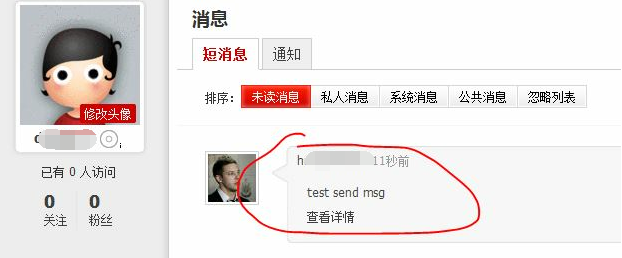
发送成功:
注意:在拼接 header 头信息时,cookie 要写成一行,否则会报 400 错误。
HTTP 笔记与总结(5)socket 编程:使用 HTTP 协议模拟登录并发帖的更多相关文章
- Socket编程之聊天程序 - 模拟Fins/ModBus协议通信过程
设备控制软件编程涉及到的基本通信方式主要有TCP/IP与串口,用到的数据通信协议有Fins与ModBus. 更高级别的通信如.net中的Remoting与WCF在进行C/S架构软件开发时会采用. 本篇 ...
- socket编程的网络协议
"我们在传输数据时,可以只使用(传输层)TCP/IP协议,但是那样的话,如果没有应用层,便无法识别数据内容" TCP/IP只是一个协议栈,就像程序运行一样,必须要实现运行,同时还要 ...
- 2020-07-26:如何用 socket 编程实现 ftp 协议?
福哥答案2020-07-26: 功能用户输入user username.pass password注册,注册后输入dir查看服务器文件列表,输入get filename path下载文件到指定路径. ...
- HTTP 笔记与总结(4 )socket 编程:批量发帖
浏览器发送 POST 请求: 表单 form.html <!doctype html> <html lang="en"> <head> < ...
- 在线服务之socket编程科普
简介 本篇文章是介绍一个典型的在线C++服务的最底层socket管理是如何实现的. 文章会从一个最简单的利用socket编程基础API的一个小程序开始,逐步引入现在典型的select,epoll机制, ...
- [Python_7] Python Socket 编程
0. 说明 Python Socket 编程 1. TCP 协议 [TCP Server] 通过 netstat -ano 查看端口是否开启 # -*-coding:utf-8-*- "&q ...
- Python基础系列讲解——TCP协议的socket编程
前言 我们知道TCP协议(Transmission Control Protocol, 传输控制协议)是一种面向连接的传输层通信协议,它能提供高可靠性通信,像HTTP/HTTPS等网络服务都采用TCP ...
- C# Socket编程笔记(转)
C# Socket编程笔记 http://www.cnblogs.com/stg609/archive/2008/11/15/1333889.html TCP Socket:Server 端连接步骤: ...
- Android Socket编程学习笔记
http://blog.csdn.net/eyu8874521/article/details/8847173 度娘给出的描述:通常也称作"套接字",用于描述IP地址和端口,是一个 ...
随机推荐
- Mysql 自动化任务
Mysql自动化任务,有两种:基于事件,基于时间. 基于事件,可由触发器来实现.具体触发器的编写比较简单,其语法规范可参照:http://www.jb51.net/article/59552.htm. ...
- Android之UI控件
本文主要包括以下内容 Spinner的使用 Gallery的使用 Spinner的使用 Spinner的实现过程是 1. 在xml文件中定义Spinner的控件 2. 在activity中获取Spin ...
- /etc/profile和$HOME/.bash_profile
Linux中含有两个重要的文件 /etc/profile和$HOME/.bash_profile 每当系统登陆时都要读取这两个文件,用来初始化系统所用到的变量,其中/etc/profile是超级用户所 ...
- DB,Cache和Redis应用场景分析
最近做一产品,微博方面的.数据存储同时用到了DB(mysql),Cache(memcache),Redis.其实最开始架构设计的时候是准备用MongoDB的,由于学习成本太高,最终选择放弃了,采用了比 ...
- C/C++中extern关键字详解
转自:http://www.cnblogs.com/yc_sunniwell/archive/2010/07/14/1777431.html 1 基本解释:extern可以置于变量或者函数前,以标示变 ...
- 我对序列化(Serializable)的理解
转自:http://blog.tianya.cn/blogger/post_show.asp?BlogID=764&PostID=3231409 序列化是把一个对象的状态写入一个字节流的过程. ...
- VMware 虚拟机网络 组网问题
1.VMware虚拟机组网概述 整个结构: 需要确定的内容: 1) 虚拟机连接到哪个VMnet(交换机)? 2) VMnet(交换机)的组网模式? 首先,讲一下VMware的界面内容 安装好VMwar ...
- 【转】cloudera新增用户权限配置
转自 http://lookqlp.iteye.com/blog/2189119 . 配置起来较复杂,需要在有测试环境之后再进行配置测试. 之后是有上HUE的计划的,所以这个也是一定要做的. ...
- RequiredFieldValidator 控件 CompareValidator 控件
RequiredFieldValidator 控件 验证关联控件非空 ControlToValidate 属性用来关联被验证控件 ErrorMEssage 触发控件后显示的错误信息 CompareVa ...
- 简单几何(线段相交+最短路) POJ 1556 The Doors
题目传送门 题意:从(0, 5)走到(10, 5),中间有一些门,走的路是直线,问最短的距离 分析:关键是建图,可以保存所有的点,两点连通的条件是线段和中间的线段都不相交,建立有向图,然后用Dijks ...