
HTTP 笔记与总结(5)socket 编程:使用 HTTP 协议模拟登录并发帖
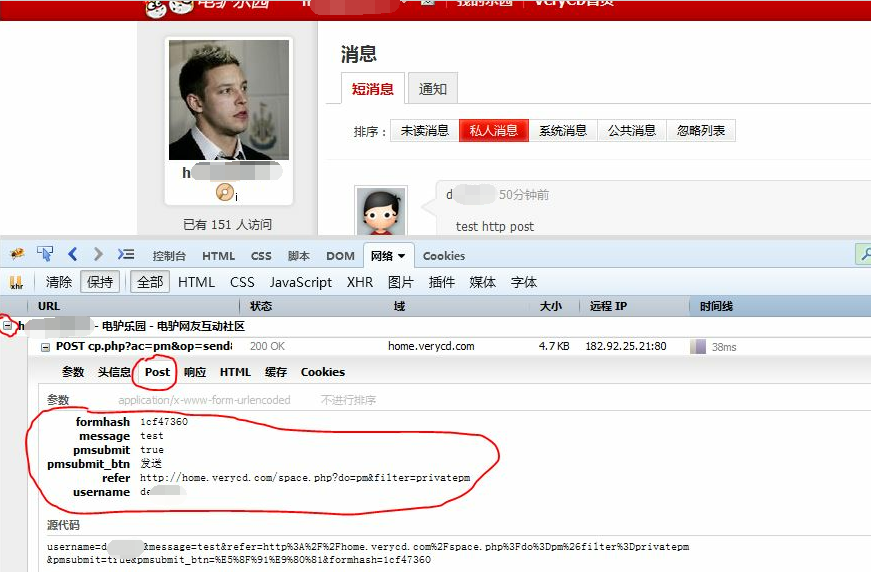
在 VeryCD 上注册两个帐号,发送和接收站内信,观察 POST 请求时发送的参数(h****2 发送给 d***2)。(最好用 FireFox 的 FireBug 工具,发送站内信之前选中 “保持” 以保证站内信发送完毕页面跳转后还能查看到之前发送的 POST 请求时的参数。找到 http://home.verycd.com/cp.php?ac=pm&op=send&touid=0&pmid=0,选中 “POST”,查看参数如下:
| formhash | 1cf47360 |
| message | test |
| pmsubmit | true |
| pmsubmit_btn | 发送 |
| refer | http://home.verycd.com/space.php?do=pm&filter=privatepm |
| username | d***2 |
),如下图所示:

新建文件 msg.php,用来模拟 POST 请求。首先测试 POST 主体信息的拼接:
<?php

require './http.class.php';

$http = new Http('http://home.verycd.com/cp.php?ac=pm&op=send&touid=0&pmid=0');

$body = array(

		'formhash'=>'1cf47360',

		'message'=>	'test',

		'pmsubmit'=>'true',

		'pmsubmit_btn'=>'发送',

		'refer'=>'http://home.verycd.com/space.php?do=pm&filter=privatepm',

		'username'=>'d***2'

	);

file_put_contents('./res.html', $http->post($body));
同时修改 http.class.php,修改 setLine() 方法,在请求行的请求地址处加上参数 $this->url['query']:
<?php

/*

	PHP + socket 编程

	@发送 HTTP 请求

	@模拟下载

	@实现注册、登录、批量发帖

*/

//http 请求类的接口

interface Proto{

	//连接 url

	function conn($url);

	//发送 GET 请求

	function get();

	//发送 POST 请求

	function post();

	//关闭连接

	function close();

}

class Http implements Proto{

	//换行符

	const CRLF = "\r\n";

	//fsocket 的错误号与错误描述

	protected $errno = -1;

	protected $errstr = '';

	//响应内容

	protected $response = '';

	protected $url = null;

	protected $version = 'HTTP/1.1';

	protected $fh = null;

	protected $line = array();

	protected $header = array();

	protected $body = array();

	public function __construct($url){

		$this->conn($url);

		$this->setHeader('Host:' . $this->url['host']);

	}

	//写请求行

	protected function setLine($method){

		$this->line[0] = $method . ' ' . $this->url['path'] . '?' . $this->url['query'] . '  ' . $this->version;

	}

	//写头信息

	protected function setHeader($headerline){

		$this->header[] = $headerline;

	}

	//写主体信息

	protected function setBody($body){

		//构造 body 的字符串

		$this->body[] = http_build_query($body);

	}

	//连接 url

	public function conn($url){

		$this->url = parse_url($url);

		//判断端口

		if(!isset($this->url['port'])){

			$this->url['port'] = 80;

		}

		$this->fh = fsockopen($this->url['host'], $this->url['port'], $this->errno, $this->errstr, 3);

	}

	//构造 GET 请求的数据

	public function get(){

		$this->setLine('GET');

		//发送请求

		$this->request();

		return $this->response;

	}

	//构造 POST 请求的数据

	public function post($body = array()){

		//构造请求行

		$this->setLine('POST');

		//设置 Content-type 和 Content-length

		$this->setHeader('Content-type: application/x-www-form-urlencoded');

		//构造主体信息, 和 GET 请求不一样的地方

		$this->setBody($body);

		$this->setHeader('Content-length: ' . strlen($this->body[0]));

		//发送请求

		$this->request();

		return $this->response;

	}

	//发送请求

	public function request(){

		//把请求行、头信息、主体信息拼接起来

		$req = array_merge($this->line, $this->header, array(''), $this->body, array(''));

		$req = implode(self::CRLF, $req);

		echo $req;exit;

		fwrite($this->fh, $req);

		while(!feof($this->fh)){

			$this->response .= fread($this->fh, 1024);

		}

		//关闭连接

		$this->close();

	}

	//关闭连接

	public function close(){

		fclose($this->fh);

	}

}
执行 msg.php,页面的源代码显示:
POST /cp.php?ac=pm&op=send&touid=0&pmid=0  HTTP/1.1

Host:home.verycd.com

Content-type: application/x-www-form-urlencoded

Content-length: 171

formhash=1cf47360&message=test&pmsubmit=true&pmsubmit_btn=%E5%8F%91%E9%80%81&refer=http%3A%2F%2Fhome.verycd.com%2Fspace.php%3Fdo%3Dpm%26filter%3Dprivatepm&username=d***2
主体信息没有问题。注释 http.class.php line:106,运行 msg.php,由于直接发送 POST 请求会因为没有登录而发生页面跳转而无法很好的观察和调试,所以把返回的数据写入日志文件(res.html),在 msg.php 文件中:
file_put_contents('./res.html', $http->post($body));
res.html 中能清楚的显示:

也就是说需要登录才能发送 POST 请求。
通过 HTTP 请求分析 Cookie
在 setcookie.php 中设置 cookie:
<?php

header('Content-type:text/html; charset=utf-8');

setcookie('user', 'dee');

echo '<a href="readcookie.php">跳转</a>';
运行,通过 FireFox 的 Firebug 工具查看请求头信息:

点击 “跳转”;
在 readcookie.php 中读取 cookie:
<?php

header('Content-type:text/html; charset=utf-8');

echo 'I Know U are '.$_COOKIE['user'];
页面输出:

响应头信息中有 Cookie user=dee
同样可以使用 telnet 发送带 cookie 的 HTTP 请求:

要模拟 VeryCD 的 POST 请求,就要知道 POST 请求时所带的 Cookie 信息,否则只会出现没有登录的提示。

另外需要注意的是,Cookie 和其他头信息是有可能关联的(Cookie 防伪),比如 Referer,User-Agent,因此要把所有的头信息都放入请求头信息:修改 msg.php
<?php

require './http.class.php';

$http = new Http('http://home.verycd.com/cp.php?ac=pm&op=send&touid=0&pmid=0');

$http->setHeader('Accept: http://home.verycd.com/cp.php?ac=pmtext/html,application/xhtml+xml,application/xml;q=0.9,*/*;q=0.8');

$http->setHeader('Accept-Encoding: gzip, deflate');

$http->setHeader('Accept-Language: zh-CN,zh;q=0.8,en-US;q=0.5,en;q=0.3');

$http->setHeader('Connection: keep-alive');

$http->setHeader('Cookie: Hm_lvt_c7849bb40e146a37d411700cb7696e46=1436679571,1436789767,1436791505,1436795485; member_id=3***** ; member_name=h******2; mgroupId=93; pass_hash=649ca21c97da98c3d183192240099369; rememberme=true; uchome_auth=b992hkSzDMnvjuKlyf%2BmE8U%2Fbt2GlJbLGC5FID5izJw5eDOK0egZ5hnPjsPbeVJOPWuQd2qYN0zTysI2zMMCpPhkrMOb ; uchome_loginuser=h******2; CNZZDATA1479=cnzz_eid%3D34351862-1436678182-http%253A%252F%252Fwww.verycd .com%252F%26ntime%3D1436798382; __utma=248211998.1001521947.1436679596.1436798878.1436801507.4; __utmz =248211998.1436798878.3.2.utmcsr=verycd.com|utmccn=(referral)|utmcmd=referral|utmcct=/; sid=dd9375417f28d09be9b80dc3b462adf093a00e71 ; BAIDU_DUP_lcr=http://www.baidu.com/link?url=BlvZ-TX3pY_kRvw_pHazRyRsX-fNXNqXsSfSwEt1fjq&wd=&eqid=ecf1add60000205d0000000255a3bfc7 ; Hm_lpvt_c7849bb40e146a37d411700cb7696e46=1436795485; __utmc=248211998; uchome_sendmail=1; uchome_checkpm =1; __utmb=248211998.1.10.1436801507; __utmt=1; dcm=1');

$http->setHeader('Referer: http://home.verycd.com/cp.php?ac=pm');

$http->setHeader('User-Agent: Mozilla/5.0 (Windows NT 6.1; rv:39.0) Gecko/20100101 Firefox/39.0');

$body = array(

		'formhash'=>'1cf47360',

		'message'=>	'test send msg',

		'pmsubmit'=>'true',

		'pmsubmit_btn'=>'发送',

		'refer'=>'http://home.verycd.com/space.php?do=pm&filter=newpm',

		'username'=>'d****2'

	);

file_put_contents('./res.html', $http->post($body));

echo 'complete';
修改 http.class.php line:55,protected ---> puclic,因为 setHeader 方法在 msg.php 中被外部调用:
<?php

/*

	PHP + socket 编程

	@发送 HTTP 请求

	@模拟下载

	@实现注册、登录、批量发帖

*/

//http 请求类的接口

interface Proto{

	//连接 url

	function conn($url);

	//发送 GET 请求

	function get();

	//发送 POST 请求

	function post();

	//关闭连接

	function close();

}

class Http implements Proto{

	//换行符

	const CRLF = "\r\n";

	//fsocket 的错误号与错误描述

	protected $errno = -1;

	protected $errstr = '';

	//响应内容

	protected $response = '';

	protected $url = null;

	protected $version = 'HTTP/1.1';

	protected $fh = null;

	protected $line = array();

	protected $header = array();

	protected $body = array();

	public function __construct($url){

		$this->conn($url);

		$this->setHeader('Host:' . $this->url['host']);

	}

	//写请求行

	protected function setLine($method){

		$this->line[0] = $method . ' ' . $this->url['path'] . '?' . $this->url['query'] . '  ' . $this->version;

	}

	//写头信息

	public function setHeader($headerline){

		$this->header[] = $headerline;

	}

	//写主体信息

	protected function setBody($body){

		//构造 body 的字符串

		$this->body[] = http_build_query($body);

	}

	//连接 url

	public function conn($url){

		$this->url = parse_url($url);

		//判断端口

		if(!isset($this->url['port'])){

			$this->url['port'] = 80;

		}

		$this->fh = fsockopen($this->url['host'], $this->url['port'], $this->errno, $this->errstr, 3);

	}

	//构造 GET 请求的数据

	public function get(){

		$this->setLine('GET');

		//发送请求

		$this->request();

		return $this->response;

	}

	//构造 POST 请求的数据

	public function post($body = array()){

		//构造请求行

		$this->setLine('POST');

		//设置 Content-type 和 Content-length

		$this->setHeader('Content-type: application/x-www-form-urlencoded');

		//构造主体信息, 和 GET 请求不一样的地方

		$this->setBody($body);

		$this->setHeader('Content-length: ' . strlen($this->body[0]));

		//发送请求

		$this->request();

		return $this->response;

	}

	//发送请求

	public function request(){

		//把请求行、头信息、主体信息拼接起来

		$req = array_merge($this->line, $this->header, array(''), $this->body, array(''));

		$req = implode(self::CRLF, $req);

		//echo $req;exit;

		fwrite($this->fh, $req);

		while(!feof($this->fh)){

			$this->response .= fread($this->fh, 1024);

		}

		//关闭连接

		$this->close();

	}

	//关闭连接

	public function close(){

		fclose($this->fh);

	}

}
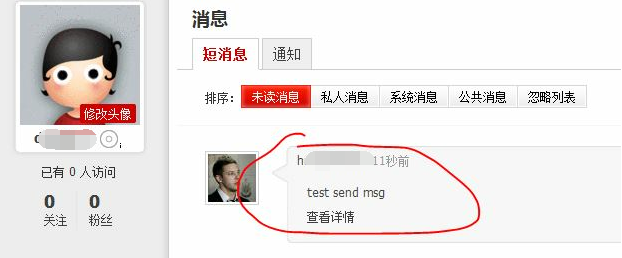
发送成功:
注意:在拼接 header 头信息时,cookie 要写成一行,否则会报 400 错误。
HTTP 笔记与总结(5)socket 编程:使用 HTTP 协议模拟登录并发帖的更多相关文章
- Socket编程之聊天程序 - 模拟Fins/ModBus协议通信过程
设备控制软件编程涉及到的基本通信方式主要有TCP/IP与串口,用到的数据通信协议有Fins与ModBus. 更高级别的通信如.net中的Remoting与WCF在进行C/S架构软件开发时会采用. 本篇 ...
- socket编程的网络协议
"我们在传输数据时,可以只使用(传输层)TCP/IP协议,但是那样的话,如果没有应用层,便无法识别数据内容" TCP/IP只是一个协议栈,就像程序运行一样,必须要实现运行,同时还要 ...
- 2020-07-26:如何用 socket 编程实现 ftp 协议?
福哥答案2020-07-26: 功能用户输入user username.pass password注册,注册后输入dir查看服务器文件列表,输入get filename path下载文件到指定路径. ...
- HTTP 笔记与总结(4 )socket 编程:批量发帖
浏览器发送 POST 请求: 表单 form.html <!doctype html> <html lang="en"> <head> < ...
- 在线服务之socket编程科普
简介 本篇文章是介绍一个典型的在线C++服务的最底层socket管理是如何实现的. 文章会从一个最简单的利用socket编程基础API的一个小程序开始,逐步引入现在典型的select,epoll机制, ...
- [Python_7] Python Socket 编程
0. 说明 Python Socket 编程 1. TCP 协议 [TCP Server] 通过 netstat -ano 查看端口是否开启 # -*-coding:utf-8-*- "&q ...
- Python基础系列讲解——TCP协议的socket编程
前言 我们知道TCP协议(Transmission Control Protocol, 传输控制协议)是一种面向连接的传输层通信协议,它能提供高可靠性通信,像HTTP/HTTPS等网络服务都采用TCP ...
- C# Socket编程笔记(转)
C# Socket编程笔记 http://www.cnblogs.com/stg609/archive/2008/11/15/1333889.html TCP Socket:Server 端连接步骤: ...
- Android Socket编程学习笔记
http://blog.csdn.net/eyu8874521/article/details/8847173 度娘给出的描述:通常也称作"套接字",用于描述IP地址和端口,是一个 ...
随机推荐
- Action返回类型
1.返回ascx页面return PartialView(); 2.Content(),返回文本ContentResultreturn Content("这是一段文本"); 3.J ...
- (五)转载:通用定时器PWM输出
1. TIMER输出PWM基本概念 脉冲宽度调制(PWM),是英文“Pulse Width Modulation”的缩写,简称脉宽调制,是利用微处理器的数字输出来对模拟电路进行控制的一种非常有 ...
- rsync --exclude 参数
/usr/bin/rsync -vr --exclude=".svn" --exclude="temp" --delete /alidata/www/pro/e ...
- 用VMware 11.0虚拟机安装Win8 系统失败,提示“shsucdx can't install”
研究了好久,网上那些更改bios的方法根本行不通,因为该版本的biso根本没有SATA选项!解决方法很简单,如下图: 重启虚拟机即可.
- hdu 4666:Hyperspace(最远曼哈顿距离 + STL使用)
Hyperspace Time Limit: 20000/10000 MS (Java/Others) Memory Limit: 65535/65535 K (Java/Others)Tota ...
- 电赛总结(二)——AD芯片总结之AD7705
1.特性参数 (1)16位无丢失代码性AD转化器 (2)只需要3.3V供电(即只需要单片机即可供电) (3)双通道差分输入 (4)基准电压为2.5V时,在单极性信号下,输入范围是0到2.5V,在双极性 ...
- jquery概要--基础02
复制节点:clone();默认不会复制绑定事件,如果传入参数true会复制:替换节点: replaceWith() //原节点放在前,新节点放在在后: replaceAll( ...
- PDA应用在WMS仓储管理系统 实现无线扫描出入库作业
WMS系统是根据仓储物流管理的建设实施经验而推出的一款专业化仓储管理软件.与传统进销存软件相比优势在于,其不但包含了正常的出入库.盘点等库存管理基本功能,重点在于可以实现仓库作业过程的管理,通过条码及 ...
- 密码等级:至少包含字母、大小写数字、字符中的两种 JS实现方案
前言 密码,如果设置的太简单,很容易就被攻破,所以很多网站将密码设置的要求设置的挺严格,一般是字母.数字.字符3选2,区分大小写.对于设置得太简单的密码,予以错误提示.或者予以密码等级(低中高)显示, ...
- 洛谷 P1541 乌龟棋 Label:O(n^4)的dp
题目背景 小明过生日的时候,爸爸送给他一副乌龟棋当作礼物. 题目描述 乌龟棋的棋盘是一行N个格子,每个格子上一个分数(非负整数).棋盘第1格是唯一的起点,第N格是终点,游戏要求玩家控制一个乌龟棋子从起 ...