
Demo4 Slides.js的使用
Slides.js挺好用的啊,把示例中的Demo调试通了。首先把css、img、js文件夹下的内容全部拷贝到Vs网站项目下的Scripts文件夹下。
代码主要修改了一些图片路径和网址链接。
<!DOCTYPE html>
<html lang="en">
<head>
<meta charset="utf-8" />
<title>Slides, A Slideshow Plugin for jQuery</title>
<link rel="stylesheet" href="Scripts/css/global.css" />
<script src="Scripts/js/jquery-2.1.1.min.js" type="text/javascript"></script>
<script src="Scripts/js/slides.min.jquery.js" type="text/javascript"></script>
<script type="text/javascript">
$(function () {
$('#slides').slides({
preload: true,
preloadImage: 'Scripts/img/loading.gif',
play: ,
pause: ,
hoverPause: true,
animationStart: function (current) {
$('.caption').animate({
bottom: -
}, );
if (window.console && console.log) {
// example return of current slide number
console.log('animationStart on slide: ', current);
};
},
animationComplete: function (current) {
$('.caption').animate({
bottom:
}, );
if (window.console && console.log) {
// example return of current slide number
console.log('animationComplete on slide: ', current);
};
},
slidesLoaded: function () {
$('.caption').animate({
bottom:
}, );
}
});
});
</script>
</head>
<body>
<div id="container">
<div id="example">
<img src="Scripts/img/new-ribbon.png" width="" height="" alt="New Ribbon" id="ribbon"/>
<div id="slides">
<div class="slides_container">
<div class="slide">
<a href="http://www.cnblogs.com/yhlx125/" title="145.365 - Happy Bokeh Thursday! | Flickr - Photo Sharing!"
target="_blank">
<img src="Scripts/img/slide-1.jpg" width="" height="" alt="Slide 1"/></a>
<div class="caption" style="bottom: 0">
<p>
Happy Bokeh Thursday!</p>
</div>
</div>
<div class="slide">
<a href="http://www.cnblogs.com/yhlx125/" title="Taxi | Flickr - Photo Sharing!"
target="_blank">
<img src="Scripts/img/slide-2.jpg" width="" height="" alt="Slide 2"/></a>
<div class="caption">
<p>
Taxi</p>
</div>
</div>
<div class="slide">
<a href="http://www.cnblogs.com/yhlx125/" title="Happy Bokeh raining Day | Flickr - Photo Sharing!"
target="_blank">
<img src="Scripts/img/slide-3.jpg" width="" height="" alt="Slide 3"/></a>
<div class="caption">
<p>
Happy Bokeh raining Day</p>
</div>
</div>
<div class="slide">
<a href="http://www.cnblogs.com/yhlx125/" title="We Eat Light | Flickr - Photo Sharing!"
target="_blank">
<img src="Scripts/img/slide-4.jpg" width="" height="" alt="Slide 4"/></a>
<div class="caption">
<p>
We Eat Light</p>
</div>
</div>
<div class="slide">
<a href="http://www.cnblogs.com/yhlx125/" title="“I must go down to the sea again, to the lonely sea and the sky; and all I ask is a tall ship and a star to steer her by.” | Flickr - Photo Sharing!"
target="_blank">
<img src="Scripts/img/slide-5.jpg" width="" height="" alt="Slide 5"/></a>
<div class="caption">
<p>
“I must go down to the sea again, to the lonely sea and the sky...”</p>
</div>
</div>
<div class="slide">
<a href="http://www.cnblogs.com/yhlx125/" title="twelve.inch | Flickr - Photo Sharing!"
target="_blank">
<img src="Scripts/img/slide-6.jpg" width="" height="" alt="Slide 6"/></a>
<div class="caption">
<p>
twelve.inch</p>
</div>
</div>
<div class="slide">
<a href="http://www.cnblogs.com/yhlx125/" title="Save my love for loneliness | Flickr - Photo Sharing!"
target="_blank">
<img src="Scripts/img/slide-7.jpg" width="" height="" alt="Slide 7"/></a>
<div class="caption">
<p>
Save my love for loneliness</p>
</div>
</div>
</div>
<a href="#" class="prev">
<img src="Scripts/img/arrow-prev.png" width="" height="" alt="Arrow Prev"/></a>
<a href="#" class="next">
<img src="Scripts/img/arrow-next.png" width="" height="" alt="Arrow Next"/></a>
</div>
<img src="Scripts/img/example-frame.png" width="" height="" alt="Example Frame" id="frame"/>
</div>
<div id="footer">
<p>
For full instructions go to <a href="http://slidesjs.com" target="_blank">http://slidesjs.com</a>.</p>
<p>
Slider design by Orman Clark at <a href="http://www.premiumpixels.com/" target="_blank">
Premium Pixels</a>. You can donwload the source PSD at <a href="http://www.premiumpixels.com/clean-simple-image-slider-psd/"
target="_blank">Premium Pixels</a></p>
<p>
© <a href="http://nathansearles.com" target="_blank">Nathan Searles</a>.
All rights reserved. Slides is licensed under the <a href="http://www.apache.org/licenses/LICENSE-2.0"
target="_blank">Apache license</a>.</p>
</div>
</div>
</body>
</html>
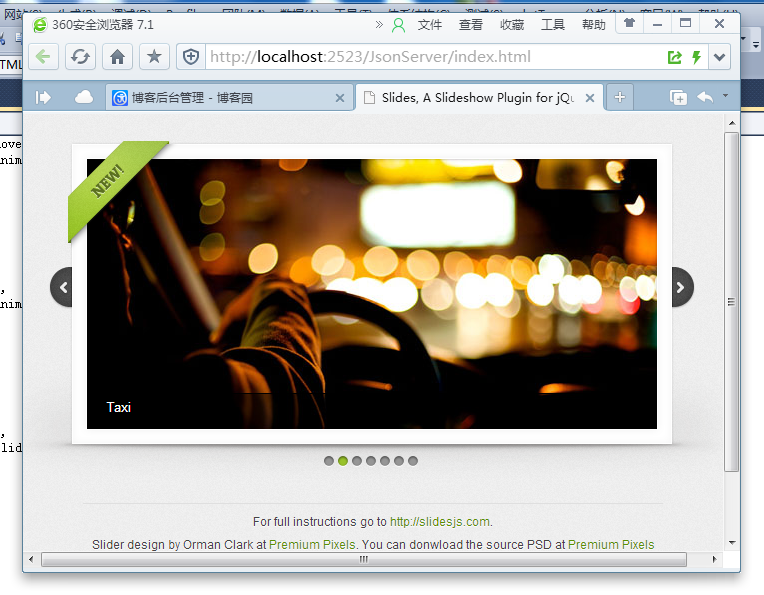
运行效果如下:
Demo4 Slides.js的使用的更多相关文章
- jquery.slides.js
http://slidesjs.com/#docs 一款强大的,专业的幻灯片组件,全方位对幻灯片的速度..全方位的控制: $(function(){ $("#slides").sl ...
- 你需要了解的JS框架
excanvas.js/Chart.js/cubism.js/d3.js/dc.js/dx.chartjs.js/echarts.js/flot.js 用途:构建数据统计图表,兼容多浏览器 ...
- 前端开发需要了解的JS插件
excanvas.js/Chart.js/cubism.js/d3.js/dc.js/dx.chartjs.js/echarts.js/flot.js 用途:构建数据统计图表,兼容多浏览器 jquer ...
- 有了jsRender,妈妈再也不用担心我用jq拼接DOM拼接的一团糟了、页面整齐了、其他伙伴读代码也不那么费劲了
写在前面 说来也很巧, 下午再做一个页面,再普通不过的分页列表,我还是像往常一样,基于MVC环境下,我正常用PagedList.MVC AJAX做无刷新分页,这时候问题就来了,列表数据中有个轮播图用到 ...
- jQuery图片轮播特效
效果预览:http://hovertree.com/texiao/jquery/51/ 这款特效有缩略图,包含文字说明和链接,可以自动播放,也可以手动切换. 使用的jQuery库版本为1.12.3 , ...
- ReactJS学习笔记(一)
1.依赖的资源: <script type="text/javascript" src='../asset/react.js'></script> &l ...
- 分享22款响应式的 jQuery 图片滑块插件
响应式(Responsive)设计的目标是要让产品界面能够响应用户的行为,根据不同终端设备自动调整尺寸,带给用户良好的使用体验.这篇文章收集了22款优秀的响应式 jQuery 幻灯片插件,它们能够帮助 ...
- SlidesJS的使用
项目中对slideshow要求要有触屏滑动换图功能,就想到了SlidesJS这个Jquery插件 例排,先把静态html写好 <div id="cm_slides"> ...
- ASP.NET Web API 的简单示例
Demo1: HTML: <!DOCTYPE html> <html> <head> <meta charset="utf-8" /> ...
随机推荐
- ASP.NET\ASP.NET MVC表单提交遇到的问题结论
同步提交的两种基本方式 1,用type=“submit”按钮.form没有必要runat=“server” <form method="post" action=" ...
- 10. 求N分之一序列前N项和
求N分之一序列前N项和 #include <stdio.h> int main() { int i, n; double item, sum; while (scanf("%d& ...
- GitHub 初探
前言:有时候在公司上班时自己写了一些代码,打算下班回家后继续写,或者在家修改好的代码第二天要拷到公司继续完善,代码就经常要在这两者之间来回同步,通常情况下我用网盘或者U盘,但是实在是很麻烦,不断的备份 ...
- 【翻译】Kinect v1和Kinect v2的彻底比较
本连载主要是比较Kinect for Windows的现行版(v1)和次世代型的开发者预览版(v2),以C++开发者为背景介绍进化的硬件和软件.本文主要是对传感的配置和运行条件进行彻底的比较. ...
- mysql数据库‘复制’的办法
mysql数据库‘复制’的办法 2006-01-17 10:36:00 标签:Mysql SQL 数据库 休闲 职场 >mysqldump wap -u root -ppassword --ad ...
- 超级有用的9个PHP代码片段
在开发网站.app或博客时,代码片段可以真正地为你节省时间.今天,我们就来分享一下我收集的一些超级有用的PHP代码片段.一起来看一看吧! 1.创建数据URI 数据URI在嵌入图像到HTML / CSS ...
- PHP学习(二)----数组
数组: 首先说一下对PHP中的理解,建立一个好的理解模型还是很关键的: 1.PHP中的数组实际上可以理解为键值对,key=>value;而对于key的取值,可以是string/integer;v ...
- [转]SQLBulkCopy使用
SQLBulkCopy,用于数据库之间大批量的数据传递.通常用于新,旧数据库之间数据的更新.即使表结构完全不同,也可以通过字段间的对应关系,顺利的将数据导过来. 首先,SQLBulkCopy需要2个连 ...
- Intel Visual Fortran Compiler 11调用lapack库实现并行多处理计算
采用fortran进行数值计算的朋友们都应该听说过大名鼎鼎的lapack库,我就不多做介绍了,在此,我只是介绍一个编译好的lapack二进制包ACML(AMD Core Math Library),并 ...
- 打造 PHP版本 1password
以前注册很多网站密码都使用简单密码,但是由于今年频繁曝出密码不安全问题,所以要使用更加复杂的密码.但是好多个账号,密码也不能设置成一样的,防止一个被盗全部不安全了,记密码就成了意见很头疼的事情. 在手 ...