
获取系统相关信息 (CPU使用率 内存使用率 系统磁盘大小)
引言
在软件开个过程中,对于软件的稳定性和使用率也是我们需要关注的 。
使用sigar来监控,简单方便!
 package com.thinkgem.jeesite.common.utils;

 import java.io.File;

 import java.io.InputStreamReader;

 import java.io.LineNumberReader;

 import java.text.DecimalFormat;

 import javax.swing.filechooser.FileSystemView;

 import org.hyperic.sigar.Mem;

 import org.hyperic.sigar.Sigar;

 import org.hyperic.sigar.SigarException;

 /**

  *

  *@description:功能说明:获取系统相关信息 (内存使用率 cpu使用率 磁盘大小及使用率)

  *@author:zsq

  *Creation date:2019年6月28日 下午3:24:39

  */

 public class SystemRelatedInfoUtils

 {

     private static final int CPUTIME=500;

     private static final int PERCENT=100;

     private static final int FAULTLENGTH=10;

     /**

      * 获得系统时间.

      * @return 获得系统时间.

      * @author zsq

      * Creation date: 2019年6月28日 下午3:30:39

      */

     public static String getSystemDate(){

       String date=DateUtils.getDate();

       return "报告日期:"+date;

     }

     /**

      * 获得CPU使用率.

      * @return 返回cpu使用率

      * @author amg

      * Creation date: 2019年6月28日 下午3:35:39

      */

     public static  String  getCpuRatioForWindows() {

         try {

             String procCmd = System.getenv("windir")

               + "//system32//wbem//wmic.exe process get Caption,CommandLine,KernelModeTime,ReadOperationCount,ThreadCount,UserModeTime,WriteOperationCount";

             // 取进程信息

             long[] c0 = readCpu(Runtime.getRuntime().exec(procCmd));

             Thread.sleep(CPUTIME);

             long[] c1 = readCpu(Runtime.getRuntime().exec(procCmd));

             if (c0 != null && c1 != null) {

              long idletime = c1[0] - c0[0];

              long busytime = c1[1] - c0[1];

              return "CPU使用率:"

                + Double.valueOf(

                  PERCENT * (busytime) * 1.0

                    / (busytime + idletime)).intValue()

                + "%";

             } else {

              return "CPU使用率:" + 0 + "%";

             }

            } catch (Exception ex) {

             ex.printStackTrace();

             return "CPU使用率:" + 0 + "%";

            }

     }

     /**

      * 读取CPU信息.

      * @param proc

      * @return

      * @author amg

      * Creation date: 2019年6月28日 下午3:40:39

      */

     private static long[] readCpu(final Process proc) {

         long[] retn = new long[2];

         try {

          proc.getOutputStream().close();

          InputStreamReader ir = new InputStreamReader(proc.getInputStream());

          LineNumberReader input = new LineNumberReader(ir);

          String line = input.readLine();

          if (line == null || line.length() < FAULTLENGTH) {

           return null;

          }

          int capidx = line.indexOf("Caption");

          int cmdidx = line.indexOf("CommandLine");

          int rocidx = line.indexOf("ReadOperationCount");

          int umtidx = line.indexOf("UserModeTime");

          int kmtidx = line.indexOf("KernelModeTime");

          int wocidx = line.indexOf("WriteOperationCount");

          long idletime = 0;

          long kneltime = 0;

          long usertime = 0;

          while ((line = input.readLine()) != null) {

           if (line.length() < wocidx) {

            continue;

           }

           // 字段出现顺序:Caption,CommandLine,KernelModeTime,ReadOperationCount,

           // ThreadCount,UserModeTime,WriteOperation

           String caption = substring(line, capidx, cmdidx - 1).trim();

           String cmd = substring(line, cmdidx, kmtidx - 1).trim();

           if (cmd.indexOf("wmic.exe") >= 0) {

            continue;

           }

           String s1 = substring(line, kmtidx, rocidx - 1).trim();

           String s2 = substring(line, umtidx, wocidx - 1).trim();

           if (caption.equals("System Idle Process")

             || caption.equals("System")) {

            if (s1.length() > 0)

             idletime += Long.valueOf(s1).longValue();

            if (s2.length() > 0)

             idletime += Long.valueOf(s2).longValue();

            continue;

           }

           if (s1.length() > 0)

            kneltime += Long.valueOf(s1).longValue();

           if (s2.length() > 0)

            usertime += Long.valueOf(s2).longValue();

          }

          retn[0] = idletime;

          retn[1] = kneltime + usertime;

          return retn;

         } catch (Exception ex) {

          ex.printStackTrace();

         } finally {

          try {

           proc.getInputStream().close();

          } catch (Exception e) {

           e.printStackTrace();

          }

         }

         return null;

     }

      /**

      * 由于String.subString对汉字处理存在问题(把一个汉字视为一个字节),因此在

      * 包含汉字的字符串时存在隐患,现调整如下:

      * @param src 要截取的字符串

      * @param start_idx 开始坐标(包括该坐标)

      * @param end_idx   截止坐标(包括该坐标)

      * @return

      */

     public static String substring(String src, int start_idx, int end_idx){

         byte[] b = src.getBytes();

         String tgt = "";

         for (int i = start_idx; i <= end_idx; i++) {

          tgt += (char) b[i];

         }

         return tgt;

     }

     /**

      * 获取内存使用率.

      * @return 获得内存使用率.

      * @author amg

      * Creation date: 2019年6月28日 下午4:30:39

      */

     @SuppressWarnings("unused")

     public static  String  getMemory() {

         Sigar sigar=new Sigar();

         Mem men;

         String string="";

         try

         {

             men = sigar.getMem();

             double total=men.getTotal()/1024;

             double use=men.getUsed()/1024;

             //double free=men.getFree()/1024;

             double rs=(use/total)*100;

             //内存总量

            // System.out.println("内存总量: "+total+" k av");

             //当前内存使用量

            // System.out.println("当前内存使用量:  "+use+" k use");

             // 当前内存剩余量

            // System.err.println("当前内存剩余量: "+free+" k free");

            // System.err.println("*****内存使用率: "+String.format("%.2f", rs)+"%");

            string="内存使用率: "+String.format("%.2f", rs)+"%";

         } catch (SigarException e)

         {

             e.printStackTrace();

         }

         return string;

     }

      /**

      * 获取磁盘信息.

      * @return 获取磁盘信息.

      * @author amg

      * Creation date: 2019年6月28日 下午4:40:39

      */

     public static String  getDisk(){

         // 当前文件系统类

         FileSystemView fsv = FileSystemView.getFileSystemView();

         // 列出所有windows 磁盘

         File[] fs = File.listRoots();

         double totalSpace=0f;

         double freeSpace=0f;

         // 显示磁盘卷标

         for (int i = 0; i < fs.length; i++) {

             //System.out.println(fsv.getSystemDisplayName(fs[i]));

            // System.out.print("总大小" + FormetFileSize(fs[i].getTotalSpace()));

            // System.out.println("剩余" + FormetFileSize(fs[i].getFreeSpace()));

             totalSpace+=Double.valueOf(FormetFileSize(fs[i].getTotalSpace()));

             freeSpace+=Double.valueOf(FormetFileSize(fs[i].getFreeSpace()));

         }

        // System.err.println("*****磁盘总大小: "+String.format("%.0f",totalSpace)+"G");

        // System.err.println("*****磁盘剩余: "+String.format("%.0f",freeSpace)+"G");

        String  totalSpaceStr="";

        String  freeSpaceStr="";

        //空间大于1024G就用T

         if(totalSpace>1024){

             totalSpace= totalSpace/1024;

             totalSpaceStr=String.format("%.2f",totalSpace)+"T";

         }else{

             totalSpaceStr=String.format("%.0f",totalSpace)+"G";

         }

         if(freeSpace>1024){

             freeSpace= freeSpace/1024;

             freeSpaceStr=String.format("%.2f",freeSpace)+"T";

         }else{

             freeSpaceStr=String.format("%.2f",freeSpace)+"G";

         }

         double rs=((totalSpace-freeSpace)/totalSpace)*100;

         String message="磁盘空间: 总大小"+totalSpaceStr+", 已用 "+String.format("%.2f",rs)+"%"+", 剩余:"+freeSpaceStr;

         return message;

     }

      /*

      * 格式化 计算出 M G T(磁盘大小)

      */

     public static String FormetFileSize(long fileS) {

         DecimalFormat df = new DecimalFormat("#.00");

         String fileSizeString = "";

         if (fileS < 1024) {

             fileSizeString = df.format((double) fileS);//B

         } else if (fileS < 1048576) {

             fileSizeString = df.format((double) fileS / 1024) ;//K

         } else if (fileS < 1073741824) {

             fileSizeString = df.format((double) fileS / 1048576);//M

         }else {

             fileSizeString = df.format((double) fileS / 1073741824);//G

         }

         return fileSizeString;

     }

     public static void main(String[] args)

     {

         SystemRelatedInfoUtils srf=new SystemRelatedInfoUtils();

         long start=System.currentTimeMillis();

         System.out.println(getSystemDate());

         System.out.println(getCpuRatioForWindows());

         long end=System.currentTimeMillis();

         //System.out.println("用时:"+(end-start)/1000+"s");

         System.err.println(getMemory());

         System.err.println(getDisk());

     }

 }
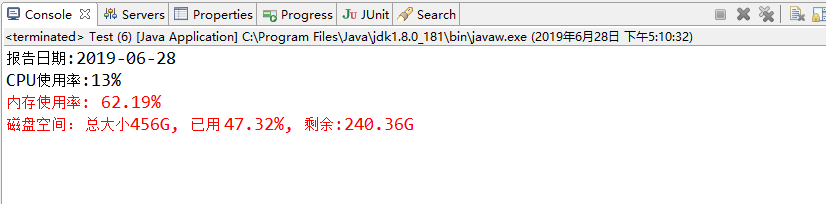
运行效果:
获取系统相关信息 (CPU使用率 内存使用率 系统磁盘大小)的更多相关文章
- C#获取CPU和内存使用率
获取内存使用率 方式1: using System; using System.Runtime.InteropServices; namespace ConsoleApp1 { public clas ...
- Linux下使用java获取cpu、内存使用率
原文地址:http://www.voidcn.com/article/p-yehrvmep-uo.html 思路如下:Linux系统中可以用top命令查看进程使用CPU和内存情况,通过Runtime类 ...
- C#获取特定进程CPU和内存使用率
首先是获取特定进程对象,可以使用Process.GetProcesses()方法来获取系统中运行的所有进程,或者使用Process.GetCurrentProcess()方法来获取当前程序所对应的进程 ...
- Python获取CPU、内存使用率以及网络使用状态代码
Python获取CPU.内存使用率以及网络使用状态代码_python_脚本之家 http://www.jb51.net/article/134714.htm
- Ubuntu 16.04 标题栏实时显示上下行网速、CPU及内存使用率--indicator-sysmonitor
---------------------------------------------------------------------------- 原文地址:http://blog.csdn.N ...
- DSAPI 获取实时统计信息CPU/内存/硬盘/网络
有时,我们需要获取当前计算机中CPU.内存.硬盘.网络等实时信息,如下图:\ 要实现上述几项信息的获取,通常需要使用Timer控件来间隔获取,以便刷新最新的数据. 本示例中,放一个Timer控件,放一 ...
- Ubuntu 16.04 标题栏实时显示上下行网速、CPU及内存使用率
有时感觉网络失去响应,就通过Ubuntu 14.04自带的系统监视器程序来查看当前网速,但是这样很不方便,遂打算让网速显示在标题栏,那样就随时可直观的看到.一番搜索尝试后,成功实现!同时也实现了CPU ...
- 转:ZABBIX监控H3C设备的CPU和内存使用率
由于最近监控的H3C路由器经常出现死机现象,SNMP获取不到数据,后面检查发现是CPU使用率过高,直接导致无法处理SNMP请求,所以需求来了,怎样通过SNMP监控H3C路由器的CPU和内存使用率? ...
- Linux sysinfo获取系统相关信息
Linux中,可以用sysinfo来获取系统相关信息. #include <stdio.h> #include <stdlib.h> #include <errno.h& ...
随机推荐
- 【bzoj4555】[Tjoi2016&Heoi2016]求和(NTT+第二类斯特林数)
传送门 题意: 求 \[ f(n)=\sum_{i=0}^n\sum_{j=0}^i\begin{Bmatrix} i \\ j \end{Bmatrix}2^jj! \] 思路: 直接将第二类斯特林 ...
- libnl概述
以下三个库都基于其核心库libnl: libnl-route:用于和Kernel中的Routing子系统交互. libnl-nf:用于和Kernel中的Netfilter子系统交互. libnl-ge ...
- VUE脚手架使用
什么是vue脚手架? 他是一个快速构建vue项目的工具,通过他,我们可以将vue所需要的文件安装完成. vue-cli这个构建工具大大降低了webpack的使用难度,支持热更新,有webpack- ...
- celery beat - 心跳包
celery -A 项目名 beat -l info -S django# 启动心跳任务 celery -A 项目名 worker -l info # 启动1个worker去执行
- ReactNative: 使用尺寸类Dimensions获取屏幕尺寸
一.简介 在前面创建使用组件时,虽然使用的都是伸缩盒子布局,但是很少使用宽高来进行绝对定位.在iOS中可以通过UIScreen控件获取当前屏幕的宽高,同样地,在RN中提供了一个尺寸组件Dimensio ...
- 《机器学习实战之第二章k-近邻算法》
入坑<机器学习实战>: 本书的第一个机器学习算法是k-近邻算法(kNN),它的工作原理是:存在一个样本数据集合,也称作训练样本集,并且样本集中每个数据都存在标签,即我们知道样本集中每一数据 ...
- Java描述设计模式(04):抽象工厂模式
本文源码:GitHub·点这里 || GitEE·点这里 一.抽象工厂模式 1.生活场景 汽车生产根据用户选择的汽车类型,指定不同的工厂进行生产,选择红旗轿车,就要使用中国工厂,选择奥迪轿车,就要使用 ...
- 用Python制作的一本道生成器,最后笑喷了!
今天皮一下,众所周知,一本道是一本正经的胡说八道的简称,想必写过议论文的小伙伴,都知道引经据典是议论文高分必备,套上名人的话更加具有说服力是语文老师必教的知识点. 所以呢,今天介绍的这个生成器就走的是 ...
- 剑指offer笔记面试题11----旋转数组的最小数字
题目:把一个数组最开始的若干个元素搬到数组的末尾,我们称之为数组的旋转.输入一个递增排序的数组的一个旋转,输出旋转数组的最小元素.例如,数组{3, 4, 5, 1, 2}为{1, 2, 3, 4, 5 ...
- choose Perseverance :)
心里话 很久都没有更新博客了,我会陆陆续续的把云笔记中的一些有意思的文章放在博客中. 这10个月以来经历了很多,9月份参加了省赛获得了一个二等奖,和一等奖失之交臂的滋味很难受,到10月份开始维护自己的 ...