
vue-cli3.x中使用axios发送请求,配合webpack中的devServer编写本地mock数据接口(get/post/put/delete)
vue-cli3.x中使用axios发送请求,配合webpack中的devServer编写本地mock数据接口(get/post/put/delete)
手把手式笔记
Axios配置
- 安装 axios
npm install axios
- main.js同级目录新建axios配置文件setaxios.js
import axios from 'axios'

// import store from './store' //vuex

// import router from './router' //路由

export default function setAxios() {

    //拦截request请求

    axios.interceptors.request.use(

        config=>{

            console.log(config.data);

            return config;

        }

    )

    //拦截response回调

    axios.interceptors.response.use(

        response=>{

            if(response.status===200){

                const data=response.data

                // if (data.code === 400){

                //     //登录过期,权限不足

                //     console.warn("登陆过期");

                //     //清除token

                //     store.commit('setToken','')

                //     window.localStorage.removeItem('token')

                //     //跳转登录

                //     router.replace({

                //         path:"/login"

                //     })

                // }

                return data;

            }

            return response;

        }

    )

}
- main.js中引入axios与其配置文件
import axios from 'axios'

import setaxios from './setaxios'

//Vue全局挂载axios

Vue.prototype.$http=axios

//设置baseUrl

axios.defaults.baseURL = '/api'
devServer中配置本地mock数据接口(vue.config.js文件中)参考webpack中文文档
module.exports = {

    publicPath: './',

    outputDir: 'dist',

    assetsDir: 'static',

    configureWebpack: {

        devServer: {

            contentBase: './build',//项目基本访问目录

            host: 'localhost',//服务器ip地址

            port: 8088,//端口

            open: true, //自动打开页面

            hot: true,//模块热替换

            hotOnly: true,//只有热更新不会刷新页面

            //mock数据接口部分 关键部分

            before(app) {

                const bodyParser = require('body-parser')

                app.use(bodyParser.json())  //通过bodyParser获取req.body)

                /**

                *   testGet

                */

                app.get('/api/test/get',(req,resp)=>{

                    console.log(req.query);

                    resp.json({

                        "code":111,

                        "msg":"get测试成功"

                    })

                })

                /**

                 * testPost

                 */

                app.post('/api/test/post', (req, resp) => {

                    console.log(req.body);

                    resp.json({

                        "code": 123,

                        "msg": "post测试成功"

                    })

                })

                /**

                 * testPut

                 */

                app.put('/api/test/put', (req, resp) => {

                    console.log(req.body)

                    resp.json({

                        "code": 123,

                        "msg": "put测试成功"

                    })

                })

                /**

                 * testDelete

                 */

                app.delete("/api/test/delete",(req,resp)=>{

                    console.log(req.body);

                    resp.json({

                        "code":666,

                        "msg":"delete测试成功"

                    })

                })

            }

        }

    }

}
通过上述配置操作即可完成本地mock数据接口编写,接下来是axios发送http请求测试示例
restful风格接口axios发送请求示例 参考axios中文文档
  methods: {

    sendGet: function() {

      this.$http

        .get("/test/get", {

          params: {

            param1: "get字符串",

            param2: 13131

          }

        })

        .then(res => {

          console.log(res);

        });

    },

    sendPost: function() {

      this.$http

        .post("/test/post", {

          param1: "post字符串",

          param2: 13131

        })

        .then(res => {

          console.log(res);

        });

    },

    sendPut: function() {

      this.$http

        .put("/test/put", {

          param1: "put字符串",

          param2: 13131

        })

        .then(res => {

          console.log(res);

        })

        .catch(err => {

          console.log(err);

        });

    },

    sendDelete: function() {

      this.$http

        .delete("/test/delete", {

          data: {

            param1: "delete字符串",

            param2: 13131

          }

        })

        .then(res => {

          console.log(res);

        })

        .catch(err => {

          console.log(err);

        });

    }

  }
完整测试demo(Test.vue)
<template>
<div>
<h2>HTTP-Request</h2>
<button @click="sendGet()">GET</button>
<span>  </span>
<button @click="sendPost()">POST</button>
<span>  </span>
<button @click="sendPut()">PUT</button>
<span>  </span>
<button @click="sendDelete()">DELETE</button>
<hr />
</div>
</template>
<script>
export default {
name: "testPage",
data() {
return {};
},
methods: {
sendGet: function() {
this.$http
.get("/test/get", {
params: {
param1: "get字符串",
param2: 13131
}
})
.then(res => {
console.log(res);
});
},
sendPost: function() {
this.$http
.post("/test/post", {
param1: "post字符串",
param2: 13131
})
.then(res => {
console.log(res);
});
},
sendPut: function() {
this.$http
.put("/test/put", {
param1: "put字符串",
param2: 13131
})
.then(res => {
console.log(res);
})
.catch(err => {
console.log(err);
});
},
sendDelete: function() {
this.$http
.delete("/test/delete", {
data: {
param1: "delete字符串",
param2: 13131
}
})
.then(res => {
console.log(res);
})
.catch(err => {
console.log(err);
});
}
}
};
</script>
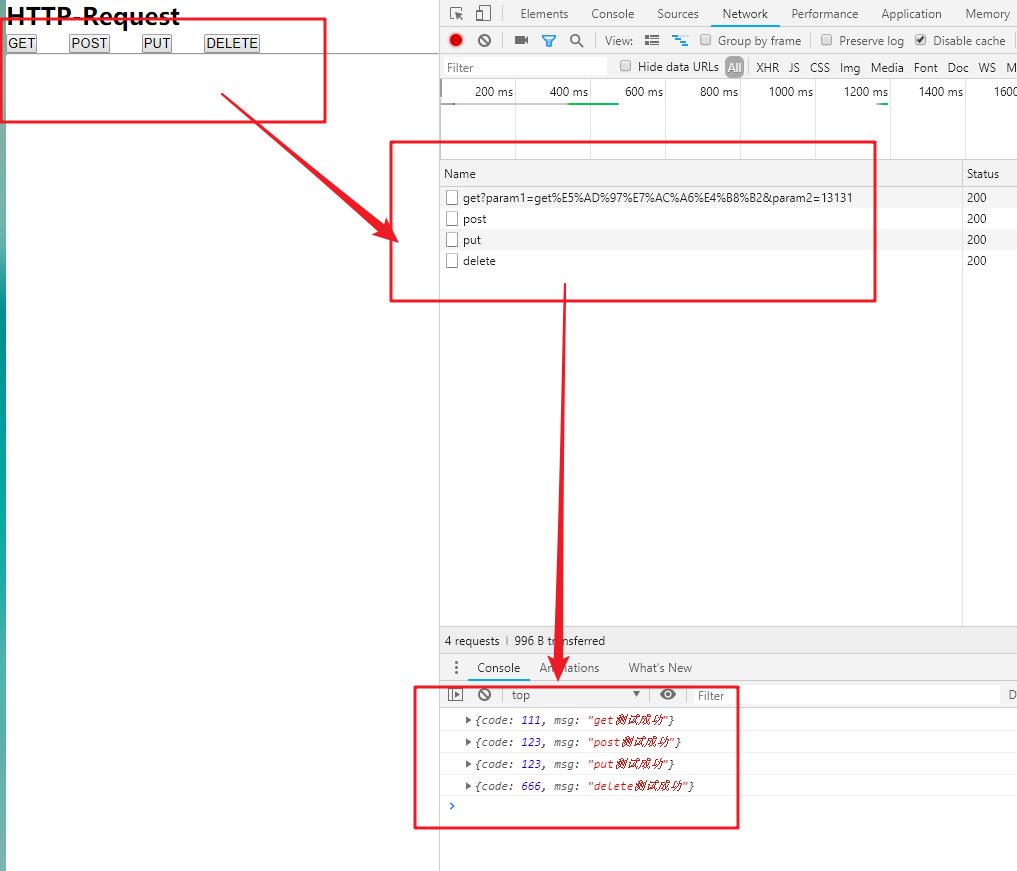
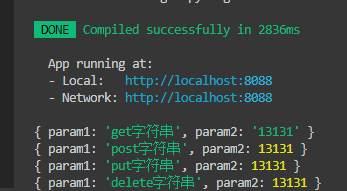
示例效果图
参考文档
如有不妥,不解之处,请滴滴我,或在评论区留言
vue-cli3.x中使用axios发送请求,配合webpack中的devServer编写本地mock数据接口(get/post/put/delete)的更多相关文章
- vue中采用axios发送请求及拦截器
这几天在使用vue中axios发送get请求的时候很顺手,但是在发送post请求的时候老是在成功的回调函数里边返回参数不存在,当时就纳闷了,经过查阅资料,终于得到了解决方案,在此做一总结: 首先我们在 ...
- vue中使用axios发送请求
我们知道,vue2.0以后,vue就不再对vue-resource进行更新,而是推荐axios,而大型项目都会使用 Vuex 来管理数据,所以这篇博客将结合两者来发送请求 1.安装axios cnpm ...
- Vue项目中使用Vuex + axios发送请求
本文是受多篇类似博文的影响写成的,内容也大致相同.无意抄袭,只是为了总结出一份自己的经验. 一直以来,在使用Vue进行开发时,每当涉及到前后端交互都是在每个函数中单独的写代码,这样一来加大了工作量,二 ...
- Vue 爬坑之路(六)—— 使用 Vuex + axios 发送请求
Vue 原本有一个官方推荐的 ajax 插件 vue-resource,但是自从 Vue 更新到 2.0 之后,官方就不再更新 vue-resource 目前主流的 Vue 项目,都选择 axios ...
- Vue笔记:使用 axios 发送请求
在Vue1.0的时候有一个官方推荐的 ajax 插件 vue-resource,但是自从 Vue 更新到 2.0 之后,官方就不再更新 vue-resource. 关于为什么放弃推荐? -> 尤 ...
- Vue 爬坑之路—— 使用 Vuex + axios 发送请求
Vue 原本有一个官方推荐的 ajax 插件 vue-resource,但是自从 Vue 更新到 2.0 之后,官方就不再更新 vue-resource 目前主流的 Vue 项目,都选择 axios ...
- vue项目使用axios发送请求让ajax请求头部携带cookie
最近做vue项目时遇到登录权限问题,登录以后再发送的请求头部并没有携带登录后设置的cookie,导致后台无法校验其是否登录.检查发现是vue项目中使用axios发送ajax请求导致的.查看文档得知ax ...
- vue2.0项目实战(3)使用axios发送请求
在Vue1.0的时候有一个官方推荐的 ajax 插件 vue-resource,但是自从 Vue 更新到 2.0 之后,官方就不再更新 vue-resource. 关于为什么放弃推荐? -> 尤 ...
- vuejs+axios发送请求
Vue 原本有一个官方推荐的 ajax 插件 vue-resource,但是自从 Vue 更新到 2.0 之后,官方就不再更新 vue-resource 目前主流的 Vue 项目,都选择 axios ...
随机推荐
- WIN10以后如果Manifest中不写支持WIN10的话,获取版本号的API获取的是6
if TOSVersion.Major = 10 then // 高版本的Delphi(比如Berlin)可以这样写 ShowMessage('Windows 10'); 或者: if Win32M ...
- Qt5.5.0在Linux下静态编译(加上-fontconfig编译项才能显示中文) good
测试系统环境:Ubuntu12.04 (32bit/64bit)编译软件环境:QT5.5.0 本文章主要介绍Linux下QT静态编译环境的搭建,以及如何编译我们的程序board_driver. 1 ...
- C语言的setlocale和localtime函数(C++也可用)
Example 1234567891011121314151617181920212223242526272829303132 /* setlocale example */ #include < ...
- 设置tablewidget自适应列宽和设置自动等宽
在网上很容易知道自适应列宽,100%不留空显示,这里还是提下: /*设置表格是否充满,即行末不留空*/ ui->tableWidget->horizontalHeader()-> ...
- 【vue系列】Virtual DOM 真的比操作原生 DOM 快吗?
一.前言 网上都说操作真实dom怎么怎么慢,这儿有个例子:http://chrisharrington.github.io/demos/performance/,例子循环2000个随机数组,点击按钮重 ...
- spring boot 2.x 系列——spring-boot 集成 Swagger2 打造在线接口文档
文章目录 一.Springfox 与 Swagger 简介 1.1 Springfox 1.2 Swagger 1.3 OpenApi.Swagger.Springfox的关系 二.spring bo ...
- spring 5.x 系列第14篇 —— 整合RabbitMQ (代码配置方式)
源码Gitub地址:https://github.com/heibaiying/spring-samples-for-all 一.说明 1.1 项目结构说明 本用例关于rabbitmq的整合提供简单消 ...
- form表单提交不刷新页面的方法
方法1:给form表单加onsubmit事件,值为return false; <form action="" method="post" onsubmi ...
- 【SQL-JOIN】mysql中left joinn、right join、full join以及inner join
看到这两张图的时候就觉得太棒了,年轻的时候曾经爬了好多坑~~~~~~
- 【设计模式】行为型11解释器模式(Interpreter Pattern)
解释器模式(Interpreter Pattern) 解释器模式应用场景比较小,也没有固定的DEMO,中心思想就是自定义解释器用来解释固定的对象. 定义:给定一个语言,定义它的文法表示,并定义一个 ...