
pytest4-单文件使用fixture(Fixtures as Function arguments)
fixture的作用:作用类似unittest中setup/teardown,它的优势是可以跨文件共享
fixture的格式:在普通函数上加上装饰器@pytest.fixture(),且函数名不能以test_开头,目的是与测试用例做区分
一 fixture的三种调用方式
1.在测试用例中 直接把fixture的函数名称作为参数传入 进行调用
fixture如何使用?fixture可以有返回值,如果没有return默认但会None;用例调用fixture的返回值,就是直接把fixture的函数名称作为参数传入。
特别说明:用例断言失败是failed,fixture断言失败是error
fixture的作用范围
demo1:fixture可以返回一个元组、列表或字典
# test_01.py

import pytest

@pytest.fixture()

def user():

    print("用户名")

    name = 'wangmm'

    password = ''

    return name,password

def test_a(user):

    u = user[0]

    p = user[1]

    assert u == 'wangmm'

执行结果:

D:\myproject\pytest_demo\testcases>pytest -vs test_01.py

=================================================================================== test session starts ====================================================================================

platform win32 -- Python 3.6.5, pytest-5.0.1, py-1.8.0, pluggy-0.12.0 -- d:\soft\python36\python.exe

cachedir: .pytest_cache

rootdir: D:\myproject\pytest_demo\testcases

collected 1 item

test_01.py::test_a 用户名

PASSED

================================================================================= 1 passed in 0.03 seconds =================================================================================
demo2:test_用例传多个fixture参数
# test_02.py

import pytest

@pytest.fixture()

def username():

    name = 'wangmm'

    return name

@pytest.fixture()

def pw():

    password = ''

    return password

def test_user(username, pw):

    assert username == 'wangmm'

    assert pw == ''

执行结果:

D:\myproject\pytest_demo\testcases>pytest -vs test_02.py

=================================================================================== test session starts ====================================================================================

platform win32 -- Python 3.6.5, pytest-5.0.1, py-1.8.0, pluggy-0.12.0 -- d:\soft\python36\python.exe

cachedir: .pytest_cache

rootdir: D:\myproject\pytest_demo\testcases

collected 1 item

test_02.py::test_user PASSED

================================================================================= 1 passed in 0.03 seconds =============================================    ====================================
demo3:fixture与fixture间相互调用
# test_03.py

import pytest

@pytest.fixture()

def first():

    a = "wangmm"

    return a

@pytest.fixture()

def sencond(first):

    '''psw调用user fixture'''

    a = first

    b = ""

    return (a, b)

def test_1(sencond):

    '''用例传fixture'''

    assert sencond[0] == "wangmm"

    assert sencond[1] == ""

输出结果:

D:\myproject\pytest_demo\testcases>pytest -vs test_03.py

=================================================================================== test session starts ====================================================================================

platform win32 -- Python 3.6.5, pytest-5.0.1, py-1.8.0, pluggy-0.12.0 -- d:\soft\python36\python.exe

cachedir: .pytest_cache

rootdir: D:\myproject\pytest_demo\testcases

collected 1 item

test_03.py::test_1 PASSED
2.使用usefixtures 但是需要注意如果fixture有返回值则不能使用usefixtures,usefixtures是获取不到返回值的
@pytest.mark.usefixtures("user")

def test_b():

    # u = user[0]

    # assert u == 'wangmm'

    assert  1 == 1
3.使用autos自动调用fixture 注意:如果不传autouse,默认scope=False
@pytest.fixture(scope='function',autouse=True)

def login_test():

    print("登录")
def test_s7():    # 该测试用例不需要传login_test,会自动调用的
    print("用例1:登录之后其它动作111")
二 使用conftest.py实现多文件共享fixture

一个测试工程下是可以有多个conftest.py的文件,一般在工程根目录放一个conftest.py起到全局作用。
在不同的测试子目录也可以放conftest.py,作用范围只在该层级以及以下目录生效。
特别地:conftest.py不需要显示导入,pytest会自动读取该文件
session > module > class > function
@pytest.fixture(scope="session"):多个文件调用一次,可以跨.py,每个.py就是module
@pytest.fixture(scope="module"):module级别的fixture在当前.py模块里,只会在用例第一次调用前执行一次
@pytest.fixture(scope="class"):class级别的fixture,在每个类里,只会在第一次调用前执行一次
@pytest.fixture(scope="function"):function级别,每个函数都会调用(默认)

# conftest.py

import pytest

@pytest.fixture(scope="class")

def login():

    print("登录系统")

# test_fix.py

import pytest

class Test1:

    def test_s1(self,login):

        print("用例1:登录之后其它动作111")

    def test_s2(self):  # 不传login

        print("用例2:不需要登录,操作222")

    def test_s3(self, login):

        print("用例3:登录之后其它动作333")

class Test2:

    def test_s4(self, login):

        print("用例4:登录之后其它动作444")

    def test_s5(self):  # 不传login

        print("用例5:不需要登录,操作555")

    def test_s6(self, login):

        print("用例6:登录之后其它动作666")

输出结果:

testcases\test_fix.py 登录系统

用例1:登录之后其它动作111

.用例2:不需要登录,操作222

.用例3:登录之后其它动作333

.登录系统

用例4:登录之后其它动作444

.用例5:不需要登录,操作555

.用例6:登录之后其它动作666
三 fixture中yield的作用
Fixture finalization / executing teardown code
By using a yield statement instead of return, all the code after the yield statement serves as the teardown code.
测试代码的执行顺序: yield前的代码-测试用例中的代码-yield后的代码
demo1:
# conftest.py

import pytest

import smtplib

@pytest.fixture(scope='module')

def smtp_connection():

    smtp_connection = smtplib.SMTP('smtp.126.com',25)

    yield smtp_connection

    print("teardown smtp")

    smtp_connection.close()

# test_module.py

def test_ehlo(smtp_connection):

    response, msg = smtp_connection.ehlo()

    assert response == 250

    # assert 0

def test_noop(smtp_connection):

    response, msg = smtp_connection.noop()

    assert response == 250

    # assert 0

输出结果:

D:\myproject\pytest_demo>pytest -qs --tb=no test_module.py      # --tb=no,指关闭回溯信息

..teardown smtp

2 passed in 13.75 seconds
四 多个fixture的执行顺序
举例:
import pytest

order = []

@pytest.fixture(scope='session')

def s1():

    order.append("s1")

@pytest.fixture(scope='module')

def m1():

    order.append('m1')

@pytest.fixture()

def f1(f3):

    order.append('f1')

@pytest.fixture()

def f3():

    order.append('f3')

@pytest.fixture(autouse=True)

def a1():

    order.append('a1')

@pytest.fixture()

def f2():

    order.append('f2')

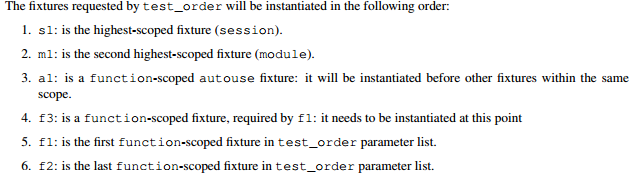
def test_order(f1, m1, f2, s1):

    assert order == ["s1", "m1", "a1", "f3", "f1", "f2"]

输出结果:1 passed   #即test_doder.py测试用例通过
理论:
session > module > class > function
@pytest.fixture(scope="session"):多个文件调用一次,可以跨.py,每个.py就是module
@pytest.fixture(scope="module"):module级别的fixture在当前.py模块里,只会在用例第一次调用前执行一次
@pytest.fixture(scope="class"):class级别的fixture,在每个类里,只会在第一次调用前执行一次
@pytest.fixture(scope="function"):function级别,每个函数都会调用(默认)
def fixture(scope="function", params=None, autouse=False, ids=None, name=None):

    :arg scope: the scope for which this fixture is shared, one of

                ``"function"`` (default), ``"class"``, ``"module"``,

                ``"package"`` or ``"session"``.

                ``"package"`` is considered **experimental** at this time.
fixture源码
特别地:平常写自动化用例会写一些前置的fixture操作,用例需要用到就直接传该函数的参数名称就行了。当用例很多的时候,每次都传这个参数,会比较麻烦。
fixture里面有个参数autouse,默认是Fasle没开启的,可以设置为True开启自动使用fixture功能,这样用例就不用每次都去传参了
pytest4-单文件使用fixture(Fixtures as Function arguments)的更多相关文章
- tp5 ajax单文件上传
HTML代码: <!DOCTYPE html> <html lang="en"> <head> <meta charset="U ...
- ASP.NET MVC5+EF6+EasyUI 后台管理系统(56)-插件---单文件上传与easyui使用fancybox
系列目录 https://yunpan.cn/cZVeSJ33XSHKZ 访问密码 0fc2 今天整合lightbox插件Fancybox1.3.4,发现1.3.4版本太老了.而目前easyui 1 ...
- 小型单文件NoSQL数据库SharpFileDB初步实现
小型单文件NoSQL数据库SharpFileDB初步实现 我不是数据库方面的专家,不过还是想做一个小型的数据库,算是一种通过mission impossible进行学习锻炼的方式.我知道这是自不量力, ...
- webpack入坑之旅(五)加载vue单文件组件
这是一系列文章,此系列所有的练习都存在了我的github仓库中vue-webpack,在本人有了新的理解与认识之后,会对文章有不定时的更正与更新.下面是目前完成的列表: webpack入坑之旅(一)不 ...
- yii2.0单文件上传和多文件上传
yii2文件上传使用到yii2自带的文件上传类UploadFIle,以及对应的模型规则,这里分别介绍单文件上传和多文件上传: yii2单个文件上传: 上传步奏,先创建上传表单模型model(包含验证规 ...
- Struts1文件上传、单文件、多文件上传【Struts1】
将struts1文件上传的操作汇总了一下,包括单文件上传和多文件上传,内容如下,留作备忘: Struts2实现文件上传的文章(http://blog.csdn.net/itwit/article/d ...
- Vue单文件组件基础模板
背景 相信大家在使用Vue开发项目时,基本都是以单文件组件的形式开发组件的,这种方式好处多多: 1.代码集中,便于开发.管理和维护 2.可复用性高,直接将vue文件拷贝到新项目中 我暂时就想到这两点, ...
- ng-file-upload(在单文件选择,并且通过点击“上传”按钮上传文件的情况下,如何在真正选择文件之前保留上一文件信息?)
文章前面研究ng-file-upload可能涉及指令: You can use ng-model or ngf-change instead of specifying function for ng ...
- Vue 单文件元件 — vTabs
简书原文 这是我做了第二个单文件元件 第一个在这里vCheckBox 这次这个叫vTabs,用于操作标签页 演示DEMO 演示DEMO2 - 子组件模式及别名 演示DEMO3 - 极简模式 示例: h ...
随机推荐
- c语言的数据类型,运算符,存储类型
[1词法符号]1. 关键字:32个1) 存储类型:决定(设备)变量的存储位置auto(自动型).extern(外部引用) static(静态型) register(寄存器类型)2) 数据类型:决定设备 ...
- centos下nc的安装和使用
安装:yum install nc.x86_64 发送文件: nc -l port < somefile.xxx 接收文件: nc -n x.x.x.x port > somefile.x ...
- 如何从请求、传输、渲染3个方面提升Web前端性能
什么是WEB前端呢?就是用户电脑的浏览器所做的一切事情.我们来看看用户访问网站,浏览器都做了哪些事情: 输入网址 –> 解析域名 -> 请求页面 -> 解析页面并发送页面中的资源请求 ...
- 建议收藏 - 专业的MySQL开发规范
为了项目的稳定,代码的高效,管理的便捷,在开发团队内部会制定各种各样的规范 这里分享一份我们定义的MySQL开发规范,欢迎交流拍砖 数据库对象命名规范 数据库对象 命名规范的对象是指数据库SCHEMA ...
- mysql5.6.27压缩版安装配置指南【个人总结】
1..下载准备压缩包 360云盘下载地址: https://yunpan.cn/cPKyugkUcDEmP 访问密码 375b 2.解压缩,将压缩版解压到D盘 D:\mysql-5.6. ...
- Eclipse通过SVN导入项目遇到的问题记录
问题一.把子项目导入为project 原因:一个大的文件夹,里面有各个小项目,需要把自己添加需求的醒目导入为Maven Project 1.右键选 Import as project 2.右键 -&g ...
- 远古框架-SSH maven配置 (包含gson)
Spring3.2.17+Struts2.3.15+Hibernate3.6.10 <?xml version="1.0" encoding="UTF-8" ...
- 【面试题】Java集合部分面试题
集合与数组? 数组:(可以存储基本数据类型)是用来存储对象的一种容器,但是数组的长度固定,不适合在对象数量未知的情况下使用 集合:(只能存储对象,对象类型可以不一样)集合的长度可变,可在多数情况下使用 ...
- Linux虚拟机--进入MySQL报错的解决办法
在Linux安装MySQL有时候会出现 [mysql]ERROR 2002 (HY000): Can't connect to local MySQL server through socket '/ ...
- Hive窗口函数最全案例详解
语法: 分析函数 over(partition by 列名 order by 列名 rows between 开始位置 and 结束位置) 常用分析函数: 聚合类 avg().sum().max(). ...