
9.Nginx常用模块
1.nginx开启目录浏览 提供下载功能
默认情况下,网站返回index指定的主页,若该网站不存在主页,则将请求交给autoindex模块
如果开启autoindex模块,则提供一个下载的页面, 如果没有开启autoindex 则会报错 403
[root@web01 centos]# cat /etc/nginx/conf.d/mirr.cheng.com.conf

server {

	listen 80;

	server_name mirror.cheng.com;

	charset utf8;					#字符集

	location / {

		root /code;

		index index.html;

		autoindex on;				#开启目录索引,提供下载

		autoindex_exact_size off;	#以人性化方式显示大小

		autoindex_localtime on;		#与本地时间保持一致

	}

}
2.nginx实现访问控制
实战一.基于来源IP控制、允许特定的IP访问,其他全部拒绝
1. 仅允许ip10.0.0.1 可以正常访问 /centos
[root@web01 code]# cat /etc/nginx/conf.d/mirr.cheng.com.conf

server {

	listen 80;

	server_name mirr.cheng.com;

	charset utf8;

	root /code;

	autoindex on;                 #开启目录索引(提供下载)

	autoindex_exact_size off;     #以人性化方式显示

	autoindex_localtime on;	      #与本地时间保持一致

	location / {

		index index.html;

	}

	location /centos {

		allow 10.0.0.1/32;         #仅允许10.0.0.1访问

		deny all;			       #其他全拒绝

	}

}
2. 拒绝特定的IP访问(10.0.0.100),其他全部允许
[root@web01 code]# cat /etc/nginx/conf.d/mirr.cheng.com.conf

server {

	listen 80;

	server_name mirr.cheng.com;

	charset utf8;

	root /code;

	autoindex on;                 #开启目录索引(提供下载)

	autoindex_exact_size off;     #以人性化方式显示

	autoindex_localtime on;	      #与本地时间保持一致

	location / {

		index index.html;

	}

	location /centos {

		deny 10.0.0.100/32;

		allow all;

	}

}

注意: deny和allow的顺序是有影响的

    默认情况下,从第一条规则进行匹配

    如果匹配成功,则不继续匹配下面的内容

    如果匹配不成功,则继续往下寻找能匹配成功的内容
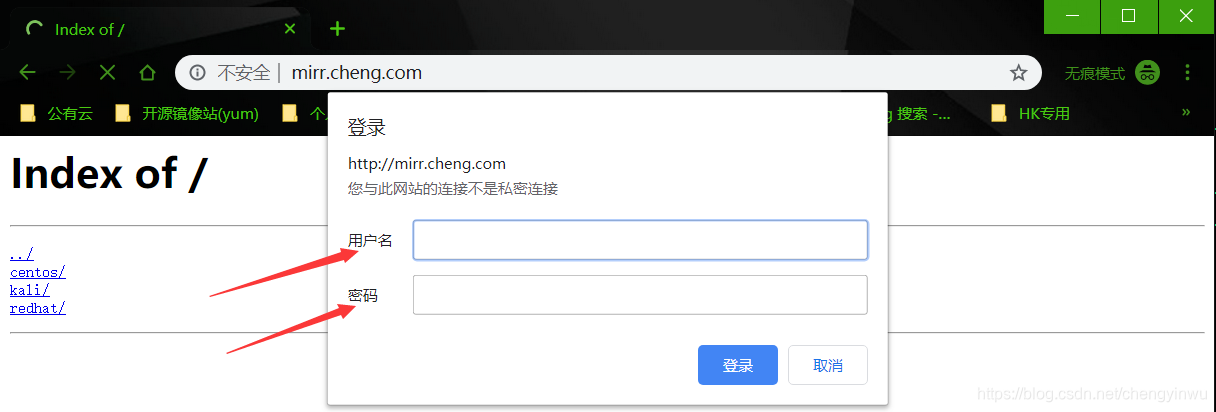
实战二.基于用户名和密码的方式限制 (个人/运维人员)
1.安装密码生成工具

[root@web01 ~]# yum install httpd-tools -y

2.生成密码

[root@web01 code]# htpasswd -b -c /etc/nginx/auth_conf chengyinwu 123456

3.修改nginx配置文件

[root@web01 code]# cat /etc/nginx/conf.d/mirr.cheng.com.conf

server {

	listen 80;

	server_name mirr.cheng.com;

	charset utf8;

	root /code;

	autoindex on;                 #开启目录索引(提供下载)

	autoindex_exact_size off;     #以人性化方式显示

	autoindex_localtime on;	      #与本地时间保持一致

	location / {

		index index.html;

	}

	location /centos {

		auth_basic "hello test";

		auth_basic_user_file "/etc/nginx/auth_conf";

	}

}
3.Nginx实现限速 ( 下载限速 限制单位时间内的Http请求 连接限制 )
1.请求频率限制(一秒内Http请求的次数(刷新频率))
[root@web01 ~]# cat /etc/nginx/conf.d/mirr.cheng.com.conf

limit_req_zone $binary_remote_addr zone=req_od:10m rate=1r/s;

server {

	listen 80;

	server_name mirr.cheng.com;

	charset utf8;

	root /code;

	autoindex on;                 #开启目录索引(提供下载)

	autoindex_exact_size off;     #以人性化方式显示

	autoindex_localtime on;	      #与本地时间保持一致

	limit_req zone=req_od burst=3 nodelay;

	location / {

		index index.html;

	}

	location /centos {

		auth_basic "hello test";

		auth_basic_user_file "/etc/nginx/auth_conf";

	}

}

limit_req_zone $binary_remote_addr zone=req_one:10m rate=1r/s;

第一个参数:$binary_remote_addr表示通过这个标识来做限制,限制同一客户端ip地址。

第二个参数:zone=req_one:10m表示生成一个大小为10M,名为req_one的内存区域,用来存储访问的频次信息。

第三个参数:rate=1r/s表示允许相同标识的客户端的访问频次,这里限制的是每秒1次,还可以30r/m。

limit_req zone=req_one burst=3 nodelay;

第一个参数:zone=req_one 设置使用哪个配置区域来做限制,与上面limit_req_zone 里的name对应。

第二个参数:burst=3,设置一个大小为3的缓冲区,当有大量请求过来时,超过了访问频次限制的请求可以先放到这个缓冲区内。

第三个参数:nodelay,超过访问频次并且缓冲区也满了的时候,则会返回503,如果没有设置,则所有请求会等待排队。
2.连接限制(同一时刻只允许一个用户下载)
[root@web01 ~]# cat /etc/nginx/conf.d/mirr.cheng.com.conf

limit_req_zone $binary_remote_addr zone=req_od:10m rate=1r/s;

limit_conn_zone $binary_remote_addr zone=conn_od:10m;

server {

	listen 80;

	server_name mirr.cheng.com;

	charset utf8;

	root /code;

	autoindex on;                 #开启目录索引(提供下载)

	autoindex_exact_size off;     #以人性化方式显示

	autoindex_localtime on;	      #与本地时间保持一致

	limit_req zone=req_od burst=3 nodelay;

	limit_conn conn_od 1;

	location / {

		index index.html;

	}

#	location /centos {                    ---->>>注释

#		auth_basic "hello test";          ---->>>注释

#		auth_basic_user_file "/etc/nginx/auth_conf";   ---->>>注释

#	}                                     ---->>>注释

}
3.下载速率限制(企业会有对应的程序控制)
[root@web01 ~]# cat /etc/nginx/conf.d/mirr.cheng.com.conf

limit_req_zone $binary_remote_addr zone=req_od:10m rate=1r/s;

limit_conn_zone $binary_remote_addr zone=conn_od:10m;

server {

	listen 80;

	server_name mirr.cheng.com;

	charset utf8;

	root /code;

	autoindex on;                 #开启目录索引(提供下载)

	autoindex_exact_size off;     #以人性化方式显示

	autoindex_localtime on;	      #与本地时间保持一致

	limit_req zone=req_od burst=3 nodelay;

	limit_conn conn_od 2;        ---->>>允许2个用户同时下载

	limit_rate_after 100m;       ---->>>100m峰值

	limit_rate 100k;             ---->>>降至100k

	location / {

		index index.html;

	}

#	location /centos {

#		auth_basic "hello test";

#		auth_basic_user_file "/etc/nginx/auth_conf";

#	}

}
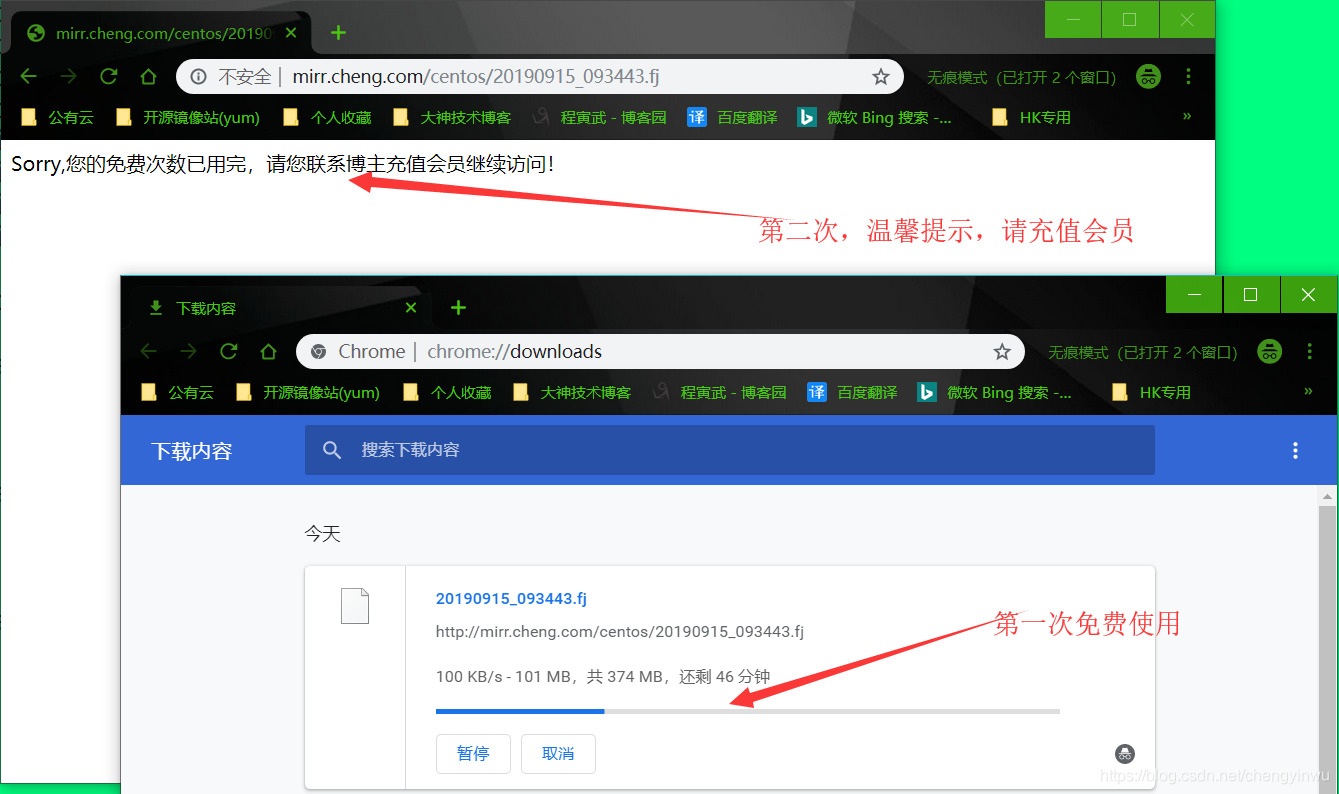
4.综合案例:限制web服务器请求数处理为1秒一个,触发值为5、限制并发连接数为1、限制下载速度为100k如果超过下载次数,则返回提示 "请充值会员"
[root@web01 ~]# cat /etc/nginx/conf.d/mirr.cheng.com.conf

limit_req_zone $binary_remote_addr zone=req_od:10m rate=1r/s;

limit_conn_zone $binary_remote_addr zone=conn_od:10m;

server {

	listen 80;

	server_name mirr.cheng.com;

	charset utf8;

	root /code;

	autoindex on;                 #开启目录索引(提供下载)

	autoindex_exact_size off;     #以人性化方式显示

	autoindex_localtime on;	      #与本地时间保持一致

	limit_req zone=req_od burst=5 nodelay;

	limit_conn conn_od 1;

	limit_rate_after 100m;

	limit_rate 100k;

	error_page 503 @errpage;

	location @errpage {

		default_type text/html;

		return 200 'Sorry,您的免费次数已用完,请您联系博主充值会员继续访问!';

	}

	location / {

		index index.html;

	}

#	location /centos {

#		auth_basic "hello test";

#		auth_basic_user_file "/etc/nginx/auth_conf";

#	}

}
4.nginx状态指标,俗称7种状态 监控Nginx
	location /nginx_status {

		stub_status;

	}

Active connections: 2

server accepts handled requests

			2     2      17

Reading: 0 Writing: 1 Waiting: 1

Active connections		活跃的连接数

accepts					总的TCP连接数

handled					成功握手的TCP连接数

accepts-handled		    失败的TCP连接数(总的减去成功的)

requests				总的请求数

Reading					读取到请求头的数量。

Writing					响应客户端到的数量。

Waiting					客户端与服务端的连接数

vim /etc/nginx/nginx.conf

	keepalive_timeout 65;		#长连接超时时间

	keepalive_timeout 0;		#模拟短连接效果
5.nginx location匹配、匹配优先级
location是用来控制用户请求的uri路径的
语法:
location [ = | ~ | ~* | ^~ ] uri { ... }
location @name { ... } #用户内部重定向
=  精确匹配

~  正则匹配

~* 正则匹配(忽略大小写)

^~ 以字符串方式匹配

/  通用匹配
编写实例:
[root@web01 conf.d]# cat location.com.conf

server {

	listen 80;

	server_name location.yinwu.com;

	location = / {

	default_type text/html;

	return 200 'location = /';

	}

	location / {

	default_type text_html;

	return 200 'location /';

	}

	location /documents/ {

	default_type text_html;

	return 200 'location /documents/';

	}

	location ^~ /images/ {

	default_type text_html;

	return 200 'localtion ^~ /images/';

	}

	location ~* \.(gif|jpg|jpeg)$ {

	default_type text/html;

	return 200 'location ~* \.(gif|jpg|jpeg)';

	}

}

测试:

	1.请求 http://location.yinwu.com/ 						会被  location =/   		匹配

	2.请求 http://location.yinwu.com/index.html				会被  location /			匹配

	3.请求 http://location.yinwu.com/documents/test.html	会被  location /documents/	匹配

	4.请求 http://location.yinwu.com/images/test.gif		会被  location ^~ /images/	匹配

	5.请求 http://location.yinwu.com/documents/1.jpg		会被  location ~* \.(gif|jpg|jpeg)$	匹配

优先级:

匹配符	匹配规则						优先级

=		精确匹配						1

^~		以某个字符串开头				2

~		区分大小写的正则匹配			3

~*		不区分大小写的正则匹配			4

/		通用匹配,任何请求都会匹配到	5

[root@web01 conf.d]# cat location2.yinwu.com.conf

server {

	listen 80;

	server_name location2.yinwu.com;

	# 通用匹配,任何请求都会匹配到

	location / {

		root html;

		index index.html;

	}

	# 精准匹配,必须请求的uri是/nginx_status

	location = /nginx_status {

		stub_status;

	}

	# 严格区分大小写,匹配以.php结尾的都走这个location

	location ~ \.php$ {

		default_type text/html;

		return 200 'php访问成功';

	}

	# 严格区分大小写,匹配以.jsp结尾的都走这个location

	location ~ \.jsp$ {

		default_type text/html;

		return 200 'jsp访问成功';

	}

	# 不区分大小写匹配,只要用户访问.jpg,gif,png,js,css 都走这条location

	location ~* \.(jpg|gif|png|js|css)$ {

		return 403;

	}

	# 不区分大小写匹配

	location ~* \.(sql|bak|tgz|tar.gz|.git)$ {

		deny all;

	}

}

	location @name { ... }

	@”前缀定义命名位置。这样的位置不用于常规请求处理,而是用于请求重定向.

	server {

		listen 80;

		mirror.yinwu.com;

		root /code;

		location / {

			index index.html;

		}

		#如果出现异常,则重新定向到@error_404这个location上

		error_page 404  @error_404;

		location @error_404 {

			default_type text/html;

			return 200 '你可能是瞎访问,走丢了。但是不要以为瞎访问就能找到Bug.....';

		}

	}
6.nginx 日志、访问日志、错误日志、日志过滤、日志切割
	统计 分析  那个 uri请求的次数最多

	错误日志     用来排除故障

    log_format  main  '$remote_addr - $remote_user [$time_local] "$request" '

                      '$status $body_bytes_sent "$http_referer" '

                      '"$http_user_agent" "$http_x_forwarded_for"';

	log_format  ttt   '$remote_addr - $remote_user [$time_local] "$request" '

                      '$status $body_bytes_sent';

	access_log /var/log/nginx/access.log main;

$remote_addr			# 来源的客户端IP			 		(   user--->web  )

$remote_user			# 登录的用户名 Http基本认证才会有 -

[$time_local]			# 时间

$request				# 请求uri 请求的方法 请求的协议

$status					# 状态码

$body_bytes_sent		# 发送的字节

$http_referer			# 从那个url过来的

$http_user_agent		# 来源的设备

$http_x_forwarded_for	# 记录真实的客户端IP  				(   user--->proxy--->web  )

日志过滤

location = /favicon.ico {

        access_log off;

        access_log /dev/null;

}

错误日志:
9.Nginx常用模块的更多相关文章
- nginx常用模块(三)
Nginx常用模块(三) ngx_http_proxy_module模块配置(http或https协议代理) proxy_pass URL; 应用上下文:location, if in locatio ...
- Nginx 常用模块
Nginx 常用模块 1. ngx_http_autoindex_module # ngx_http_autoindex_module模块处理以斜杠字符(' / ')结尾的请求,并生成一个目录列表. ...
- (转)nginx 常用模块整理
原文:http://blog.51cto.com/arm2012/1977090 1. 性能相关配置 worker_processes number | auto: worker进程的数量:通常应该为 ...
- nginx常用模块(一)
1.Nginx目录索引 1.1Nginx默认是不允许列出整个目录浏览下载.Syntax: autoindex on | off;Default: autoindex off;Context: http ...
- Nginx常用模块安装命令
将目录切换至Nginx安装包目录下,使用./configure命令进行安装.一些第三方模块需要先下载过来,指定下解压后的目录即可. ./configure --prefix=/usr/local/ng ...
- nginx常用模块
Nginx模块介绍 核心模块:core module 标准模块:stand modules HTTP modules: Standard HTTP modules Optional HTTP modu ...
- Nginx常用模块及作用
Nginx模块详解 nginx模块分为两种,官方和第三方,我们通过命令 nginx -V 查看 nginx已经安装的模块! [root@localhost ~]# nginx -V nginx ver ...
- 07 . Nginx常用模块及案例
访问控制 用户访问控制 ngx_http_auth_basic_module 有时我们会有这么一种需求,就是你的网站并不想提供一个公共的访问或者某些页面不希望公开,我们希望的是某些特定的客户端可以访问 ...
- NGINX常用模块(二)
5.Nginx日志配置 Nginx有非常灵活的日志记录模式.每个级别的配置可以有各自独立的访问日志.日志格式 通过log_format命令定义格式 1.log_format指令 # 配置语法:包括:e ...
随机推荐
- [Spark] 04 - HBase
BHase基本知识 基本概念 自我介绍 HBase是一个分布式的.面向列的开源数据库,该技术来源于 Fay Chang 所撰写的Google论文“Bigtable:一个结构化数据的分布式存储系统”. ...
- Moonraker 靶机渗透
0x01 简介 攻击Moonraker系统并且找出存在最大的威胁漏洞,通过最大威胁漏洞攻击目标靶机系统并进行提权获取系统中root目录下的flag信息. Moonraker: 1镜像下载地址: htt ...
- .NET生成漂亮桌面背景
.NET生成漂亮桌面背景 一天,我朋友指着某某付费软件对我说,这个东西不错,每天生成一张桌面背景,还能学英语(放置名人名言和翻译)!我说,这东西搞不好我也能做,然后朋友说,"如果你搞出来了, ...
- JVM调优—Jstack
Java命令学习系列(二)——Jstack jstack是java虚拟机自带的一种堆栈跟踪工具. 功能 jstack用于生成java虚拟机当前时刻的线程快照.线程快照是当前java虚拟机内每一条线 ...
- springboot + mybatis + mycat整合
1.mycat服务 搭建mycat服务并启动,windows安装参照. 系列文章: [Mycat 简介] [Mycat 配置文件server.xml] [Mycat 配置文件schema.xml] [ ...
- springboot新版本(2.0.0+)自定义ErrorController中使用ErrorAttributes
2.0.0之前使用: @Autowired private ErrorAttributes errorAttributes; private Map<String, Object> get ...
- Python邮件发送功能
import smtplibfrom email.mime.text import MIMEText_user = "1147016115@qq.com"#发件人_pwd = &q ...
- 07-简单认识margin
margin 外边距,表示边框到最近盒子的距离. 对于左右两边 <!DOCTYPE html> <html lang="en"> <head> ...
- 【集群监控】Docker上部署Prometheus+Alertmanager+Grafana实现集群监控
Docker部署 下载 sudo yum-config-manager --add-repo https://download.docker.com/linux/centos/docker-ce.re ...
- zend studio 13.6 导入项目及其他设置
1. 先创建一个新的项目:file -> new -> project 2. 创建新项目之后,在左侧的项目目录上右键 -> import 到此导入项目, 完成! 设置编码utf-8 ...