
forEach标签
1、forEach标签的简单使用:
(1)未设置步长属性时,默认步长为1:
<c:forEach ">
    <c:out value="${number}"></c:out>
</c:forEach>

(2)设置步长属性后,步长改变:
<c:forEach ">
    <c:out value="${number}"></c:out>
</c:forEach>
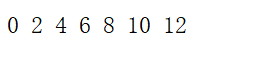
从0到12输出,需要运用到begin和end属性。
2、遍历ArrayList集合:
(1)forEach遍历集合(ArrayList集合存储字符串):
<body>
<%
    ArrayList<String> string=new ArrayList<String>();
    string.add("星期一");
    string.add("星期二");
    string.add("星期三");
    string.add("星期四");
    string.add("星期五");
    string.add("星期六");
    string.add("星期天");
    request.setAttribute("string",string);
%>
<c:forEach items="${requestScope.string}" var="str">
    <c:out value="${str}"></c:out><br>
</c:forEach>
</body>
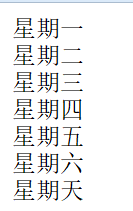
先向ArrayList集合中添加元素,再将ArrayList集合添加到request域,使用forEach指明要遍历的集合来自哪个域,并将每一个元素分别输出(str代表每一个数据)。
(2)遍历存储了学生对象的集合:
建立javabean:
package pers.zhb.domain;

public class Student {
    private String name;
    private int age;
    private String sex;
    public String getName() {
        return name;
    }

    public void setName(String name) {
        this.name = name;
    }

    public int getAge() {
        return age;
    }

    public void setAge(int age) {
        this.age = age;
    }

    public String getSex() {
        return sex;
    }

    public void setSex(String sex) {
        this.sex = sex;
    }

    @Override
    public String toString() {
        return "Student{" +
                "name='" + name + '\'' +
                ", age=" + age +
                ", sex='" + sex + '\'' +
                '}';
    }
}
遍历集合中的对象:
<body>
<%
   ArrayList<Student> students=new ArrayList<Student>();
   Student student1=new Student();
   student1.setSex("男");
   student1.setAge();
   student1.setName("mill");
   students.add(student1);

    Student student2=new Student();
    student2.setSex("女");
    student2.setAge();
    student2.setName("莉莉");
    students.add(student2);

    request.setAttribute("student",students);
%>
<c:forEach items="${requestScope.student}" var="stu">
    <c:out value="${stu}"></c:out><br>
</c:forEach>
</body>

3、遍历Map集合:
(1)键和值都为String类型:
<body>
<%
    Map<String, String> map = new HashMap<String, String>();
    map.put("河南", "郑州");
    map.put("北京", "北京");
    session.setAttribute("provincialCapital",map);
%>
<c:forEach items="${sessionScope.provincialCapital}" var="province">
    <c:out value="${province.key}:${province.value}"></c:out>
</c:forEach>
</body>
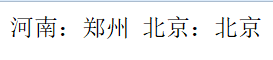
(2)遍历值为Student对象的Map集合:
<body>
<%
    ArrayList<Student> students=new ArrayList<Student>();
    Student student1=new Student();
    student1.setSex("男");
    student1.setAge();
    student1.setName("mill");
    students.add(student1);

    Student student2=new Student();
    student2.setSex("女");
    student2.setAge();
    student2.setName("莉莉");
    students.add(student2);

    Map<String, Student> map = new HashMap<String, Student>();
    map.put("student1", student1);
    map.put("student2", student2);
    session.setAttribute("studentsMap",map);
%>
<c:forEach items="${sessionScope.studentsMap}" var="student">
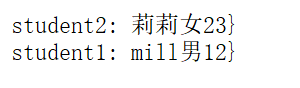
    <c:out value="${student.key}: ${student.value.getName()}${student.value.getSex()}${student.value.getAge()}}"></c:out><br>
</c:forEach>
</body>
forEach标签的更多相关文章
- MyBatis的Mapper文件的foreach标签详解
MyBatis的Mapper文件的foreach标签用来迭代用户传递过来的Lise或者Array,让后根据迭代来拼凑或者批量处理数据.如:使用foreach来拼接in子语句. 在学习MyBatis M ...
- jstl foreach标签
forEach标签 forEach标签用来循环. 属性: * var :定义循环变量 * begin :从哪开始 * end :到哪结束 * step :递增 * items :遍历的内容 * var ...
- MyBatis foreach标签遍历数组
有时候开发中需要根据多个ID去查询,可以将ID封装为List或者数组然后使用MyBatis中的foreach标签构建in条件. 这里我将ID封装为String[]作为参数. <select id ...
- jstl 中<c:forEach />标签
<c:forEach>标签有如下属性: 属性 描述 是否必要 默认值 items 要被循环的信息 否 无 begin 开始的元素(0=第一个元素,1=第二个元素) 否 0 end 最后一个 ...
- JSTL的c:forEach标签(${status.index})
<c:forEach>标签具有以下一些属性: var:迭代参数的名称.在迭代体中可以使用的变量的名称,用来表示每一个迭代变量.类型为String. items:要进行迭代的集合.对于它所支 ...
- javaWeb 使用jsp开发 foreach 标签
1.jsp代码 测试数据 <% List<String> list = new ArrayList<String>(); list.add("aaa" ...
- mybatis动态sql中foreach标签的使用
foreach标签主要用于构建in条件,他可以在sql中对集合进行迭代.如下: <delete id="deleteBatch"> delete from user w ...
- 详解JSTL的forEach标签
详解JSTL的forEach标签 为循环控制,它可以将集合(Collection)中的成员循序浏览一遍. <c:forEach> 标签的语法 说明 : 语法:迭代一集合对象之所有 ...
- mybatis foreach标签
一.批量插入数据 示例:添加订单商品表 1.模型层的相应代码 /** * 添加订单商品表 * @param ordergoods * @return */ public boolean addOrde ...
- [jstl] forEach标签使用
在JSP的开发中,迭代是经常要使用到的操作.例如,逐行的显示查询的结果等.在早期的JSP中,通常使用Scriptlets来实现Iterator或者Enumeration对象的迭代输出.现在,通过JS ...
随机推荐
- BS/CS 区别
转载自:https://www.cnblogs.com/chenmingjun 一.CS和BS含义: CS即Client/Server(客户机/服务器)结构.C/S结构在技术上很成熟,它的主要特点是交 ...
- Jedis操作Redis--Key操作
/** * Key(键) * DEL,DUMP,EXISTS,EXPIRE,EXPIREAT,KEYS,MIGRATE,MOVE,OBJECT,PERSIST,PEXPIRE,PEXPIREAT,PT ...
- P4570 [BJWC2011]元素 线性基 + 贪心
题意 给定n个物品,每个物品有一个编号和价值,问如何取使得拿到的物品价值总和最大,并且取得物品的编号的子集异或和不能为0. 思路 这是个贪心,我们先按照价值从大到小排序,然后贪心地取,如果当前要取的物 ...
- 牛客小白月赛6 J 洋灰三角 数学
链接:https://www.nowcoder.com/acm/contest/136/J来源:牛客网 题目描述 洋灰是一种建筑材料,常用来筑桥搭建高层建筑,又称,水泥.混凝土. WH ...
- bzoj 1146 网络管理Network (CDQ 整体二分 + 树刨)
题目传送门 题意:求树上路径可修改的第k大值是多少. 题解:CDQ整体二分+树刨. 每一个位置上的数都会有一段持续区间 根据CDQ拆的思维,可以将这个数拆成出现的时间点和消失的时间点. 然后通过整体二 ...
- codeforces 755D. PolandBall and Polygon(线段树+思维)
题目链接:http://codeforces.com/contest/755/problem/D 题意:一个n边形,从1号点开始,每次走到x+k的位置如果x+k>n则到x+k-n的位置,问每次留 ...
- 用户上传gif动图分解成多张帧图片,并合并生成新gif图片
背景 为什么要制作这么一款工具 首先公司最近在做一款表情包的产品,需要将文字生成到gif图片中,并可以控制文字显示的位置,并将不同的文字显示在不同的图片上 制作成网页端工具,随时随地,方便使用 探索 ...
- Spring Boot2 系列教程(四)理解Spring Boot 配置文件 application.properties
在 Spring Boot 中,配置文件有两种不同的格式,一个是 properties ,另一个是 yaml . 虽然 properties 文件比较常见,但是相对于 properties 而言,ya ...
- hdu 1007 Quoit Design 题解
原题地址 题目大意 查询平面内最近点对的距离,输出距离的一半. 暴力做法 枚举每一个点对的距离直接判断,时间复杂度是 $ O(n^2) $,对于这题来说会超时. 那么我们考虑去优化这一个过程,我们在求 ...
- 渗透之路基础 -- 服务端请求伪造SSRF
简介:SSRF 服务器端请求伪造,有的大型网站在web应用上提供了从其他服务器获取数据的功能.使用户指定的URL web应用获取图片,下载文件,读取文件内容.通常用于控制web进而探测内网服务以及攻击 ...