
Selenium(十七):unittest单元测试框架(三) 脚本分析、编写Web用例
1. 带unittest的脚本分析
也许你现在心里还有疑问,unittest框架与我们前面所编写的Web自动化测试之间有什么必然联系吗?当然有,既然unittest可以组织、运行测试用例,那么为什么不能组织、运行Web自动化测试用例呢?我们现在就来开始通过一个实例来看看吧。
# -*- coding:utf-8 -*-

from selenium import webdriver

from selenium.webdriver.common.by import By

from selenium.webdriver.common.keys import Keys

from selenium.webdriver.support.ui import Select

from selenium.common.exceptions import NoSuchElementException

from selenium.common.exceptions import NoAlertPresentException

import unittest,time,re

class BaiduTest(unittest.TestCase):

    def setUp(self):

        self.driver = webdriver.Chrome()

        self.driver.implicitly_wait(30)

        self.base_url = "http://www.baidu.com/"

        self.verificationErrors = []

        self.accept_next_alert = True

    def test_baidu(self):

        driver = self.driver

        driver.get(self.base_url + "/")

        driver.find_element_by_id("kw").clear()

        driver.find_element_by_id("kw").send_keys("selenium")

        driver.find_element_by_id("su").click()

    def is_element_present(self,how,what):

        try:

            self.driver.find_element(by=how,value=what)

        except NoSuchElementException:

            return False

        return True

    def is_alert_present(self):

        try:

            self.driver.switch_to.alert()

        except NoAlertPresentException:

            return False

        return True

    def close_alert_and_get_its_text(self):

        try:

            alert = self.driver.switch_to.alert()

            alert_text = alert.text

            if self.accept_next_alert:

                alert.accept()

            else:

                alert.dismiss()

            return alert_text

        finally:

            self.accept_next_alert = True

    def tearDown(self):

        self.driver.quit()

        self.assertEqual([],self.verificationErrors)

if __name__ == "__main__":

    unittest.main()
相信大家现在再看到这个脚本时已经不再感到陌生了,下面我们就来分析一下这些diamante都做了哪些事情。
import unittest
首先引入unittest框架。
class BaiduTest(unittest.TestCase):
BaiduTest类继承unittest框架的TestCase类称为标准的测试类。
def setUp(self):

    self.driver = webdriver.Chrome()

    self.driver.implicitly_wait(30)

    self.base_url = "http://www.baidu.com/"

    self.verificationErrors = []

    self.accept_next_alert = True
setUp用于设置初始化工作,在执行每一个测试用例前先被执行,它与tearDown方法相呼应,后者在每一个测试用例执行后被执行。这里的初始化工作定义了浏览器启动和基础URL地址。
implicitly_wait()在前面已经学过,设置页码上元素的隐性等待时间为30秒。
接下来定义空的verificationErrors数组,脚本运行时的报错信息将被记录到这个数组中。
定义accept_next_alert变量,表示是否继续接受下一个警告,初始状态为True。
def test_baidu(self):

    driver = self.driver

    driver.get(self.base_url + "/")

    driver.find_element_by_id("kw").clear()

    driver.find_element_by_id("kw").send_keys("selenium")

    driver.find_element_by_id("su").click()
test_baidu中放置的就是我们的测试脚本,这部分我们已经很熟悉了,这里就不再解释了。
def is_element_present(self,how,what):

    try:

        self.driver.find_element(by=how,value=what)

    except NoSuchElementException:

        return False

    return True
is_element_present方法用于查找页面元素是否存在,通过find_element()来接受元素的定位方法(how)和定位值(what)。如果定位到元素则返回True,否则抛出异常并返回False。try...except...为Python语言的异常处理。
def is_alert_present(self):

    try:

        self.driver.switch_to.alert()

    except NoAlertPresentException:

        return False

    return True
is_alert_present()方法用于判断当前页面是否存在警告框,利用WebDriver提供的switch_to.alert()方法来捕捉页面上警告框。如果捕捉到警告框则返回True,否则抛出NoAlertPresentException类型异常,并返回False。
def close_alert_and_get_its_text(self):

    try:

        alert = self.driver.switch_to.alert()

        alert_text = alert.text

        if self.accept_next_alert:

            alert.accept()

        else:

            alert.dismiss()

        return alert_text

    finally:

        self.accept_next_alert = True
close_alert_and_get_its_text()关闭警告并获得警告信息。首先通过switch_to_alert()获得警告,通过text获得警告框信息。接着通过if语句判断accept_next_alert的状态,在setUp()中已经初始化状态为True,如果为True,则通过accept()接受警告,否则dismiss()忽略此警告。
def tearDown(self):

    self.driver.quit()

    self.assertEqual([],self.verificationErrors)
tearDown()方法在每个测试方法执行后调用,这个方法用于测试用例执行后的清理工作,如退出浏览器、关闭驱动,恢复用例执行状态等。
在setUp()方法中定义了verificationErrors为空数组,这里通过assertEqual()比较其是否为空,如果为空则说明用例执行的过程中没有出现异常,负责将抛出AssertionError异常。
if __name__ == "__main__":

    unittest.main()
通过unittest.main()方法来运行当前文件中的测试方法,其默认匹配并运行以test开头的方法。
2. 编写Web测试用例
前面用了大量的篇幅详细介绍了unittest单元测试框架,其目的是用它来运行Web自动化测试脚本。在此之前,需要简单规划一下测试目录。
test_project/
test_case/
test_baidu.py
test_youdao.py
report/
login.txt
runtest.py
创建Web测试用例。
test_baidu.py:
from selenium import webdriver

import unittest

import time

class MyTest(unittest.TestCase):

    def setUp(self):

        self.driver = webdriver.Chrome()

        self.driver.maximize_window()

        self.driver.implicitly_wait(10)

        self.base_url = "http://www.baidu.com"

    def test_baidu(self):

        driver = self.driver

        driver.get(self.base_url+"/")

        driver.find_element_by_id("kw").clear()

        driver.find_element_by_id("kw").send_keys("unittest")

        driver.find_element_by_id("su").click()

        time.sleep(2)

        title = driver.title

        self.assertEqual(title,"unittest_百度搜索")

    def tearDown(self):

        self.driver.quit()

if __name__ == "__main__":

    unittest.main()
test_youdao.py:
from selenium import webdriver

import unittest

import time

class MyTest(unittest.TestCase):

    def setUp(self):

        self.driver = webdriver.Chrome()

        self.driver.maximize_window()

        self.driver.implicitly_wait(10)

        self.base_url = "http://www.youdao.com"

    def test_youdao(self):

        driver = self.driver

        driver.get(self.base_url+"/")

        driver.find_element_by_id("translateContent").clear()

        driver.find_element_by_id("translateContent").send_keys("webdriver")

        driver.find_element_by_xpath('//*[@id="form"]/button').click()

        time.sleep(2)

        title = driver.title

        self.assertEqual(title,"【webdriver】什么意思_英语webdriver的翻译_音标_读音_用法_例句_在线翻译_有道词典")

    def tearDown(self):

        self.driver.close()

if __name__ == "__main__":

    unittest.main()
在test_case/目录下分别创建百度搜索test_baidu.py和有道搜索test_youdao.py测试文件,并在测试文件中编写Web自动化测试用例。
runtest.py:
import unittest

#定义测试用例的目录为当前目录

test_dir = '../test_project/test_case'

discover = unittest.defaultTestLoader.discover(test_dir,pattern='test*.py')

if __name__ == "__main__":

    runner = unittest.TextTestRunner()

    runner.run(discover)
你可能有个疑问,report目录是做什么的?也许从命名上你已经猜到它是用来存放测试报告的,那么怎样才能把测试结果生成一个有log.txt的文件呢?这里需要借助dos命令来实现。
首先打开Windows命令提示符,进入到.../test_project/目录下执行目录。

打开log.txt文件,内容如下:
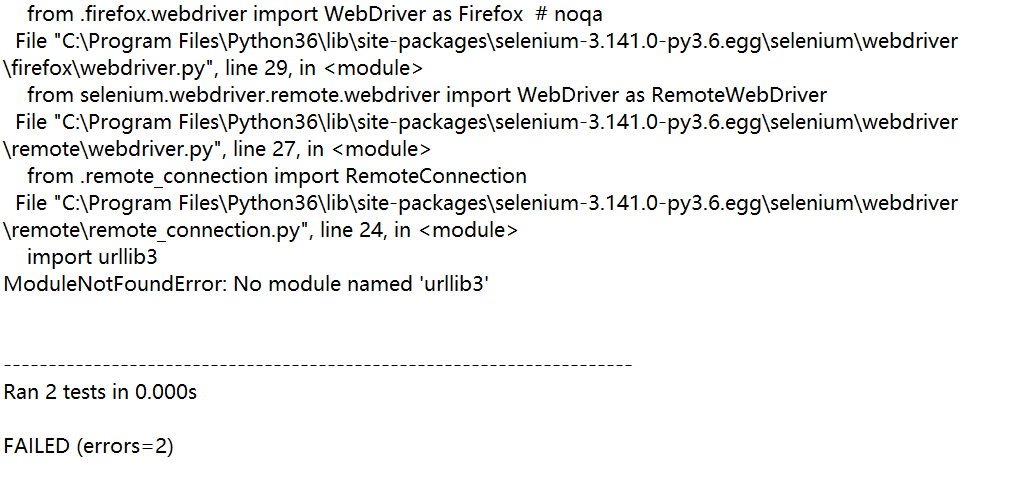
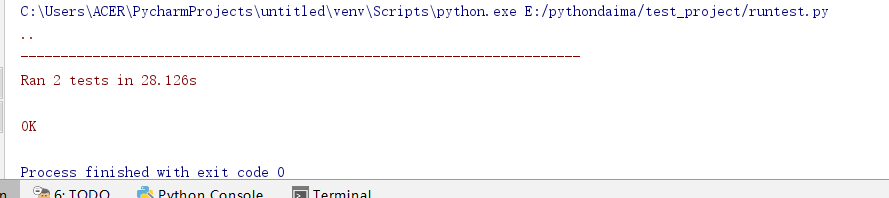
不知道为什么,pycharm运行没问题,使用cmd命令行就出问题了。
Selenium(十七):unittest单元测试框架(三) 脚本分析、编写Web用例的更多相关文章
- Selenium自动化测试-unittest单元测试框架
一.Pyhon工作原理-- 核心概念:test case, testsuite, TestLoder,TextTestRunner,TextTestResult, test fixture TestC ...
- Selenium自动化测试-unittest单元测试框架使用
一.什么是unittest 这里我们将要用的unittest是python的单元测试框架,它的官网是 https://docs.python.org/2/library/unittest.html,在 ...
- unittest单元测试框架中的参数化及每个用例的注释
相信大家和我有相同的经历,在写自动化用例脚本的时候,用例的操作是一样的,但是就是参数不同,比如说要测一个付款的接口,付款有很多种渠道,另外只有部分参数不一样,如果我们一个渠道一个渠道的写,在unitt ...
- 关于unittest单元测试框架中常用的几种用例加载方法
unittest模块是Python自带的一个单元测试模块,我们可以用来做单元测试.unittest模块包含了如下几个子模块: 测试用例:TestCase 测试集:TestSuite 加载用例:Test ...
- Selenium(十八):unittest单元测试框架(四) HTML测试报告
1. HTML测试报告 对测试人员来而言,测试的产出很难衡量.换句话说,测试人员的价值比较难以量化和评估,相信这一点对软件测试人员来说深有体会.我们花费了很多时间与精力所做的自动化测试也是如此.所以, ...
- Selenium+Python ---- 免登录、等待、unittest单元测试框架、PO模型
1.免登录在进行测试的过程中难免会遇到登录的情况,给测试工作添加了工作量,本文仅提供一些思路供参考解决方式:手动请求中添加cookies.火狐的profile文件记录信息实现.人工介入.万能验证码.去 ...
- Python+selenium之简单介绍unittest单元测试框架
Python+selenium之简单介绍unittest单元测试框架 一.unittest简单介绍 unittest支持测试自动化,共享测试用例中的初始化和关闭退出代码,在unittest中最小单元是 ...
- Python+Selenium框架设计篇之-简单介绍unittest单元测试框架
前面文章已经简单介绍了一些关于自动化测试框架的介绍,知道了什么是自动化测试框架,主要有哪些特点,基本组成部分等.在继续介绍框架设计之前,我们先来学习一个工具,叫unittest. unit ...
- Python+Selenium ----unittest单元测试框架
unittest是一个单元测试框架,是Python编程的单元测试框架.有时候,也做叫做“PyUnit”,是Junit的Python语言版本.这里了解下,Junit是Java语言的单元测试框架,Java ...
随机推荐
- 《Java基础知识》Java集合(Map)
Java集合主要由2大体系构成,分别是Collection体系和Map体系,其中Collection和Map分别是2大体系中的顶层接口. 今天主要讲:Map主要有二个子接口,分别为HashMap.Tr ...
- Maven使用教程三:maven的生命周期及插件机制详解
前言 今天这个算是学习Maven的一个收尾文章,里面内容不局限于标题中提到的,后面还加上了公司实际使用的根据profile配置项目环境以及公司现在用的archetype 模板等例子. 后面还会总结一个 ...
- Sqlite—锁机制
https://blog.csdn.net/zhangsheng_1992/article/details/52598396 https://blog.csdn.net/xiyangyang8110/ ...
- inux 内存监控分析
一.free 查看系统总的内存情况 第一部分Mem行: total 内存总数: 3768M used 已经使用的内存数: 3136M free 空闲的内存数: 632M shared 当前已经废弃不用 ...
- delete和Vue.$delete删除数组的区别
delete delete只是被删除的元素变成了 empty/undefined ,其他的元素的键值对应关系还是不变. Vue.$delete 直接删除了数组中元素,数组的键值对应关系发生相应变化 例 ...
- React: 研究Flux设计模式
一.简介 一般来说,State管理在React中是一种最常用的实现机制,使用这种state管理系统基本可以开发各种需求的应用程序.然而,随着应用程序规模的不断扩张,原有的这种State管理系统就会暴露 ...
- 最后的记忆——Spring BeanFactory
本文尝试分析一下Spring 的BeanFactory 体系的 接口设计,尝试理解为什么这么做,为什么接口这么设计.为什么这么去实现,为什么需要有这个方法,为什么 这样命名?接口.类.方法的 大致用途 ...
- EggJS接口开发
需求 随着Nodejs的普及,前端开发的开发场景基本可以贯穿界面交互到数据存储,无缝实现全栈开发.最近在实现一个内部项目管理工具的时候,就尝试了一把接口和数据库开发. 什么是Egg.js Egg.js ...
- python批量插入数据到es和读取es数据
一.插入数据 1.首先准备类似如下数据 {"_type": "type1", "_id": 1, "_index": & ...
- MyBatis框架之第一篇
MyBatis 本是apache的一个开源项目iBatis, 2010年这个项目由apache software foundation 迁移到了google code,并且改名为MyBatis.201 ...