
pixijs shader 贴图溶解效果教程
pixijs shader 贴图溶解效果教程
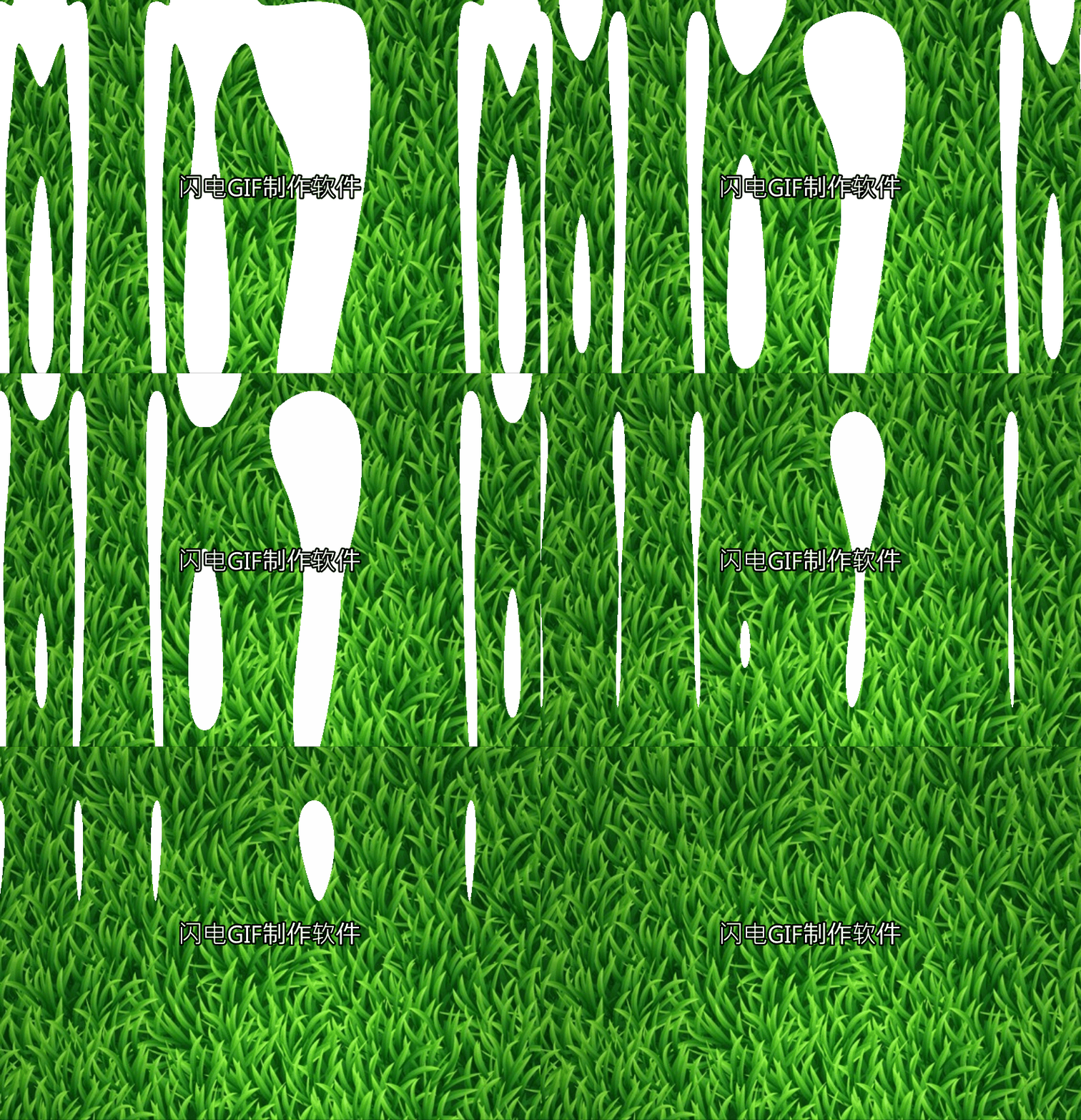
我直接贴代码了 没什么好讲解了 稍微有点基础的人应该能看懂
    const app = new PIXI.Application({ transparent: true });

        document.body.appendChild(app.view);

        // Create background image

        const background = PIXI.Sprite.from('/moban/bg_grass.jpg');

        background.width = app.screen.width;

        background.height = app.screen.height;

        app.stage.addChild(background);

        // Stop application wait for load to finish

        app.stop();

        app.loader.add('shader', '/moban/shader.frag')

            .load(onLoaded);

        let filter;

        // Handle the load completed

        function onLoaded(loader, res) {

            // Create the new filter, arguments: (vertexShader, framentSource)

            filter = new PIXI.Filter(null, res.shader.data, {

                customUniform: 0.0,

            });

            // === WARNING ===

            // specify uniforms in filter constructor

            // or set them BEFORE first use

            // filter.uniforms.customUniform = 0.0

            // Add the filter

            background.filters = [filter];

            // Resume application update

            app.start();

        }

         var i=-1.0;

        // Animate the filter

        app.ticker.add((delta) => {

            i+=0.03;

            if(i>=){

              i=;

            }

            filter.uniforms.customUniform = i;

        });
/moban/shader.frag代码如下
precision mediump float;

varying vec2 vTextureCoord;

varying vec4 vColor;

uniform sampler2D uSampler;

uniform float customUniform;

//

// Description : Array and textureless GLSL 2D simplex noise function.

//      Author : Ian McEwan, Ashima Arts.

//  Maintainer : stegu

//     Lastmod : 20110822 (ijm)

//     License : Copyright (C) 2011 Ashima Arts. All rights reserved.

//               Distributed under the MIT License. See LICENSE file.

//               https://github.com/ashima/webgl-noise

//               https://github.com/stegu/webgl-noise

//

vec3 mod289(vec3 x) {

  return x - floor(x * (1.0 / 289.0)) * 289.0;

}

vec2 mod289(vec2 x) {

  return x - floor(x * (1.0 / 289.0)) * 289.0;

}

vec3 permute(vec3 x) {

  return mod289(((x*34.0)+1.0)*x);

}

float snoise(vec2 v)

  {

  const vec4 C = vec4(0.211324865405187,  // (3.0-sqrt(3.0))/6.0

                      0.366025403784439,  // 0.5*(sqrt(3.0)-1.0)

                     -0.577350269189626,  // -1.0 + 2.0 * C.x

                      0.024390243902439); // 1.0 / 41.0

// First corner

  vec2 i  = floor(v + dot(v, C.yy) );

  vec2 x0 = v -   i + dot(i, C.xx);

// Other corners

  vec2 i1;

  //i1.x = step( x0.y, x0.x ); // x0.x > x0.y ? 1.0 : 0.0

  //i1.y = 1.0 - i1.x;

  i1 = (x0.x > x0.y) ? vec2(1.0, 0.0) : vec2(0.0, 1.0);

  // x0 = x0 - 0.0 + 0.0 * C.xx ;

  // x1 = x0 - i1 + 1.0 * C.xx ;

  // x2 = x0 - 1.0 + 2.0 * C.xx ;

  vec4 x12 = x0.xyxy + C.xxzz;

  x12.xy -= i1;

// Permutations

  i = mod289(i); // Avoid truncation effects in permutation

  vec3 p = permute( permute( i.y + vec3(0.0, i1.y, 1.0 ))

    + i.x + vec3(0.0, i1.x, 1.0 ));

  vec3 m = max(0.5 - vec3(dot(x0,x0), dot(x12.xy,x12.xy), dot(x12.zw,x12.zw)), 0.0);

  m = m*m ;

  m = m*m ;

// Gradients: 41 points uniformly over a line, mapped onto a diamond.

// The ring size 17*17 = 289 is close to a multiple of 41 (41*7 = 287)

  vec3 x = 2.0 * fract(p * C.www) - 1.0;

  vec3 h = abs(x) - 0.5;

  vec3 ox = floor(x + 0.5);

  vec3 a0 = x - ox;

// Normalise gradients implicitly by scaling m

// Approximation of: m *= inversesqrt( a0*a0 + h*h );

  m *= 1.79284291400159 - 0.85373472095314 * ( a0*a0 + h*h );

// Compute final noise value at P

  vec3 g;

  g.x  = a0.x  * x0.x  + h.x  * x0.y;

  g.yz = a0.yz * x12.xz + h.yz * x12.yw;

  return 130.0 * dot(m, g);

}

void main(void)

{

    vec2 uv = vTextureCoord;

    vec2 pos = uv;

    pos.x = snoise(vec2(pos.x * 2.0));

    float noise = snoise(pos);

    vec4 texture2 =  texture2D(uSampler,uv);

    float step = customUniform;

    gl_FragColor = texture2 * (1.0 - smoothstep(step, step, noise));

}
pixijs shader 贴图溶解效果教程的更多相关文章
- pixijs shader贴图扫光效果
pixijs shader贴图扫光效果 直接贴代码 const app = new PIXI.Application({ transparent: true }); document.body.app ...
- pixijs shader 实现图片波浪效果
const app = new PIXI.Application({ transparent: true }); document.body.appendChild(app.view); // Cre ...
- Esfog_UnityShader教程_溶解效果Dissolve
溶解效果在游戏中是很常见的,比如在一些神话或者魔法世界中,一些NPC角色在剧情需要时候会身体会渐渐的消失掉.甚至有一些更炫的,比如用火焰喷射器把目标燃尽.这些都可以用到溶解效果.这篇文章主要是讲解一下 ...
- pixijs shader fade 从左到有右淡入 从下到上淡入效果
pixijs shader fade 从左到有右淡入 从下到上淡入效果 const app = new PIXI.Application({ transparent: true }); doc ...
- pixijs shader颗粒化显示贴图
pixijs shader颗粒化显示贴图 const app = new PIXI.Application({ transparent: true }); document.body.appendCh ...
- pixijs shader 制作百叶窗效果
pixijs shader 制作百叶窗效果 直接贴代码了 const app = new PIXI.Application({ transparent: true }); document.body. ...
- Shader之溶解效果的几种实现方法
这里通过 “是否丢弃像素”的2种方法,写2个shader,效果是一样的,也提到了,丢弃某个像素的3种方式. 是否丢弃: 1.通过脚本控制shader变量判断当前是否丢弃像素,需要额外脚本: 2.sha ...
- Shader食谱 Chapter3--Toonshader卡通效果
Shader食谱 Chapter3--Toonshader卡通效果 unity shader toon 卡通Shader Shader食谱 Chapter3--Toonshader卡通效果 Over ...
- 25个CSS3 渐变和动画效果教程
随着最新版CSS3渐变和动画功能发布,Web开发者在开发的过程中有了更多的选择.实际上,已经有了一些替代的技术,目的都是使网站的建设变得简易,高效和快速.不过CSS3所提供的渐变功能有着显著的优点,特 ...
随机推荐
- 【Git】远程分支
[Git]远程分支 转载:https://www.cnblogs.com/yangchongxing/p/10239270.html 目录 ============================ 1 ...
- final关键字、finally代码块和finalize()方法有什么区别?
1. final是关键字,final可以修饰类.方法.属性. 如果一个类被final修饰,那么这个类就是最终类,不能派生出新的子类,不能作为父类被继承,该类中的所有方法都不能被重写,但是final类中 ...
- 人生苦短,我用Python(2)
1.for循环遍历字符串: string="人生苦短,我用Python" print(string) for ch in string: print(ch) for 循环语句还可以 ...
- harbor客户端证书问题
自己搭了个harbor来托管private docker image,按照官方的教程非常顺利,最后通过jenkins打包后push docker image 的时候发现证书信任有问题了 Error r ...
- CCF-CSP题解 201803-4 棋局评估
求当前井字棋局的得分. 用dfs虚构一下搜索树,每个节点对应一个不同的棋局. 每个节点有一个situation()情况评估,若胜负已定,则对应该棋局的评分:否则为0,表示胜负未定或平局. 每个节点还有 ...
- 基于WCF 的远程数据库服务访问技术
原文出处:http://www.lw80.cn/shuji/jsjlw/13588Htm.Htm摘要:本文介绍了使用WCF 建立和运行面向服务(SOA)的数据库服务的系统结构和技术要素,分析了WCF ...
- 利用sklearn对多分类的每个类别进行指标评价
今天晚上,笔者接到客户的一个需要,那就是:对多分类结果的每个类别进行指标评价,也就是需要输出每个类型的精确率(precision),召回率(recall)以及F1值(F1-score). 对于 ...
- 一个小工具帮你搞定实时监控Nginx服务器
Linux运维工程师的首要职责就是保证业务7 x 24小时稳定的运行,监控Web服务器对于查看网站上发生的情况至关重要.关注最多的便是日志变动,查看实时日志文件变动大家第一反应应该是'tail -f ...
- pip install pyspider失败的解决办法
td{ width:10000px } 报错 下载pycurl库 地址:https://www.lfd.uci.edu/~gohlke/pythonlibs/#pycurl 选择对应的python版本 ...
- ObjectPool 对象池设计模式
Micosoft.Extension.ObjectPool 源码架构.模式分析: 三大基本对象: ObjectPool抽象类 ObjectPoolProvider抽象类 IPooledObjectPo ...