
Android 菜单 使用XML
    @Override

    public boolean onCreateOptionsMenu(Menu menu) {

        // Inflate the menu; this adds items to the action bar if it is present.

        getMenuInflater().inflate(R.menu.main, menu);

        return true;

    }

    @Override

    public boolean onOptionsItemSelected(MenuItem item) {

        // TODO Auto-generated method stub

        switch (item.getItemId()) {

        case R.id.create:

            Toast.makeText(MainActivity.this, "选择了创建文件", 1).show();

            Intent intent = new Intent(MainActivity.this, NextActivity.class);

            item.setIntent(intent); /* 切换到第二个Activity */

            break;

        case R.id.open:

            Toast.makeText(MainActivity.this, "选择了打开文件", 1).show();

            break;

        case R.id.load:

            Toast.makeText(MainActivity.this, "选择了加载文件", 1).show();

            break;

        case R.id.save:

            Toast.makeText(MainActivity.this, "选择了保存文件", 1).show();

            break;

        default:

            break;

        }

        return super.onOptionsItemSelected(item);

    }
<menu xmlns:android="http://schemas.android.com/apk/res/android" >

    <item

        android:id="@+id/action_settings"

        android:icon="@drawable/a1"

        android:orderInCategory="100"

        android:showAsAction="never"

        android:title="主菜单">

        <menu>

            <item

                android:id="@+id/create"

                android:title="新建文件"/>

            <item

                android:id="@+id/open"

                android:title="打开文件"/>

        </menu>

    </item>

    <item

        android:id="@+id/action_user"

        android:icon="@drawable/a1"

        android:orderInCategory="100"

        android:showAsAction="never"

        android:title="用户菜单">

        <menu>

            <item

                android:id="@+id/load"

                android:title="加载文件"/>

            <item

                android:id="@+id/save"

                android:title="保存文件"/>

        </menu>

    </item>

</menu>
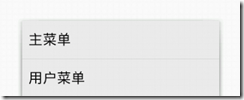
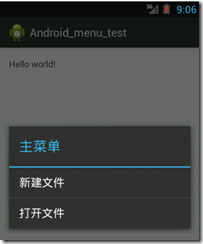
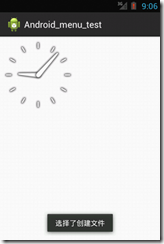
菜单显示到导航栏
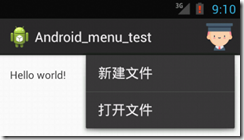
android:showAsAction="ifRoom"
Android 菜单 使用XML的更多相关文章
- [转载]关于android SDK安装Failed to fetch URL http://dl-ssl.google.com/android/repository/addons_list-1.xml出错
原文地址为:http://blog.csdn.net/springsky_/article/details/7442388 因为入行移动测试,所以很多测试环境的搭建.从中遇到了和这个GG同样的问题.怕 ...
- Android菜单详解(四)——使用上下文菜单ContextMenu
之前在<Android菜单详解(二)——创建并响应选项菜单>和<Android菜单详解(三)——SubMenu和IconMenu>中详细讲解了选项菜单,子菜单和图标菜单.今天接 ...
- 【转】Android菜单详解——理解android中的Menu--不错
原文网址:http://www.cnblogs.com/qingblog/archive/2012/06/08/2541709.html 前言 今天看了pro android 3中menu这一章,对A ...
- Failed to fetch URL https://dl-ssl.google.com/android/repository/addons_list-2.xml, reason: Connect
Failed to fetch URL https://dl-ssl.google.com/android/repository/addons_list-2.xml, reason: Connect ...
- Android菜单
Android菜单概述 菜单是Activity的一个重要组成部分,它为用户操作提供了快捷的途径.Android提供了一个简单的框架来向程序中添加标准菜单 . 一.创建一个菜单资源 你需要在一个XML ...
- Android菜单(menu)
Android 菜单 我们继续来进行学习,今天写一下在软件中用的还算较多的菜单. 1.Menu 菜单,很显然,作用就是点击不同的选项触发不同的方法.现在在安卓使用中推荐使用ActionBar,但这里 ...
- Android在layout xml中使用include
Android include与merge标签使用详解 - shuqiaoniu的博客 - 博客频道 - CSDN.NEThttp://blog.csdn.net/shuqiaoniu/article ...
- android获取string.xml的值(转)
为什么需要把应用中出现的文字单独存放在string.xml文件中呢? 一:是为了国际化,当需要国际化时,只需要再提供一个string.xml文件,把里面的汉子信息都修改为对应的语言(如,English ...
- [android警告] AndroidManifest.xml警告 Should explicitly set android:allowBackup to true or false
http://www.cnblogs.com/javadu/p/3812528.html Android中AndroidManifest.xml警告 Should explicitly set and ...
随机推荐
- Spring Cloud - Zuul添加过滤器
Zuul作为网关的其中一个重要功能,就是实现请求的鉴权.而这个动作我们往往是通过Zuul提供的过滤器来实现的. 一.过滤器方法的作用 想要使用Zuul实现过滤功能,我们需要自定义一个类继承ZuulFi ...
- Linux(CentOS7)修改默认yum源为国内的阿里云、网易yum源
修改方式: echo 备份当前的yum源 mv /etc/yum.repos.d /etc/yum.repos.d.backup4comex echo 新建空的yum源设置目录 mkdir /etc/ ...
- .Net Core使用分布式缓存Redis:基础
一.前言 Redis的介绍网上很多不再赘述.本次环境为net core 2.2,使用的StackExchange.Redis来操作Redis. 二.引用Microsoft.Extensions.Cac ...
- CSS新特性之2D转换transform
transform是css3中具有颠覆性特征之一,可以实现元素的位移.旋转.缩放等效果 1.位移translate 1.1语法 transform: translate(x,y);//x,y分别表示x ...
- 构建调试Linux内核网络代码的环境MenuOS系统
构建MenuOS系统 1.将指定文件拷贝到本地: git clone https://github.com/mengning/linuxnet.git 此过程可能需要输入github账号和密码. 2. ...
- MySQL 库、表、记录、相关操作(1)
库.表.记录.相关操作(1) 数据库配置 # 通过配置文件统一配置的目的:统一管理 服务端(mysqld) .客户端(client) # 配置了 mysqld(服务端) 的编码为utf8,那么再创建的 ...
- 高并发编程-AQS深入解析
要点解说 AbstractQueuedSynchronizer简称AQS,它是java.util.concurrent包下CountDownLatch/FutureTask/ReentrantLock ...
- Educational Codeforces Round 34 (Rated for Div. 2) A B C D
Educational Codeforces Round 34 (Rated for Div. 2) A Hungry Student Problem 题目链接: http://codeforces. ...
- 一招教你如何修复MySQL slave中继日志损坏问题
[摘要]MySQL的Crash safe slave是指slave crash后,把slave重新拉起来可以继续从Master进行复制,不会出现复制错误也不会出现数据不一致. PS:华为云数据库特惠专 ...
- 让微信推送Jenkins构建消息
Jenkins作为开发必备之神器,各家大小公司都在使用.Jenkins自身内置了基于邮件推送构建结果的功能.但是随着移动互联网的发展,邮件这玩意已经越来越少使用了,是否有一种办法能把jenkins构建 ...