
分布式远程调用SpringCloud-Feign的两种具体操作方式(精华)
一 前言
几大RPC框架介绍
spring cloud远程调用方式---Feign
Feign是一个声明似的web服务客户端,它使得编写web服务客户端变得更加容易。使用Fegin创建一个接口并对它进行注解。它具有可插拔的注解支持包括Feign注解与JAX-RS注解,Feign还支持可插拔的编码器与解码器,Spring Cloud 增加了对 Spring MVC的注解,Spring Web 默认使用了HttpMessageConverters, Spring Cloud 集成 Ribbon 和 Eureka 提供的负载均衡的HTTP客户端 Feign。
官方解释: Feign is a Java to HTTP client binder inspired by Retrofit, JAXRS-2.0, and WebSocket. Feign's first goal was reducing the complexity of binding Denominator uniformly to HTTP APIs regardless of ReSTfulness.
Feign的两种调用方式
1 直接在调用者声明Feign客户端
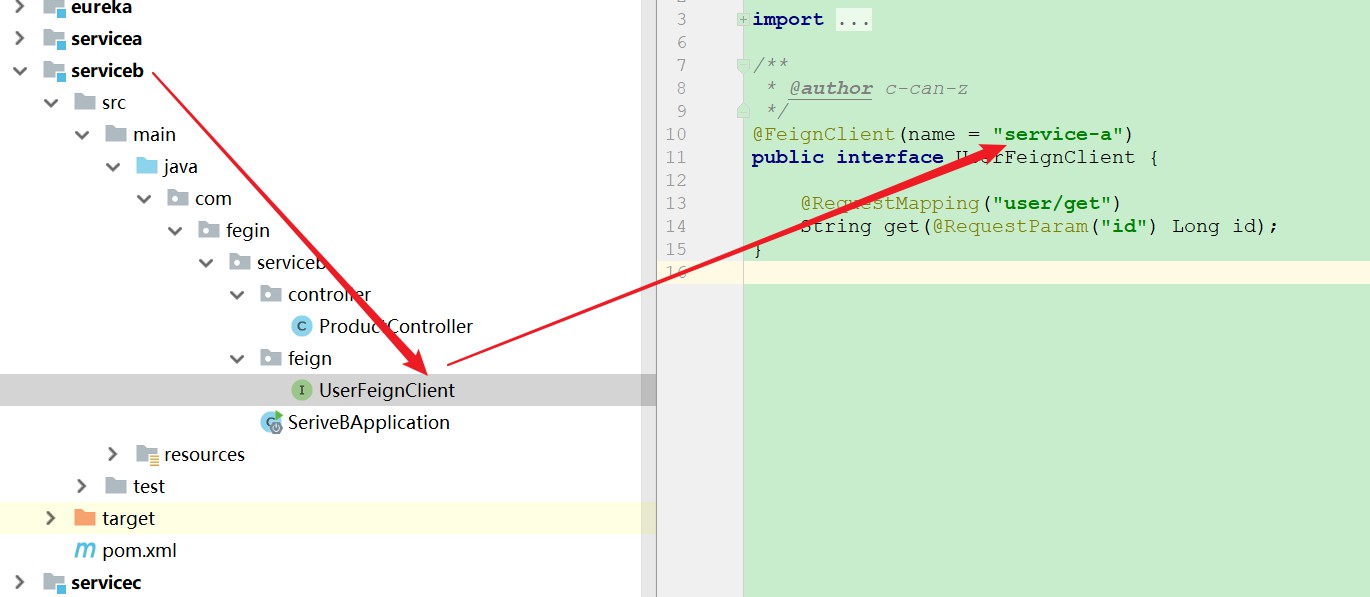
如下图所示, service-b 声明一个接口, 去调用路径为 /user/get 的服务 service-a 的服务
2 在被调用者接口Api中声明Feign客户端
如下图, 在被调用者中声明接口, 去调用自己, 这种方法遵循面向接口编程, 而且使用起来, 就类似dubbo一样, @Autowire直接注入就可以使用了.

以上可能看得读者一头雾水, 以下具体的代码流程, 可以方便更加具体的了解
二 案例1直接在调用者声明Feign客户端代码实现
以下步骤为手把手教学, 请明白我的良苦用心
步骤0 创建一个SpringCloud-Eureka注册中心
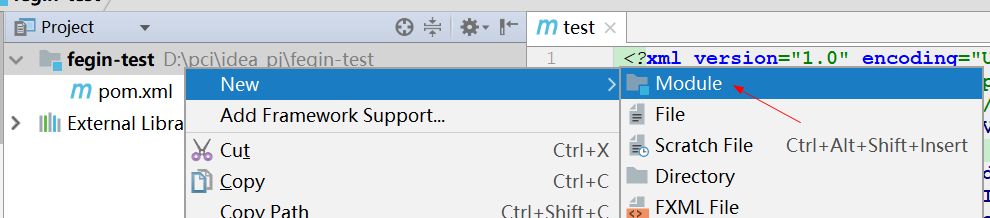
首先创建一个父项目
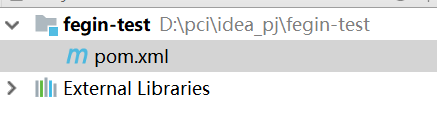
把其他都删除, 剩下pom文件
以下为父项目的依赖
<?xml version="1.0" encoding="UTF-8"?>

<project xmlns="http://maven.apache.org/POM/4.0.0" xmlns:xsi="http://www.w3.org/2001/XMLSchema-instance"

    xsi:schemaLocation="http://maven.apache.org/POM/4.0.0 https://maven.apache.org/xsd/maven-4.0.0.xsd">

    <modelVersion>4.0.0</modelVersion>

    <groupId>com.fegin</groupId>

    <artifactId>test</artifactId>

    <version>0.0.1-SNAPSHOT</version>

    <packaging>pom</packaging>

    <!--springboot version 2.1.4-->

    <parent>

        <groupId>org.springframework.boot</groupId>

        <artifactId>spring-boot-starter-parent</artifactId>

        <version>2.1.4.RELEASE</version>

        <relativePath/> <!-- lookup parent from repository -->

    </parent>

    <properties>

        <java.version>1.8</java.version>

        <spring-cloud.version>Greenwich.SR1</spring-cloud.version>

    </properties>

    <!--springcloud version Greenwish.SR1-->

    <dependencyManagement>

        <dependencies>

            <dependency>

                <groupId>org.springframework.cloud</groupId>

                <artifactId>spring-cloud-dependencies</artifactId>

                <version>${spring-cloud.version}</version>

                <type>pom</type>

                <scope>import</scope>

            </dependency>

        </dependencies>

    </dependencyManagement>

</project>
创建eureka项目
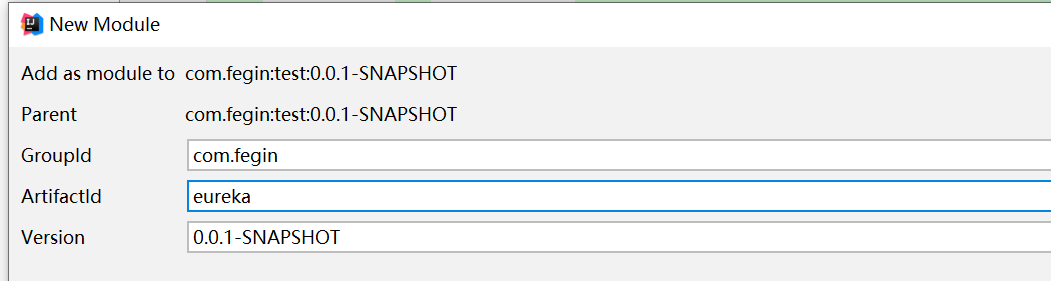
项目结构如图
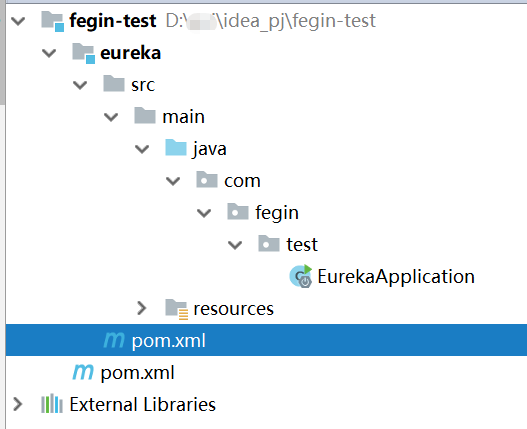
添加eureka的依赖
<?xml version="1.0" encoding="UTF-8"?>

<project xmlns="http://maven.apache.org/POM/4.0.0"

         xmlns:xsi="http://www.w3.org/2001/XMLSchema-instance"

         xsi:schemaLocation="http://maven.apache.org/POM/4.0.0 http://maven.apache.org/xsd/maven-4.0.0.xsd">

    <parent>

        <artifactId>test</artifactId>

        <groupId>com.fegin</groupId>

        <version>0.0.1-SNAPSHOT</version>

    </parent>

    <modelVersion>4.0.0</modelVersion>

    <artifactId>eureka</artifactId>

    <!--eureka服务端配置-->

    <dependencies>

        <dependency>

            <groupId>org.springframework.cloud</groupId>

            <artifactId>spring-cloud-starter-netflix-eureka-server</artifactId>

        </dependency>

    </dependencies>

</project>
添加application.yml
server:

  port: 8761

eureka:

  instance:

    hostname: localhost

  client:

    # 是否把自己作为服务注册到其他服务注册中心

    registerWithEureka: false

    # 是否从其他的服务中心同步服务列表

    fetchRegistry: false

    serviceUrl:

      defaultZone: http://${eureka.instance.hostname}:${server.port}/eureka/

  server:

    # 关闭保护机制,默认true

    enable-self-preservation: false

    # 剔除失效服务间隔,默认60000

    eviction-interval-timer-in-ms: 3000
添加启动类代码EurekaApplication
/**

 * @author c-can-z

 */

@EnableEurekaServer

@SpringBootApplication

public class EurekaApplication {

    public static void main(String[] args) {

        SpringApplication.run(EurekaApplication.class,args);

    }

}
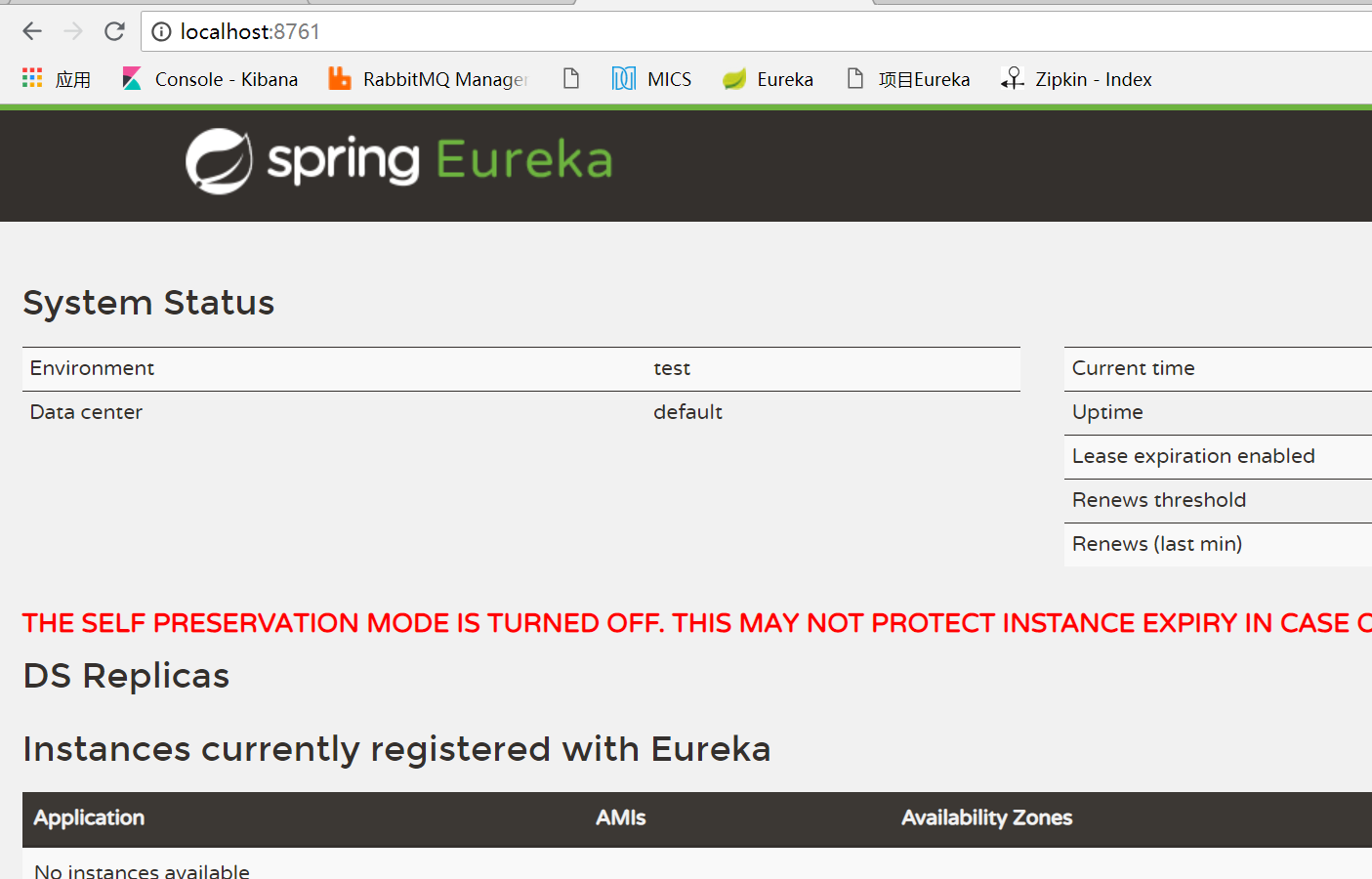
浏览器输入 http://localhost:8761/
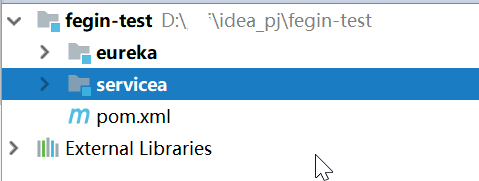
步骤1 准备一个服务servicea --- 该服务为被调用者
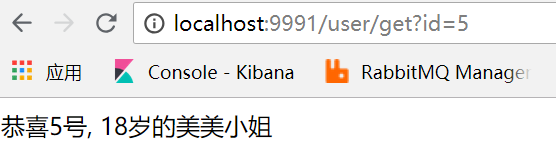
步骤2 准备一个服务serviceb --- 该服务为调用者
创建一个serviceb
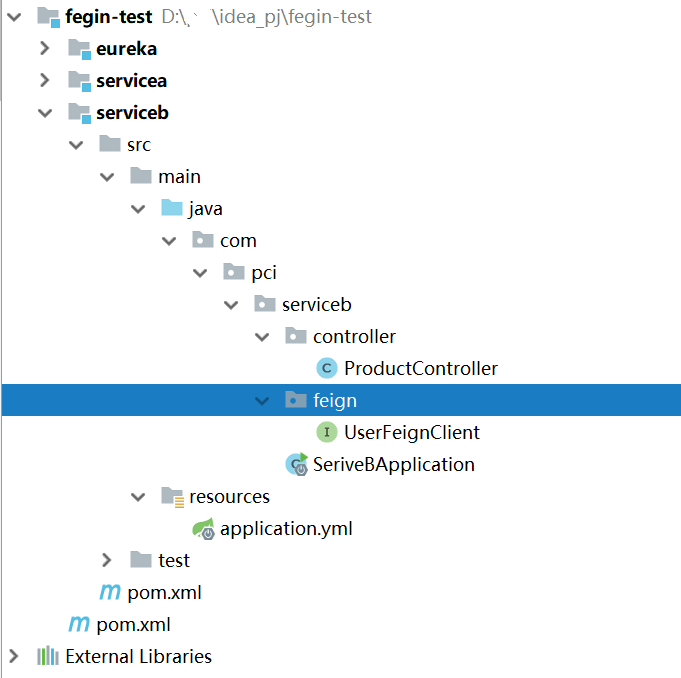
添加一下serviceb必须的依赖
<?xml version="1.0" encoding="UTF-8"?>

<project xmlns="http://maven.apache.org/POM/4.0.0"

         xmlns:xsi="http://www.w3.org/2001/XMLSchema-instance"

         xsi:schemaLocation="http://maven.apache.org/POM/4.0.0 http://maven.apache.org/xsd/maven-4.0.0.xsd">

    <parent>

        <artifactId>test</artifactId>

        <groupId>com.fegin</groupId>

        <version>0.0.1-SNAPSHOT</version>

    </parent>

    <modelVersion>4.0.0</modelVersion>

    <artifactId>serviceb</artifactId>

    <dependencies>

        <!--springboot web-->

        <dependency>

            <groupId>org.springframework.boot</groupId>

            <artifactId>spring-boot-starter-web</artifactId>

        </dependency>

        <!--springboot 测试-->

        <dependency>

            <groupId>org.springframework.boot</groupId>

            <artifactId>spring-boot-starter-test</artifactId>

            <scope>test</scope>

        </dependency>

        <!--lombok-->

        <dependency>

            <groupId>org.projectlombok</groupId>

            <artifactId>lombok</artifactId>

        </dependency>

        <!--eureka客户端配置-->

        <dependency>

            <groupId>org.springframework.cloud</groupId>

            <artifactId>spring-cloud-starter-netflix-eureka-client</artifactId>

        </dependency>

        <dependency>

            <groupId>org.springframework.cloud</groupId>

            <artifactId>spring-cloud-starter-netflix-ribbon</artifactId>

        </dependency>

        <!--微服务调用-->

        <dependency>

            <groupId>org.springframework.cloud</groupId>

            <artifactId>spring-cloud-starter-openfeign</artifactId>

        </dependency>

        <!--zipkin客户端配置, 已经包含sleuth-->

        <dependency>

            <groupId>org.springframework.cloud</groupId>

            <artifactId>spring-cloud-starter-zipkin</artifactId>

        </dependency>

    </dependencies>

</project>
把 application.properties 修改为 application.yml, 本服务名称为 service-b 端口为 9992
server:

  port: 9992

spring:

  application:

    name: service-b

  zipkin:

    base-url: http://localhost:9411

  sleuth:

    sampler:

      probability: 1

eureka:

  client:

    serviceUrl:

      defaultZone: http://localhost:8761/eureka/

    registry-fetch-interval-seconds: 5 #eureka client刷新本地缓存时间,默认30

  instance:

    prefer-ip-address: true

    #Eureka客户端向服务端发送心跳的时间间隔,单位为秒(客户端告诉服务端自己会按照该规则),默认30

    lease-renewal-interval-in-seconds: 5

    #Eureka服务端在收到最后一次心跳之后等待的时间上限,单位为秒,超过则剔除(客户端告诉服务端按照此规则等待自己),默认90

    lease-expiration-duration-in-seconds: 7

feign:

  client:

    config:

      default:

        connectTimeout: 7000

        readTimeout: 7000

service-b:

  ribbon:

    NFLoadBalancerRuleClassName: com.netflix.loadbalancer.RandomRule

logging:

  level:

    root: info
导入启动类文件
@SpringBootApplication

@EnableFeignClients

public class SeriveBApplication {

    public static void main(String[] args) {

        SpringApplication.run(SeriveBApplication.class,args);

    }

}
创建Feign客户端
//在创建该步骤的时候, 需要关注一下步骤1的说明

//@FeignClient(name = "service-a")注解来绑定该接口对应servic-a服务

@FeignClient(name = "service-a")

public interface UserFeginClient {

    //service-a服务对应资源路径.必须加上@RequestParam, 否则会报错,返回参数也必须对应上

    @RequestMapping("user/get")

    String get(@RequestParam("id")Long id);

}
在controller中直接进行调用
@RestController

@RequestMapping("/product")

public class ProductController {

    @Autowired

    private UserFeginClient userFeginClient;

    @RequestMapping("/get")

    public String get(Long id){

        return "产品服务抽奖: "+userFeginClient.get(id);

    }

}
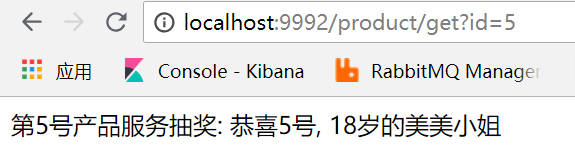
步骤3 测试Feign调用效果
三 案例2 在被调用者接口Api中声明Feign客户端代码实现
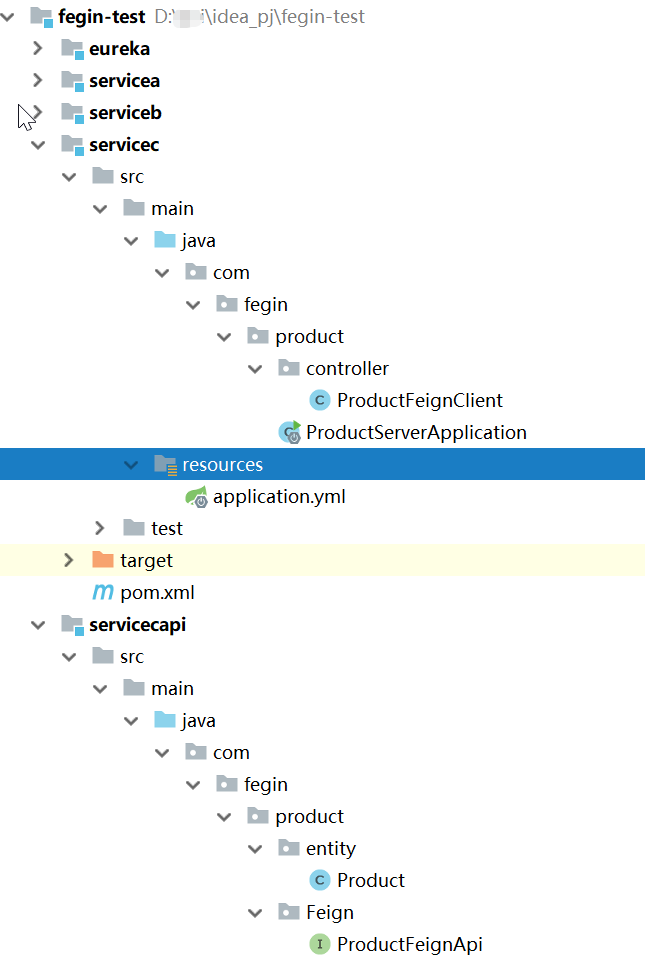
步骤1 创建servicecapi, 该Api用来创建Feign客户端
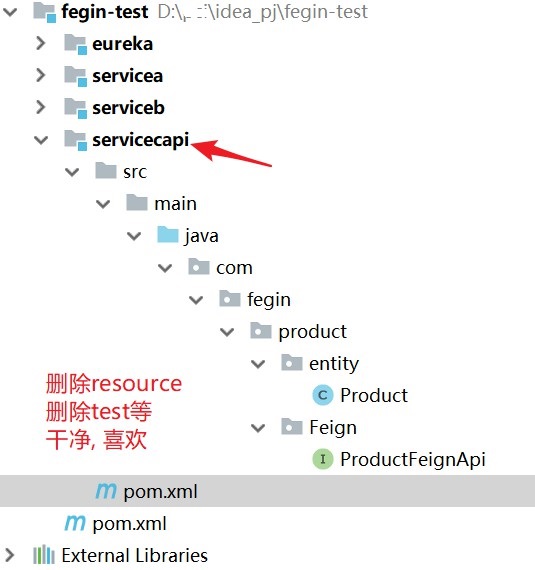
<?xml version="1.0" encoding="UTF-8"?>

<project xmlns="http://maven.apache.org/POM/4.0.0"

         xmlns:xsi="http://www.w3.org/2001/XMLSchema-instance"

         xsi:schemaLocation="http://maven.apache.org/POM/4.0.0 http://maven.apache.org/xsd/maven-4.0.0.xsd">

    <parent>

        <artifactId>test</artifactId>

        <groupId>com.fegin</groupId>

        <version>0.0.1-SNAPSHOT</version>

    </parent>

    <modelVersion>4.0.0</modelVersion>

    <artifactId>servicec-api</artifactId>

    <dependencies>

        <!--lombok-->

        <dependency>

            <groupId>org.projectlombok</groupId>

            <artifactId>lombok</artifactId>

        </dependency>

        <!--微服务调用-->

        <dependency>

            <groupId>org.springframework.cloud</groupId>

            <artifactId>spring-cloud-starter-openfeign</artifactId>

        </dependency>

    </dependencies>

</project>
实体类product
public class Product implements Serializable {

    private Long id;

    private String name;

    public Long getId() {

        return id;

    }

    public void setId(Long id) {

        this.id = id;

    }

    public String getName() {

        return name;

    }

    public void setName(String name) {

        this.name = name;

    }
}
feign客户端
/**

 * 服务名称

 * @author c-can-z

 */

@FeignClient(name="service-c")

public interface ProductFeignApi {

    //动态代理需要的地址, 但是我们实际操作不到

    @RequestMapping("/servicec/get")

    Product get(@RequestParam("id") Long id);

}
步骤2 创建servicec服务
项目结构
service项目依赖
<?xml version="1.0" encoding="UTF-8"?>

<project xmlns="http://maven.apache.org/POM/4.0.0"

         xmlns:xsi="http://www.w3.org/2001/XMLSchema-instance"

         xsi:schemaLocation="http://maven.apache.org/POM/4.0.0 http://maven.apache.org/xsd/maven-4.0.0.xsd">

    <parent>

        <artifactId>test</artifactId>

        <groupId>com.fegin</groupId>

        <version>0.0.1-SNAPSHOT</version>

    </parent>

    <modelVersion>4.0.0</modelVersion>

    <artifactId>servicec</artifactId>

    <dependencies>

        <!--springboot web-->

        <dependency>

            <groupId>org.springframework.boot</groupId>

            <artifactId>spring-boot-starter-web</artifactId>

        </dependency>

        <!--eureka客户端配置-->

        <dependency>

            <groupId>org.springframework.cloud</groupId>

            <artifactId>spring-cloud-starter-netflix-eureka-client</artifactId>

        </dependency>

        <!--zipkin客户端配置, 已经包含sleuth-->

        <dependency>

            <groupId>org.springframework.cloud</groupId>

            <artifactId>spring-cloud-starter-zipkin</artifactId>

        </dependency>

        <!--springboot 测试-->

        <dependency>

            <groupId>org.springframework.boot</groupId>

            <artifactId>spring-boot-starter-test</artifactId>

            <scope>test</scope>

        </dependency>

        <!--导入api-->

        <dependency>

            <groupId>com.fegin</groupId>

            <artifactId>servicec-api</artifactId>

            <version>0.0.1-SNAPSHOT</version>

        </dependency>

    </dependencies>

</project>
servicec的 application.yml
server:

  port: 9993

spring:

  application:

    name: service-c

  zipkin:

    base-url: http://localhost:9411

  sleuth:

    sampler:

      probability: 1

eureka:

  client:

    serviceUrl:

      defaultZone: http://localhost:8761/eureka/

    registry-fetch-interval-seconds: 5 #eureka client刷新本地缓存时间,默认30

  instance:

    prefer-ip-address: true

    #Eureka客户端向服务端发送心跳的时间间隔,单位为秒(客户端告诉服务端自己会按照该规则),默认30

    lease-renewal-interval-in-seconds: 5

    #Eureka服务端在收到最后一次心跳之后等待的时间上限,单位为秒,超过则剔除(客户端告诉服务端按照此规则等待自己),默认90

    lease-expiration-duration-in-seconds: 7

feign:

  client:

    config:

      default:

        connectTimeout: 7000

        readTimeout: 7000

logging:

  level:

    root: info
实现Feign客户端接口, 也是该文章的核心代码
采用实现的方式
/**

 * 远程调用接口的实现类

 * @author c-can-z

 */

@RestController

public class ProductFeignClient implements ProductFeignApi {

    @Override

    public Product get(Long id) {

        Product product = new Product();

        product.setId(id);

        product.setName("我是服务C");

        return product;

    }

}
servicec的启动类
@SpringBootApplication

public class ProductServerApplication {

    public static void main(String[] args) {

        SpringApplication.run(ProductServerApplication.class, args);

    }

}
步骤3 创建serviced服务去调用servicec
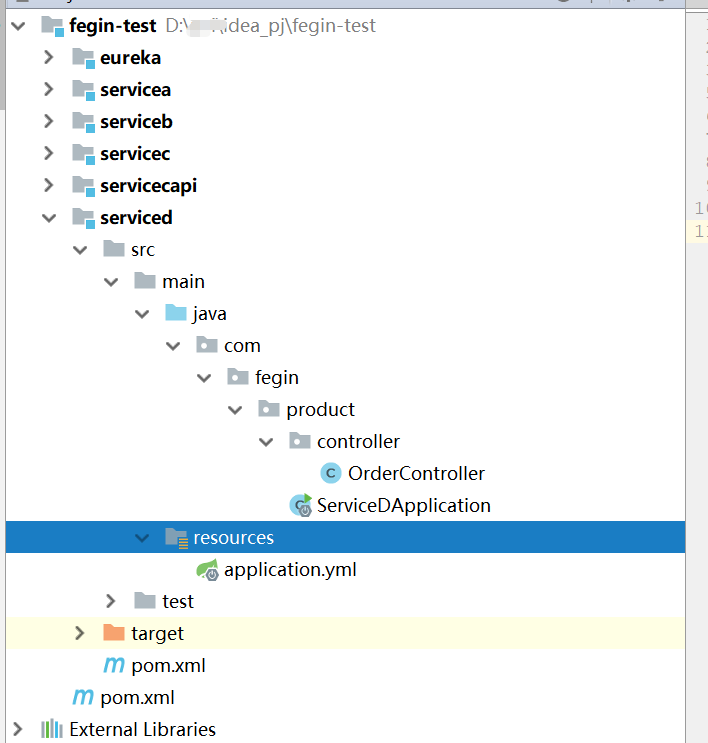
项目结构
注意启动类的位置, servicecapi的路径必须被启动类扫描到
serviced的依赖,
注意, 必须引入servicec的api, 有人会说有代码侵入的问题, 但是对比案例1, 如果多个项目调用, 要创建多个Feign客户端, 孰是孰非, 还得看项目的具体需求
<?xml version="1.0" encoding="UTF-8"?>

<project xmlns="http://maven.apache.org/POM/4.0.0"

         xmlns:xsi="http://www.w3.org/2001/XMLSchema-instance"

         xsi:schemaLocation="http://maven.apache.org/POM/4.0.0 http://maven.apache.org/xsd/maven-4.0.0.xsd">

    <parent>

        <artifactId>test</artifactId>

        <groupId>com.fegin</groupId>

        <version>0.0.1-SNAPSHOT</version>

    </parent>

    <modelVersion>4.0.0</modelVersion>

    <artifactId>serviced</artifactId>

    <dependencies>

        <!--springboot web-->

        <dependency>

            <groupId>org.springframework.boot</groupId>

            <artifactId>spring-boot-starter-web</artifactId>

        </dependency>

        <!--springboot 测试-->

        <dependency>

            <groupId>org.springframework.boot</groupId>

            <artifactId>spring-boot-starter-test</artifactId>

            <scope>test</scope>

        </dependency>

        <!--lombok-->

        <dependency>

            <groupId>org.projectlombok</groupId>

            <artifactId>lombok</artifactId>

        </dependency>

        <!--eureka客户端配置-->

        <dependency>

            <groupId>org.springframework.cloud</groupId>

            <artifactId>spring-cloud-starter-netflix-eureka-client</artifactId>

        </dependency>

        <!--微服务调用-->

        <dependency>

            <groupId>org.springframework.cloud</groupId>

            <artifactId>spring-cloud-starter-openfeign</artifactId>

        </dependency>

        <!--zipkin客户端配置, 已经包含sleuth-->

        <dependency>

            <groupId>org.springframework.cloud</groupId>

            <artifactId>spring-cloud-starter-zipkin</artifactId>

        </dependency>

        <dependency>

            <groupId>com.fegin</groupId>

            <artifactId>servicec-api</artifactId>

            <version>0.0.1-SNAPSHOT</version>

        </dependency>

    </dependencies>

</project>
serviced的 application.yml
server:

  port: 9994

spring:

  application:

    name: service-d

  zipkin:

    base-url: http://localhost:9411

  sleuth:

    sampler:

      probability: 1

eureka:

  client:

    serviceUrl:

      defaultZone: http://localhost:8761/eureka/

    registry-fetch-interval-seconds: 5 #eureka client刷新本地缓存时间,默认30

  instance:

    prefer-ip-address: true

    #Eureka客户端向服务端发送心跳的时间间隔,单位为秒(客户端告诉服务端自己会按照该规则),默认30

    lease-renewal-interval-in-seconds: 5

    #Eureka服务端在收到最后一次心跳之后等待的时间上限,单位为秒,超过则剔除(客户端告诉服务端按照此规则等待自己),默认90

    lease-expiration-duration-in-seconds: 7

feign:

  client:

    config:

      default:

        connectTimeout: 7000

        readTimeout: 7000

logging:

  level:

    root: info
serviced的控制类
/**

 * @author c-can-z

 */

@RestController

@RequestMapping("/order")

public class OrderController {

    @Autowired

    private ProductFeignApi productFeignApi;

    @RequestMapping("/get")

    public String get(Long id){

        Product product = productFeignApi.get(id);

        return "订单为: 货品:" + product.getName() + ", 货品id:"+product.getId();

    }

}
serviced的启动类
/**

 * @author c-can-z

 */

@SpringBootApplication

@EnableFeignClients

public class ServiceDApplication {

    public static void main(String[] args) {

        SpringApplication.run(ServiceDApplication.class,args);

    }

}
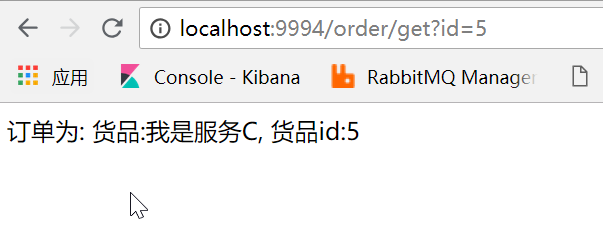
步骤4 测试Feign调用效果
http://localhost:9994/order/get?id=5
四 总结
到了这里, 不知道你是否理解 直接在调用者声明Feign客户端 或者 在被调用者接口Api中声明Feign客户端
直接在调用者声明Feign客户端:
每一个服务调用其他服务, 就需要创建一个客户端, 从代码方面来说, 相对比较麻烦
在被调用者接口Api中声明Feign客户端:
从调用者来看, 使用起来就跟使用淘宝的dubbo一样方便, 但是每一个服务调用其他服务, 就需要引入其他服务的api依赖, 从项目之间的互相依赖来看, 相对来说, 也会比较麻烦.
分布式远程调用SpringCloud-Feign的两种具体操作方式(精华)的更多相关文章
- Atitit.分布式远程调用 rpc rmi CORBA的关系
Atitit.分布式远程调用 rpc rmi CORBA的关系 1. 远程调用(包括rpc,rmi,rest)1 2. 分布式调用大体上就分为两类,RPC式的,REST式的1 3. RPC(远程 ...
- WCF 客户端调用服务操作的两种方法
本节的主要内容:1.通过代理类的方式调用服务操作.2.通过通道的方式调用服务操作.3.代码下载 一.通过代理类的方式调用服务操作(两种方式添加代理类) 1.手动编写代理类,如下: 客户端契约: usi ...
- C#动态调用WCF接口,两种方式任你选。
写在前面 接触WCF还是它在最初诞生之处,一个分布式应用的巨作. 从开始接触到现在断断续续,真正使用的项目少之又少,更谈不上深入WCF内部实现机制和原理去研究,最近自己做一个项目时用到了WCF. 从这 ...
- SoapUI调用webservice实现的两种方式
SoapUI用来做测试,已经是很多人做过的事情了,而且网上教程也很多.不过还是写下来,对比webservice协议与http协议脚本编写的不同. 首先测接口得有一个服务,刚好笔者所在项目做ESB集成. ...
- java中调用dll文件的两种方法
一中是用JNA方法,另外是用JNative方法,两种都是转载来的, JNA地址:http://blog.csdn.net/shendl/article/details/3589676 JNativ ...
- JGit与远程仓库链接使用的两种验证方式(ssh和https)
JGit是使用JAVA的API来操控Git仓库的库,由Eclipse公司维护.他提供的API分成两个层次,底层命令和高层命令.底层API是直接作用于低级的仓库对象,高层的API是一个面向普通用户级别功 ...
- rsync 远程同步 实时同步备份 两种免交互的方式实现实时备份
rsync 远程同步: 一款快速增量备份工具 Remote Sync,远程同步 支持本地复制,或者与其他SSH.rsync主机同步 作用:做数据备份 备份方式: 完全备份 增量备份 ...
- JGit与远程仓库链接使用的两种验证方式(ssh和https)
JGit是使用JAVA的API来操控Git仓库的库,由Eclipse公司维护.他提供的API分成两个层次,底层命令和高层命令.底层API是直接作用于低级的仓库对象,高层的API是一个面向普通用户级别功 ...
- C++调用C代码的两种方式
由于C++支持函数重载,在编译函数代码的时候会加上参数类型的信息,而C编译只有函数名信息,导致C++直接调用C代码在链接的时候会出现函数未定义的问题.解决这种问题有两种方法.方法一:在写C代码的时候考 ...
随机推荐
- 基于AOP和Redis实现对接口调用情况的监控及IP限流
目录 需求描述 概要设计 代码实现 参考资料 需求描述 项目中有许多接口,现在我们需要实现一个功能对接口调用情况进行统计,主要功能如下: 需求一:实现对每个接口,每天的调用次数做记录: 需求二:如果某 ...
- 上下文管理器及with的相关总结
什么是上下文管理器 基本语法 with EXPR as VAR: BLOCK 概念 上下文表达式:with open('test.txt') as f: 上下文管理器:open('test.txt') ...
- 微服务SpringCloud之GateWay服务化和过滤器
Spring Cloud Gateway 提供了一种默认转发的能力,只要将 Spring Cloud Gateway 注册到服务中心,Spring Cloud Gateway 默认就会代理服务中心的所 ...
- [考试反思]0803NOIP模拟测试12:偿还
嗯,rank5.没什么可评价的,高不算高低不算低. 一套好题,被我浪费了. 离上面280的大神差的有点远. 分机房的绝响就要来临. 越来越感觉自己变菜了,整体的能力水平在下滑. 说的不只是考试,包括平 ...
- Spring Cloud gateway 五 Sentinel整合
微服务当前这么火爆的程度,如果不能学会一种微服务框架技术.怎么能升职加薪,增加简历的筹码?spring cloud 和 Dubbo 需要单独学习.说没有时间?没有精力?要学俩个框架?而Spring C ...
- java.io.StreamCorruptedException: invalid stream header: 00000000
Caused by: java.io.StreamCorruptedException: invalid stream header: 00000000 at java.io.ObjectInputS ...
- python经典算法题:求字符串中最长的回文子串
题目 给定一个字符串 s,找到 s 中最长的回文子串.你可以假设 s 的最大长度为 1000. 示例 1: 输入: "babad" 输出: "bab" 注意: ...
- 一种logging封装方法,不会产生重复log
在调试logging的封装的时候,发现已经调用了logging封装的函数,在被其它函数再调用时,会出现重复的logging.原因是不同的地方创建了不同的handler,所以会重复,可以使用暴力方法解决 ...
- kubernetes 控制器详解【持续完善中】
目录 资源创建详解 一:Pod及常用参数 1.简介 2.模板 3.删除pod 4.设置Pod主机名 5.镜像拉取策略(ImagePullPolicy) 二:RC 1.简介 2.模板 三:Deploym ...
- 痞子衡嵌入式:串行EEPROM接口事实标准及SPI EEPROM简介
大家好,我是痞子衡,是正经搞技术的痞子.今天痞子衡给大家介绍的是EEPROM接口标准及SPI EEPROM. 痞子衡之前写过一篇文章 <SLC Parallel NOR简介>,介绍过并行N ...