
遇到Elements in iteration expect to have 'v-bind:key' directives.' 这个错误
解决方式一:更改VS Code编辑器的vetur配置
错误提示:
[vue-language-server] Elements in iteration expect to have 'v-bind:key' directives.
Renders the element or template block multiple times based on the source data
使用VS Code 出现如下问题,如图
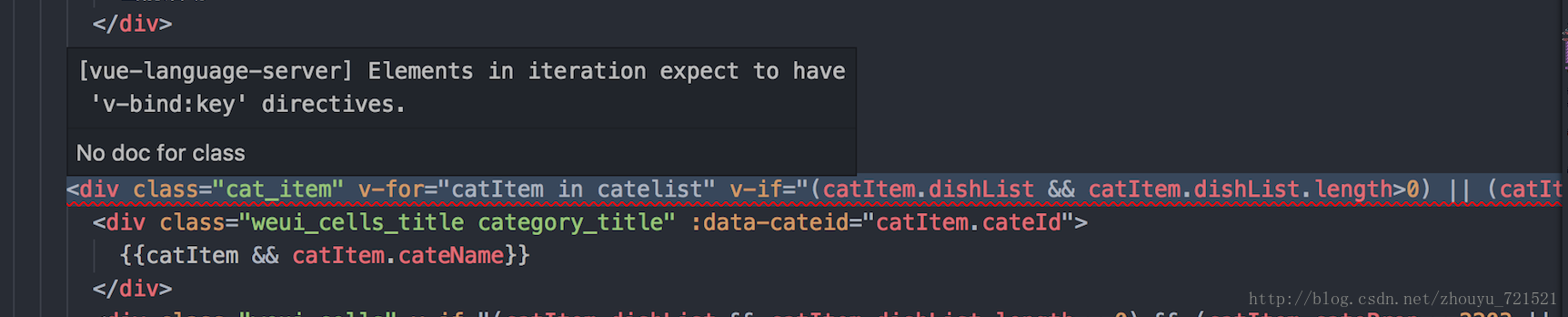
Vue 2.2.0+的版本里,当在组件中使用v-for时,key是必须的。
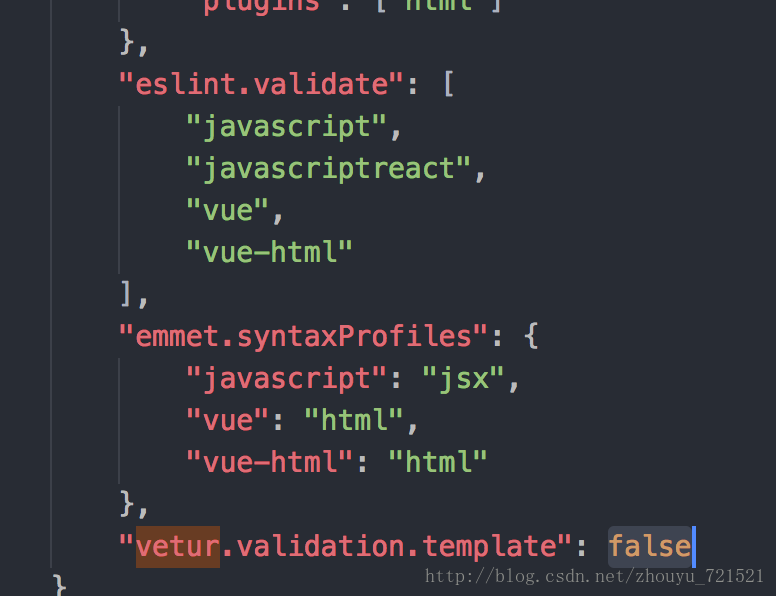
更改vetur配置 vscode->首选项->设置->搜索(vetur)
改成:false
解决方式二:设置对应的key
在学习vue过程中遇到Elements in iteration expect to have 'v-bind:key' directives.' 这个错误,查阅资料得知Vue 2.2.0+的版本里,当在组件中使用v-for时,key是必须设置的。
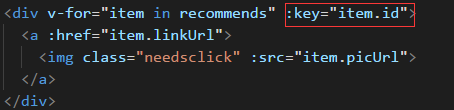
注意上面key值不要用对象或是数组作为key,用string或number作为key,否则报错:[Vue warn] Avoid using non-primitive value as key, use string/number value instead.
key
当 Vue.js 用 v-for 正在更新已渲染过的元素列表时,它默认用“就地复用”策略。如果数据项的顺序被改变,Vue 将不会移动 DOM 元素来匹配数据项的顺序, 而是简单复用此处每个元素,并且确保它在特定索引下显示已被渲染过的每个元素。这个类似 Vue 1.x 的 track-by="$index" 。
这个默认的模式是高效的,但是只适用于不依赖子组件状态或临时 DOM 状态 (例如:表单输入值) 的列表渲染输出。
为了给 Vue 一个提示,以便它能跟踪每个节点的身份,从而重用和重新排序现有元素,你需要为每项提供一个唯一 key 属性。理想的 key 值是每项都有的且唯一的 id。这个特殊的属性相当于 Vue 1.x 的 track-by ,但它的工作方式类似于一个属性,所以你需要用 v-bind 来绑定动态值 (在这里使用简写):
<div v-for="item in items" :key="item.id"> |
建议尽可能在使用 v-for 时提供 key,除非遍历输出的 DOM 内容非常简单,或者是刻意依赖默认行为以获取性能上的提升。
因为它是 Vue 识别节点的一个通用机制,key 并不与 v-for 特别关联,key 还具有其他用途,我们将在后面的指南中看到其他用途。
遇到Elements in iteration expect to have 'v-bind:key' directives.' 这个错误的更多相关文章
- vue开发中v-for在Eslint的规则检查下出现:Elements in iteration expect to have 'v-bind:key' directives
在使用VScode编辑器vue开发过程中,v-for在Eslint的规则检查下出现报错:Elements in iteration expect to have 'v-bind:key' direct ...
- v-for 在 VSCode 中出现 Elements in iteration expect to have 'v-bind:key' directives.
在 VSCode 中编辑代码时,在有 v-for 的语句下面有一条红色波浪线,鼠标放上去有提示 Elements in iteration expect to have 'v-bind:key' di ...
- vue使用v-for时vscode报错 Elements in iteration expect to have 'v-bind:key' directives
vue使用v-for时vscode报错 Elements in iteration expect to have 'v-bind:key' directives Vue 2.2.0+的版本里,当在组件 ...
- vetur插件提示 [vue-language-server] Elements in iteration expect to have 'v-bind:key' directives错误的解决办法
错误提示: [vue-language-server] Elements in iteration expect to have 'v-bind:key' directives.Renders the ...
- vetur插件提示 [vue-language-server] Elements in iteration expect to have 'v-bind:key' directives
错误如下图所示: 错误提示: [vue-language-server] Elements in iteration expect to have 'v-bind:key' directives.Re ...
- Elements in iteration expect to have 'v-bind:key' directives.' 提示错误如何解决?
在学习vue过程中遇到Elements in iteration expect to have 'v-bind:key' directives.' 这个错误,查阅资料得知Vue 2.2.0+的版本里, ...
- Elements in iteration expect to have 'v-bind:key' directives错误的解决办法
一.错误如下 [eslint-plugin-vue][vue/require-v-for-key]Elements in iteration expect to have 'v-bind:key' d ...
- vue的开发中v-for报错 [vue/require-v-for-key] Elements in iteration expect to have 'v-bind:key' directives.
用的VS Code 工具,安装了vetur插件,报错了如下 [eslint-plugin-vue] [vue/require-v-for-key] Elements in iteration expe ...
- [vue/require-v-for-key] Elements in iteration expect to have 'v-bind:key' directives.
使用VScode开发vue中,v-for在Eslint的规则检查下出现报错:如下Elements in iteration expect to have ‘v-bind:key’ directives ...
随机推荐
- 第一个web程序(web.xml , ServletConfig , ServletContext)
一:第一个jsp程序 1.项目设计结构 2.新建Person.java package com.java.demo; public class Person { public void printSt ...
- CSU - 2061 Z‘s Coffee
Description Z is crazy about coffee. One day he bought three cups of coffee. The first cup has a cap ...
- 一、redis系列之基础知识与centos下环境搭建
1. Redis 与其他 key - value 缓存产品有以下三个特点: Redis支持数据的持久化,可以将内存中的数据保持在磁盘中,重启的时候可以再次加载进行使用. Redis不仅仅支持简单的ke ...
- Java 中的异常处理机制
生活中的异常: 不能够完整而顺利的完成一些工作 根据不同的异常进行相应的处理,而不会就此终端我们的生活 引出: 异常处理: 方式: 1.选择结构(逻辑判断)避免 demo:if逻辑处理异常 im ...
- Ubuntu 16.04 64位 tftp服务器搭建
TFTP(Trivial File Transfer Protocol,简单文件传输协议)是TCP/IP协议族中的一个用来在客户机与服务器之间进行简单文件传输的协议,提供不复杂.开销不大的文件传输服务 ...
- android 视频
韩梦飞沙 韩亚飞 313134555@qq.com yue31313 han_meng_fei_sha 第一套完整版: 第二套完整版: 第三套完整版: 第四套完整版: 第五套完整版: ==== ...
- BZOJ 2653: middle 主席树 二分
https://www.lydsy.com/JudgeOnline/problem.php?id=2653 因为是两个方向向外延伸所以不能对编号取前缀和(这里只有前缀和向后传递的性质,不是实际意义的和 ...
- 20162327WJH第三次实验——查找与排序2
20162327WJH第三次实验--查找与排序2 实 验 报 告 课程:程序设计与数据结构 班级: 1623 姓名: 王旌含 学号:20162327 成绩: 指导教师:娄嘉鹏 王志强 实验日期:11月 ...
- 安装第三方jar包的两种方式
由于部分第三放jar包没有放到maven中央仓库,而项目中又依赖了这些jar包,那么如何安装?我实践了两种,特做记录. 一.安装到 nexus 私有库: 在 3rd party 仓库下有个 Artif ...
- bzoj 3671 贪心
想到了从小到大依次填,但想到可能有重复元素,那是就会有分支,就不知怎样办了,最后才发现它是用随机数来调整排列,所以没有重复元素,唉..... /**************************** ...