
Android导航抽屉-Navigation Drawer
Google今年七月份的时候更新了他们的Google+应用,采用了新的导航方式并抛弃了navigationdrawer。一时之间,又引发了一系列关于NavigationDrawer利弊的讨论,不过对于开发者而言我们只需要管好自己需要实现或者学习的功能的即可,2012年Youtube、Facebook、Path等应用纷纷使用了Navigationdrawer这样的导航方式,去年Google为了整治越来越混的Android,设计出了抽屉导航,开始正题还是关心下如何使用吧:
页面布局
看布局之前看下布局吧,网上常见的一张图片如下,Android官方文档上的一个图片,文章最后会给出链接:
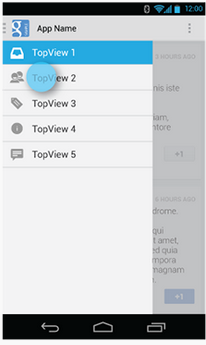
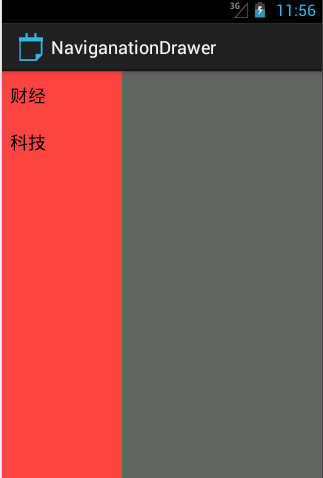
布局文件代码:
<RelativeLayout xmlns:android="http://schemas.android.com/apk/res/android"

    xmlns:tools="http://schemas.android.com/tools"

    android:layout_width="match_parent"

    android:layout_height="match_parent"

    tools:context="com.example.naviganationdrawer.MainActivity" >

    <android.support.v4.widget.DrawerLayout

        android:id="@+id/mDrawerLayout"

        android:layout_width="match_parent"

        android:layout_height="match_parent" >

        <FrameLayout

            android:id="@+id/content_frame"

            android:layout_width="match_parent"

            android:layout_height="match_parent" >

        </FrameLayout>

        <!-- 导航抽屉 -->

        <ListView

            android:id="@+id/left_drawer"

            android:layout_width="120dp"

            android:layout_height="match_parent"

            android:layout_gravity="start"

            android:background="@android:color/holo_red_light"

            android:choiceMode="singleChoice"

            android:divider="@android:color/transparent"

            android:dividerHeight="0dp" />

    </android.support.v4.widget.DrawerLayout>

</RelativeLayout>
DrawerLayout 作为界面根控件,在DrawerLayout里面第一个View为当前界面主内容;第二个和第三个View为抽屉菜单内容。如果当前界面只需要一个抽屉菜单,则第三个View可以省略。
显示的主要内容的View必须要是第一个必须为DrawerLayout的第一个子View, 原因在于 XML 布局文件中的View顺序为Android系统中的 z-ordering顺序,而抽屉必须出现在内容之上。
右侧图片的显示是个ImageView,贴下代码:
<?xml version="1.0" encoding="utf-8"?>

<FrameLayout xmlns:android="http://schemas.android.com/apk/res/android"

    android:layout_width="match_parent"

    android:layout_height="match_parent" >

    <ImageView

        android:id="@+id/content_image"

        android:layout_width="wrap_content"

        android:layout_height="wrap_content"

        android:src="@drawable/ic_launcher"

        />

</FrameLayout>
代码实现
onCreate中的代码实现:
	    mPlanetTitles=new String[]{"财经","科技"};

	        mDrawerList = (ListView) findViewById(R.id.left_drawer);

	        mDrawerList.setAdapter(new ArrayAdapter<String>(this,

	                android.R.layout.simple_list_item_1, mPlanetTitles));

	    	mDrawerLayout=(DrawerLayout) findViewById(R.id.mDrawerLayout);

	        mDrawerList.setOnItemClickListener(new DrawerItemClickListener());
页面左侧是ListView,里面的是当用户选择菜单List中的条目时,系统会调用 OnItemClickListener的 onItemClick()函数,点击事件:
	private class DrawerItemClickListener implements ListView.OnItemClickListener {

	    @Override

	    public void onItemClick(AdapterView parent, View view, int position, long id) {

	        selectItem(position);

	    }

	}
选中的事件:
	private void selectItem(int position) {

	    Fragment fragment = new FragmentContent(mImageList[position]);

	    getSupportFragmentManager().beginTransaction().replace(R.id.content_frame, fragment)

		.commit();

	    mDrawerList.setItemChecked(position, true);

	    setTitle(mPlanetTitles[position]);

	    mDrawerLayout.closeDrawer(mDrawerList);

	}
设置标题:
	@Override

	public void setTitle(CharSequence title) {

	    mTitle = title;

	    getActionBar().setTitle(mTitle);

	}
右侧显示图片的FragementContent中的代码:
public class FragmentContent extends Fragment {

	private int resourceId;

	public FragmentContent(int i) {

		// TODO Auto-generated constructor stub

		resourceId=i;

	}

	@Override

	public void onActivityCreated(Bundle savedInstanceState) {

		// TODO Auto-generated method stub

		super.onActivityCreated(savedInstanceState);

	}

	private View view;

	private ImageView mImageView;

	@Override

	public View onCreateView(LayoutInflater inflater,

			 ViewGroup container,  Bundle savedInstanceState) {

		// TODO Auto-generated method stub

		 view= inflater.inflate(R.layout.fragmentcontent, null);

		 mImageView = (ImageView)view.findViewById(R.id.content_image);

		 mImageView.setImageResource(resourceId);

		return view;

	}

	@Override

	public void onCreate(Bundle savedInstanceState) {

		// TODO Auto-generated method stub

		super.onCreate(savedInstanceState);

	}

}
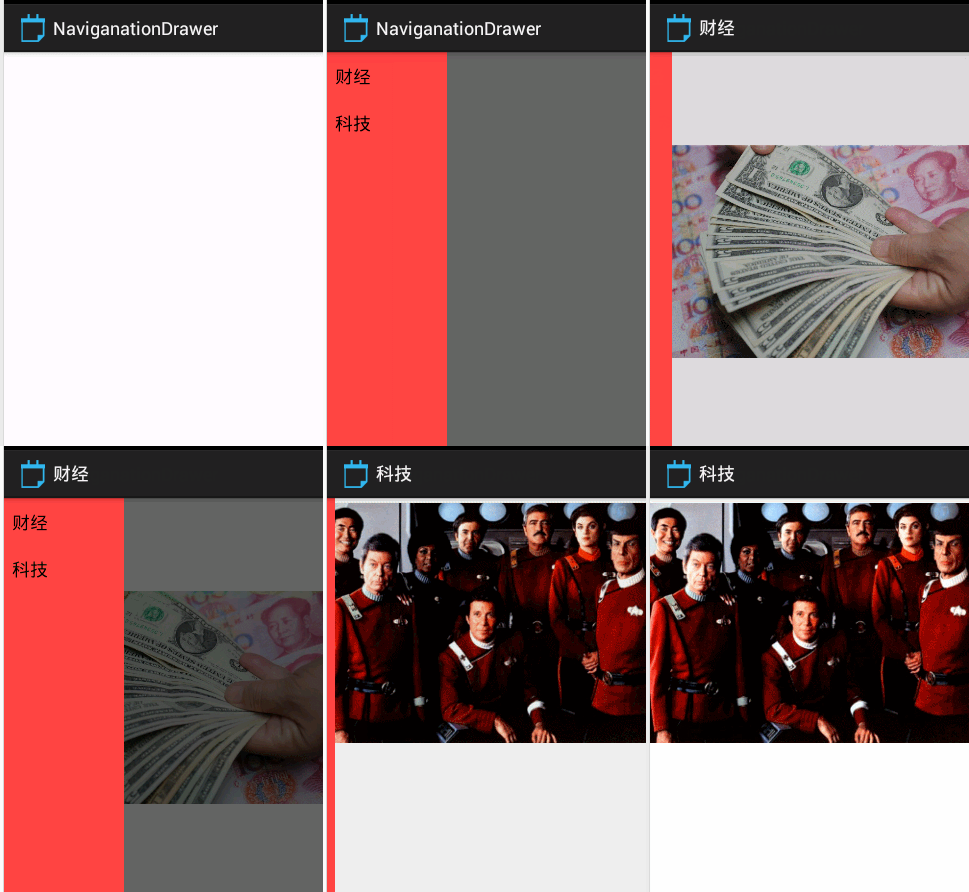
最后看下效果吧:
参考资料:
http://developer.android.com/design/patterns/navigation-drawer.html
http://developer.android.com/training/implementing-navigation/nav-drawer.html
Android导航抽屉-Navigation Drawer的更多相关文章
- 安卓导航抽屉 Navigation Drawer 实现沉浸通知栏
在使用 Navigation Drawer Activity 模版的时候,遇到了通知栏无法完全沉浸的问题,尝试搜索一些现有的解决方法,但是或多或少都会存在一些问题,通过反复尝试找到找到了一种比较靠谱的 ...
- 【原创+译文】官方文档中声明的如何创建抽屉导航栏(Navigation Drawer)
如需转载请注明出处:http://www.cnblogs.com/ghylzwsb/p/5831759.html 创建一个抽屉导航栏 抽屉式导航栏是显示在屏幕的左边缘,它是应用程序的主导航选项面板.它 ...
- [Android]Android Design之Navigation Drawer
概述 在以前ActionBar是Android 4.0的独有的,后来的ActionBarSherlock的独步武林,对了还有SlidingMenu,但是这个可以对4.0下的可以做很好的适配.自从Goo ...
- Android官方终于支持 Navigation Drawer(导航抽屉)模式
在2013 google IO当天,Android团的更新了Support库,新版本(V13)的Support库中新加入了几个比较重要的功能. 添加 DrawerLayout 控件,支持创建 Nav ...
- Android Navigation Drawer(导航抽屉)
Google I/O 2013 Android 更新了Support库,新版本的Support库中新加入了几个比较重要的功能. 添加 DrawerLayout 控件,支持创建 Navigation ...
- Navigation Drawer(导航抽屉)
目录(?)[-] 创建一个导航抽屉 创建抽屉布局 初始化抽屉列表 处理导航项选点击事件 监听导航抽屉打开和关闭事件 点击应用图标来打开和关闭导航抽屉 创建一个导航抽屉 导航抽屉是一个位于屏幕左侧边缘用 ...
- 【转】Navigation Drawer(导航抽屉)
创建一个导航抽屉 创建抽屉布局 初始化抽屉列表 处理导航项选点击事件 监听导航抽屉打开和关闭事件 点击应用图标来打开和关闭导航抽屉 创建一个导航抽屉 导航抽屉是一个位于屏幕左侧边缘用来显示应用程序 ...
- Android UI开发第三十二篇——Creating a Navigation Drawer
Navigation Drawer是从屏幕的左侧滑出,显示应用导航的视图.官方是这样定义的: The navigation drawer is a panel that displays the ap ...
- Creating a Navigation Drawer 创建一个导航侧边栏
The navigation drawer is a panel that displays the app’s main navigation options on the left edge of ...
随机推荐
- MVC、MVP和MVVM的异同
No1: Model一般用来保持程序的数据状态,比如数据存储.网络请求等 No2: Android开发中应用到MVC的地方:比如ListView与Adapter,如果把ListView看作View层, ...
- 洛谷P2525 Uim的情人节礼物·其之壱 [康托展开]
题目传送门 Uim的情人节礼物·其之壱 题目描述 情人节到了,Uim打算给他的后宫们准备情人节礼物.UIm一共有N(1<=N<=9)个后宫妹子(现充去死 挫骨扬灰!). 为了维护他的后宫的 ...
- C#语言-NPOI.dll导入Excel功能的实现
前言:刚工作那会,公司有一套完善的MVC框架体系,每当有导入EXCEL功能要实现的时候,都会借用框架里自带的导入方法,一般三下五除二就完成了,快是快,可总是稀里糊涂的,心里很没有底.前几天,在另一个原 ...
- JAVAEE——SSH项目实战06:统计信息管理、Spring注解开发和EasyUI
作者: kent鹏 转载请注明出处: http://www.cnblogs.com/xieyupeng/p/7190925.html 一.统计信息管理 二.Spring注解开发 1.service ...
- android viewHolder static 静态
韩梦飞沙 韩亚飞 313134555@qq.com yue31313 han_meng_fei_sha 不是静态内部类 会 持有 外部类的 引用. 就像经常自定义的 适配器 类 作为内部类 ...
- QT学习笔记4:QT中GraphicsView编程
一.QGraphicsScene 1.QGraphicsScene QGraphicsScene继承自QObject,是一个管理图元的容器,与QGraphicsView合用可以在2D屏幕上显示如线.三 ...
- hihocoder 1526 序列的值
题面在这里! 好久没做题啦,养生一下qwq 推一推贡献就会发现这TM就是一个水题啊! #include<bits/stdc++.h> #define ll long long using ...
- hdu 4403 爆搜
题意:给一串数字,在其间加入若干加号和一个等号,问使等式成立的方案总数 if the digits serial is "1212", you can get 2 equation ...
- HDU 5700 区间交 离线线段树
区间交 题目连接: http://acm.hdu.edu.cn/showproblem.php?pid=5700 Description 小A有一个含有n个非负整数的数列与m个区间.每个区间可以表示为 ...
- [Android] 字体使用dp单位避免设置系统字体大小对排版的影响
[Android] 字体使用dp单位避免设置系统字体大小对排版的影响 以魄族mx3为例,在设置->显示->字体大小中能够选择字号大小例如以下图: 图1. 魄族mx3 会导致软件在有固定定高 ...