
glusterfs分布式文件系统
第一:安装依赖包:
yum install libibverbs librdmacm xfsprogs nfs-utils rpcbind libaio liblvm2app lvm2-devel libevent-devel nfs-utils-lib-devel tcl-devel libsysfs-devel userspace-rcu atop iozone fio iperf
安装gluserfs server 和 client
yum install glusterfs glusterfs-server glusterfs-fuse
# yum install glusterfs-3.7.9-12 glusterfs-server-3.7.8-1.el7.x86_64
yum -y install glusterfs glusterfs-client
8.组建集群
/etc/init.d/glusterd start
chkconfig glusterd on
登陆服务器server1,执行命令
[root@server1 yum.repos.d]# gluster peer probe server2
[root@server1 yum.repos.d]# gluster peer probe server3
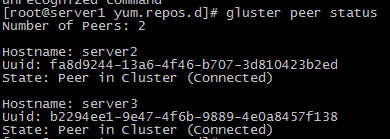
使用 gluster peer status 查看状态
9.创建卷
1.确定创建卷的类型
2.去创建卷的brick列表
3.确定创建卷的网络类型(TCP/RDMA)
4.gluster volume create 创建复制卷,至少2台主机
卷里使用2台主机
gluster volume create testvol replica 3 server1:/brick1/images server2:/brick1/images
#分布式复制glusterfs卷,至少4台主机
#gluster volume create fengvol replica 2 transport tcp judge1:/data/feng judge2:/data/feng graph1:/data/feng graph2:/data/feng force
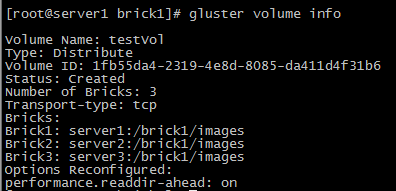
查看volume 卷信息
为硬盘访问设置权限:
Gluster volume set testVol auth.allow 172.16.1.*
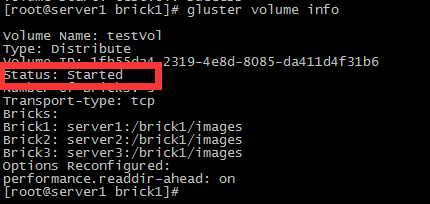
启动创建的卷
gluster volume start testVol
查看卷的扩展属性
getfattr -d -m . -e hex /brick1/images

客户端挂载
mount -t glusterfs glusterfs1:/testvol /data
cat /etc/fstab
glusterfs1:/testvol /data glusterfs defaults 0 0
# 设置 cache 大小, 默认32MB

$ gluster volume set testvol performance.cache-size 4GB

# 设置 io 线程, 太大会导致进程崩溃

$ gluster volume set testvol performance.io-thread-count 16

# 设置 网络检测时间, 默认42s

$ gluster volume set testvol network.ping-timeout 10

# 设置 写缓冲区的大小, 默认1M

$ gluster volume set testvol performance.write-behind-window-size 1024MB
查看卷
Gluster volume info
删除卷
gluster volume stop testvol
gluster volume delete testvol
将机器移出集群
gluster peer detach 172.28.26.102
只允许172.28.0.0的网络访问glusterfs
gluster volume set testvol auth.allow 172.28.26.*
加入新的机器并添加到卷里(由于副本数设置为2,至少要添加2(4、6、8..)台机器)
gluster peer probe 172.28.26.105
gluster peer probe 172.28.26.106
gluster volume add-brick testvol 172.28.26.105:/data/gluster 172.28.26.106:/data/gluster
收缩卷
# 收缩卷前gluster需要先移动数据到其他位置
gluster volume remove-brick testvol 172.28.26.101:/data/gluster/testvol 172.28.26.102:/data/gluster/testvol start
# 查看迁移状态
gluster volume remove-brick testvol 172.28.26.101:/data/gluster/testvol 172.28.26.102:/data/gluster/testvol status
# 迁移完成后提交
gluster volume remove-brick testvol 172.28.26.101:/data/gluster/testvol 172.28.26.102:/data/gluster/testvol commit
迁移卷
# 将172.28.26.101的数据迁移到,先将172.28.26.107加入集群
gluster peer probe 172.28.26.107
gluster volume replace-brick testvol 172.28.26.101:/data/gluster/testvol 172.28.26.107:/data/gluster/testvol start
# 查看迁移状态gluster volume replace-brick testvol 172.28.26.101:/data/gluster/testvol 172.28.26.107:/data/gluster/testvol status
# 数据迁移完毕后提交gluster volume replace-brick testvol 172.28.26.101:/data/gluster/testvol 172.28.26.107:/data/gluster/testvol commit
# 如果机器172.28.26.101出现故障已经不能运行,执行强制提交然后要求gluster马上执行一次同步
gluster volume replace-brick testvol 172.28.26.101:/data/gluster/testvol 172.28.26.102:/data/gluster/testvol commit -force
gluster volume heal testvol s full
移除集群 gluster peer detach server3
glusterfs分布式文件系统的更多相关文章
- GlusterFS 分布式文件系统的使用入门-管理GlusterFS卷
GlusterFS 分布式文件系统的使用入门-管理GlusterFS卷 作者:尹正杰 版权声明:原创作品,谢绝转载!否则将追究法律责任. 一.卷的扩容 您可以根据需要在群集联机且可用时扩展卷.例如,您 ...
- GlusterFS分布式文件系统部署及基本使用(CentOS 7.6)
GlusterFS分布式文件系统部署及基本使用(CentOS 7.6) 作者:尹正杰 版权声明:原创作品,谢绝转载!否则将追究法律责任. Gluster File System 是一款自由软件,主要由 ...
- GlusterFS分布式文件系统高速管理
TaoCloud XDFS基于GlusterFS开源分布式文件系统,进行了系统优化.project化.定制化和产品化工作,五年以上的实践积累了大量实践经验,包含客户案例.最佳实践.定制开发.咨询服务和 ...
- GlusterFS分布式文件系统的使用
glusterfs是一款开源的分布式文件系统. 它具备高扩展.高可用及高性能等特性,由于其无元数据服务器的设计,使其真正实现了线性的扩展能力,使存储总容量可轻松达到PB级别,支持数千客户端并发访问. ...
- GlusterFS分布式文件系统部署
GlusterFS是一个可伸缩的网络文件系统,使用常见的现成的硬件,您可以创建大型分布式存储流媒体解决方案.数据分析.和其他数据相关的任务.GlusterFS是自由和开源软件. 详细参考官网:http ...
- GlusterFS 分布式文件系统
简介 官方文档:https://docs.gluster.org/en/latest/Quick-Start-Guide/Architecture/ Glusterfs是一个开源的分布式文件系统,是S ...
- CentOS7.5 GlusterFS 分布式文件系统集群环境搭建
环境准备: 系统版本:CentOS Linux release 7.5.1804 (Core) glusterfs:3.6.9 userspace-rcu-master: 硬件资源: 10.200.2 ...
- glusterFS分布式文件系统的搭建
准备工作 1.安装IBA yum install libradmacm librdmacm-devel libmlx4 infiniband-diags 2.配置IPOIB /etc/sysconfi ...
- GlusterFS分布式文件系统概述
一.GlusterFS概述 GlusterFS是一个开源的分布式文件系统,同时也是Scale-Out存储解决方案Gluster的核心,在存储数据方面有强大的横向扩展能力,通过扩展不同的节点可以支持PB ...
随机推荐
- java 将页面指定区域截图并上传到服务器
controller层: /** * 上传获取到的收据图片 * @param request * @param data 获取到的图片 * @return */ @RequestMapping(val ...
- 后台管理UI+功能
kingRoad功能强大,丰富各种功能和插件,自定义开发功能组件及样式,使用webpack方式集成和纯html两种,UI(自定义开发和AdminLTE的集成优化),弹窗功能使用(Layer弹窗,并与框 ...
- System.Collections空间下的Hashtable类与System.Collections.Specialized下的StringDictionary的一点小区别
哎.有一周没有写自己的博客. 最近在做一个调用web服务的小程序,没有使用c#自动生成的代理类,而是使用http-get.post.以及soap的方式去请求的,使用这http请求这种方式需要自己去拼参 ...
- yii 修改模块使用的布局文件
方法一:yii模块默认使用系统当前的主题布局文件,如果在主配置文件中配置了主题比如: 'theme'=>'mythm', 那么yii的模块就使用 protected/themes/mythm/v ...
- axios上传图片(及vue上传图片到七牛))
浏览器上传图片到服务端,我用过两种方法: 1.本地图片转换成base64,然后通过普通的post请求发送到服务端. 操作简单,适合小图,以及如果想兼容低版本的ie没办法用此方法 2.通过form表单提 ...
- angualrJs实现图片上传功能
整体逻辑:service提供FileReader函数,directive提供点击事件的绑定和监听,controller用来修改html上的ng-src属性值 1.HTML <input type ...
- div+css模拟select下拉框
<!DOCTYPE html><html ><head lang="zh"> <meta http-equiv="Content ...
- opencv之图像拼接
参考博客http://blog.csdn.net/u011630458/article/details/44175965 博主:羽凌寒 之后再进行系统学习
- 编译器错误消息: CS0016: 未能写入输出文件"c:\Windows\Microsoft.NET\Framework
解决办法: 原因是由于系统目录下的Temp目录无相应的权限所致,具体操作如下: 来到C:/Windows目录,修改temp文件夹的属性. 在安全页设置IIS-IUSRS的权限,赋予修改.读取.写入等权 ...
- 一些不错的Android开源音视频播放器
摘要:来自Github上的一点点整理,希望对你有用! 整理了一下Github上几个开源的音视频播放器项目,有兴趣的同学可以clone代码去研究学习. 1.UniversalMusicPlayer ht ...