
Docker和CI/CD实战
一、CICD和DevOps
前面已经了解了CI/CD,其实CI/CD已经存在多年了,只是最近软件工程方面又提出了敏捷开发、DevOps,又把CI/CD炒火了。
那么什么是DevOps?DevOps和CI/CD有又什么关系呢?
以下内容摘自https://en.wikipedia.org/wiki/DevOps
DevOps (a clipped compound of "development" and "operations") is a software development methodology that combines software development (Dev) with information technology operations (Ops). The goal of DevOps is to shorten the systems development life cycle while delivering features, fixes, and updates frequently in close alignment with business objectives.
DevOps(是由"development" and "operations"两个单词合成)是一个软件开发工程的方法论,它包含了软件开发和IT操作(测试和部署)。DevOps的目标是在持续交付、修改、更新时,紧密结合业务,旨在缩短系统开发的生命周期。
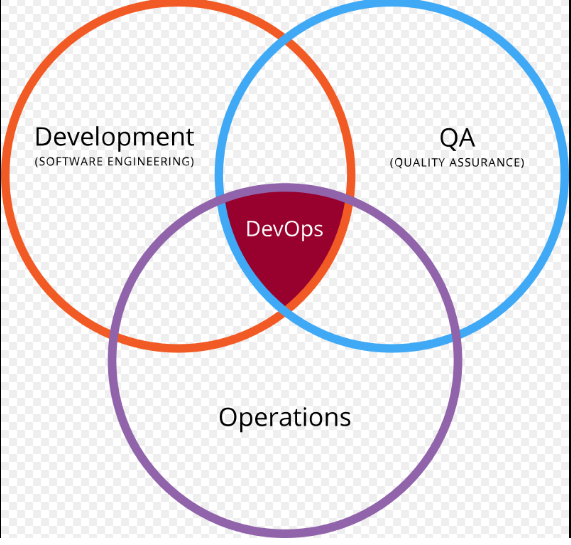

我这里为什么提出DevOps呢?因为DevOps其实是一套方法论,涵盖了我们将要说的CI/CD。从上图可以看出,DevOps包含了以下内容:
- Coding – code development and review, source code management tools, code merging(代码)
- Building – continuous integration tools, build status(构建)
- Testing – continuous testing tools that provide feedback on business risks(测试)
- Packaging – artifact repository, application pre-deployment staging(打包)
- Releasing – change management, release approvals, release automation(发版)
- Configuring – infrastructure configuration and management, infrastructure as code tools(发布)
- Monitoring – applications performance monitoring, end-user experience(监控)
CI基本上包括了编码、构建、测试、打包、发版。
CD基本上主要就是发布。
二、CI/CD和Docker结合
结合Docker,我们可以快速实现CI/CD,当然有少不了版本管理和编译工具。

具体流程如下:
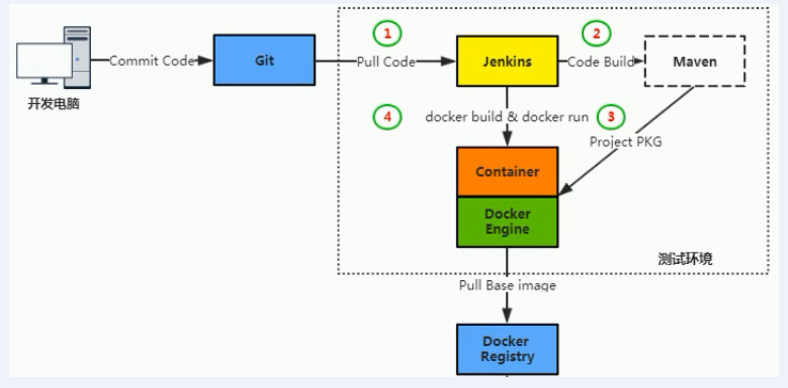
流程解析:
- 开发人员提交代码到代码库(Git Push)
- Jenkins从版本库拉取最新代码(Pull Code)
- Jenkins通过Maven进行构建打包(Build Package)
- 通过Docker将最新版本做成镜像,并推算至镜像仓库(Push/Harbor)
- 测试环境直接拉取最新版本镜像,并部署到测试环境(Pull/Docker Build)
服务器分布:

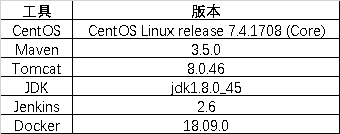
软件环境:
三、实现
1、安装Docker
Docker服务三台机器上都需要安装:
- 191上的Jenkins需要通过Docker编译打包;
- 192上的Docker需要进行版本发布,即将191上打好的最新版本包发布到线上;
- 192上安装Harbor需要依赖Docker;
Docker安装过程在Docker安装一文中有介绍,三步就搞定。
最后能够正常输出docker info算是完成。
[root@localhost local]# docker info

Containers: 1

 Running: 1

 Paused: 0

 Stopped: 0

Images: 5

Server Version: 18.09.0

Storage Driver: overlay2

 Backing Filesystem: extfs

 Supports d_type: true

 Native Overlay Diff: true

Logging Driver: json-file

Cgroup Driver: cgroupfs

Plugins:

 Volume: local

 Network: bridge host macvlan null overlay

 Log: awslogs fluentd gcplogs gelf journald json-file local logentries splunk syslog

Swarm: inactive

Runtimes: runc

Default Runtime: runc

Init Binary: docker-init

containerd version: c4446665cb9c30056f4998ed953e6d4ff22c7c39

runc version: 4fc53a81fb7c994640722ac585fa9ca548971871

init version: fec3683

Security Options:

 seccomp

  Profile: default

Kernel Version: 3.10.0-693.el7.x86_64

Operating System: CentOS Linux 7 (Core)

OSType: linux

Architecture: x86_64

CPUs: 4

Total Memory: 7.639GiB

Name: localhost.localdomain

ID: GUA5:BZVI:PA5N:7ASK:RZQN:I6VL:IGXE:XCRC:TBFN:7UFI:Y5WS:4O7L

Docker Root Dir: /var/lib/docker

Debug Mode (client): false

Debug Mode (server): false

Registry: https://index.docker.io/v1/

Labels:

Experimental: false

Insecure Registries:

 127.0.0.0/8

Registry Mirrors:

 https://registry.docker-cn.com/

Live Restore Enabled: false

Product License: Community Engine
2、安装Jenkins
在191服务器上安装Jenkins,包括JDK、Tomcat、Maven环境的安装。因为我们会模拟一个java工程,通过maven进行编译打包,通过Tomcat跑起来。
将apache-maven-3.5.0-bin.tar.gz、apache-tomcat-8.0.46.tar.gz、jdk-8u45-linux-x64.tar.gz解压到/usr/local目录下。
[root@localhost local]# ll

total 52

drwxr-xr-x  6 root root 4096 Dec 20 11:15 apache-maven-3.5.0

drwxr-xr-x  9 root root 4096 Dec 20 11:44 apache-tomcat-8.0.46

drwxr-xr-x. 2 root root 4096 Nov  5  2016 bin

drwxr-xr-x. 2 root root 4096 Nov  5  2016 etc

drwxr-xr-x. 2 root root 4096 Nov  5  2016 games

drwxr-xr-x. 2 root root 4096 Nov  5  2016 include

drwxr-xr-x  8   10  143 4096 Apr 11  2015 jdk1.8.0_45

drwxr-xr-x. 2 root root 4096 Nov  5  2016 lib

drwxr-xr-x. 2 root root 4096 Nov  5  2016 lib64

drwxr-xr-x. 2 root root 4096 Nov  5  2016 libexec

drwxr-xr-x. 2 root root 4096 Nov  5  2016 sbin

drwxr-xr-x. 5 root root 4096 Mar 19  2018 share

drwxr-xr-x. 2 root root 4096 Dec 20 09:35 src
通过Docker运行Jenkins,Dockerfile如下:
FROM jenkins

USER root

RUN echo '' > /etc/apt/sources.list.d/jessie-backports.list && \

wget http://mirrors.163.com/.help/sources.list.jessie -O /etc/apt/sources.list

RUN apt-get update && apt-get install -y git libltdl-dev
使用线上的Jenkins基础镜像,替换apt源,初始化安装git客户端和libltdl-dev包
构建Jenkins镜像:
docker build -t jenkins:v1 .
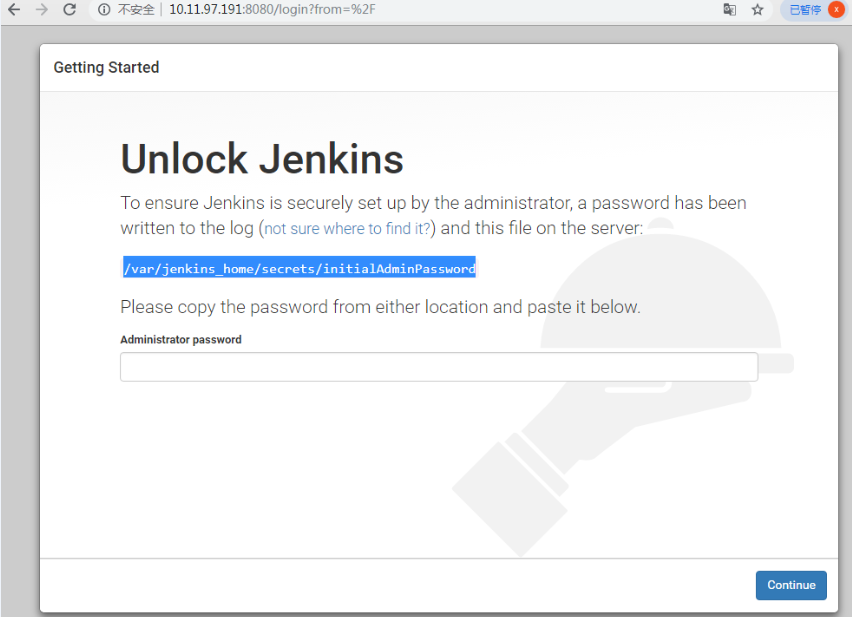
启动Jenkins
docker run -d --name jenkins -p 8080:8080 \

-v /var/jenkins_home/:/var/jenkins_home \

-v /usr/local/apache-maven-3.5.0:/usr/local/maven \

-v /usr/local/jdk1.8.0_45:/usr/local/jdk \

-v /var/run/docker.sock:/var/run/docker.sock \

-v $(which docker):/usr/bin/docker \

-v ~/.ssh:/root/.ssh \

jenkins:v1
3、安装Git Server
1 、安装 Git

 yum install git

2 2 、创建 Git 用户

 useradd git

 passwd git

3 3 、创建仓库

su – git

mkdir app.git

 git -bare init
4、安装Harbor
[root@reg harbor]# ll

total 651416

drwxr-xr-x 4 root root      4096 Dec 20 10:40 common

-rw-r--r-- 1 root root       813 Nov 19 15:02 docker-compose.chartmuseum.yml

-rw-r--r-- 1 root root       863 Nov 19 15:02 docker-compose.clair.yml

-rw-r--r-- 1 root root      1258 Nov 19 15:02 docker-compose.notary.yml

-rw-r--r-- 1 root root      3675 Nov 19 15:02 docker-compose.yml

drwxr-xr-x 3 root root      4096 Nov 19 15:02 ha

-rw-r--r-- 1 root root      7928 Dec 20 14:57 harbor.cfg

-rw-r--r-- 1 root root 665406909 Nov 19 15:02 harbor.v1.6.2.tar.gz

-rwxr-xr-x 1 root root      6162 Nov 19 15:02 install.sh

-rw-r--r-- 1 root root     10768 Nov 19 15:02 LICENSE

-rw-r--r-- 1 root root       482 Nov 19 15:02 NOTICE

-rw-r--r-- 1 root root   1535603 Nov 19 15:02 open_source_license

-rw-r--r-- 1 root root        18 Dec 24 22:30 password

-rwxr-xr-x 1 root root     39132 Nov 19 15:02 prepare
配置harbor.cfg,修改hostname。
prepare
Generated and saved secret to file: /data/secretkey

Generated configuration file: ./common/config/nginx/nginx.conf

Generated configuration file: ./common/config/adminserver/env

Generated configuration file: ./common/config/ui/env

Generated configuration file: ./common/config/registry/config.yml

Generated configuration file: ./common/config/db/env

Generated configuration file: ./common/config/jobservice/env

Generated configuration file: ./common/config/jobservice/config.yml

Generated configuration file: ./common/config/log/logrotate.conf

Generated configuration file: ./common/config/registryctl/env

Generated configuration file: ./common/config/ui/app.conf

Generated certificate, key file: ./common/config/ui/private_key.pem, cert file: ./common/config/registry/root.crt

The configuration files are ready, please use docker-compose to start the service.

[root@localhost harbor]#
错误提示:
[root@localhost harbor]# ./install.sh

[Step 0]: checking installation environment ...

✖ Need to install docker(1.10.0+) first and run this script again.

[root@localhost harbor]#

[root@localhost harbor]# ./install.sh

[Step 0]: checking installation environment ...

Note: docker version: 18.09.0

✖ Need to install docker-compose(1.7.1+) by yourself first and run this script again.
install
[root@localhost harbor]# ./install.sh

[Step 0]: checking installation environment ...

Note: docker version: 18.09.0

Note: docker-compose version: 1.15.0

[Step 1]: loading Harbor images ...

4de51055f30c: Loading layer [==================================================>]  133.2MB/133.2MB

e42dc4492c57: Loading layer [==================================================>]  23.38MB/23.38MB

6fd7d92da0ec: Loading layer [==================================================>]  3.072kB/3.072kB

92c622c62d9c: Loading layer [==================================================>]   2.56kB/2.56kB

eee26e869426: Loading layer [==================================================>]   2.56kB/2.56kB

0bdc2068fdfa: Loading layer [==================================================>]  2.048kB/2.048kB

1161820c2669: Loading layer [==================================================>]   22.8MB/22.8MB

1eebb5c60237: Loading layer [==================================================>]   22.8MB/22.8MB

Loaded image: goharbor/registry-photon:v2.6.2-v1.6.2

0155cb3a636c: Loading layer [==================================================>]  23.38MB/23.38MB

62f917db5fed: Loading layer [==================================================>]  12.16MB/12.16MB

2e192a070c25: Loading layer [==================================================>]   17.3MB/17.3MB

64fa72e486ec: Loading layer [==================================================>]  11.26kB/11.26kB

23afd47b0f1a: Loading layer [==================================================>]  3.072kB/3.072kB

3fa7415d357e: Loading layer [==================================================>]  29.46MB/29.46MB

Loaded image: goharbor/notary-server-photon:v0.5.1-v1.6.2

2f06068ec40a: Loading layer [==================================================>]    158MB/158MB

d6e5bcc842f3: Loading layer [==================================================>]  10.93MB/10.93MB

c272c6b03ae0: Loading layer [==================================================>]  2.048kB/2.048kB

7b0653de0007: Loading layer [==================================================>]  48.13kB/48.13kB

484f0b8e979d: Loading layer [==================================================>]  3.072kB/3.072kB

72004696fb26: Loading layer [==================================================>]  10.98MB/10.98MB

Loaded image: goharbor/clair-photon:v2.0.6-v1.6.2

c5362d9a52ab: Loading layer [==================================================>]    158MB/158MB

547ee492a9fc: Loading layer [==================================================>]  35.08MB/35.08MB

72ca312cce32: Loading layer [==================================================>]  2.048kB/2.048kB

ba7a5e9f2574: Loading layer [==================================================>]  3.072kB/3.072kB

8fabfc794eb2: Loading layer [==================================================>]  35.08MB/35.08MB

Loaded image: goharbor/chartmuseum-photon:v0.7.1-v1.6.2

a86040096f1b: Loading layer [==================================================>]  73.32MB/73.32MB

d81fe13ca34f: Loading layer [==================================================>]  3.584kB/3.584kB

a25703e967fd: Loading layer [==================================================>]  3.072kB/3.072kB

5a619498aaf0: Loading layer [==================================================>]  4.096kB/4.096kB

490efa0d32bb: Loading layer [==================================================>]  3.584kB/3.584kB

0a8ef8ce5e5e: Loading layer [==================================================>]  9.728kB/9.728kB

Loaded image: goharbor/harbor-log:v1.6.2

192ffc0c6a5f: Loading layer [==================================================>]  95.86MB/95.86MB

a0f6ec07aba5: Loading layer [==================================================>]  6.656kB/6.656kB

5cb4047d9a6f: Loading layer [==================================================>]  2.048kB/2.048kB

3c5d322a1758: Loading layer [==================================================>]   7.68kB/7.68kB

d69b5a088645: Loading layer [==================================================>]   2.56kB/2.56kB

38a2b4654f0b: Loading layer [==================================================>]   2.56kB/2.56kB

4f04d5805632: Loading layer [==================================================>]   2.56kB/2.56kB

Loaded image: goharbor/harbor-db:v1.6.2

b6bb4bf71953: Loading layer [==================================================>]  23.38MB/23.38MB

2c121a1131b7: Loading layer [==================================================>]  21.15MB/21.15MB

bdea637333e2: Loading layer [==================================================>]  21.15MB/21.15MB

Loaded image: goharbor/harbor-jobservice:v1.6.2

15e806b56692: Loading layer [==================================================>]  5.124MB/5.124MB

Loaded image: goharbor/nginx-photon:v1.6.2

b777c542e104: Loading layer [==================================================>]  10.95MB/10.95MB

c2ccff7df242: Loading layer [==================================================>]   17.3MB/17.3MB

e188e4d1b597: Loading layer [==================================================>]  11.26kB/11.26kB

ca7cd6746e0b: Loading layer [==================================================>]  3.072kB/3.072kB

c7d958c5de1a: Loading layer [==================================================>]  28.24MB/28.24MB

Loaded image: goharbor/notary-signer-photon:v0.5.1-v1.6.2

fbc524a787eb: Loading layer [==================================================>]    684MB/684MB

e8e8215cd36d: Loading layer [==================================================>]   7.68kB/7.68kB

d061c1c55f93: Loading layer [==================================================>]  197.6kB/197.6kB

Loaded image: goharbor/harbor-migrator:v1.6.2

77719882ce23: Loading layer [==================================================>]  23.38MB/23.38MB

1136e0b049e1: Loading layer [==================================================>]  15.58MB/15.58MB

4469c6f64c47: Loading layer [==================================================>]  15.36kB/15.36kB

91ffefa33975: Loading layer [==================================================>]  15.58MB/15.58MB

Loaded image: goharbor/harbor-adminserver:v1.6.2

0d6ec75380ac: Loading layer [==================================================>]  23.38MB/23.38MB

5ffcef8af51b: Loading layer [==================================================>]  26.88MB/26.88MB

334a9c59109a: Loading layer [==================================================>]  7.168kB/7.168kB

15b85ff320f4: Loading layer [==================================================>]  11.32MB/11.32MB

5118ce7d7887: Loading layer [==================================================>]  26.87MB/26.87MB

Loaded image: goharbor/harbor-ui:v1.6.2

4316b32f3d05: Loading layer [==================================================>]  84.34MB/84.34MB

0ba9b0933327: Loading layer [==================================================>]  3.072kB/3.072kB

65e524929f77: Loading layer [==================================================>]   59.9kB/59.9kB

8675c8d64203: Loading layer [==================================================>]  61.95kB/61.95kB

Loaded image: goharbor/redis-photon:v1.6.2

[Step 2]: preparing environment ...

Clearing the configuration file: ./common/config/ui/app.conf

Clearing the configuration file: ./common/config/ui/private_key.pem

Clearing the configuration file: ./common/config/ui/env

Clearing the configuration file: ./common/config/log/logrotate.conf

Clearing the configuration file: ./common/config/registryctl/config.yml

Clearing the configuration file: ./common/config/registryctl/env

Clearing the configuration file: ./common/config/db/env

Clearing the configuration file: ./common/config/nginx/nginx.conf

Clearing the configuration file: ./common/config/jobservice/config.yml

Clearing the configuration file: ./common/config/jobservice/env

Clearing the configuration file: ./common/config/adminserver/env

Clearing the configuration file: ./common/config/registry/config.yml

Clearing the configuration file: ./common/config/registry/root.crt

loaded secret from file: /data/secretkey

Generated configuration file: ./common/config/nginx/nginx.conf

Generated configuration file: ./common/config/adminserver/env

Generated configuration file: ./common/config/ui/env

Generated configuration file: ./common/config/registry/config.yml

Generated configuration file: ./common/config/db/env

Generated configuration file: ./common/config/jobservice/env

Generated configuration file: ./common/config/jobservice/config.yml

Generated configuration file: ./common/config/log/logrotate.conf

Generated configuration file: ./common/config/registryctl/env

Generated configuration file: ./common/config/ui/app.conf

Generated certificate, key file: ./common/config/ui/private_key.pem, cert file: ./common/config/registry/root.crt

The configuration files are ready, please use docker-compose to start the service.

[Step 3]: checking existing instance of Harbor ...

[Step 4]: starting Harbor ...

Creating network "harbor_harbor" with the default driver

Creating harbor-log ...

Creating harbor-log ... done

Creating registry ...

Creating harbor-db ...

Creating redis ...

Creating harbor-adminserver ...

Creating registry

Creating redis

Creating harbor-adminserver

Creating registry ... done

Creating harbor-ui ...

Creating harbor-ui ... done

Creating nginx ...

Creating harbor-jobservice ...

Creating nginx

Creating nginx ... done

✔ ----Harbor has been installed and started successfully.----

Now you should be able to visit the admin portal at http://reg.xuequn.com.

For more details, please visit https://github.com/goharbor/harbor .
启动harbor:
[root@reg harbor]# docker-compose -f docker-compose.yml up -d

harbor-log is up-to-date

harbor-adminserver is up-to-date

registry is up-to-date

harbor-db is up-to-date

Starting redis ...

Starting harbor-ui ...

Starting redis

Starting harbor-ui ... done

nginx is up-to-date

Starting harbor-jobservice ...

Starting harbor-jobservice ... done
Harbor支持Https配置(后面pull镜像的时候需要使用,从安全角度来说,最好也是https)
[root@reg harbor]# cat harbor.cfg |grep -v "#"|grep -v ^$

_version = 1.6.0

hostname = reg.xuequn.com

ui_url_protocol = https

max_job_workers = 10

customize_crt = on

ssl_cert = /data/cert/reg.xuequn.com.crt

ssl_cert_key = /data/cert/reg.xuequn.com.key

secretkey_path = /data
证书生成:
[root@reg data]# openssl req \

>     -newkey rsa:4096 -nodes -sha256 -keyout ca.key \

>     -x509 -days 365 -out ca.crt

Generating a 4096 bit RSA private key

.........................................++

..................................................................................................................................................................................++

writing new private key to 'ca.key'

-----

You are about to be asked to enter information that will be incorporated

into your certificate request.

What you are about to enter is what is called a Distinguished Name or a DN.

There are quite a few fields but you can leave some blank

For some fields there will be a default value,

If you enter '.', the field will be left blank.

-----

Country Name (2 letter code) [XX]:china

string is too long, it needs to be less than  2 bytes long

Country Name (2 letter code) [XX]:ch

State or Province Name (full name) []:zh

Locality Name (eg, city) [Default City]:zhuhai

Organization Name (eg, company) [Default Company Ltd]:king

Organizational Unit Name (eg, section) []:seasun

Common Name (eg, your name or your server's hostname) []:reg.xuequn.com

Email Address []:xuequn@qq.com

[root@reg data]# openssl req \

> -newkey rsa:4096 -nodes -sha256 -keyout reg.xuequn.com.key \

> -out reg.xuequn.com.csr

Generating a 4096 bit RSA private key

..................++

..............................................................................................................................................++

writing new private key to 'reg.xuequn.com.key'

-----

You are about to be asked to enter information that will be incorporated

into your certificate request.

What you are about to enter is what is called a Distinguished Name or a DN.

There are quite a few fields but you can leave some blank

For some fields there will be a default value,

If you enter '.', the field will be left blank.

-----

Country Name (2 letter code) [XX]:ch

State or Province Name (full name) []:zh

Locality Name (eg, city) [Default City]:zhuhai

Organization Name (eg, company) [Default Company Ltd]:king

Organizational Unit Name (eg, section) []:seasun

Common Name (eg, your name or your server's hostname) []:reg.xuequn.com

Email Address []:xuequn@qq.com

Please enter the following 'extra' attributes

to be sent with your certificate request

A challenge password []:xuequn123

An optional company name []:king

[root@reg data]#

[root@reg data]# openssl x509 -req -days 365 -in reg.xuequn.com.csr -CA ca.crt -CAkey ca.key -CAcreateserial -out reg.xuequn.com.crt

Signature ok

subject=/C=ch/ST=zh/L=zhuhai/O=king/OU=seasun/CN=xuequn/emailAddress=xuequn@qq.com

Getting CA Private Key

[root@reg data]#

[root@localhost solo]# docker login reg.xuequn.com

Username: xuequn

Password:

Error response from daemon: Get https://reg.xuequn.com/v2/: x509: certificate signed by unknown authority

[root@localhost solo]# mkdir -p /etc/docker/

daemon.json  key.json

[root@localhost solo]# mkdir -p /etc/docker/

daemon.json  key.json

[root@localhost solo]# mkdir -p /etc/docker/cert.d/

[root@localhost solo]# cd /etc/docker/cert.d/

[root@localhost cert.d]# ls

[root@localhost cert.d]# rz -y

rz waiting to receive.

 zmodem trl+C ȡ

  100%       1 KB    1 KB/s 00:00:01       0 Errors

[root@localhost cert.d]# ls

reg.xuequn.com.crt

[root@localhost cert.d]# systemctl restart docker
注意:修改harbor.cfg文件后,需要重新prepare,生成配置文件。
登陆镜像仓库,提示x509: certificate signed by unknown authority错误,解决办法如下:
[root@localhost cert.d]# docker login reg.xuequn.com

Username: xuequn

Password:

Error response from daemon: Get https://reg.xuequn.com/v2/: x509: certificate signed by unknown authority

[root@localhost cert.d]# chmod 644 /etc/pki/ca-trust/extracted/pem/tls-ca-bundle.pem

[root@localhost cert.d]#

[root@localhost cert.d]# cat reg.xuequn.com.crt >>/etc/pki/tls/certs/ca-bundle.crt

[root@localhost cert.d]# chmod 444 /etc/pki/ca-trust/extracted/pem/tls-ca-bundle.pem

[root@localhost cert.d]# systemctl restart docker

[root@localhost cert.d]# docker login reg.xuequn.com

Username: xuequn

Password:

WARNING! Your password will be stored unencrypted in /root/.docker/config.json.

Configure a credential helper to remove this warning. See

https://docs.docker.com/engine/reference/commandline/login/#credentials-store

Login Succeeded

[root@localhost cert.d]# docker logout reg.xuequn.com

Removing login credentials for reg.xuequn.com

[root@localhost cert.d]#
https方式访问Harbor,并创建项目:
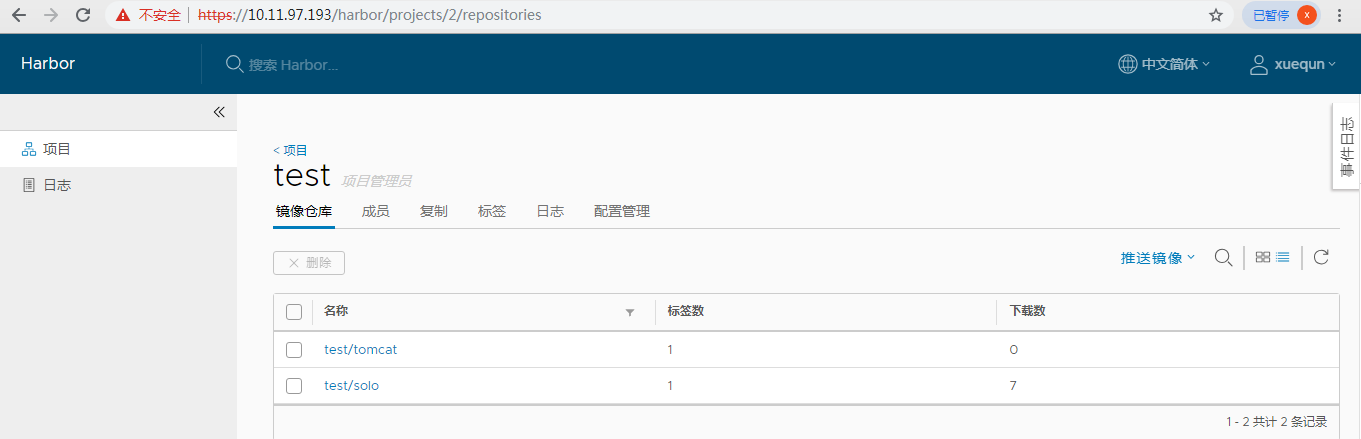
新建test项目:
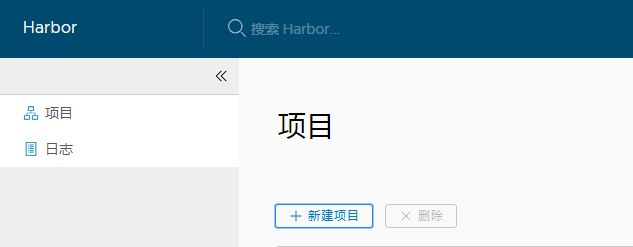
5、Jenkins配置
全局工具配置,JDK、Git、Maven环境:
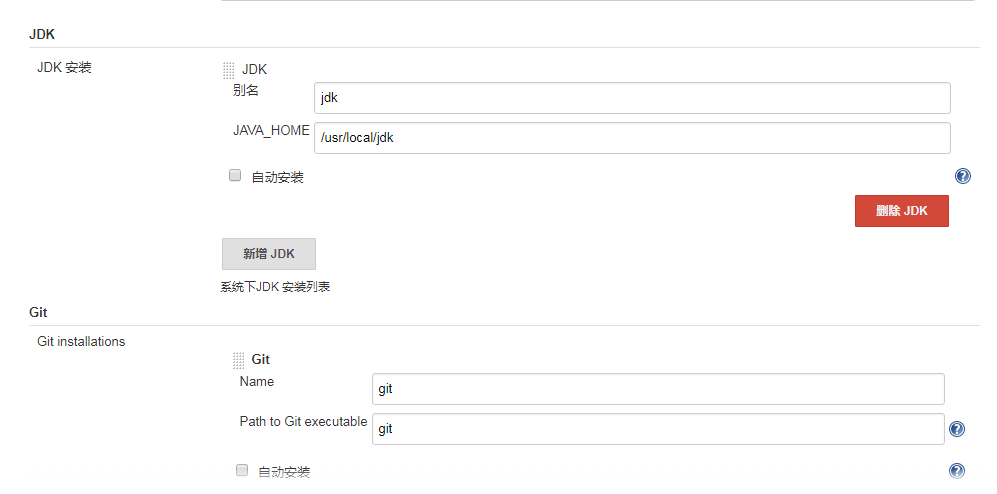
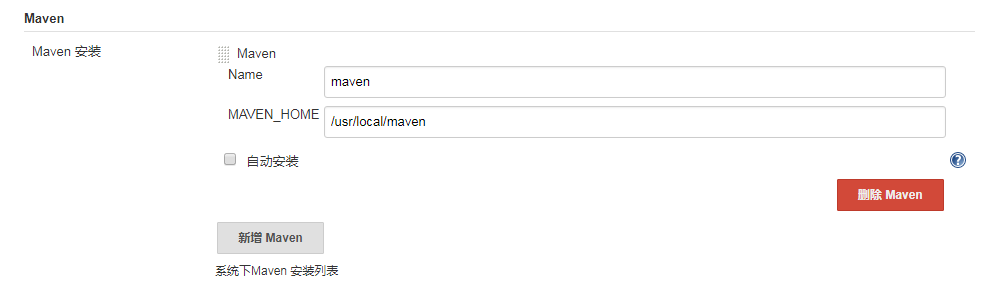
构建配置,配置项目名称
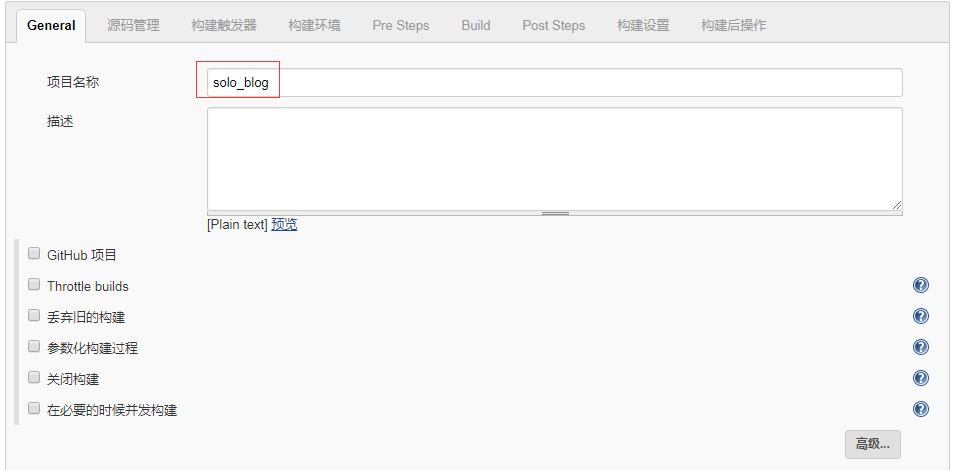
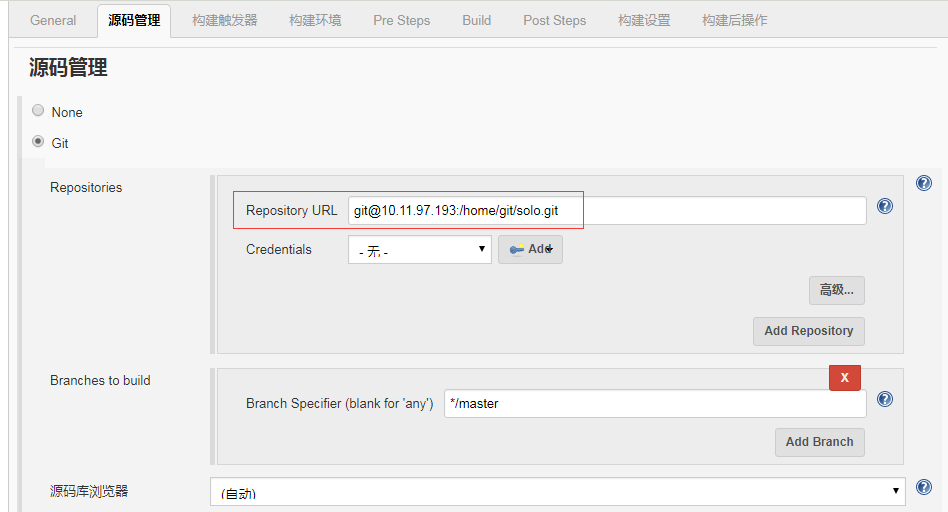
配置源码仓库
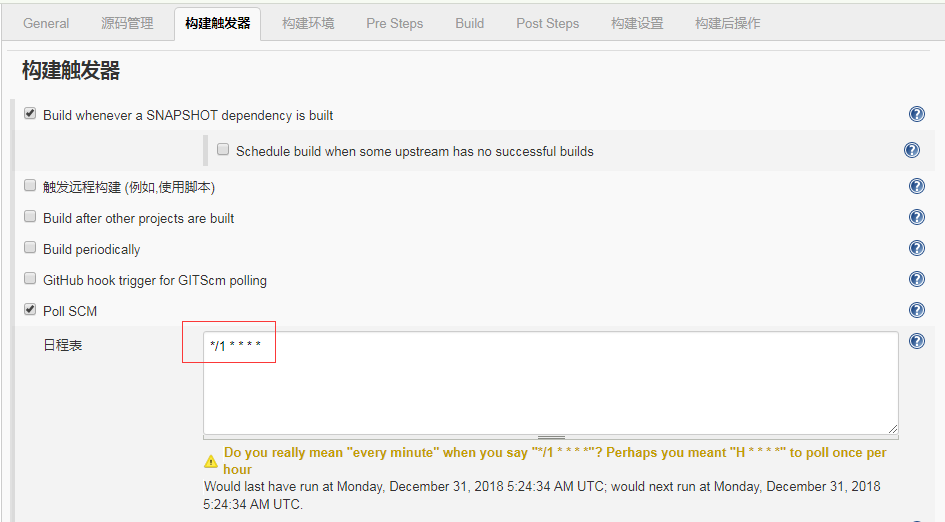
创建构建触发器,每分钟拉取一次,如果有新的版本生成的话,会自动构建:
跳过测试样例,节省构建时间

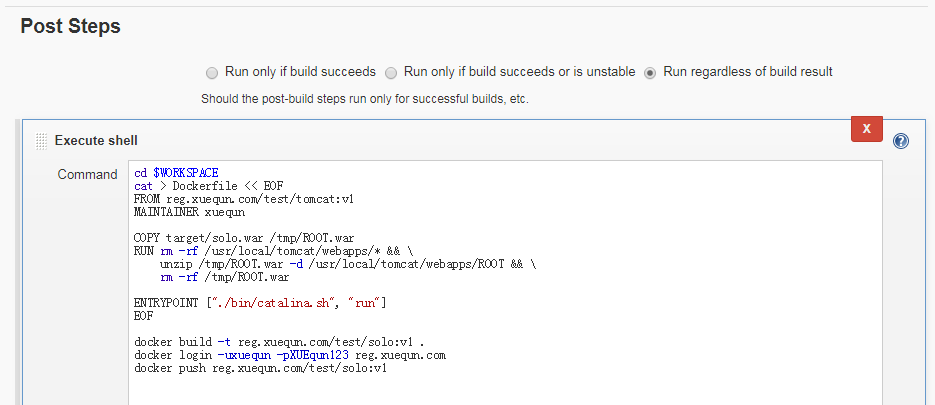
正式构建,在工作目录下新建Dockerfile,构建好镜像文件后,推送到远程镜像仓库,以便部署时可以直接从远程镜像仓库拉取:
远程部署,即从镜像仓库拉取最新镜像文件,并进行部署:
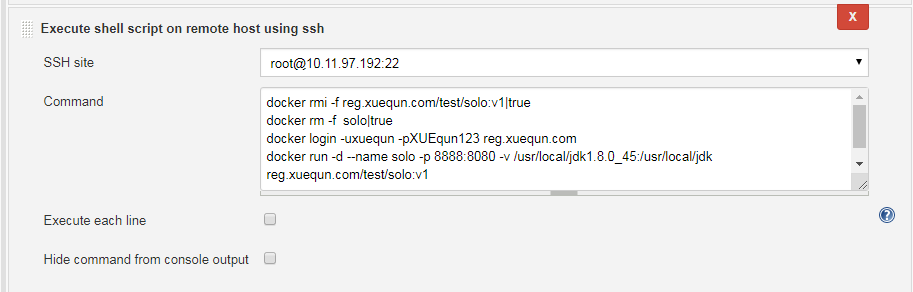
6、测试服务是否正常
1、构建
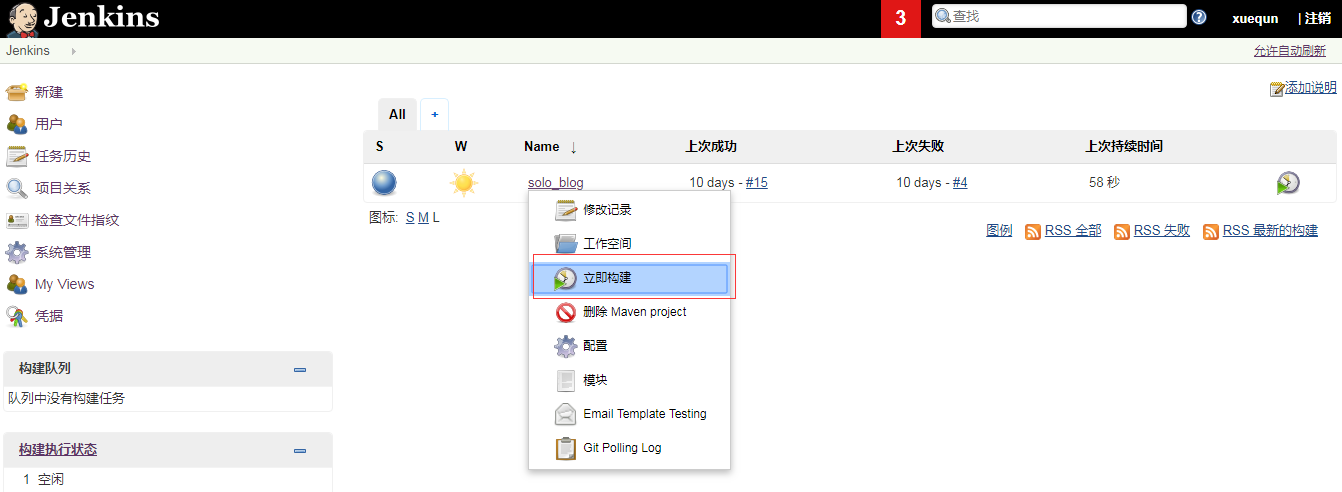
2、查看构建log,中间省略若干文字
Started by user xuequn

Building in workspace /var/jenkins_home/workspace/solo_blog

 > git rev-parse --is-inside-work-tree # timeout=10

Fetching changes from the remote Git repository

 > git config remote.origin.url git@10.11.97.193:/home/git/solo.git # timeout=10

Fetching upstream changes from git@10.11.97.193:/home/git/solo.git

 > git --version # timeout=10

 > git fetch --tags --progress git@10.11.97.193:/home/git/solo.git +refs/heads/*:refs/remotes/origin/*

 > git rev-parse refs/remotes/origin/master^{commit} # timeout=10

 > git rev-parse refs/remotes/origin/origin/master^{commit} # timeout=10

Checking out Revision ff738c19ebc781c2adbe5907a24df824a4a787d9 (refs/remotes/origin/master)

 > git config core.sparsecheckout # timeout=10

 > git checkout -f ff738c19ebc781c2adbe5907a24df824a4a787d9

Commit message: "aaa"

 > git rev-list --no-walk ff738c19ebc781c2adbe5907a24df824a4a787d9 # timeout=10

No emails were triggered.

Parsing POMs

Established TCP socket on 33529

[solo_blog] $ /usr/local/jdk/bin/java -cp /var/jenkins_home/plugins/maven-plugin/WEB-INF/lib/maven35-agent-1.12.jar:/usr/local/maven/boot/plexus-classworlds-2.5.2.jar:/usr/local/maven/conf/logging jenkins.maven3.agent.Maven35Main /usr/local/maven /var/jenkins_home/war/WEB-INF/lib/remoting-3.7.jar /var/jenkins_home/plugins/maven-plugin/WEB-INF/lib/maven35-interceptor-1.12.jar /var/jenkins_home/plugins/maven-plugin/WEB-INF/lib/maven3-interceptor-commons-1.12.jar 33529

<===[JENKINS REMOTING CAPACITY]===>channel started

Executing Maven:  -B -f /var/jenkins_home/workspace/solo_blog/pom.xml clean package -Dmaven.test.skip=true

[INFO] Scanning for projects...

[WARNING]

[WARNING] Some problems were encountered while building the effective model for org.b3log:solo:war:2.7.0

[WARNING] 'dependencies.dependency.systemPath' for org.patchca:patchca:jar should not point at files within the project directory, ${project.basedir}/src/main/resources/lib/net/pusuo/patchca-0.5.0.jar will be unresolvable by dependent projects @ line 237, column 25

[WARNING]

[WARNING] It is highly recommended to fix these problems because they threaten the stability of your build.

[WARNING]

[WARNING] For this reason, future Maven versions might no longer support building such malformed projects.

[WARNING]

[INFO]

[INFO] ------------------------------------------------------------------------

[INFO] Building Solo 2.7.0

[INFO] ------------------------------------------------------------------------

[INFO]

[INFO] --- maven-clean-plugin:2.5:clean (default-clean) @ solo ---

[INFO] Deleting /var/jenkins_home/workspace/solo_blog/target

[INFO]

[INFO] --- maven-resources-plugin:2.7:resources (default-resources) @ solo ---

[INFO] Using 'UTF-8' encoding to copy filtered resources.

[INFO] Copying 9 resources

[INFO]

[INFO] --- maven-compiler-plugin:3.3:compile (default-compile) @ solo ---

[INFO] Changes detected - recompiling the module!

[INFO] Compiling 159 source files to /var/jenkins_home/workspace/solo_blog/target/classes

[INFO] /var/jenkins_home/workspace/solo_blog/src/main/java/org/b3log/solo/util/Markdowns.java: /var/jenkins_home/workspace/solo_blog/src/main/java/org/b3log/solo/util/Markdowns.java uses or overrides a deprecated API.

[INFO] /var/jenkins_home/workspace/solo_blog/src/main/java/org/b3log/solo/util/Markdowns.java: Recompile with -Xlint:deprecation for details.

[INFO] /var/jenkins_home/workspace/solo_blog/src/main/java/org/b3log/solo/repository/impl/ArticleRepositoryImpl.java: Some input files use unchecked or unsafe operations.

[INFO] /var/jenkins_home/workspace/solo_blog/src/main/java/org/b3log/solo/repository/impl/ArticleRepositoryImpl.java: Recompile with -Xlint:unchecked for details.

[INFO]

[INFO] --- maven-resources-plugin:2.7:testResources (default-testResources) @ solo ---

[INFO] Not copying test resources

[INFO]

[INFO] --- maven-compiler-plugin:3.3:testCompile (default-testCompile) @ solo ---

[INFO] Not compiling test sources

[INFO]

[INFO] --- maven-surefire-plugin:2.18.1:test (default-test) @ solo ---

[INFO] Tests are skipped.

[INFO]

[INFO] --- maven-war-plugin:3.0.0:war (default-war) @ solo ---

[INFO] Packaging webapp

[INFO] Assembling webapp [solo] in [/var/jenkins_home/workspace/solo_blog/target/solo]

[INFO] Processing war project

[INFO] Copying webapp webResources [/var/jenkins_home/workspace/solo_blog/src/main/resources/lib/net/pusuo] to [/var/jenkins_home/workspace/solo_blog/target/solo]

[INFO] Copying webapp resources [/var/jenkins_home/workspace/solo_blog/src/main/webapp]

[INFO] Webapp assembled in [1831 msecs]

[INFO] Building war: /var/jenkins_home/workspace/solo_blog/target/solo.war

[INFO] ------------------------------------------------------------------------

[INFO] BUILD SUCCESS

[INFO] ------------------------------------------------------------------------

[INFO] Total time: 12.332 s

[INFO] Finished at: 2018-12-31T05:34:01Z

[INFO] Final Memory: 32M/294M

[INFO] ------------------------------------------------------------------------

Waiting for Jenkins to finish collecting data

[JENKINS] Archiving /var/jenkins_home/workspace/solo_blog/pom.xml to org.b3log/solo/2.7.0/solo-2.7.0.pom

[JENKINS] Archiving /var/jenkins_home/workspace/solo_blog/target/solo.war to org.b3log/solo/2.7.0/solo-2.7.0.war

[solo_blog] $ /bin/sh -xe /tmp/jenkins1057186757167035727.sh

channel stopped

+ cd /var/jenkins_home/workspace/solo_blog

+ cat

+ docker build -t reg.xuequn.com/test/solo:v1 .

Sending build context to Docker daemon  81.43MB

Step 1/5 : FROM reg.xuequn.com/test/tomcat:v1

 ---> f2cc90fa1b2d

Step 2/5 : MAINTAINER xuequn

 ---> Using cache

 ---> cbf693fd58b6

Step 3/5 : COPY target/solo.war /tmp/ROOT.war

 ---> a0f92a38817e

Step 4/5 : RUN rm -rf /usr/local/tomcat/webapps/* &&     unzip /tmp/ROOT.war -d /usr/local/tomcat/webapps/ROOT &&     rm -rf /tmp/ROOT.war

 ---> Running in e5fe01176375

Archive:  /tmp/ROOT.war

  inflating: /usr/local/tomcat/webapps/ROOT/META-INF/MANIFEST.MF

   creating: /usr/local/tomcat/webapps/ROOT/css/

   creating: /usr/local/tomcat/webapps/ROOT/css/fonts/

   中间省略若干字.........

  inflating: /usr/local/tomcat/webapps/ROOT/META-INF/maven/org.b3log/solo/pom.properties

Removing intermediate container e5fe01176375

 ---> df6ccb273fff

Step 5/5 : ENTRYPOINT ["./bin/catalina.sh", "run"]

 ---> Running in 5fbd157b4bca

Removing intermediate container 5fbd157b4bca

 ---> f3973c67b6d9

Successfully built f3973c67b6d9

Successfully tagged reg.xuequn.com/test/solo:v1

+ docker login -uxuequn -pXUEqun123 reg.xuequn.com

WARNING! Using --password via the CLI is insecure. Use --password-stdin.

WARNING! Your password will be stored unencrypted in /root/.docker/config.json.

Configure a credential helper to remove this warning. See

https://docs.docker.com/engine/reference/commandline/login/#credentials-store

Login Succeeded

+ docker push reg.xuequn.com/test/solo:v1

The push refers to repository [reg.xuequn.com/test/solo]

b2ea9726881e: Preparing

39ec58847bc2: Preparing

dbfd362fd452: Preparing

8e53cd053a9e: Preparing

7914b85f4bf8: Preparing

071d8bd76517: Preparing

071d8bd76517: Waiting

8e53cd053a9e: Layer already exists

7914b85f4bf8: Layer already exists

dbfd362fd452: Layer already exists

071d8bd76517: Layer already exists

39ec58847bc2: Pushed

b2ea9726881e: Pushed

v1: digest: sha256:17c9dcb2ea28bab46adebd5c38ee8acd34abc2d63eef55e449a1338598904447 size: 1587

[SSH] script:

docker rmi -f reg.xuequn.com/test/solo:v1|true

docker rm -f  solo|true

docker login -uxuequn -pXUEqun123 reg.xuequn.com

docker run -d --name solo -p 8888:8080 -v /usr/local/jdk1.8.0_45:/usr/local/jdk reg.xuequn.com/test/solo:v1

[SSH] executing...

WARNING! Using --password via the CLI is insecure. Use --password-stdin.

WARNING! Your password will be stored unencrypted in /root/.docker/config.json.

Configure a credential helper to remove this warning. See

https://docs.docker.com/engine/reference/commandline/login/#credentials-store

Unable to find image 'reg.xuequn.com/test/solo:v1' locally

v1: Pulling from test/solo

a02a4930cb5d: Already exists

498cfd4001de: Already exists

5338299d7f49: Already exists

13ead51b14a6: Already exists

33bbfcb012e2: Pulling fs layer

cba7031d67c2: Pulling fs layer

Login Succeeded

cba7031d67c2: Verifying Checksum

cba7031d67c2: Download complete

33bbfcb012e2: Download complete

33bbfcb012e2: Pull complete

cba7031d67c2: Pull complete

Digest: sha256:17c9dcb2ea28bab46adebd5c38ee8acd34abc2d63eef55e449a1338598904447

Status: Downloaded newer image for reg.xuequn.com/test/solo:v1

4c24f68a36ac688d723b6d9df1862038144139141fdb8fa61faceeb5592f3743

[SSH] completed

[SSH] exit-status: 0

No emails were triggered.

Finished: SUCCESS
3、查看服务
在docker服务器上,查看服务是否正常运行:

web访问服务:
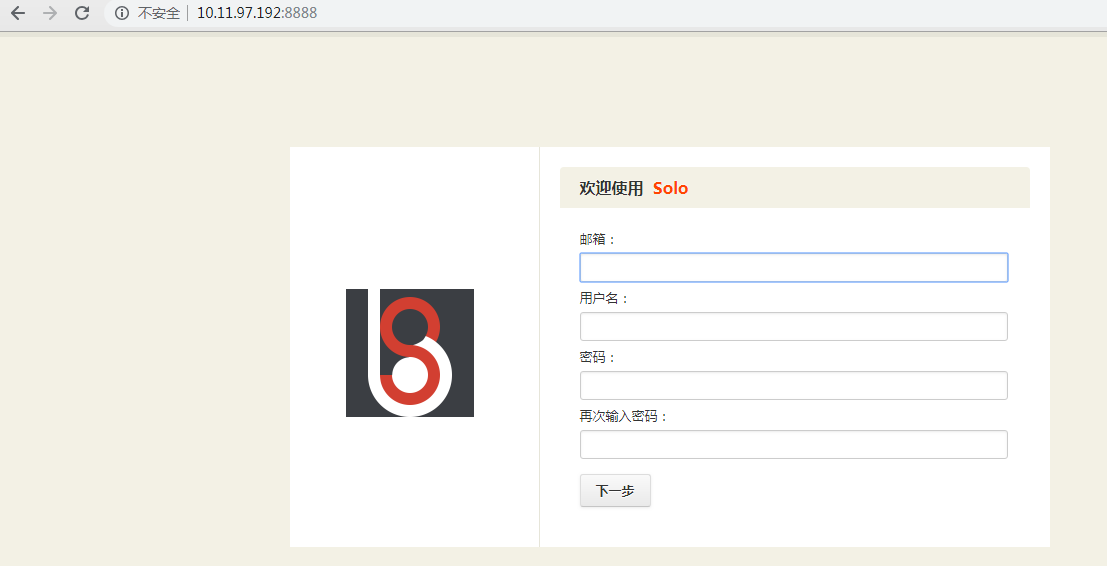
至此,整个流程已完成。
7、注意事项
1、Jenkins服务器到git服务器无密码登陆:ssh-copy-id git@10.11.97.193
[root@localhost t]# git clone git@10.11.97.193:/home/git/solo.git

Cloning into 'solo'...

remote: Counting objects: 2534, done.

remote: Compressing objects: 100% (1878/1878), done.

remote: Total 2534 (delta 646), reused 2462 (delta 587)

Receiving objects: 100% (2534/2534), 28.00 MiB | 43.45 MiB/s, done.

Resolving deltas: 100% (646/646), done.
2、Jenkins服务和Docker服务器都需要能够login镜像仓库,第一次需要输入用户名和密码,后续可无密码登陆
将证书加入信任:
[root@localhost cert.d]# docker login reg.xuequn.com

Username: xuequn

Password:

Error response from daemon: Get https://reg.xuequn.com/v2/: x509: certificate signed by unknown authority

[root@localhost cert.d]# chmod 644 /etc/pki/ca-trust/extracted/pem/tls-ca-bundle.pem

[root@localhost cert.d]#

[root@localhost cert.d]# cat reg.xuequn.com.crt >>/etc/pki/tls/certs/ca-bundle.crt

[root@localhost cert.d]# chmod 444 /etc/pki/ca-trust/extracted/pem/tls-ca-bundle.pem

[root@localhost cert.d]# systemctl restart docker

[root@localhost cert.d]# docker login reg.xuequn.com

Username: xuequn

Password:

WARNING! Your password will be stored unencrypted in /root/.docker/config.json.

Configure a credential helper to remove this warning. See

https://docs.docker.com/engine/reference/commandline/login/#credentials-store

Login Succeeded

[root@localhost cert.d]# docker logout reg.xuequn.com

Removing login credentials for reg.xuequn.com

[root@localhost cert.d]#
再次登陆,无需输入密码:
[root@localhost t]# docker login reg.xuequn.com

Authenticating with existing credentials...

WARNING! Your password will be stored unencrypted in /root/.docker/config.json.

Configure a credential helper to remove this warning. See

https://docs.docker.com/engine/reference/commandline/login/#credentials-store

Login Succeeded
Docker和CI/CD实战的更多相关文章
- Jenkins与Docker的自动化CI/CD实战
Jenkins与Docker的自动化CI/CD实战 互联网Java架构 2018-09-19 15:46:13 一.发布流程设计 工作流程: 开发人员提交代码到Git版本仓库:Jenkins人工/定时 ...
- CI/CD系列
一.CI/CD系列 什么是CI/CD(译) Docker与CI/CD(转) Docker和CI/CD实战 二.Git 三.GitLab
- 超简单让.NET Core开发者快速拥有CI/CD的能力-Docker版本
超简单让.NET Core开发者快速拥有CI/CD的能力-Docker版本 前言 上一篇自动化测试,全面且详细的介绍了从零开始到发布版本的步骤,这是传统的方式,本次为大家带来的是如何在5分钟内使用上d ...
- CI Weekly #19 | 关于软件开发模型的思考,以及最新 CI/CD 实践分享
五月一来,夏天便悄然而至.flow.ci 也带来了几个新的变化,帮你进一步优化开发工作流.一起来看看这几个重点功能: 支持 iOS 项目 Xcode8.3 构建 iOSer 们重点来了,flow.ci ...
- CI/CD
CI/CD 啥是CI/CD CI: continuous integration, 持续集成.就是频繁地把开发的工作提交到主线代码.主要是为了解决集成问题.什么是集成问题呢,白话说,就是从你本地的代码 ...
- 7款不错的 CI/CD工具
时至今日,越来越多的工程团队开始实行敏捷开发,借以推动更短.更快的发布周期.而代码库的增长与更高的生产构建频率,也带动持续集成与持续部署/交付工具快速兴起.如果您有意提升发布频率,或者是不太清楚哪些工 ...
- 8款不错的 CI/CD工具
Jenkins Jenkins是CI市场中最知名且最常见的名号之一.其最初是由Sun公司的一位工程师打造的一个辅助项目,并迅速扩展为最大的开源CI工具之一,可帮助工程团队实现自动化部署.顺带一提:我们 ...
- Docker: Jenkins与Docker的自动化CI/CD流水线实战
什么是CI/CD 持续集成(Continuous Integration,CI):代码合并.构建.部署.测试都在一起,不断地执行这个过程,并对结果反馈.持续部署(Continuous Deployme ...
- .Net微服务实战之CI/CD
系列文章 .Net微服务实战之技术选型篇 .Net微服务实战之技术架构分层篇 .Net微服务实战之DevOps篇 .Net微服务实战之负载均衡(上) 相关源码:https://github.com/S ...
随机推荐
- mysql 创建数据数据库 (避免新建的库名已经存在、设置编码)
1.创建数据库的 create database 数据库名 eg: Create database mydatabase 查看已创建的数据: show databases; 结果: 2.数据库名所对应 ...
- Linux 系统的/目录
根目录下的重要目录 目录 应放置档案内容 /bin 系统有很多放置执行档的目录,但/bin比较特殊.因为/bin放置的是在单人维护模式下还能够被操作的指令.在/bin底下的指令可以被root与一般帐号 ...
- 解决华为交换机S5700无法解除ip/Mac绑定的问题
今天同事离职,需要解除他的个人笔记本Mac与ip的绑定 首先进入系统用户视图,然后进入vlanif4,解除151绑定 system-view interface vlanif 4 undo dhcp ...
- .NET Reflector注册机激活方法
.NET Reflector注册机是一款专门针对.NET Reflector(.NET反编译工具软件)而推出的一款破解辅助工具软件.因为官方破解版软件需要118美元才能用,不然只有14天的试用期,为此 ...
- September 05th 2017 Week 36th Tuesday
I always in the deepest despair, meet the most beautiful sunrise. 我总是在最深的绝望里遇见最美丽的惊喜. Some pessimist ...
- IKVM.NET入门(2)
ikvm.net是什么 http://www.ikvm.net/ ikvm.net是能够运行在mono和.net framework的java虚拟机.它包括了 在.net中实现的一个java虚拟机 j ...
- Jenkins 配合 GitLab 实现分支的自动合并、自动创建 Tag
Jenkins 配合 GitLab 实现分支的自动合并.自动创建 Tag 背景 GitFlow工作流简介 Gitflow工作流定义了一个围绕项目发布的严格分支模型,它会相对复杂一点,但提供了用于一个健 ...
- angular 生命周期钩子 ngOnInit() 和 ngAfterViewInit() 的区别
angular 生命周期钩子的详细介绍在 https://angular.cn/guide/lifecycle-hooks 文档中做了介绍. ngOnInit() 在 Angular 第一次显示数据 ...
- 1060. [ZJOI2007]时态同步【树形DP】
Description 小Q在电子工艺实习课上学习焊接电路板.一块电路板由若干个元件组成,我们不妨称之为节点,并将其用数 字1,2,3….进行标号.电路板的各个节点由若干不相交的导线相连接,且对于电路 ...
- Loj #2256. 「SNOI2017」英雄联盟
题目 我就是个丝薄 如果要用\(dp_i\)表示凑出\(i\)的最小花费显然不可能的 之后大力猜想能凑出来的状态不会很多,我的暴力也告诉我不是很多,好像也确实不多的样子,大概\(4e4\)左右 但是我 ...