
git仓库迁移的解决方案
一、问题
在github中遇到感兴趣的项目,直接克隆下来,随着兴趣越来越浓,在本地做了些修改,后来干脆想fork到自己的github仓库,又要把本地的修改提交到fork后的自己的github仓库中。这时就遇到了git仓库的迁移问题。
二、解决
1. 使用Git命令行操作如下
先查看remote的名字
git branch -r假设你的remote是origin,用git remote set_url 更换地址
git remote set-url origin remote_git_addressremote_git_address更换成你的新的仓库地址。
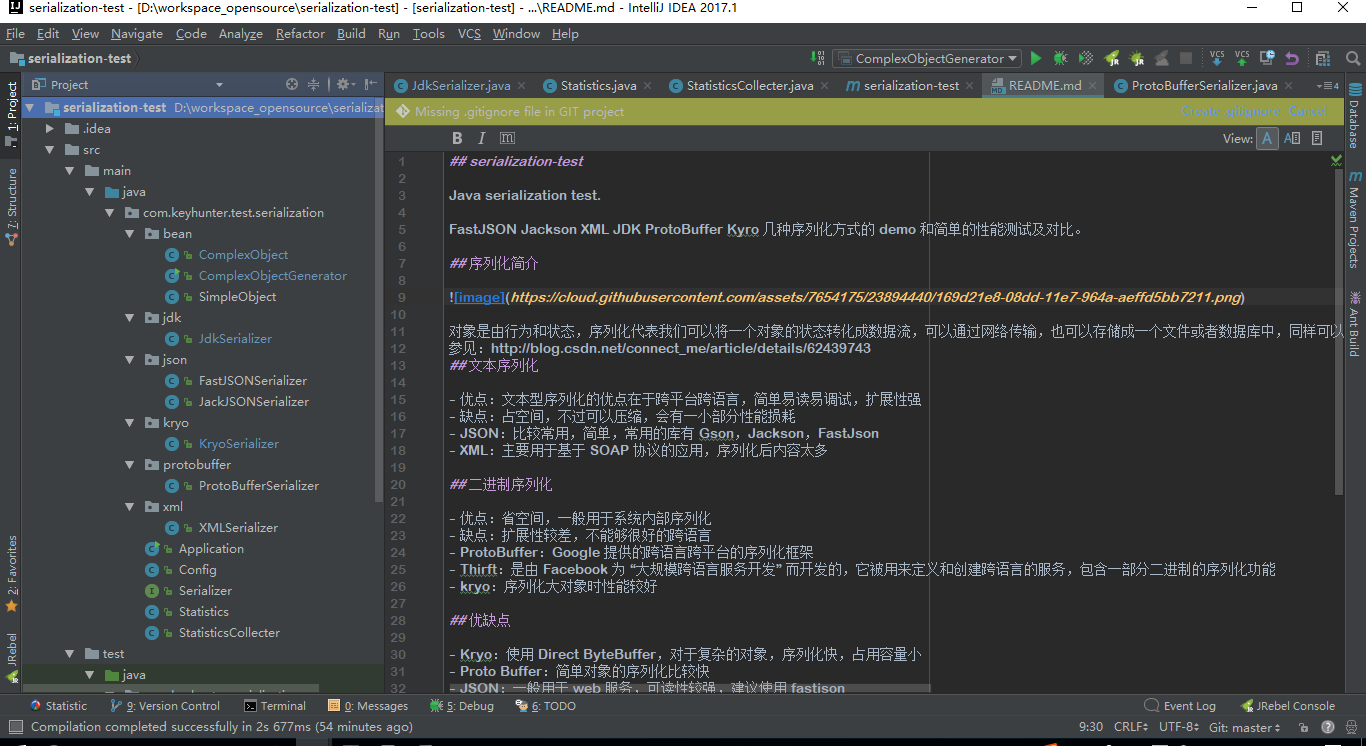
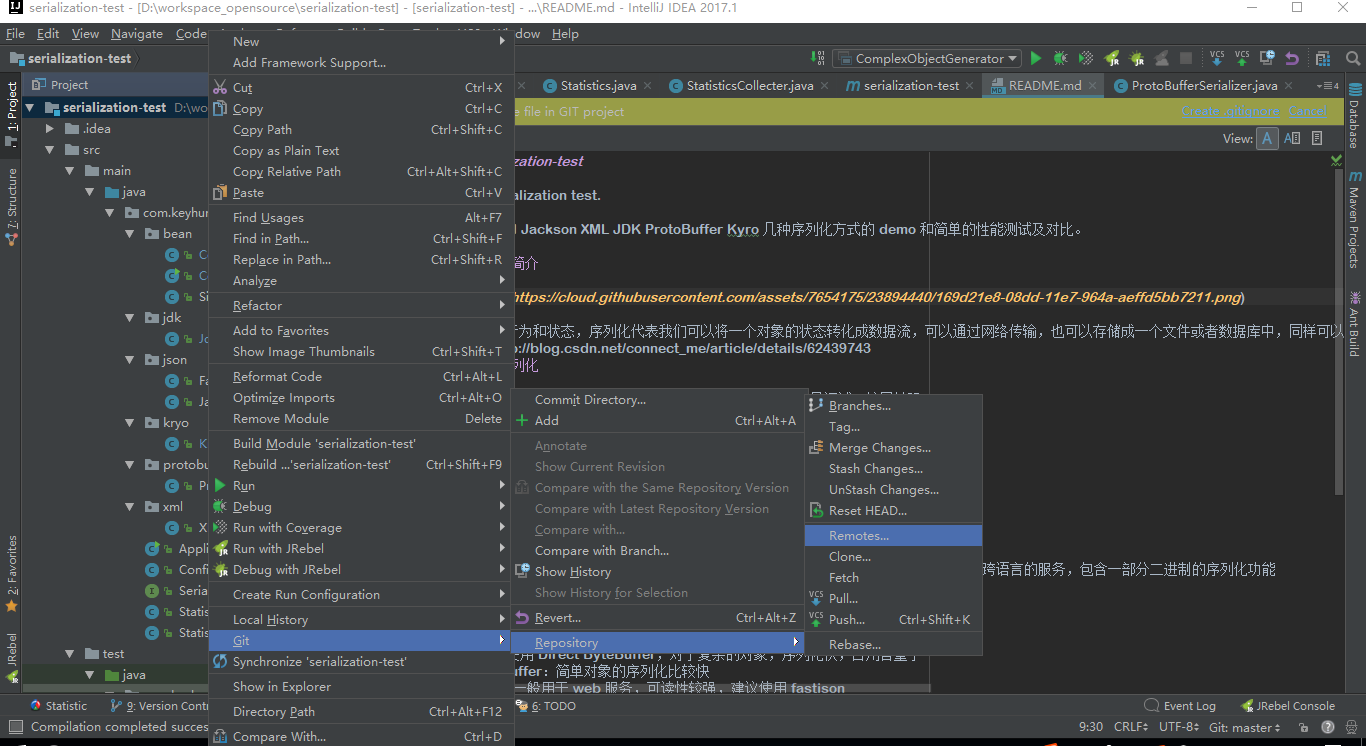
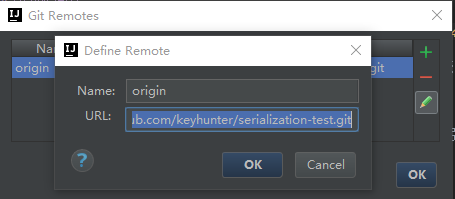
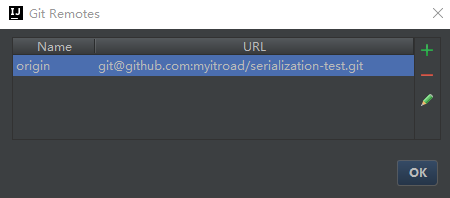
2. 使用 IntelliJ IDEA界面化操作,步骤如下:
(1)本地clone自GitHub某开源项目到本地
(2)在本地修改了一些内容
如下,蓝色标题的Java代码即为经过修改的。然后对项目产生兴趣,fork到自己的GitHub仓库中,并想将这些修改提交到自己的GitHub仓库中。
三、参考
Git仓库迁移而不丢失log的方法
- 要求能保留原先的commit记录,应该如何迁移呢?
- 同时,本地已经clone了原仓库,要配置成新的仓库地址,该如何修改呢?
- 注意:如果使用了代码审核工具Gerrit,那么在进行操作之前需要将Gerrit关掉,等成功恢复后再将Gerrit开户即可
1、使用git push --mirror
先了解一些git的基本参数介绍
git clone --bare
GIT-CLONE(1)                      Git Manual                      GIT-CLONE(1)

NAME

       git-clone - Clone a repository into a new directory

SYNOPSIS

       git clone [--template=<template_directory>]

                 [-l] [-s] [--no-hardlinks] [-q] [-n] [--bare] [--mirror]

                 [-o <name>] [-b <name>] [-u <upload-pack>] [--reference <repository>]

                 [--depth <depth>] [--recursive] [--] <repository> [<directory>]

        --bare

            Make a bare GIT repository. That is, instead of creating <directory> and placing the administrative files

           in <directory>/.git, make the <directory> itself the $GIT_DIR. This obviously implies the -n because there

           is nowhere to check out the working tree. Also the branch heads at the remote are copied directly to

           corresponding local branch heads, without mapping them to refs/remotes/origin/. When this option is used,

           neither remote-tracking branches nor the related configuration variables are created.
git push --mirror
--mirror

           Instead of naming each ref to push, specifies that all refs under refs/ (which includes but is not limited

           to refs/heads/, refs/remotes/, and refs/tags/) be mirrored to the remote repository. Newly created local

           refs will be pushed to the remote end, locally updated refs will be force updated on the remote end, and

           deleted refs will be removed from the remote end. This is the default if the configuration option

           remote.<remote>.mirror is set.
1、建立新仓库
- 1). 从原地址克隆一份裸版本库,比如原本托管于 GitHub,或者是本地的私有仓库
git clone --bare git://192.168.10.XX/git_repo/project_name.git- 2). 然后到新的 Git 服务器上创建一个新项目,比如 GitCafe,亦或是本地的私有仓库,如192.168.20.XX
su - git

cd /path/to/path/

mkdir new_project_name.git

git init --bare new_project_name.git- 3). 以镜像推送的方式上传代码到 GitCafe 服务器上。
请确保已经添加了公钥到新的机器上
cd project_name.git

git push --mirror git@192.168.20.XX/path/to/path/new_project_name.git- 4). 删除本地代码
cd ..

rm -rf project_name.git- 5). 到新服务器上找到 Clone 地址,直接Clone到本地就可以了。
git clone git@192.168.20.XX/path/to/path/new_project_name.git这种方式可以保留原版本库中的所有内容。
2、切换remote_url
先查看remote的名字
git branch -r假设你的remote是origin,用git remote set_url 更换地址
git remote set-url origin remote_git_addressremote_git_address更换成你的新的仓库地址。
第二种切换remote_url的方法更直接,直接更改.git/conf配置文件里的ip地址就行。
git仓库迁移的解决方案的更多相关文章
- git仓库迁移的两种解决方案
Git仓库迁移而不丢失log的方法 要求能保留原先的commit记录,应该如何迁移呢? 同时,本地已经clone了原仓库,要配置成新的仓库地址,该如何修改呢? 注意:如果使用了代码审核工具Gerrit ...
- git仓库迁移和更新远程仓库地址
一.git仓库迁移 1,从原仓库clone或pull到本地仓库 git clone project_name [old_remote_repository_address] 2,在新的git创建一 ...
- git 仓库迁移,git remote 更改源
git仓库迁移 我们有时候需要迁移git仓库,但又想保留每次commit的记录,所以我们只需要更改git remote [源]的问题即可 首先查看你的remote的地址 git remote -vv ...
- git仓库迁移
最近,装了git的本地服务器坏掉了, 没办法只能临时进行仓库的迁移 保证项目正常进行 在项目的根目录执行右键执行 查询当前仓库的远程地址 git remote -v 查看现有远程仓库的地址url 修 ...
- Git仓库迁移命令
1. 从原git上clone bare下到本地 git clone --bare https://***.git 2. push mirror到目标仓库 git push --mirror https ...
- 从一个git仓库迁移到另外一个git仓库
1 从原地址克隆一份裸版本库,比如原本托管于 GitHub. git clone --bare git://github.com/username/project.git git操作的结果会有一个XX ...
- svn迁移到git仓库并保留commit历史记录
svn迁移到git仓库并保留commit历史记录 最近在做svn迁移到gitlab,由于之前一直是由svn做版本控制.最简单的方式是将svn的内容export出来,然后添加到gitlab即可.但是,如 ...
- git知识总结-4.git服务器搭建及迁移git仓库
1. 前言 因为手里有一份代码之前是直接从其它git服务器上克隆下来的,现在想自己搭建一个git服务器把这份代码管起来. 2. 搭建git服务器 1.安装git: $ sudo apt-get ins ...
- svn 版本迁移到 git 仓库
1.拉取 svn代码并转成 git 版本 git svn fetch http://svn.qtz.com/svn/qtz_code/java/qtz_sm/project/qtz_sm -Auser ...
随机推荐
- bzoj 4299 Codechef FRBSUM
定义一个集合的神秘数为不能表示成这个集合的某个子集和的最小正整数,给一个数列,多次求区间神秘数 $n \leq 100000$ sol: 考虑这个神秘数的性质,可以发现,如果神秘数是 $x$,那么 $ ...
- 一步一步使用webpack+react+scss脚手架重构项目
前几天做了一个项目:[node]记录项目的开始与完成——pipeline_kafka流式数据库管理项目:因为开发时间紧迫,浅略的使用了一下react,感觉这个ui库非常的符合我的口味,现在趁着有空闲时 ...
- git常用命令备忘录
返回未修改状态 [git checkout . --没有的提交的,都返回到原来的状态 git clean -xdf 删除文件和目录] git checkout . && git cl ...
- Oracle 存储过程_(收集)
oracle 存储过程的基本语法 1.基本结构 CREATE OR REPLACE PROCEDURE 存储过程名字( 参数1 IN NUMBER, 参数2 IN NUMBER) IS变量 ...
- 11.Selenium+Python案例--百度
一.具体代码实现 from selenium import webdriver from selenium.webdriver.common.action_chains import ActionCh ...
- mysql下this is incompatible with sql_mode=only_full_group_by解决方案
本地测试没有问题,部署到客户服务器之后报如下错误: com.mysql.jdbc.exceptions.jdbc4.MySQLSyntaxErrorException: Expression #1 o ...
- Oracle记录(一)Oracle简介与安装
Oracle笔记(一) Oracle简介及安装 一.轨迹 二.Oracle简介 Oracle是现在全世界最大的数据库提供商,编程语言提供商,应用软件提供商,它的地位等价于微软的地位. Oracle在古 ...
- uboot指令和环境变量
一.uboot指令 1.printenv(pri) - 打印环境变量 2.setenv - 设置环境变量,和saveenv 配合使用 3.saveenv - 保存环境变量 4.run - 执行设置好的 ...
- Breaking Good
Time limit2000 ms Memory limit262144 kB Breaking Good is a new video game which a lot of gamers want ...
- HTTP-Runoob:HTPP Content-Type
ylbtech-HTTP-Runoob:HTPP Content-Type 1.返回顶部 1. HTTP content-type Content-Type,内容类型,一般是指网页中存在的Conten ...