
Entity Framework Code-First(9.9):DataAnnotations - ForeignKey Attribute
DataAnnotations - ForeignKey Attribute:
ForeignKey attribute can be applied to properties of a class. Default Code-First convention for ForeignKey relationship expects foreign key property name match with primary key property.
Consider the following example.
public class Student

{

    public Student()

    {

    }

    public int StudentID { get; set; }

    public string StudentName { get; set; }

    //Foreign key for Standard

    public int StandardId { get; set; }

    public Standard Standard { get; set; }

}

public class Standard

{

    public Standard()

    {

    }

    public int StandardId { get; set; }

    public string StandardName { get; set; }

    public ICollection<Student> Students { get; set; }

 }
As you can see in the above code, Student class includes foreign key StandardId, which is key property in Standard class. So now, Code First will create StandardId column in Students class as shown below.
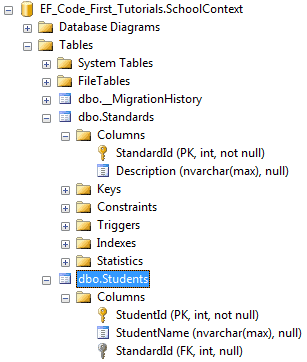
ForeignKey attribute overrides this convention. You can have a different name of a foreign key property name than the primary key of a dependent class.
public class Student

{

    public Student()

    {

    }

    public int StudentID { get; set; }

    public string StudentName { get; set; }

    //Foreign key for Standard

    public int StandardRefId { get; set; }

    [ForeignKey("StandardRefId")]

    public Standard Standard { get; set; }

}

public class Standard

{

    public Standard()

    {

    }

    public int StandardId { get; set; }

    public string StandardName { get; set; }

    public ICollection<Student> Students { get; set; }

}
As you can see in the above example, Student class includes StandardRefId foreign key property name instead of StandardId. We specify it using ForeignKey attribute on Standard navigation property so that Code-First will consider StandardRefId as foreign key, as shown below.
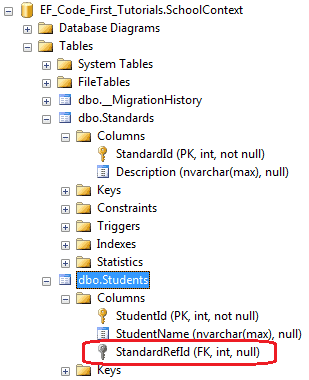
ForeignKey attribute can be applied to key property to specify which navigation property it points to, as shown below.
public class Student

{

    public Student()

    {

    }

    public int StudentID { get; set; }

    public string StudentName { get; set; }

    //Foreign key for Standard

    [ForeignKey("Standard")]

    public int StandardRefId { get; set; }

    public Standard Standard { get; set; }

}

public class Standard

{

    public Standard()

    {

    }

    public int StandardId { get; set; }

    public string StandardName { get; set; }

    public ICollection<Student> Students { get; set; }

}
Thus, you can use ForeignKey attribute to give a different name to a foreign key property.
Entity Framework Code-First(9.9):DataAnnotations - ForeignKey Attribute的更多相关文章
- Entity Framework Code-First(9.6):DataAnnotations - StringLength Attribute
DataAnnotations - StringLength Attribute: StringLength attribute can be applied to a string type pro ...
- Entity Framework Code-First(9.5):DataAnnotations - MaxLength Attribute
DataAnnotations - MaxLength Attribute: MaxLength attribute can be applied to a string or array type ...
- Entity Framework Code-First(9.10):DataAnnotations - NotMapped Attribute
DataAnnotations - NotMapped Attribute: NotMapped attribute can be applied to properties of a class. ...
- Entity Framework Code-First(9.8):DataAnnotations - Column Attribute
DataAnnotations - Column Attribute: Column attribute can be applied to properties of a class. Defaul ...
- Entity Framework Code-First(9.7):DataAnnotations - Table Attribute
DataAnnotations - Table Attribute: Table attribute can be applied to a class. Default Code-First con ...
- Entity Framework Code-First(9.2):DataAnnotations - TimeStamp Attribute
DataAnnotations - TimeStamp Attribute: TimeStamp attribute can be applied to only one byte array pro ...
- Entity Framework Code-First(9.1):DataAnnotations - Key Attribute
DataAnnotations - Key Attribute: Key attribute can be applied to properties of a class. Default Code ...
- Entity Framework Code-First(9.4):DataAnnotations - Required Attribute
Required attribute can be applied to a property of a domain class. EF Code-First will create a NOT N ...
- Entity Framework Code-First(9.3):DataAnnotations - ConcurrencyCheck Attribute
ConcurrencyCheck Attribute: ConcurrencyCheck attribute can be applied to a property of a domain clas ...
随机推荐
- 手机端适配rem代码片段
<!DOCTYPE html> <html lang="en"> <head> <meta charset="UTF-8&quo ...
- In a Web Application and Mobile (hybrid), how to know which this platform running?
needed depending on the platform to change the CSS to suit the size of the font. for example the DbG ...
- 激活idea2018
首先下载安装完成后,打开hosts文件,新增一条路由: 0.0.0.0 account.jetbrains.com 打开软件输入序列码: EB101IWSWD-eyJsaWNlbnNlSWQiOiJF ...
- CSS重置 reset.css
1. [文件] reset.css ~/*------------------------------------------* site:ifnoif.net* Style author:ifnoi ...
- HTML5 学习记录——0
2015/08/19 HTML5的标签功能划分:基础.格式.表单.框架.图像.音视频.链接.列表.表格.样式.元信息.编程 1.HTML基础标题 <h1> - <h6>段落 & ...
- Java_util_02_Java判断字符串是中文还是英文
做微信开发,使用百度翻译API时,需要指定译文的语种.这就需要我们判断待翻译内容是中文还是英文,若是中文,则翻译成英文,若是英文则翻译成中文. 方法一:字符与字节的长度 依据:一个中文占两个字节,一个 ...
- 几个常用的url生成二维码的接口
找到了几个URL生成的接口,速度上可能会有差别,可试验后选用,我用过第一个,分享: <!doctype html> <html lang="en"> < ...
- JSP分页1
分页 1.什么分页? 第N页/共M页 首页 上一页 1 2 3 4 5 6 7 8 9 10 下一页 尾页 口 go 分页的优点:只查询一页,不用查询所有页! 2.分页数据 页面的数据都是由Servl ...
- java--Hibernate添加数据save
添加按钮跳转到add表单页面 <a href="${pageContext.request.contextPath }/department_saveUI.action"&g ...
- 通知消息与ON_NOTIFY
1.通知消息一般是由子控件发出,由父窗口响应,因此响应函数的位置在父窗口内. 2.通知消息发送给父窗口的是通知码,即WM_NOTIFY消息(但为了区分方便不同的消息有不同的名称,但都是以WM_NOTI ...