
CentOS7部署LAMP+xcache (php-fpm模式)
此次实验准备3台CentOS7服务器,版本号:CentOS Linux release 7.2.1511。

搭建Apache服务器
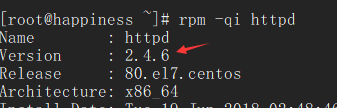
- 通过 yum -y install httpd 安装Apache:
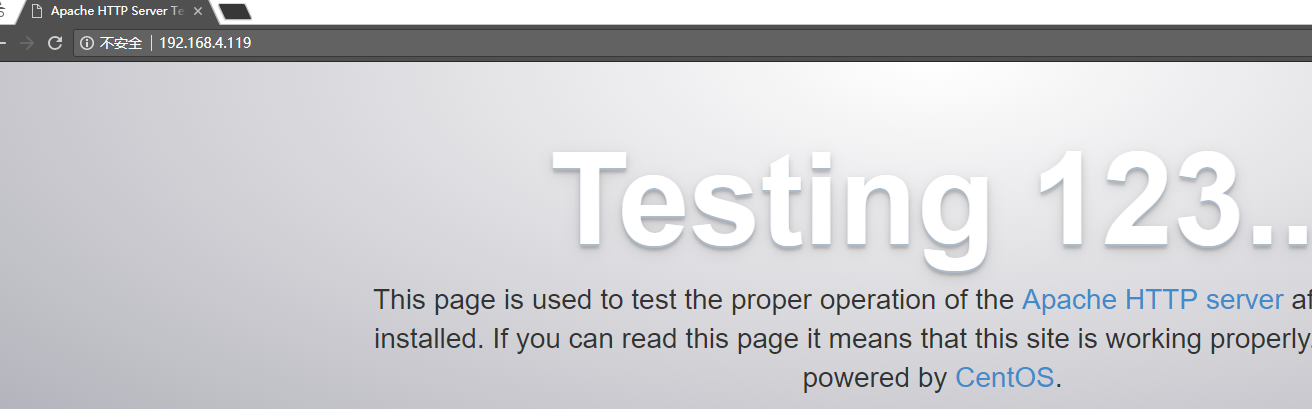
- 访问正常:
- 修改配置文件,添加2个虚拟主机,一个提供phpMyAdmin,一个提供wordpress:
[root@happiness ~]# vim /etc/httpd/conf/httpd.conf

#启用解析,加速httpd服务的启动

    ServerName localhost:80

#注销默认主目录

    #DocumentRoot "/var/www/html"

[root@happiness ~]# vim /etc/httpd/conf.d/vhost.conf

#默认主页

    DirectoryIndex index.php

#虚拟主机a,后期提供phpMyAdmin

    <VirtualHost 192.168.4.119:80>

        ServerName www.aaa.net

        DocumentRoot /var/www/aaa

        ProxyRequests off

        ProxyPassMatch ^/(.*\.php)$ fcgi://192.168.4.118:9000/var/www/php_aaa/$1

        <Directory "/var/www/aaa">

            Options None

            Allowoverride None

            Require all granted

        </Directory>

    </VirtualHost>

#虚拟主机b,后期提供wordpress

    <VirtualHost 192.168.4.119:80>

        ServerName www.bbb.net

        DocumentRoot /var/www/bbb

        ProxyRequests off

        ProxyPassMatch ^/(.*\.php)$ fcgi://192.168.4.118:9000/var/www/php_bbb/$1

        <Directory "/var/www/bbb">

            Options None

            Allowoverride None

            Require all granted

        </Directory>

    </VirtualHost>
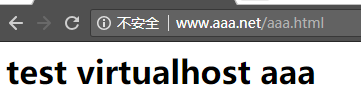
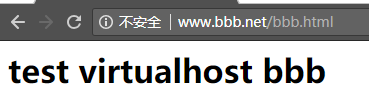
- 测试2个虚拟主机静态资源是否可用:
#在虚拟主机a中新建测试页aaa.html

[root@happiness ~]# vim /var/www/aaa/aaa.html

    <h1>test virtualhost aaa</h1>

#在虚拟主机b中新建测试页bbb.html

[root@happiness ~]# vim /var/www/bbb/bbb.html

    <h1>test virtualhost bbb</h1>

访问结果:(实验中没搭建dns服务,修改要访问Apache的主机的hosts文件,添加 192.168.4.119  www.aaa.net 和 192.168.4.119  www.bbb.net,来完成访问)
搭建php服务器
- 通过 yum -y install php-fpm php-mysql php-mbstring 搭建php:
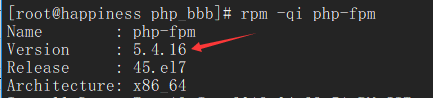
- 修改php配置文件:
[root@happiness ~]# vim /etc/php-fpm.d/www.conf

#监听本地能与外部通信的地址

    listen = 192.168.4.118:9000

#允许哪些主机访问

    listen.allowed_clients = 192.168.4.119

#确保user、group跟Apache服务器httpd进程的user、group一致

    user = apache

    group = apache

#session目录不存在,需要手动创建

    php_value[session.save_path] = /var/lib/php/session

[root@happiness ~]# mkdir /var/lib/php/session

[root@happiness ~]# chown apache:apache /var/lib/php/session

[root@happiness ~]# ll -hd /var/lib/php/session/

    drwxr-xr-x. 2 apache apache 4.0K Jun 21 10:28 /var/lib/php/session/

#虚拟机a新建php测试页

[root@happiness ~]# cat /var/www/php_aaa/index.php

    <h1>a</h1>

    <?php

            phpinfo();

    ?>

#虚拟机b新建php测试页

[root@happiness ~]# cat /var/www/php_bbb/testbbb.php

    <h1>b</h1>

    <?php

        phpinfo();

    ?>

访问结果:(注意,如果访问结果出现:File not found类似的提示时,需要关闭php服务器的selinux,临时关闭通过命令 setenforce Permissive 进行,永久关闭修改配置文件 vim /etc/sysconfig/selinux)


搭建Mariadb服务器
- 通过 yum -y install mariadb-server 安装mariadb:
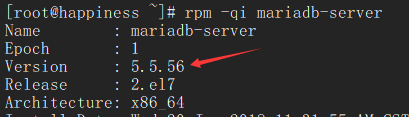
- 创建mariadb用户访问权限:
MariaDB [(none)]> CREATE USER 'wpuser'@'192.168.4.118' IDENTIFIED BY 'wppasswd';

MariaDB [(none)]> GRANT ALL PRIVILEGES ON wordpressdb.* TO 'wpuser'@'192.168.4.118';

MariaDB [(none)]> CREATE USER 'pmauser'@'192.168.4.118' IDENTIFIED BY 'pmapasswd';

MariaDB [(none)]> GRANT ALL PRIVILEGES ON pmadb.* TO 'pmauser'@'192.168.4.118';

MariaDB [(none)]> FULSH PRIVILEGES;

MariaDB [(none)]> CREATE DATABASE wordpressdb DEFAULT CHARACTER SET utf8 COLLATE utf8_general_ci;

MariaDB [(none)]> CREATE DATABASE pmadb DEFAULT CHARACTER SET utf8 COLLATE utf8_general_ci;
- 分别在虚拟机a和b中建立测试页,看能否成功连接mariadb服务器:
[root@happiness ~]# cat /var/www/php_aaa/mysql_conn.php

    <h1>aaa</h1>

    <?php

        $conn = mysql_connect('192.168.4.117','pmauser','pmapasswd');

        if($conn)

            echo "aaa connects successfully";

        else

            echo "aaa fails to connect.";

    ?>

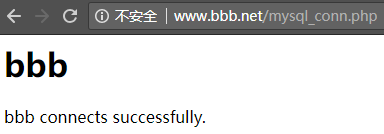
[root@happiness ~]# cat /var/www/php_bbb/mysql_conn.php

    <h1>bbb</h1>

    <?php

        $conn = mysql_connect('192.168.4.117','wpuser','wppasswd');

        if($conn)

            echo "bbb connects successfully.";

        else

            echo "bbb fails to connect.";

    ?>

访问结果: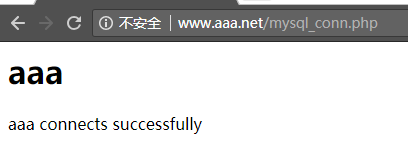
搭建phpMyAdmin和WordPress
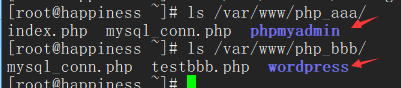
- 分别从官网下载 phpMyAdmin 和 WordPress 源码包,分别解压于对应的虚拟机主目录下:(此时最新的 phpMyAdmin-4.8.1版本仅支持 PHP 5.5 to 7.2 and MySQL 5.5,而实验中PHP版本为5.4,故下载了 phpMyAdmin-4.4.15.10版本)
- 搭建phpMyAdmin:
#修改phpMyAdmin配置文件
[root@happiness ~]# vim /var/www/php_aaa/phpmyadmin/libraries/config.default.php

#可通过 openssl rand -base64 32 随机字符串

  $cfg['blowfish_secret'] = 'w14hLCZeyOtg4+9izK9O3oW8BLjTpJVAzF1GCAtJ7U4=';

  $cfg['Servers'][$i]['host'] = '192.168.4.117';

  $cfg['Servers'][$i]['user'] = 'pmauser';

  $cfg['Servers'][$i]['password'] = 'pmapasswd';

#修改完配置后复制一整份 phpmyadmin文件到Apache服务器

[root@happiness ~]# scp -r /var/www/php_aaa/phpmyadmin/ root@192.168.4.119:/var/www/aaa/

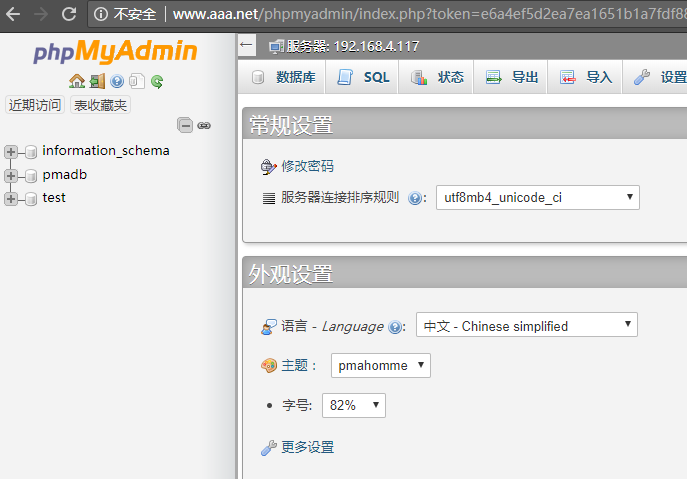
访问结果:
- 搭建WordPress:
#修改WordPress配置文件

[root@happiness ~]# cp /var/www/php_bbb/wordpress/wp-config-sample.php /var/www/php_bbb/wordpress/wp-config.php

[root@happiness ~]# vim /var/www/php_bbb/wordpress/wp-config.php

  define('DB_NAME', 'wordpressdb');

  define('DB_USER', 'wpuser');

  define('DB_PASSWORD', 'wppasswd');

  define('DB_HOST', '192.168.4.117');

#修改完配置后复制一整份wordpress到Apache服务器:

[root@happiness ~]# scp -r /var/www/php_bbb/wordpress root@192.168.4.119:/var/www/bbb/

访问结果:

借助php-xcache加速访问
- 没安装php-xcache进行的压力测试:
[root@happiness ~]# ab -n 10000 -c 1000 http://www.bbb.net/wordpress

This is ApacheBench, Version 2.3 <$Revision: 1430300 $>

Copyright 1996 Adam Twiss, Zeus Technology Ltd, http://www.zeustech.net/

Licensed to The Apache Software Foundation, http://www.apache.org/

Benchmarking www.bbb.net (be patient)

Completed 1000 requests

Completed 2000 requests

Completed 3000 requests

Completed 4000 requests

Completed 5000 requests

Completed 6000 requests

Completed 7000 requests

Completed 8000 requests

Completed 9000 requests

Completed 10000 requests

Finished 10000 requests

Server Software:        Apache/2.4.6

Server Hostname:        www.bbb.net

Server Port:            80

Document Path:          /wordpress

Document Length:        237 bytes

Concurrency Level:      1000

Time taken for tests:   12.966 seconds

Complete requests:      10000

Failed requests:        0

Write errors:           0

Non-2xx responses:      10000

Total transferred:      4650000 bytes

HTML transferred:       2370000 bytes

Requests per second:    771.26 [#/sec] (mean)

Time per request:       1296.588 [ms] (mean)

Time per request:       1.297 [ms] (mean, across all concurrent requests)

Transfer rate:          350.23 [Kbytes/sec] received

Connection Times (ms)

              min  mean[+/-sd] median   max

Connect:        0   47 206.0      0    1004

Processing:     5  136 1056.6     14   12899

Waiting:        1  136 1056.6     14   12899

Total:         10  183 1085.0     15   12947

Percentage of the requests served within a certain time (ms)

  50%     15

  66%     15

  75%     16

  80%     17

  90%     25

  95%   1208

  98%   1676

  99%   1679

 100%  12947 (longest request)
- 在php服务器上通过 yum -y install php-cache 安装cache:
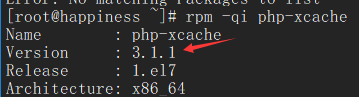
- systemctl reload php-fpm.service,并进行压力测试,可以看到访问速度有了很大提升:
[root@happiness ~]# ab -n 10000 -c 1000 http://www.bbb.net/wordpress

This is ApacheBench, Version 2.3 <$Revision: 1430300 $>

Copyright 1996 Adam Twiss, Zeus Technology Ltd, http://www.zeustech.net/

Licensed to The Apache Software Foundation, http://www.apache.org/

Benchmarking www.bbb.net (be patient)

Completed 1000 requests

Completed 2000 requests

Completed 3000 requests

Completed 4000 requests

Completed 5000 requests

Completed 6000 requests

Completed 7000 requests

Completed 8000 requests

Completed 9000 requests

Completed 10000 requests

Finished 10000 requests

Server Software:        Apache/2.4.6

Server Hostname:        www.bbb.net

Server Port:            80

Document Path:          /wordpress

Document Length:        237 bytes

Concurrency Level:      1000

Time taken for tests:   1.973 seconds

Complete requests:      10000

Failed requests:        0

Write errors:           0

Non-2xx responses:      10000

Total transferred:      4650000 bytes

HTML transferred:       2370000 bytes

Requests per second:    5068.89 [#/sec] (mean)

Time per request:       197.282 [ms] (mean)

Time per request:       0.197 [ms] (mean, across all concurrent requests)

Transfer rate:          2301.79 [Kbytes/sec] received

Connection Times (ms)

              min  mean[+/-sd] median   max

Connect:        0   56 220.6      4    1011

Processing:     5   39  90.4     13    1102

Waiting:        1   36  90.5     10    1101

Total:         10   95 245.2     16    1222

Percentage of the requests served within a certain time (ms)

  50%     16

  66%     17

  75%     19

  80%     20

  90%    220

  95%   1019

  98%   1029

  99%   1213

 100%   1222 (longest request)
- 修改xcache配置文件,修改缓存大小为100M,再进行压力测试,可以看到访问速度略有提高:
[root@happiness ~]# vim /etc/php.d/xcache.ini

    xcache.size  =  100M

[root@happiness ~]# ab -n 10000 -c 1000 http://www.bbb.net/wordpress

This is ApacheBench, Version 2.3 <$Revision: 1430300 $>

Copyright 1996 Adam Twiss, Zeus Technology Ltd, http://www.zeustech.net/

Licensed to The Apache Software Foundation, http://www.apache.org/

Benchmarking www.bbb.net (be patient)

Completed 1000 requests

Completed 2000 requests

Completed 3000 requests

Completed 4000 requests

Completed 5000 requests

Completed 6000 requests

Completed 7000 requests

Completed 8000 requests

Completed 9000 requests

Completed 10000 requests

Finished 10000 requests

Server Software:        Apache/2.4.6

Server Hostname:        www.bbb.net

Server Port:            80

Document Path:          /wordpress

Document Length:        237 bytes

Concurrency Level:      1000

Time taken for tests:   1.642 seconds

Complete requests:      10000

Failed requests:        0

Write errors:           0

Non-2xx responses:      10000

Total transferred:      4650000 bytes

HTML transferred:       2370000 bytes

Requests per second:    6088.82 [#/sec] (mean)

Time per request:       164.235 [ms] (mean)

Time per request:       0.164 [ms] (mean, across all concurrent requests)

Transfer rate:          2764.94 [Kbytes/sec] received

Connection Times (ms)

              min  mean[+/-sd] median   max

Connect:        0   57 226.4      3    1011

Processing:     6   49 171.5     11    1613

Waiting:        1   47 171.7      8    1612

Total:          8  106 310.0     14    1636

Percentage of the requests served within a certain time (ms)

  50%     14

  66%     16

  75%     22

  80%     23

  90%    219

  95%   1028

  98%   1409

  99%   1418

 100%   1636 (longest request)
CentOS7部署LAMP+xcache (php-fpm模式)的更多相关文章
- Centos7部署LAMP平台之架构之路
部署LAMP平台搭建 一.源码安装LAMP 1. 安装apache [root@localhost ~]# yum -y install gcc* apr-devel apr-util-devel p ...
- FastCGI模式编译安装LAMP+Xcache
PHP的工作模式:php在lamp环境下共有三种工作模式:CGI模式.apache模块.FastCGI模式.CGI模式下运行PHP,性能不是很好.(已淘汰)FastCGI的方式和apache模块的不同 ...
- CentOS6编译LAMP基于FPM模式的应用wordpress
CentOS6编译LAMP基于FPM模式的应用wordpress 引言:其实我们可以直接使用yum安装LAMP(Linux+Apache[httpd]+Mysql+PHP),比手动编译安装LAMP要简 ...
- 阿里云服务器 ECS 部署lamp:centos+apache+mysql+php安装配置方法 (centos7)
阿里云服务器 ECS 部署lamp:centos+apache+mysql+php安装配置方法 (centos7) 1.效果图 1 2. 部署步骤 1 1. mysql安装附加(centos7) 7 ...
- 部署LAMP+NFS实现双Web服务器负载均衡
一.需求分析 1.前端需支持更大的访问量,单台Web服务器已无法满足需求了,则需扩容Web服务器: 2.虽然动态内容可交由后端的PHP服务器执行,但静态页面还需要Web服务器自己解析,那是否意味着多台 ...
- 部署lamp服务器
系统:CentOS 6.5 64位 1.卸载旧版本软件 rpm -qa | grep mysql #查询是否已经安装MySQL,如有执行下面的操作将其全部删除 rpm -e mysql --nodep ...
- CentOS6系统编译部署LAMP(Linux, Apache, MySQL, PHP)环境
我们一般常规的在Linux服务器中配置WEB系统会用到哪种WEB引擎呢?Apache还是比较常用的引擎之一.所以,我们在服务器中配置LAMP(Linux, Apache, MySQL, PHP)是我们 ...
- rhel6+apache2.4+mysql5.7+php5.6部署LAMP架构
rhel6+apache2.4+mysql5.7+php5.6部署LAMP架构 2017年10月01日 ~~~~~~~~~~~~~~~~~~~~~~~~~~~~~~~准备阶段~~~~~~~~~~~~~ ...
- centos7 部署 docker ce
=============================================== 2019/4/9_第1次修改 ccb_warlock === ...
随机推荐
- css内容整理2
10.6.css伪类.伪元素 伪类用于向某些选择器添加特殊效果:伪元素用于将特殊的效果添加达到某选择器. 区别:伪类的效果可通过添加一个实际的类达到,用::伪元素效果则需要添加一个实际的元素,用:: ...
- sqlmap 命令笔记
基础命令 注入 MySQL mssql access 直接爆表.然后你懂的BT5里面的话前面就要加pythonsqlmap.py -u url --dbs //爆数据库sqlmap.py -u url ...
- #include stdio.h(3)
#include <stdio.h> int main() { /* * ** *** **** ***** */ ;a<;a++) { printf("\n") ...
- iDempiere 使用指南 销售发货流程
Created by 蓝色布鲁斯,QQ32876341,blog http://www.cnblogs.com/zzyan/ iDempiere官方中文wiki主页 http://wiki.idemp ...
- 【起航计划 011】2015 起航计划 Android APIDemo的魔鬼步伐 10 App->Activity->Reorder Activities 后退栈 Intent FLAG
Reorder Activities 示例有四个相关的Activitives: ReorderOnLaunch, ReorderTwo,ReorderThree, ReorderFour.其中Reor ...
- react-native 视频播放器(很不错哦)
第一步: npm i -S react-native-af-video-player(安装前:先安装: react-native-video.react-native-keep-awake.react ...
- Java—多态
多态——对象的多种形态(继承是多态实现的基础) 引用多态:父类的引用可以指向本类的对象:父类的引用可以指向子类的对象 方法多态:创建本类对象时,调用的方法为本类方法:创建子类对象时,调用的方法为子类重 ...
- mysql:用cmd启动mysql服务被拒绝原因
原因是命令行的权限不够,需要以管理员模式运行,然后输入net start mysql 即可启动mysql服务
- Apache common-io AutoCloseInputStream 分析
Apache common-io 包是常用的工具包,他提供了对IO操作的一些封装.首先看一下input包下的 AutoCloseInputStream 类 1: * This class is typ ...
- Python模块与函数
python的程序由包(package).模块(module)和函数组成.模块是处理某一类问题的集合,模块由函数和类组成,包是由一系列模块组成的集合.包必须至少包含一个__init__.py文件,该文 ...