
Python命令模块argparse学习笔记(二)
argparse模块可以设置两种命令参数,一个是位置参数,一个是命令参数
位置参数
import argparse

parser = argparse.ArgumentParser(description="The Help of Python")

parser.add_argument("name")

args = parser.parse_args()

if args.name:

   print(args.name)
直接不带参数运行

报错,需要传个位置参数

打印了传的参数
可选参数
# -*- coding:utf-8 -*-

__author__ = "MuT6 Sch01aR"

import argparse

parser = argparse.ArgumentParser(description="The Help of Python")

parser.add_argument("-t","--thread")

args = parser.parse_args()

if args.thread:

   print(args.thread)
运行结果

没传参数也没有报错,所以参数是可选的,而且参数的顺序也不是按顺序的
-t和--thread都能进行传参数
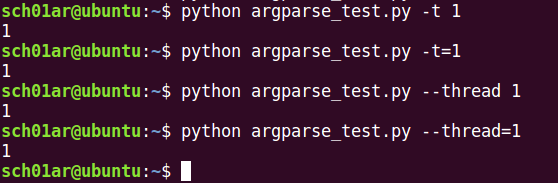
后面加等号和直接传参数是一样的
可选参数用规定的符号来识别,如上例的-和--,其他的为位置参数,如果有位置参数,不传的话就会报错
设置命令参数的参数
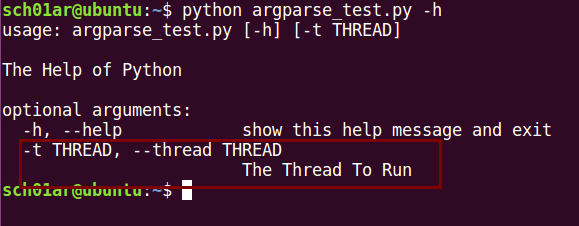
help:参数描述信息
# -*- coding:utf-8 -*-

__author__ = "MuT6 Sch01aR"

import argparse

parser = argparse.ArgumentParser(description="The Help of Python")

parser.add_argument("-t","--thread",help="The Thread To Run")

args = parser.parse_args()

if args.thread:

   print(args.thread)
运行
type:参数类型,如果类型不对就会报错
# -*- coding:utf-8 -*-

__author__ = "MuT6 Sch01aR"

import argparse

parser = argparse.ArgumentParser(description="The Help of Python")

parser.add_argument("-t","--thread",type=int,help="The Thread To Run")

args = parser.parse_args()

if args.thread:

   print(args.thread)
参数类型设置为int类型
传入一个字符串

传入一个整型

成功执行
default:默认值
# -*- coding:utf-8 -*-

__author__ = "MuT6 Sch01aR"

import argparse

parser = argparse.ArgumentParser(description="The Help of Python")

parser.add_argument("-t","--thread",default=23,help="The Thread To Run")

args = parser.parse_args()

if args.thread:

   print(args.thread)
不传入任何参数,直接运行

dest:可作为参数名
# -*- coding:utf-8 -*-

__author__ = "MuT6 Sch01aR"

import argparse

parser = argparse.ArgumentParser(description="The Help of Python")

parser.add_argument("-t","--thread",dest="thread_num",help="The Thread To Run")

args = parser.parse_args()

if args.thread_num: #需要改为dest的值

   print(args.thread_num)
运行

choices:可选择的值
# -*- coding:utf-8 -*-

__author__ = "MuT6 Sch01aR"

import argparse

parser = argparse.ArgumentParser(description="The Help of Python")

parser.add_argument("-t","--thread",choices=["one","two"],help="The Thread To Run")

args = parser.parse_args()

if args.thread:

   print(args.thread)
参数-t/--thread可选的值为one和two
运行

required:是否为必须参数,值为True或False
# -*- coding:utf-8 -*-

__author__ = "MuT6 Sch01aR"

import argparse

parser = argparse.ArgumentParser(description="The Help of Python")

parser.add_argument("-t","--thread",required=true,help="The Thread To Run")

args = parser.parse_args()

if args.thread:

   print(args.thread)
不传参数,运行

报错
const:保存一个常量,不能单独使用,可以和nargs和action中的部分参数一起使用
nargs:参数的数量,值为整数,*为任意个,+为一个或多个,当值为?时,首先从命令行获取参数,然后是从const获取参数,最后从default获得参数
# -*- coding:utf-8 -*-

__author__ = "MuT6 Sch01aR"

import argparse

parser = argparse.ArgumentParser(description="The Help of Python")

parser.add_argument("-t","--thread",nargs="*",help="The Thread To Run")

args = parser.parse_args()

if args.thread:

   print(args.thread)
运行结果

把传入的参数以列表输出
# -*- coding:utf-8 -*-

__author__ = "MuT6 Sch01aR"

import argparse

parser = argparse.ArgumentParser(description="The Help of Python")

parser.add_argument("-t","--thread",nargs="?",const=1,default=2,help="The Thread To Run")

args = parser.parse_args()

if args.thread:

   print(args.thread)
从const获取了值
action:默认值为store,store_true和store_false把值设置为True或False,store_const把值存入const中,count统计参数出现的次数,append把传入参数存为列表,append_const根据const存为列表
store:
# -*- coding:utf-8 -*-

__author__ = "MuT6 Sch01aR"

import argparse

parser = argparse.ArgumentParser(description="The Help of Python")

parser.add_argument("-t","--thread",action="store",help="The Thread To Run")

args = parser.parse_args()

if args.thread:

   print(args.thread)
运行结果

store_true和store_false:
# -*- coding:utf-8 -*-

__author__ = "MuT6 Sch01aR"

import argparse

parser = argparse.ArgumentParser(description="The Help of Python")

parser.add_argument("-t","--thread",action="store_true")

parser.add_argument("-u","--url",action="store_false")

args = parser.parse_args()

if args:

   print(args)
运行

store_const:
# -*- coding:utf-8 -*-

__author__ = "MuT6 Sch01aR"

import argparse

parser = argparse.ArgumentParser(description="The Help of Python")

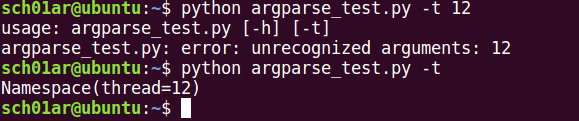
parser.add_argument("-t","--thread",action="store_const",const=12)

args = parser.parse_args()

if args:

   print(args)
运行结果
count:
# -*- coding:utf-8 -*-

__author__ = "MuT6 Sch01aR"

import argparse

parser = argparse.ArgumentParser(description="The Help of Python")

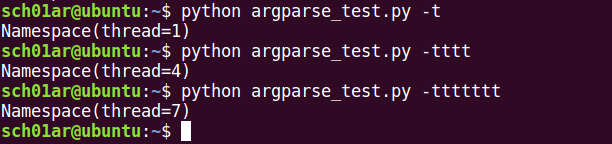
parser.add_argument("-t","--thread",action="count")

args = parser.parse_args()

if args:

   print(args)
运行结果
append:
# -*- coding:utf-8 -*-

__author__ = "MuT6 Sch01aR"

import argparse

parser = argparse.ArgumentParser(description="The Help of Python")

parser.add_argument("-t","--thread",action="append")

args = parser.parse_args()

if args:

   print(args)
运行结果

append_const:
# -*- coding:utf-8 -*-

__author__ = "MuT6 Sch01aR"

import argparse

parser = argparse.ArgumentParser(description="The Help of Python")

parser.add_argument("-t","--thread",action="append_const",const=1)

args = parser.parse_args()

if args:

   print(args)
运行结果

Python命令模块argparse学习笔记(二)的更多相关文章
- Python命令模块argparse学习笔记(一)
首先是关于-h/--help参数的设置 description:位于help信息前,可用于描述helpprog:描述help信息中程序的名称epilog:位于help信息后usage:描述程序的用途a ...
- Python命令模块argparse学习笔记(四)
默认参数 ArgumentParser.set_defaults(**kwargs) set_defaults()可以设置一些参数的默认值 >>> parser = argparse ...
- Python命令模块argparse学习笔记(三)
参数组 ArgumentParser.add_argument_group(title=None, description=None) 默认情况下,当显示帮助消息时,ArgumentParser将命令 ...
- python 命令行参数学习(二)
照着例子看看打打,码了就会.写了个命令行参数调用进行运算的脚本. 参考文章链接:http://www.jianshu.com/p/a50aead61319 #-*-coding:utf-8-*- __ ...
- 基于python实现自动化办公学习笔记二
word文件(1)读word文件 import win32comimport win32com.client def readWordFile(path): # 调用系统word功能,可以处理doc和 ...
- python3.4学习笔记(二十四) Python pycharm window安装redis MySQL-python相关方法
python3.4学习笔记(二十四) Python pycharm window安装redis MySQL-python相关方法window安装redis,下载Redis的压缩包https://git ...
- python3.4学习笔记(二十三) Python调用淘宝IP库获取IP归属地返回省市运营商实例代码
python3.4学习笔记(二十三) Python调用淘宝IP库获取IP归属地返回省市运营商实例代码 淘宝IP地址库 http://ip.taobao.com/目前提供的服务包括:1. 根据用户提供的 ...
- python3.4学习笔记(二十六) Python 输出json到文件,让json.dumps输出中文 实例代码
python3.4学习笔记(二十六) Python 输出json到文件,让json.dumps输出中文 实例代码 python的json.dumps方法默认会输出成这种格式"\u535a\u ...
- python3.4学习笔记(二十五) Python 调用mysql redis实例代码
python3.4学习笔记(二十五) Python 调用mysql redis实例代码 #coding: utf-8 __author__ = 'zdz8207' #python2.7 import ...
随机推荐
- python matrix/array反向切片
>>> import numpy as np >>> m = np.mat([[1.,1,1],[1,2,3,],[1,5,1,]]) >>> m ...
- STL视频_01
ZC:这里视频里面有一个调试小技巧,VS08/VS2010开始,控制台程序会自动退出(不像VC6),那么可以在 函数退出的最后一句语句上设置断点,然后查看控制台打印出来的信息.ZC:这一讲,给我的感觉 ...
- 深入分析理解Tomcat体系结构
Tomcat整体结构 由上图可知Tomcat的顶层容器是Server,而且一个Tomcat对应一个Server,一个server有多个service提供服务.service包含两个重要组件:Conne ...
- java的Random()类使用方法
//随机生成1~100之间的一个整数 int randomNumber = (int)(Math.random() * 100) + 1; System.out.println(randomNumbe ...
- Ubuntu18.04 升级python3后 安装pip3 后报错
pip3 -VTraceback (most recent call last): File , in <module> from pip._internal import main Mo ...
- poj1523割顶-点双联通
题意:求出所有的割顶,而且还有输出该割顶连接了几个点双连通分量 题解:直接tarjan求点双联通分量就好了,可以在加入边的时候记录加入次数,大于1的都是桥,输入输出很恶心,注意格式 #include& ...
- 数据结构录 之 单调队列&单调栈。(转)
http://www.cnblogs.com/whywhy/p/5066306.html 队列和栈是很常见的应用,大部分算法中都能见到他们的影子. 而单纯的队列和栈经常不能满足需求,所以需要一些很神奇 ...
- 51nod 1189 算术基本定理/组合数学
www.51nod.com/onlineJudge/questionCode.html#!problemId=1189 1189 阶乘分数 题目来源: Spoj 基准时间限制:1 秒 空间限制:131 ...
- 数据库Dao类BaseDao(增删改)
package com.changim.patient.app.db; import android.content.ContentValues; import android.content.Con ...
- gradle_学习_01_gradle安装与基本使用
一.下载安装 1.下载地址 官方下载地址: https://gradle.org/install/#manually 下载二进制文件,解压即可 2.环境变量配置 加入以下环境变量 GRADLE_HOM ...