
Python命令行参数学习
man python 查看python的帮助文件
命令行参数:
-B Don't write .py[co] files on import.
See also PYTHONDONTWRITEBYTECODE.
当使用import的时候,不产生.pyc/.pyo文件
-c command
Specify the command to execute (see
next section). This terminates the
option list (following options are
passed as arguments to the command).
直接指定执行的命令
举例:python -c 'print "shen"'
-d Turn on parser debugging output (for
wizards only, depending on compila-
tion options).
-E Ignore environment variables like
PYTHONPATH and PYTHONHOME that mod-
ify the behavior of the interpreter.
-h , -? , --help
Prints the usage for the interpreter
executable and exits.
-i When a script is passed as first
argument or the -c option is used,
enter interactive mode after execut-
ing the script or the command. It
does not read the $PYTHONSTARTUP
file. This can be useful to inspect
global variables or a stack trace
when a script raises an exception.
执行完命令、py文件后进入交互模式
举例:
python -i -c "print 'shen'"
shen
>>>
-m module-name
Searches sys.path for the named mod-
ule and runs the corresponding .py
file as a script.
在sys.path里的路径里搜索某个模块,并运行相应的.py文件
将模块按照脚本执行,最常见的用法是:
python -m SimpleHTTPServer 8081
在打开浏览器的8081端口,可以用于局域网的简单文件下载服务
-O Turn on basic optimizations. This
changes the filename extension for
compiled (bytecode) files from .pyc
to .pyo. Given twice, causes doc-
strings to be discarded.
-OO Discard docstrings in addition to
the -O optimizations.
-R Turn on "hash randomization", so
that the hash() values of str, bytes
and datetime objects are "salted"
with an unpredictable pseudo-random
value. Although they remain con-
stant within an individual Python
process, they are not predictable
between repeated invocations of
Python.
This is intended to provide protec-
tion against a denial of service
caused by carefully-chosen inputs
that exploit the worst case perfor-
mance of a dict construction, O(n^2)
complexity. See
http://www.ocert.org/advi-
sories/ocert-2011-003.html for
details.
-Q argument
Division control; see PEP 238. The
argument must be one of "old" (the
default, int/int and long/long
return an int or long), "new" (new
division semantics, i.e. int/int and
long/long returns a float), "warn"
(old division semantics with a warn-
ing for int/int and long/long), or
"warnall" (old division semantics
with a warning for all use of the
division operator). For a use of
"warnall", see the
Tools/scripts/fixdiv.py script.
-s Don't add user site directory to
sys.path.
-S Disable the import of the module
site and the site-dependent manipu-
lations of sys.path that it entails.
-t Issue a warning when a source file
mixes tabs and spaces for indenta-
tion in a way that makes it depend
on the worth of a tab expressed in
spaces. Issue an error when the
option is given twice.
-u Force stdin, stdout and stderr to be
totally unbuffered. On systems
where it matters, also put stdin,
stdout and stderr in binary mode.
Note that there is internal buffer-
ing in xreadlines(), readlines() and
file-object iterators ("for line in
sys.stdin") which is not influenced
by this option. To work around
this, you will want to use
"sys.stdin.readline()" inside a
"while 1:" loop.
对标准输入、输出、错误不进行缓存,直接输出;正常情况下都是等到缓冲区满了或者程序退出了才会打印数据
举例:test.py内容如下
 #!/usr/bin/env python

 # -*- coding: utf-8 -*-

 from time import sleep

 for i in range(10):

   print i

   sleep(1)
python test.py > ok.log 一次性把所有的数字(0~9)写入ok.log中,写一次,因为有缓存
python -u test.py > ok.log 一次把一个数字写入文件ok.log中,一共写10次
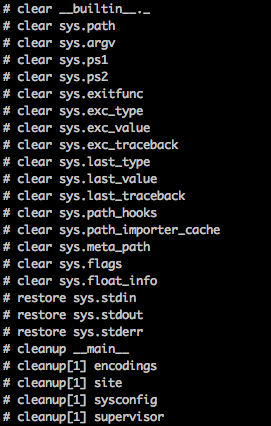
-v Print a message each time a module
is initialized, showing the place
(filename or built-in module) from
which it is loaded. When given
twice, print a message for each file
that is checked for when searching
for a module. Also provides infor-
mation on module cleanup at exit.
会输出每一个模块引用信息,包括从何处引用的,以及何时被清除的
-V , --version
Prints the Python version number of
the executable and exits.
-W argument
Warning control. Python sometimes
prints warning message to
sys.stderr. A typical warning mes-
sage has the following form:
file:line: category: message. By
default, each warning is printed
once for each source line where it
occurs. This option controls how
often warnings are printed. Multi-
ple -W options may be given; when a
warning matches more than one
option, the action for the last
matching option is performed.
Invalid -W options are ignored (a
warning message is printed about
invalid options when the first warn-
ing is issued). Warnings can also
be controlled from within a Python
program using the warnings module.
The simplest form of argument is one
of the following action strings (or
a unique abbreviation): ignore to
ignore all warnings; default to
explicitly request the default
behavior (printing each warning once
per source line); all to print a
warning each time it occurs (this
may generate many messages if a
warning is triggered repeatedly for
the same source line, such as inside
a loop); module to print each warn-
ing only the first time it occurs in
each module; once to print each
warning only the first time it
occurs in the program; or error to
raise an exception instead of print-
ing a warning message.
The full form of argument is
action:message:category:module:line.
Here, action is as explained above
but only applies to messages that
match the remaining fields. Empty
fields match all values; trailing
empty fields may be omitted. The
message field matches the start of
the warning message printed; this
match is case-insensitive. The cat-
egory field matches the warning cat-
egory. This must be a class name;
the match test whether the actual
warning category of the message is a
subclass of the specified warning
category. The full class name must
be given. The module field matches
the (fully-qualified) module name;
this match is case-sensitive. The
line field matches the line number,
where zero matches all line numbers
and is thus equivalent to an omitted
line number.
-x Skip the first line of the source.
This is intended for a DOS specific
hack only. Warning: the line num-
bers in error messages will be off
by one!
-3 Warn about Python 3.x incompatibili-
ties that 2to3 cannot trivially fix.
Python命令行参数学习的更多相关文章
- python 命令行参数学习(一)
用了这么久,还没怎么学习python的命令行参数,是在惭愧. 参考文章地址:http://www.cnblogs.com/jianboqi/archive/2013/01/10/2854726.htm ...
- [转载]Python命令行参数学习
转载自: http://blog.163.com/weak_time/blog/static/25852809120169333247925/ Python的命令行参数,提供了很多有用的功能,可以方便 ...
- python 命令行参数学习(二)
照着例子看看打打,码了就会.写了个命令行参数调用进行运算的脚本. 参考文章链接:http://www.jianshu.com/p/a50aead61319 #-*-coding:utf-8-*- __ ...
- Python命令行参数解析模块getopt使用实例
Python命令行参数解析模块getopt使用实例 这篇文章主要介绍了Python命令行参数解析模块getopt使用实例,本文讲解了使用语法格式.短选项参数实例.长选项参数实例等内容,需要的朋友可以参 ...
- python命令行参数解析OptionParser类用法实例
python命令行参数解析OptionParser类用法实例 本文实例讲述了python命令行参数解析OptionParser类的用法,分享给大家供大家参考. 具体代码如下: from opt ...
- Python命令行参数及文件读出写入
看完了柯老板的个人编程作业,虽然是评测组不用做此次作业,但还是想对本次作业涉及到利用Python命令行参数以及进行文件读出写入操作做一个简单的总结.(个人编程作业还是想自己能敲一敲,毕竟我的码力还是小 ...
- Python命令行参数sys.argv[]
学习C语言的时候就没弄明白命令行参数的用法,在学习Pyton 的时候又遇到了命令行参数,在这里稍微学习了一下,稍微明白了一些在这里做个记录方便后面回顾复习. Sys.argv[]是用来获取命令行参数的 ...
- [转]Python 命令行参数和getopt模块详解
FROM : http://www.tuicool.com/articles/jaqQvq 有时候我们需要写一些脚本处理一些任务,这时候往往需要提供一些命令行参数,根据不同参数进行不同的处理,在Pyt ...
- python命令行参数
〇.python中对应的argc, argv需要模块:sys参数个数:len(sys.argv)脚本名: sys.argv[0]参数1: sys.argv[1]参数2: sys. ...
随机推荐
- [洛谷P4588][TJOI2018]数学计算
题目大意:有一个数$x$和取模的数$mod$,初始为$1$,有两个操作: $m:x=x\times m$并输出$x\% mod$ $pos:x=x/第pos次操作乘的数$(保证合法),并输出$x\%m ...
- 洛谷 P2485 [SDOI2011]计算器 解题报告
P2485 [SDOI2011]计算器 题目描述 你被要求设计一个计算器完成以下三项任务: 1.给定y.z.p,计算y^z mod p 的值: 2.给定y.z.p,计算满足xy ≡z(mod p)的最 ...
- Vue,watch观察对象中的某个属性的变化
你只需要属性这样写,用引号引起来
- spring管理事务回滚
spring 事务回滚 1.遇到的问题 当我们一个方法里面有多个数据库保存操作的时候,中间的数据库操作发生的错误.伪代码如下: ? 1 2 3 4 5 6 7 public method() { ...
- 《c程序设计语言》读书笔记-5.3-指针实现strcat
#include <stdio.h> #include <math.h> #include <stdlib.h> #include <string.h> ...
- sublime text常用快捷键及多行列模式批量操作教程
列模式 苹果:OS X -鼠标左键+Option -或者鼠标中键 -增加选择:Command,减少选择:Command+Shift 2 Windows: -鼠标右键+Shift -或者鼠标中键 -增加 ...
- .net使用memcached
Windows中memached安装 -------------服务器端配置 1>开始>运行:CMD(确定) 2>cd C:\memcached(回车) 3>memcached ...
- Linux下Tcpdump使用
1. 介绍 tcpdump是一款用来截取网络数据的工具:这里主要介绍的是为嵌入式Linux编译tcpdump的方法 2. 编译 首先去官网下载源代码, 需要下载tcpdump和libpcap, 将他们 ...
- linux中高端内存和低端内存的概念【转】
转自:http://blog.csdn.net/hdujinhuihui/article/details/8686817 高端内存是Linux中一个重要的概念,初涉Linux时曾经对这个概念非常迷惑. ...
- 从linux看Android之一--init进程
准备环境: 熟悉linux环境和shell脚本 用SSHDROID和XShell搭建android的命令行环境(帮助找到熟悉的linux界面,因为android删除了很多标准linux平台上很多的sh ...