
Server-Side UI Automation Provider - WinForm Sample
Server-Side UI Automation Provider - WinForm Sample
2014-09-14
目录
引用程序集
提供程序接口
公开服务器端 UI 自动化提供程序
从 UI 自动化提供程序返回属性
从 UI 自动化提供程序中引发事件
在 UI 自动化提供程序中支持控件模式
WinForm Sample
参考
引用程序集[1]
UI 自动化提供程序项目必须引用以下程序集:
- UIAutomationProviders.dll
- UIAutomationTypes.dll
- WindowsBase.dll
提供程序接口[1]
每个 UI 自动化提供程序必须实现下列接口之一。
|
接口 |
说明 |
|---|---|
|
提供窗口中承载的简单控件的功能,包括对控件模式和属性的支持。 |
|
|
继承自 IRawElementProviderSimple。 为复杂控件中的元素添加功能,包括在片段中导航、设置焦点和返回元素的边框。 |
|
|
继承自 IRawElementProviderFragment。 为复杂控件中的根元素添加功能,包括将子元素定位于指定坐标以及设置整个控件的焦点状态。 |
IRawElementProviderSimple的metadata见图1
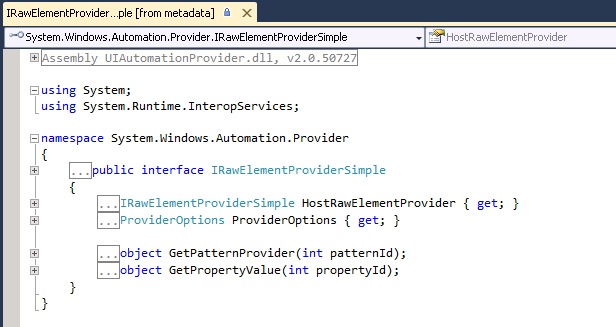
图1 metadata - IRawElementProviderSimple
公开服务器端 UI 自动化提供程序[2]
重写窗口过程以捕获 WM_GETOBJECT,以响应客户端应用程序发送到控件窗口的 WM_GETOBJECT 消息时,返回实现 IRawElementProviderSimple(或派生接口)的对象。
         /// <summary>

         /// Handles WM_GETOBJECT message; others are passed to base handler.

         /// </summary>

         /// <param name="m">Windows message.</param>

         /// <remarks>

         /// This method enables UI Automation to find the control.

         /// </remarks>

         [PermissionSetAttribute(SecurityAction.Demand, Unrestricted = true)]

         protected override void WndProc(ref Message m)

         {

             const int WM_GETOBJECT = 0x003D;

             if ((m.Msg == WM_GETOBJECT) && (m.LParam.ToInt32() == AutomationInteropProvider.RootObjectId))

             {

                 m.Result = AutomationInteropProvider.ReturnRawElementProvider(

                     Handle, m.WParam, m.LParam, (IRawElementProviderSimple)this);

                 return;

             }

             base.WndProc(ref m);

         }
从 UI 自动化提供程序返回属性[3]
实现接口IRawElementProviderSimple方法GetPropertyValue,使得UI 自动化提供程序将元素的属性返回到客户端应用程序。
对于不显式支持的任意属性,提供程序必须返回 null。这样可以确保 UI 自动化尝试从其他源(如宿主窗口提供程序)获取属性。
         /// <summary>

         /// Returns property values.

         /// </summary>

         /// <param name="propId">Property identifier.</param>

         /// <returns>Property value.</returns>

         object IRawElementProviderSimple.GetPropertyValue(int propId)

         {

             if (propId == AutomationElementIdentifiers.ClassNameProperty.Id)

             {

                 return "CustomButtonControlClass";

             }

             else if (propId == AutomationElementIdentifiers.ControlTypeProperty.Id)

             {

                 return ControlType.Button.Id;

             }

             if (propId == AutomationElementIdentifiers.HelpTextProperty.Id)

             {

                 return "Change the button color and pattern.";

             }

             if (propId == AutomationElementIdentifiers.IsEnabledProperty.Id)

             {

                 return true;

             }

             else

             {

                 return null;

             }

         }
从 UI 自动化提供程序中引发事件[4]
下面的代码在自定义按钮控件的实现中引发了UI自动化事件。该实现使UI自动化客户端应用程序能够模拟按钮单击。
为了避免不必要的处理,示例将检查 ClientsAreListening 以确定是否应该引发事件。
 /// <summary>

 /// Responds to a button click, regardless of whether it was caused by a mouse or

 /// keyboard click or by InvokePattern.Invoke.

 /// </summary>

 private void OnCustomButtonClicked()

 {

     // TODO  Perform program actions invoked by the control.

     // Raise an event.

     if (AutomationInteropProvider.ClientsAreListening)

     {

         AutomationEventArgs args = new AutomationEventArgs(InvokePatternIdentifiers.InvokedEvent);

         AutomationInteropProvider.RaiseAutomationEvent(InvokePatternIdentifiers.InvokedEvent, this, args);

     }

 }
在 UI 自动化提供程序中支持控件模式[5]
支持控件模式
1.为该元素支持的控件模式实现相应的接口,例如,为 InvokePattern 实现 IInvokeProvider。
         /// <summary>

         /// Responds to an InvokePattern.Invoke by simulating a MouseDown event.

         /// </summary>

         void IInvokeProvider.Invoke()

         {

             // If the control is not enabled, we're responsible for letting UI Automation know.

             // It catches the exception and then throws it to the client.

             IRawElementProviderSimple provider = this as IRawElementProviderSimple;

             if (false == (bool)provider.GetPropertyValue(AutomationElementIdentifiers.IsEnabledProperty.Id))

             {

                 throw new ElementNotEnabledException();

             }

             // Create arguments for the click event. The parameters aren't used.

             MouseEventArgs mouseArgs = new MouseEventArgs(MouseButtons.Left, , , , );

             // Simulate a mouse click. We cannot call RespondToClick directly,

             // because it is illegal to update the UI from a different thread.

             MouseEventHandler handler = CustomButton_MouseDown;

             BeginInvoke(handler, new object[] { this, mouseArgs });

         }
若invoke实现如下,则用客户端模拟点击操作,只会弹出对话框。
void IInvokeProvider.Invoke(){ MessageBox.Show("invoke Pattern."); }
我们可以用UISpy模拟客户端操作,引发invoke事件:
- 选中CustomControl
- 菜单‘View'->'Control Pattern,选择'Call Method'
见下图2,只弹出了MessageBox,customControl的图形并没有改变
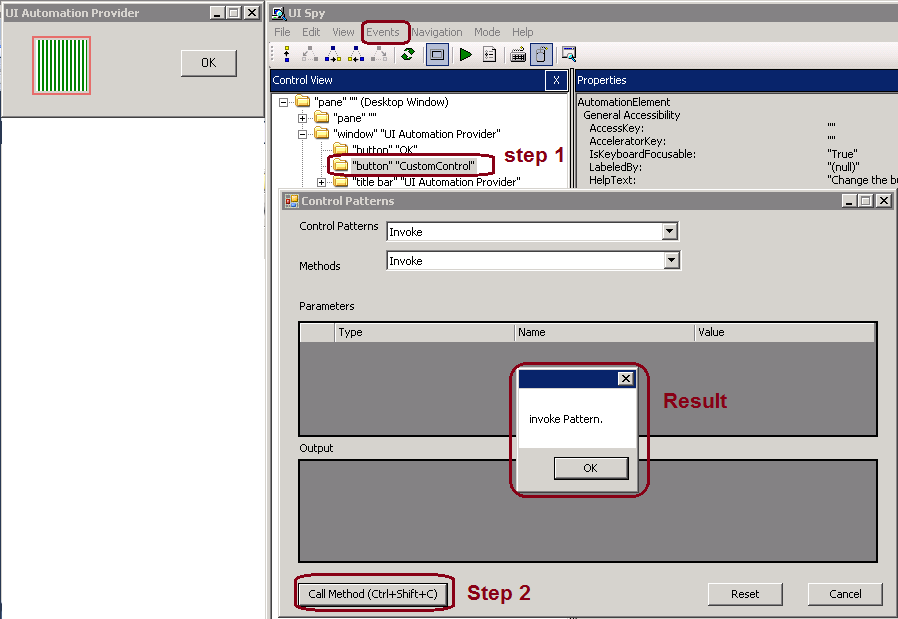
图2 UISpy模拟客户端操作,引发invoke事件
2.返回一个对象,其中包含 IRawElementProviderSimple.GetPatternProvider 实现中的每个控件接口的实现。
         /// <summary>

         /// Returns the object that supports the specified pattern.

         /// </summary>

         /// <param name="patternId">ID of the pattern.</param>

         /// <returns>Object that implements IInvokeProvider.</returns>

         object IRawElementProviderSimple.GetPatternProvider(int patternId)

         {

             if (patternId == InvokePatternIdentifiers.Pattern.Id)

             {

                 return this;

             }

             else

             {

                 return null;

             }

         }
WinForm Sample[6]
 using System;

 using System.Collections.Generic;

 using System.Text;

 using System.Windows.Automation.Provider;

 using System.Windows.Automation;

 using System.Drawing;

 using System.Windows.Forms;

 using System.Diagnostics;

 using System.Security.Permissions;

 namespace ElementProvider

 {

     class CustomButton : Control, IRawElementProviderSimple, IInvokeProvider

     {

         bool buttonState = false;

         IntPtr myHandle;

         /// <summary>

         /// Constructor.

         /// </summary>

         /// <param name="rect">Position and size of control.</param>

         public CustomButton()

         {

             myHandle = Handle;

             // Add event handlers.

             MouseDown += new System.Windows.Forms.MouseEventHandler(this.CustomButton_MouseDown);

             this.KeyPress += new System.Windows.Forms.KeyPressEventHandler(this.CustomButton_KeyPress);

             this.GotFocus += new EventHandler(CustomButton_ChangeFocus);

             this.LostFocus += new EventHandler(CustomButton_ChangeFocus);

         }

         /// <summary>

         /// Handles WM_GETOBJECT message; others are passed to base handler.

         /// </summary>

         /// <param name="m">Windows message.</param>

         /// <remarks>

         /// This method enables UI Automation to find the control.

         /// </remarks>

         [PermissionSetAttribute(SecurityAction.Demand, Unrestricted = true)]

         protected override void WndProc(ref Message m)

         {

             const int WM_GETOBJECT = 0x003D;

             if ((m.Msg == WM_GETOBJECT) && (m.LParam.ToInt32() == AutomationInteropProvider.RootObjectId))

             {

                 m.Result = AutomationInteropProvider.ReturnRawElementProvider(

                     Handle, m.WParam, m.LParam, (IRawElementProviderSimple)this);

                 return;

             }

             base.WndProc(ref m);

         }

         /// <summary>

         /// Ensure that the focus rectangle is drawn or erased when focus changes.

         /// </summary>

         /// <param name="sender"></param>

         /// <param name="e"></param>

         void CustomButton_ChangeFocus(object sender, EventArgs e)

         {

             Refresh();

         }

         /// <summary>

         /// Handles Paint event.

         /// </summary>

         /// <param name="e">Event arguments.</param>

         protected override void OnPaint(PaintEventArgs e)

         {

             Rectangle buttonRect = new Rectangle(ClientRectangle.Left + ,

                 ClientRectangle.Top + ,

                 ClientRectangle.Width - ,

                 ClientRectangle.Height - );

             System.Drawing.Drawing2D.HatchBrush brush;

             if (buttonState)

             {

                 brush = new System.Drawing.Drawing2D.HatchBrush(

                     System.Drawing.Drawing2D.HatchStyle.DarkHorizontal, Color.Red, Color.White);

             }

             else

             {

                 brush = new System.Drawing.Drawing2D.HatchBrush(

                     System.Drawing.Drawing2D.HatchStyle.DarkVertical, Color.Green, Color.White);

             }

             e.Graphics.FillRectangle(brush, buttonRect);

             if (Focused)

             {

                 ControlPaint.DrawFocusRectangle(e.Graphics, ClientRectangle);

             }

         }

         /// <summary>

         /// Responds to a button click, regardless of whether it was caused by a mouse or

         /// keyboard click or by InvokePattern.Invoke.

         /// </summary>

         private void RespondToClick()

         {

             buttonState = !buttonState;

             this.Focus();

             this.Refresh();

             // Raise an event.

             if (AutomationInteropProvider.ClientsAreListening)

             {

                 AutomationEventArgs args = new AutomationEventArgs(InvokePatternIdentifiers.InvokedEvent);

                 AutomationInteropProvider.RaiseAutomationEvent(InvokePatternIdentifiers.InvokedEvent, this, args);

             }

         }

         /// <summary>

         /// Handles MouseDown event.

         /// </summary>

         /// <param name="sender">Object that raised the event.</param>

         /// <param name="e">Event arguments.</param>

         public void CustomButton_MouseDown(object sender, MouseEventArgs e)

         {

             RespondToClick();

         }

         /// <summary>

         /// Handles Keypress event.

         /// </summary>

         /// <param name="sender">Object that raised the event.</param>

         /// <param name="e">Event arguments.</param>

         public void CustomButton_KeyPress(object sender, KeyPressEventArgs e)

         {

             if (e.KeyChar == (char)Keys.Space)

             {

                 RespondToClick();

             }

         }

         #region IRawElementProviderSimple

         /// <summary>

         /// Returns the object that supports the specified pattern.

         /// </summary>

         /// <param name="patternId">ID of the pattern.</param>

         /// <returns>Object that implements IInvokeProvider.</returns>

         object IRawElementProviderSimple.GetPatternProvider(int patternId)

         {

             if (patternId == InvokePatternIdentifiers.Pattern.Id)

             {

                 return this;

             }

             else

             {

                 return null;

             }

         }

         /// <summary>

         /// Returns property values.

         /// </summary>

         /// <param name="propId">Property identifier.</param>

         /// <returns>Property value.</returns>

         object IRawElementProviderSimple.GetPropertyValue(int propId)

         {

             if (propId == AutomationElementIdentifiers.ClassNameProperty.Id)

             {

                 return "CustomButtonControlClass";

             }

             else if (propId == AutomationElementIdentifiers.ControlTypeProperty.Id)

             {

                 return ControlType.Button.Id;

             }

             if (propId == AutomationElementIdentifiers.HelpTextProperty.Id)

             {

                 return "Change the button color and pattern.";

             }

             if (propId == AutomationElementIdentifiers.IsEnabledProperty.Id)

             {

                 return true;

             }

             else

             {

                 return null;

             }

         }

         /// <summary>

         /// Tells UI Automation that this control is hosted in an HWND, which has its own

         /// provider.

         /// </summary>

         IRawElementProviderSimple IRawElementProviderSimple.HostRawElementProvider

         {

             get

             {

                 return AutomationInteropProvider.HostProviderFromHandle(myHandle);

             }

         }

         /// <summary>

         /// Retrieves provider options.

         /// </summary>

         ProviderOptions IRawElementProviderSimple.ProviderOptions

         {

             get

             {

                 return ProviderOptions.ServerSideProvider;

             }

         }

         #endregion IRawElementProviderSimple

         #region IInvokeProvider

         /// <summary>

         /// Responds to an InvokePattern.Invoke by simulating a MouseDown event.

         /// </summary>

         void IInvokeProvider.Invoke()

         {

             // If the control is not enabled, we're responsible for letting UI Automation know.

             // It catches the exception and then throws it to the client.

             IRawElementProviderSimple provider = this as IRawElementProviderSimple;

             if (false == (bool)provider.GetPropertyValue(AutomationElementIdentifiers.IsEnabledProperty.Id))

             {

                 throw new ElementNotEnabledException();

             }

             // Create arguments for the click event. The parameters aren't used.

             MouseEventArgs mouseArgs = new MouseEventArgs(MouseButtons.Left, , , , );

             // Simulate a mouse click. We cannot call RespondToClick directly,

             // because it is illegal to update the UI from a different thread.

             MouseEventHandler handler = CustomButton_MouseDown;

             BeginInvoke(handler, new object[] { this, mouseArgs });

         }

         #endregion InvokeProvider

     }  // CustomButton class.

 } // Namespace.
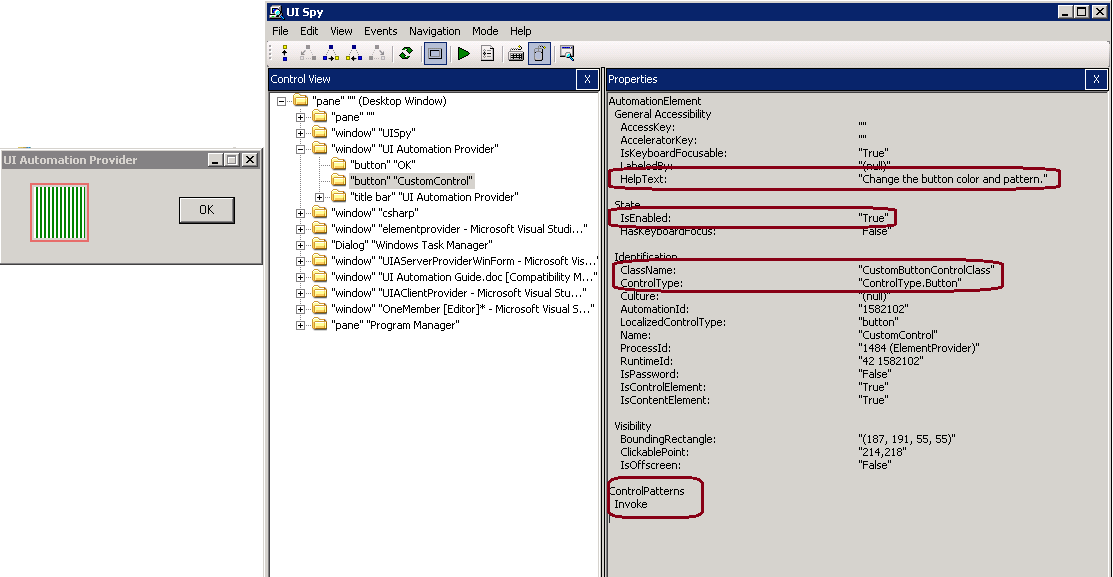
图3 UISpy Co年trol view
参考
[3] 从 UI 自动化提供程序返回属性
Server-Side UI Automation Provider - WinForm Sample的更多相关文章
- Client-Side UI Automation Provider - WinForm Sample
Client-Side UI Automation Provider - WinForm Sample 2014-09-15 源代码 目录 引用程序集实现提供程序接口分发客户端提供程序注册和配置客户 ...
- Server-Side UI Automation Provider - WPF Sample
Server-Side UI Automation Provider - WPF Sample 2014-09-14 引用程序集 自动化对等类 WPF Sample 参考 引用程序集 返回 UIAut ...
- MS UI Automation Introduction
MS UI Automation Introduction 2014-09-17 MS UI Automation是什么 UIA架构 UI自动化模型 UI自动化树概述 UI自动化控件模式概述 UI 自 ...
- 开源自己用python封装的一个Windows GUI(UI Automation)自动化工具,支持MFC,Windows Forms,WPF,Metro,Qt
首先,大家可以看下这个链接 Windows GUI自动化测试技术的比较和展望 . 这篇文章介绍了Windows中GUI自动化的三种技术:Windows API, MSAA - Microsoft Ac ...
- 使用UI Automation实现自动化测试--5-7
使用UI Automation实现自动化测试--5 (Winfrom和WPF中弹出和关闭对话框的不同处理方式) 在使用UI Automation对Winform和WPF的程序测试中发现有一些不同的地方 ...
- 使用UI Automation实现自动化测试--1-4
Introduction UI Automation是Microsoft .NET 3.0框架下提供的一种用于自动化测试的技术,是在MSAA基础上建立的,MSAA就是Microsoft Active ...
- UI Automation 简介
转载,源地址: http://blog.csdn.net/ffeiffei/article/details/6637418 MS UI Automation(Microsoft User Interf ...
- MS UI Automation简介
转自:http://blog.csdn.net/ffeiffei/article/details/6637418 MS UI Automation(Microsoft User Interface A ...
- UI Automation的两个成熟的框架(QTP 和Selenium)
自己在google code中开源了自己一直以来做的两个自动化的框架,一个是针对QTP的一个是针对Selenium的,显而易见,一个是商业的UI automation工具,一个是开源的自动化工具. 只 ...
随机推荐
- [Shoi2007]Bookcase 书柜的尺寸 dp
这道dp算是同类型dp中比较难的了,主要难点在于设置状态上: 如果像平时那样设置,必定爆空间没商量: 下面是一种思路: 先把输入进来的数据按h从大到小排序,这样就可以大大减少状态数, 然后设f[i][ ...
- 研究AVCaptureDevice
一.Apple Resource 1. wwdc 2014: Camera Caputre: Manual Controls 2. Exaple code: AVCam&AVCamManul ...
- Nodejs Express 4.X 中文API 4--- Router篇
相关阅读: Express 4.X API 翻译[一] -- Application篇 Express4.XApi 翻译[二] -- Request篇 Express4.XApi 翻译[三] -- ...
- spring mvc注解@RequestParam
在spring mvc 的使用过程中 获取 页面传来的参数的时候,我平时都习惯 @RequestParam String name,突然有一天我发现 直接在方法参数后面写 String name , ...
- CSS3:线上编辑工具及实用资料整理
an I Use 个人最常用的,资料比较全,桌面和移动浏览器支持HTML5,CSS3,SVG和兼容性表. 官网地址:http://caniuse.com/ CSS3 Click Chart CSS3 ...
- 移动MM failed to find resource file{mmiap.xml}
原地址:http://blog.csdn.net/alking_sun/article/details/36175861 在进行移动MM集成的时候总是会遇到一个bug: failed to find ...
- NumPy的array
1.numpy包中的array数组,用于弥补列表可以存储任意的数据类型的不足,因为有时候我们需要存储某种类型的数据在数组中,这才是数组的本来内涵.我们通过向numpy.array()函数中传递pyth ...
- ASP.NET 处理get/post数据方式
1.GET方式 NameValueCollection coding; coding = HttpUtility.ParseQueryString(Request.Url.Query, Encodin ...
- HDU 1028 Ignatius and the Princess III (递归,dp)
以下引用部分全都来自:http://blog.csdn.net/ice_crazy/article/details/7478802 Ice—Crazy的专栏 分析: HDU 1028 摘: 本题的意 ...
- laravel where中多条件查询
1. http://www.mobanstore.com/doc/bianchengkaifa/119.html //初学laravel 发现他的查询构造器很好用 //如下 $user = DB::t ...