
ASP.NET MVC5+EF6+EasyUI 后台管理系统(36)-文章发布系统③-kindeditor使用
我相信目前国内富文本编辑器中KindEditor 属于前列,详细的中文帮助文档,简单的加载方式,可以定制的轻量级。都是系统的首选
很多文章教程有kindeditor的使用,但本文比较特别可能带有,上传文件的缩略图和水印的源码!这块也是比较复杂和备受关注的功能
一、下载编辑器
KindEditor 4.1.10 (2013-11-23) [1143KB] 官方最新版 或者: http://www.kindsoft.net/down.php
二、添加到项目
解压 kindeditor-x.x.x.zip 文件,将所有文件上传到您的网站程序目录里
我放在Scripts下
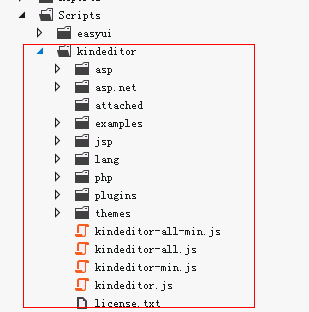
里面有很多例子,你都可以删掉,比如说asp ,asp.net ,jsp ,php,examples
themes是主题,共4个
三、了解常用方法
我们不需要很深入和学习这个富文本编辑器,用到什么到官方查什么就可以,或者google一下,下面是最受关注的几个方法了
- 加载编辑器
- 设置编辑器的值
- 获取编辑器的值
- 上传图片和文件
- 上传图片加水印、缩略图
现在我们一个一个来了解
1.加载编辑器
引入JS(前要引入jquery)
<script src="@Url.Content("~/Scripts/kindeditor/kindeditor-min.js")" type="text/javascript"></script>
编辑器需要textarea标签的支持,所以
<textarea id="BodyConetent" name="BodyContent" style="width:700px;height:300px;">HTML内容</textarea>
或者在MVC
@Html.TextAreaFor(model => model.BodyContent, new { style = "width:675px; height:225px;" })
style的宽高是编辑器的宽高
最后代码是
<script src="@Url.Content("~/Scripts/kindeditor/kindeditor-min.js")" type="text/javascript"></script>

<script type="text/javascript">

    $(function () {

        //加载编辑器

        var editor = KindEditor.create('textarea[name="BodyContent"]', {

            resizeType: 1,

            uploadJson: '/Core/upload_ajax.ashx?action=EditorFile&IsWater=1',

            fileManagerJson: '/Core/upload_ajax.ashx?action=ManagerFile',

            allowFileManager: false,

            items: ['source', 'undo', 'redo', 'wordpaste', 'justifyleft', 'justifycenter', 'justifyright', 'insertorderedlist', 'formatblock', 'fontname', 'fontsize', 'forecolor', 'bold', 'italic', 'table', 'link', 'unlink', 'image', 'fullscreen']

        });

    });

</script>

<textarea id="BodyConetent" name="BodyContent" style="width:700px;height:300px;">HTML内容</textarea>
有必要解释一下上面的方法
uploadJson:上传文件地址
fileManagerJson:文件管理
allowFileManager:是否启用管理器 false不启动(管理器可以看到以前上传的文件)
(之前分享过一个上传例子)转到 swfupload多文件上传[附源码] 下载这里的源码。并提取upload_ajax.ashx这个文件所相关的类
替换upload_ajax.ashx这个文件,里面添加了几个kindeditor上传和文件管理的方法
using System;

using System.Collections;

using System.IO;

using System.Collections.Generic;

using System.Web.SessionState;

using System.Web;

using System.Text.RegularExpressions;

using App.Common;

using LitJson;

using App.Core;

namespace App.Admin

{

    /// <summary>

    /// 文件上传处理页

    /// </summary>

    public class upload_ajax : IHttpHandler, IRequiresSessionState

    {

        public void ProcessRequest(HttpContext context)

        {

            //取得处事类型

            string action = ContextRequest.GetQueryString("action");

            switch (action)

            {

                case "SingleFile": //单文件

                    SingleFile(context);

                    break;

                case "MultipleFile": //多文件

                    MultipleFile(context);

                    break;

                case "EditorFile": //编辑器文件

                    EditorFile(context);

                    break;

                case "ManagerFile": //管理文件

                    ManagerFile(context);

                    break;

            }

        }

        #region 上传单文件处理===================================

        private void SingleFile(HttpContext context)

        {

            string _refilepath = ContextRequest.GetQueryString("ReFilePath"); //取得返回的对象名称

            string _upfilepath = ContextRequest.GetQueryString("UpFilePath"); //取得上传的对象名称

            string _delfile = ContextRequest.GetString(_refilepath);

            HttpPostedFile _upfile = context.Request.Files[_upfilepath];

            bool _iswater = false; //默认不打水印

            bool _isthumbnail = false; //默认不生成缩略图

            bool _isimage = false;

            if (ContextRequest.GetQueryString("IsWater") == "")

                _iswater = true;

            if (ContextRequest.GetQueryString("IsThumbnail") == "")

                _isthumbnail = true;

            if (ContextRequest.GetQueryString("IsImage") == "")

                _isimage = true;

            if (_upfile == null)

            {

                context.Response.Write("{\"msg\": 0, \"msgbox\": \"请选择要上传文件!\"}");

                return;

            }

            UpLoad upFiles = new UpLoad();

            string msg = upFiles.fileSaveAs(_upfile, _isthumbnail, _iswater, _isimage);

            //删除已存在的旧文件

            Utils.DeleteUpFile(_delfile);

            //返回成功信息

            context.Response.Write(msg);

            context.Response.End();

        }

        #endregion

        #region 上传多文件处理===================================

        private void MultipleFile(HttpContext context)

        {

            string _upfilepath = context.Request.QueryString["UpFilePath"]; //取得上传的对象名称

            HttpPostedFile _upfile = context.Request.Files[_upfilepath];

            bool _iswater = false; //默认不打水印

            bool _isthumbnail = false; //默认不生成缩略图

            if (ContextRequest.GetQueryString("IsWater") == "")

                _iswater = true;

            if (ContextRequest.GetQueryString("IsThumbnail") == "")

                _isthumbnail = true;

            if (_upfile == null)

            {

                context.Response.Write("{\"msg\": 0, \"msgbox\": \"请选择要上传文件!\"}");

                return;

            }

            UpLoad upFiles = new UpLoad();

            string msg = upFiles.fileSaveAs(_upfile, _isthumbnail, _iswater);

            //返回成功信息

            context.Response.Write(msg);

            context.Response.End();

        }

        #endregion

        #region 编辑器上传处理===================================

        private void EditorFile(HttpContext context)

        {

            bool _iswater = false; //默认不打水印

            if (context.Request.QueryString["IsWater"] == "")

                _iswater = true;

            HttpPostedFile imgFile = context.Request.Files["imgFile"];

            if (imgFile == null)

            {

                showError(context, "请选择要上传文件!");

                return;

            }

            UpLoad upFiles = new UpLoad();

            string remsg = upFiles.fileSaveAs(imgFile, false, _iswater);

            //string pattern = @"^{\s*msg:\s*(.*)\s*,\s*msgbox:\s*\""(.*)\""\s*}$"; //键名前和键值前后都允许出现空白字符

            //Regex r = new Regex(pattern, RegexOptions.IgnoreCase); //正则表达式实例,不区分大小写

            //Match m = r.Match(remsg); //搜索匹配项

            //string msg = m.Groups[1].Value; //msg的值,正则表达式中第1个圆括号捕获的值

            //string msgbox = m.Groups[2].Value; //msgbox的值,正则表达式中第2个圆括号捕获的值

            JsonData jd = JsonMapper.ToObject(remsg);

            string msg = jd["msg"].ToString();

            string msgbox = jd["msgbox"].ToString();

            if (msg == "")

            {

                showError(context, msgbox);

                return;

            }

            Hashtable hash = new Hashtable();

            hash["error"] = ;

            hash["url"] = msgbox;

            context.Response.AddHeader("Content-Type", "text/html; charset=UTF-8");

            context.Response.Write(JsonMapper.ToJson(hash));

            context.Response.End();

        }

        //显示错误

        private void showError(HttpContext context, string message)

        {

            Hashtable hash = new Hashtable();

            hash["error"] = ;

            hash["message"] = message;

            context.Response.AddHeader("Content-Type", "text/html; charset=UTF-8");

            context.Response.Write(JsonMapper.ToJson(hash));

            context.Response.End();

        }

        #endregion

        #region 浏览文件处理=====================================

        private void ManagerFile(HttpContext context)

        {

            App.Models.Sys.SysConfig siteConfig = new App.BLL.SysConfigBLL().loadConfig(Utils.GetXmlMapPath("Configpath"));

            //String aspxUrl = context.Request.Path.Substring(0, context.Request.Path.LastIndexOf("/") + 1);

            //根目录路径,相对路径

            String rootPath = siteConfig.webpath + siteConfig.attachpath + "/"; //站点目录+上传目录

            //根目录URL,可以指定绝对路径,比如 http://www.App.com/attached/

            String rootUrl = siteConfig.webpath + siteConfig.attachpath + "/";

            //图片扩展名

            String fileTypes = "gif,jpg,jpeg,png,bmp";

            String currentPath = "";

            String currentUrl = "";

            String currentDirPath = "";

            String moveupDirPath = "";

            String dirPath = Utils.GetMapPath(rootPath);

            String dirName = context.Request.QueryString["dir"];

            //if (!String.IsNullOrEmpty(dirName))

            //{

            //    if (Array.IndexOf("image,flash,media,file".Split(','), dirName) == -1)

            //    {

            //        context.Response.Write("Invalid Directory name.");

            //        context.Response.End();

            //    }

            //    dirPath += dirName + "/";

            //    rootUrl += dirName + "/";

            //    if (!Directory.Exists(dirPath))

            //    {

            //        Directory.CreateDirectory(dirPath);

            //    }

            //}

            //根据path参数,设置各路径和URL

            String path = context.Request.QueryString["path"];

            path = String.IsNullOrEmpty(path) ? "" : path;

            if (path == "")

            {

                currentPath = dirPath;

                currentUrl = rootUrl;

                currentDirPath = "";

                moveupDirPath = "";

            }

            else

            {

                currentPath = dirPath + path;

                currentUrl = rootUrl + path;

                currentDirPath = path;

                moveupDirPath = Regex.Replace(currentDirPath, @"(.*?)[^\/]+\/$", "$1");

            }

            //排序形式,name or size or type

            String order = context.Request.QueryString["order"];

            order = String.IsNullOrEmpty(order) ? "" : order.ToLower();

            //不允许使用..移动到上一级目录

            if (Regex.IsMatch(path, @"\.\."))

            {

                context.Response.Write("Access is not allowed.");

                context.Response.End();

            }

            //最后一个字符不是/

            if (path != "" && !path.EndsWith("/"))

            {

                context.Response.Write("Parameter is not valid.");

                context.Response.End();

            }

            //目录不存在或不是目录

            if (!Directory.Exists(currentPath))

            {

                context.Response.Write("Directory does not exist.");

                context.Response.End();

            }

            //遍历目录取得文件信息

            string[] dirList = Directory.GetDirectories(currentPath);

            string[] fileList = Directory.GetFiles(currentPath);

            switch (order)

            {

                case "size":

                    Array.Sort(dirList, new NameSorter());

                    Array.Sort(fileList, new SizeSorter());

                    break;

                case "type":

                    Array.Sort(dirList, new NameSorter());

                    Array.Sort(fileList, new TypeSorter());

                    break;

                case "name":

                default:

                    Array.Sort(dirList, new NameSorter());

                    Array.Sort(fileList, new NameSorter());

                    break;

            }

            Hashtable result = new Hashtable();

            result["moveup_dir_path"] = moveupDirPath;

            result["current_dir_path"] = currentDirPath;

            result["current_url"] = currentUrl;

            result["total_count"] = dirList.Length + fileList.Length;

            List<Hashtable> dirFileList = new List<Hashtable>();

            result["file_list"] = dirFileList;

            for (int i = ; i < dirList.Length; i++)

            {

                DirectoryInfo dir = new DirectoryInfo(dirList[i]);

                Hashtable hash = new Hashtable();

                hash["is_dir"] = true;

                hash["has_file"] = (dir.GetFileSystemInfos().Length > );

                hash["filesize"] = ;

                hash["is_photo"] = false;

                hash["filetype"] = "";

                hash["filename"] = dir.Name;

                hash["datetime"] = dir.LastWriteTime.ToString("yyyy-MM-dd HH:mm:ss");

                dirFileList.Add(hash);

            }

            for (int i = ; i < fileList.Length; i++)

            {

                FileInfo file = new FileInfo(fileList[i]);

                Hashtable hash = new Hashtable();

                hash["is_dir"] = false;

                hash["has_file"] = false;

                hash["filesize"] = file.Length;

                hash["is_photo"] = (Array.IndexOf(fileTypes.Split(','), file.Extension.Substring().ToLower()) >= );

                hash["filetype"] = file.Extension.Substring();

                hash["filename"] = file.Name;

                hash["datetime"] = file.LastWriteTime.ToString("yyyy-MM-dd HH:mm:ss");

                dirFileList.Add(hash);

            }

            context.Response.AddHeader("Content-Type", "application/json; charset=UTF-8");

            context.Response.Write(JsonMapper.ToJson(result));

            context.Response.End();

        }

        #region Helper

        public class NameSorter : IComparer

        {

            public int Compare(object x, object y)

            {

                if (x == null && y == null)

                {

                    return ;

                }

                if (x == null)

                {

                    return -;

                }

                if (y == null)

                {

                    return ;

                }

                FileInfo xInfo = new FileInfo(x.ToString());

                FileInfo yInfo = new FileInfo(y.ToString());

                return xInfo.FullName.CompareTo(yInfo.FullName);

            }

        }

        public class SizeSorter : IComparer

        {

            public int Compare(object x, object y)

            {

                if (x == null && y == null)

                {

                    return ;

                }

                if (x == null)

                {

                    return -;

                }

                if (y == null)

                {

                    return ;

                }

                FileInfo xInfo = new FileInfo(x.ToString());

                FileInfo yInfo = new FileInfo(y.ToString());

                return xInfo.Length.CompareTo(yInfo.Length);

            }

        }

        public class TypeSorter : IComparer

        {

            public int Compare(object x, object y)

            {

                if (x == null && y == null)

                {

                    return ;

                }

                if (x == null)

                {

                    return -;

                }

                if (y == null)

                {

                    return ;

                }

                FileInfo xInfo = new FileInfo(x.ToString());

                FileInfo yInfo = new FileInfo(y.ToString());

                return xInfo.Extension.CompareTo(yInfo.Extension);

            }

        }

        #endregion

        #endregion

        public bool IsReusable

        {

            get

            {

                return false;

            }

        }

    }

}
upload_ajax
(由于上传图片涉及到水印,缩略图之类)导致类比较多所以从swf这个实例中提取并合并
下载LitJson并引入 http://pan.baidu.com/share/link?shareid=2964341274&uk=3624026355 里面需要用到序列化json这个类可以帮助,这个类是开源的,大家可以百度源码
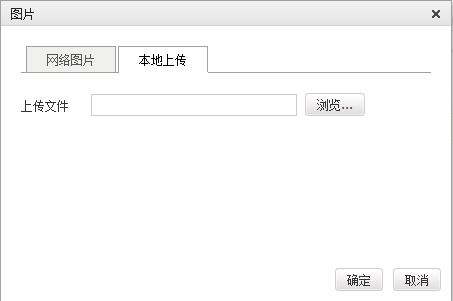
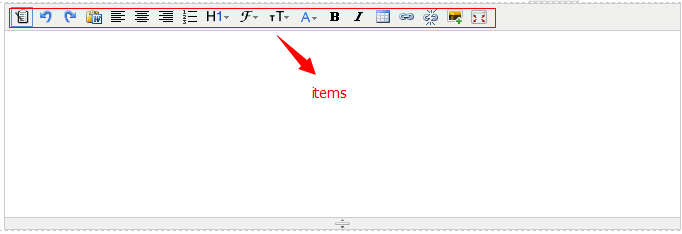
items:代表自定义工具栏
http://kindeditor.net/ke4/examples/custom-plugin.html 可以参考官方例子,将不需要的去掉,比如缩进功能
无设置items的完整模式

设置后的模式
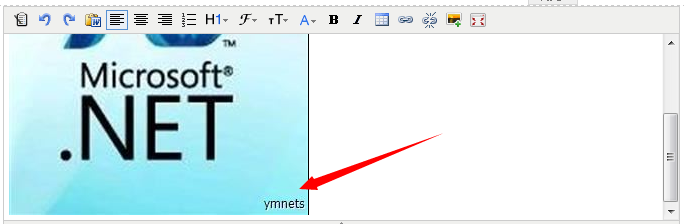
水印可以是文字和图片
请大家到swfupload例子源码中获取到UpLoad.cs这个类,这个类写了生成缩略图、打水印等信息,是本次上传的核心类之一
2.设置编辑器的值和初始化编辑器的值
初始化值值需要一开始赋值给textarea就可以了
设置值editor.html('<h3>Hello KindEditor</h3>');
3.获取编辑器的值
editor.html()
看到官方的http://kindeditor.net/ke4/examples/default.html例子
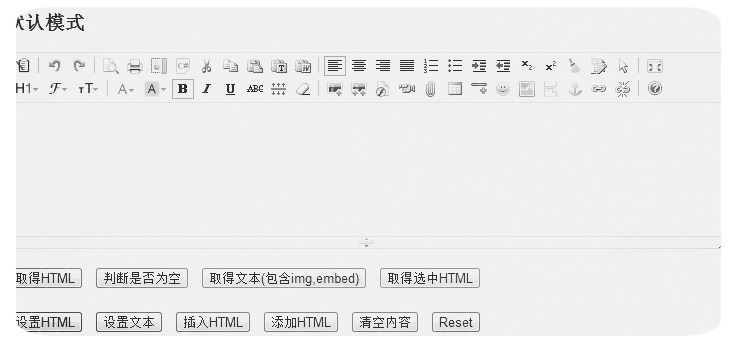
很简单的一次使用编辑器,比以前的很流行的CKEditor好用
ASP.NET MVC5+EF6+EasyUI 后台管理系统(36)-文章发布系统③-kindeditor使用的更多相关文章
- ASP.NET MVC5+EF6+EasyUI 后台管理系统(60)-系统总结
系列目录 前言: 起初写这个框架的时候,可以说在当时来说并不是很流行的设计模式,那是在2012年,面向对象的编程大家都很熟悉, 但是“注入.控制反转(DI,IOC,依赖注入).AOP切面编程”新兴名词 ...
- ASP.NET MVC5+EF6+EasyUI 后台管理系统(28)-系统小结
系列目录 我们从第一节搭建框架开始直到二十七节,权限管理已经告一段落,相信很多有跟上来的园友,已经搭配完成了,并能从模块创建授权分配和开发功能了 我没有发布所有源代码,但在14节发布了最后的一次源代码 ...
- ASP.NET MVC5+EF6+EasyUI 后台管理系统(1)-前言与目录(持续更新中...)
开发工具:VS2015(2012以上)+SQL2008R2以上数据库 您可以有偿获取一份最新源码联系QQ:729994997 价格 666RMB 升级后界面效果如下: 任务调度系统界面 http: ...
- ASP.NET MVC5+EF6+EasyUI 后台管理系统(1)-前言与目录(转)
开发工具:VS2015(2012以上)+SQL2008R2以上数据库 您可以有偿获取一份最新源码联系QQ:729994997 价格 666RMB 升级后界面效果如下: 日程管理 http://ww ...
- ASP.NET MVC5+EF6+EasyUI 后台管理系统(63)-Excel导入和导出-自定义表模导入
系列目录 前言 上一节使用了LinqToExcel和CloseXML对Excel表进行导入和导出的简单操作,大家可以跳转到上一节查看: ASP.NET MVC5+EF6+EasyUI 后台管理系统(6 ...
- ASP.NET MVC5+EF6+EasyUI 后台管理系统-WebApi的用法与调试
1:ASP.NET MVC5+EF6+EasyUI 后台管理系统(1)-WebApi与Unity注入 使用Unity是为了使用我们后台的BLL和DAL层 2:ASP.NET MVC5+EF6+Easy ...
- ASP.NET MVC5+EF6+EasyUI 后台管理系统(51)-系统升级
系统很久没有更新内容了,期待已久的更新在今天发布了,最近花了2个月的时间每天一点点,从原有系统 MVC4+EF5+UNITY2.X+Quartz 2.0+easyui 1.3.4无缝接入 MVC5+E ...
- ASP.NET MVC5+EF6+EasyUI 后台管理系统(58)-DAL层重构
系列目录 前言:这是对本文系统一次重要的革新,很久就想要重构数据访问层了,数据访问层重复代码太多.主要集中增删该查每个模块都有,所以本次是为封装相同接口方法 如果你想了解怎么重构普通的接口DAL层请查 ...
- ASP.NET MVC5+EF6+EasyUI 后台管理系统(34)-文章发布系统①-简要分析
系列目录 最新比较闲,为了学习下Android的开发构建ASP.NET MVC4+EF5+EasyUI+Unity2.x注入的后台管理系统(1)-前言与,虽然有点没有目的的学习,但还是了解了Andro ...
随机推荐
- Python 小而美的函数
python提供了一些有趣且实用的函数,如any all zip,这些函数能够大幅简化我们得代码,可以更优雅的处理可迭代的对象,同时使用的时候也得注意一些情况 any any(iterable) ...
- jquery.uploadify文件上传组件
1.jquery.uploadify简介 在ASP.NET中上传的控件有很多,比如.NET自带的FileUpload,以及SWFUpload,Uploadify等等,尤其后面两个控件的用户体验比较好, ...
- web前端基础知识
#HTML 什么是HTML,和他ML... 网页可以比作一个装修好了的,可以娶媳妇的房子. 房子分为:毛坯房,精装修 毛坯房的修建: 砖,瓦,水泥,石头,石子.... 精 ...
- [C#] 简单的 Helper 封装 -- RandomHelper
using System; namespace Wen.Helpers { /// <summary> /// 随机数助手 /// </summary> public seal ...
- NDK开发_笔记0
自谷歌搜索退出中国以来,谷歌对全球第二大市场中国的态度一直保持冷淡.可是北京时间12月8日,谷歌2016开发者大会在北京召开,同时专门针对中国的谷歌开发者网站已经上线:https://develope ...
- Linux基础介绍【第二篇】
远程连接Linux的原理 SHH远程连接介绍 当前,在几乎所有的互联网企业环境中,最常用的Linux提供远程连接服务的工具就是SSH软件,SSH分为SSH客户端和SSH服务端两部分.其中,SSH服务端 ...
- web.xml中welcome-file-list的作用
今天尝试使用struts2+ urlrewrite+sitemesh部署项目,结果发现welcome-file-list中定义的欢迎页不起作用: <welcome-file-list> & ...
- 第14章 Linux启动管理(3)_系统修复模式
3. 系统修复模式 3.1 单用户模式 (1)在grub界面中选择第2项,并按"e键"进入编辑.并在"-quiet"后面加入" 1",即&q ...
- 【第三篇】ASP.NET MVC快速入门之安全策略(MVC5+EF6)
目录 [第一篇]ASP.NET MVC快速入门之数据库操作(MVC5+EF6) [第二篇]ASP.NET MVC快速入门之数据注解(MVC5+EF6) [第三篇]ASP.NET MVC快速入门之安全策 ...
- 为Xamarin更好的开发而改写的库
欢迎大家加入以下开源社区 Xamarin-Cn:https://github.com/Xamarin-Cn Mvvmcross-Cn:https://github.com/Mvvmcross-Cn ...