
NodeJS 各websocket框架性能分析
For a current project at WhoScored, I needed to learn JavaScript, Node.js and WebSocket channel, after seven years of writing web applications with Java and Spring framework. We wanted an application that can send data to thousands of concurrent users, and Node.js appeared to be the right way of doing it with its event-driven, non-blocking I/O model that can scale up easily.
Firstly, to learn JavaScript I started doing the tutorials in Code Academy and reading D. Crockford’s JavaScript: The Good Parts book. In parallel, I read J. R. Wilson’s Node.js the Right Way as well. It was a great read: by using some great modules like async, Q, ZMQ, Express, and methods like Promises and Generators, the book explains how to build scalable Node applications. It also covers sockets with Pub/Sub, Req/Res and Push/Pull patterns which shaped the WebSocket applications that I wrote.
System structure
After some trials, errors, and brainstorming sessions, the final structure looks like this:
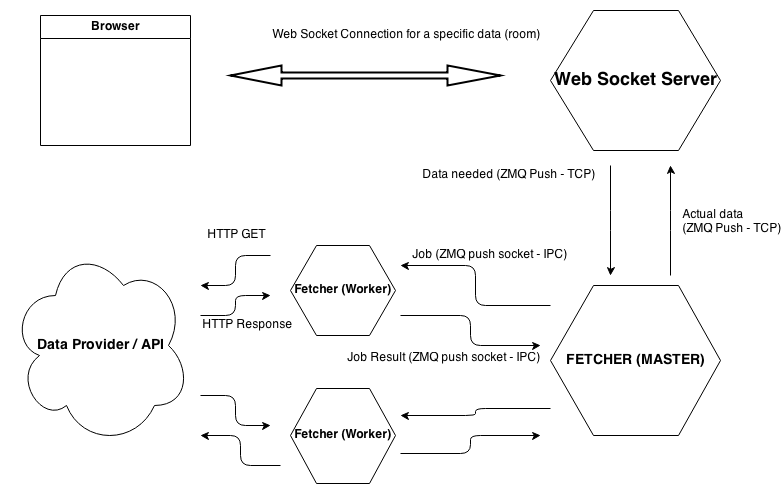
A client connects for a specific key/resource, let’s say “matchesfeed/8/matchcentre”. WebSocket server’s responsibility is to return some JSON data for this key. If it doesn’t have data for this key in its memory, it requests it from “Fetcher” via a Push socket implemented with ZMQ library over a TCP connection. Fetcher receives this request, and adds it to a queue of jobs. Worker processes (implemented with Node.js clusters) check this queue constantly, get a job, and make an HTTP call to an API that has the actual JSON data for this key. When response is received by a worker, it passes the data to master process, which sends it to WebSocket server, and puts the job back into queue. When WebSocket server receives data, it publishes to clients who are connected for that key. All applications are open source, and you can find web socket server here, fetcher here and the data provider here. Node.js version used in all applications are 0.10.
einaros / ws (v 0.4)
Based on Heroku’s WebSocket demo, I began with einaros/ws implementation. It didn’t have as much as documentation that other frameworks had, but the development went smooth and I had something working in a short time.

Client beautifully connects via WebSockets
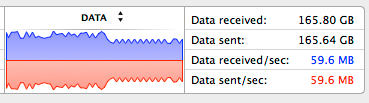
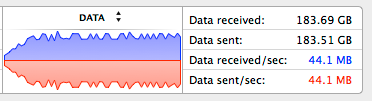
Then I wrote a load test to see the performance. The test basically connects clients every half a second, all requesting the same data. Data is 165KB, and is sent every second. With 120 concurrent clients, the application allocates around 210MB of RAM, and data sent appears to be around 35 MB/second. The test machine is a 3.4 Ghz Intel i7 (8 processors) with 16GB of RAM, running OSX v10.9.

I monitored the process with Strongloop’s agent, I find it pretty impressive.
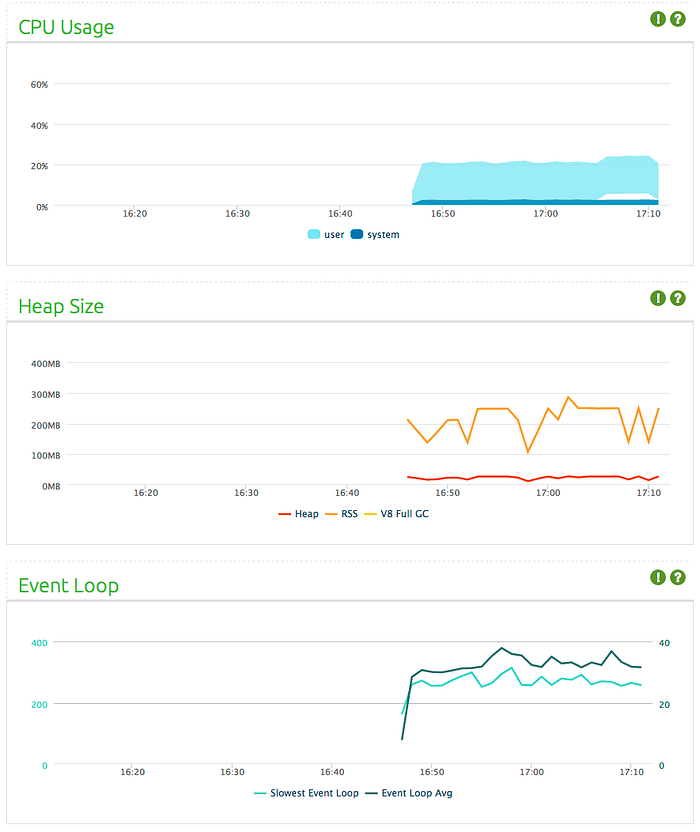
At this point, the biggest drawback for me was it being a pure WebSocket implementation: if the client browser did not support WebSockets, it would not work. This made me try Socket.IO.
Socket.IO (v. 0.9)
Socket.IO seemed like the perfect solution, as it selects the most capable transport at runtime: it tries to connect to server via WebSockets first, if it doesn’t work, it downgrades by trying XHR-polling, if it doesn’t work, continues with flash sockets etc. Moreover, it would try to reconnect sockets if connection fails, and it supports rooms so that I could cluster connections based on what information they asked for, without any custom implementation. So I re-implemented the application by keeping everything the same but web socket framework.
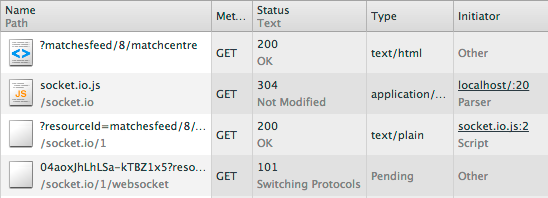
Client connects to Socket.IO server
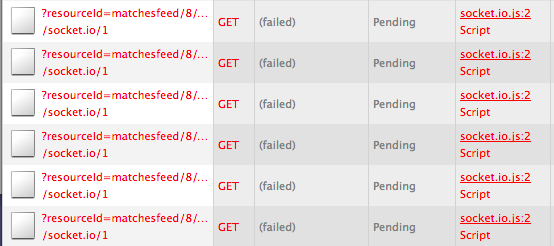
Indeed, when the server is down, Socket.IO tries to connect back with decreasing frequency.
And when the server is up, WebSocket connection is re-established:
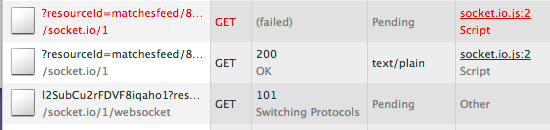
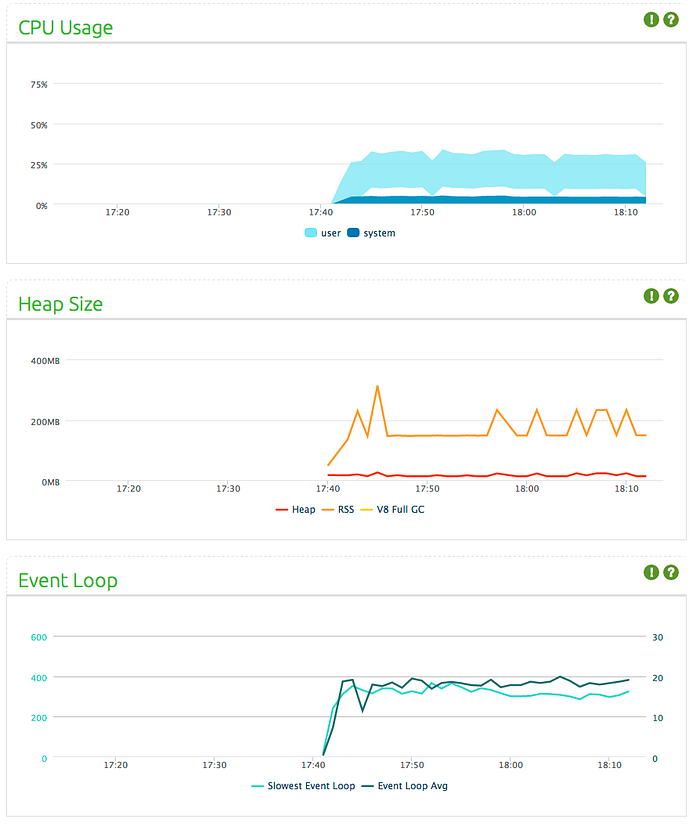
Load test results are below, it is the same test I executed for ws/einaros implementation with the same data:
The data output looks like:
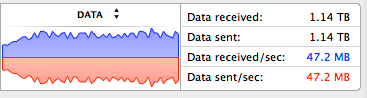
In WS, average load was 35 MBs
Performance limit
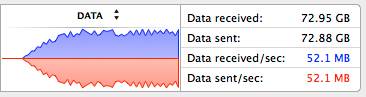
However, when I connect 140 clients, the memory usage starts to increment without the number of clients or the data size changing. Garbage Collector kicks in very frequently and gets more aggressive over time (sometimes a couple of times per second), eating up CPU time and desperately trying to free memory. Memory usage would reach ~1GB, then heartbeats would fail and clients would start to lose connection.

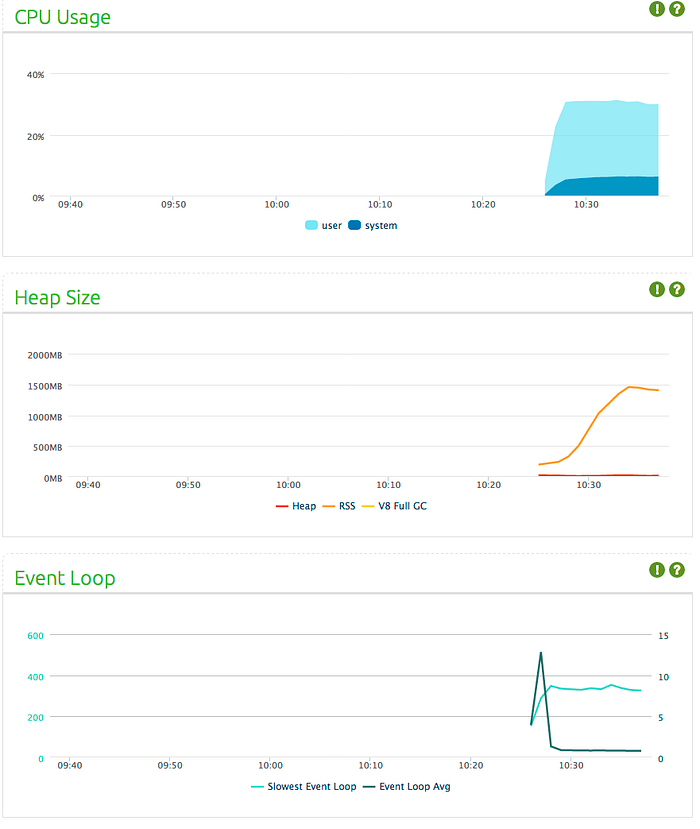
Heap size stops increasing when connections start dropping, and keeps stable as Socket.IO clients tries to connect back. Also notice the very low event loop latency.
It’s time to debug!
I used Mozilla’s memwatch module to detect memory leaks and take heap dumps to inspect the data. I found out that somehow 10MB Buffer objects would stack up constantly, you can find more details in my Stackoverflow Question. I couldn’t figure out why this would happen, but I think due to some cumulative CPU intensive operations, event loop response slows down and operations (sending messages) stack up in the queue. Being stuck, I decided to try out Sock.js.
I must admit my Sock.js adventure didn’t last long after discovering that Sock.js does not support connection query strings. This would mean that I’d need to amend my code so that after clients connect, they’d need to send a seperate message to pass the parameter(s), and this was a bit turn off. Next, I decided to give Engine.IO a try.
Engine.IO (v 0.7.12)
As far as I’ve seen, both Engine.IO and Socket.IO are mainly developed by Guillermo Rauch, and Engine.IO is a lower level library. Socket.IO v0.9 appears to be somewhat outdated and Engine.IO is the interim successor until Socket.IO v1.0 is released — which will use Engine.IO. One major difference is that Engine.IO always establishes a long-polling connection first, then tries to upgrade to better transports. This makes it resilient to firewalls and proxies, gives more predictable results and less frequent reconnecting. All other differences are very well listed on project’s readme. As you see, Engine.IO first started to connect via long-polling, then connected via WebSockets:
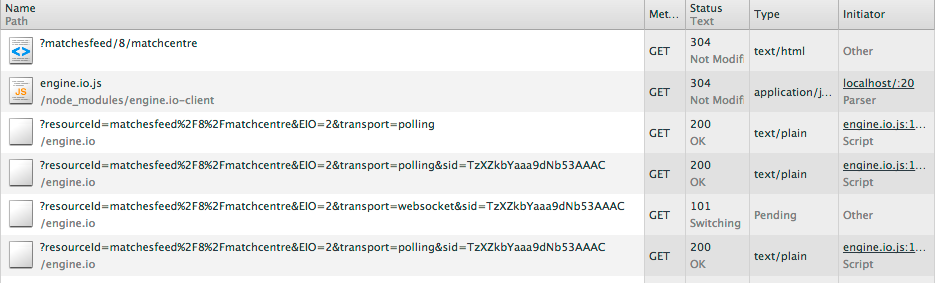
Notice the ‘transport’ parameter
However its client library does not try to reconnect when connection terminates.
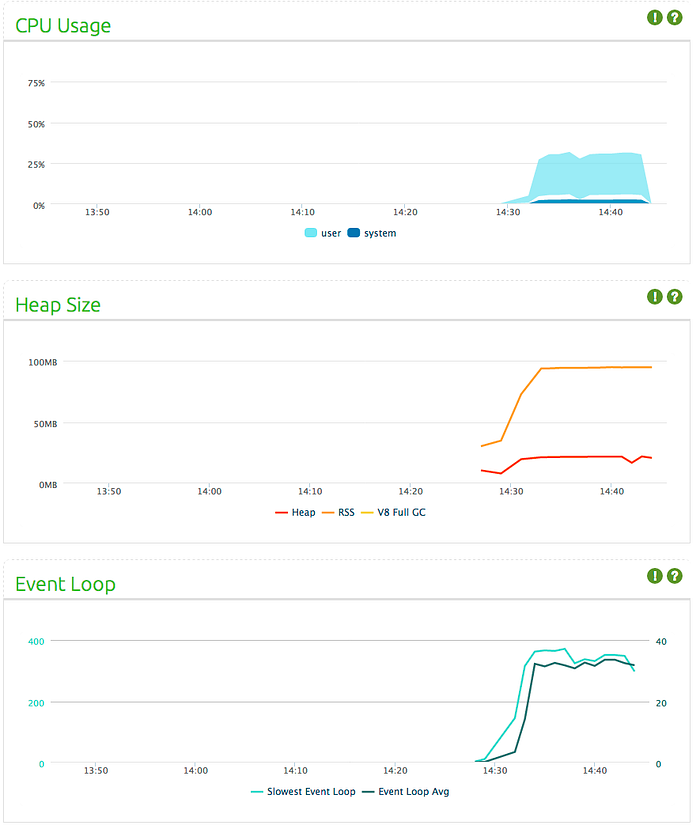
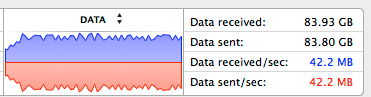
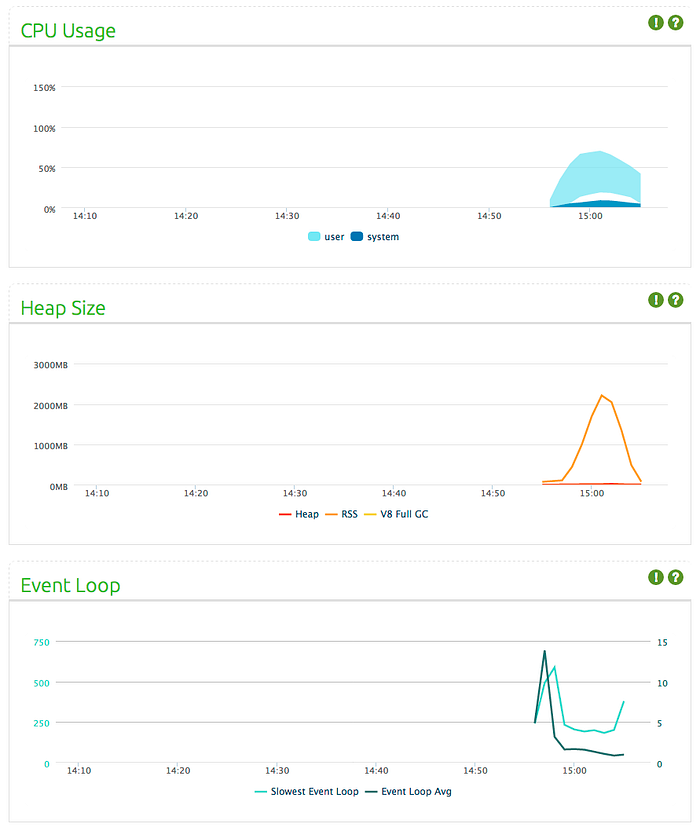
Same load test with same values (160KB sent every second to 120 clients) looks like:
Performance limit
Let’s see what happens when we increase connection size. Engine.IO’s performance proved to be better for my application: I could load test with 230 concurrent connections, with (again) each one sent 165KB of data every second. Any number above 230 connections resulted in the application using massive amounts of data — up to 2GB (the same issue with Socket.IO implementation). Then connections would start dropping until 160 connections are remaining, and obviously this results in less resource usage. You can see this drop in the charts below. Remember in Engine.IO client implementation, clients don’t reconnect once they are disconnected.
Primus (v 1.5.0)
When I was about to end my research and development, I came across Primus. It is developed by Arnout Kazemier who is an active collabrator in some of the projects mentioned above. Primus actually lets you do what I have done all this time (changing WebSocket technologies for the business logic) dead easy: only with a single line of code. It has a similar syntax with all of the other frameworks, reconnects clients when connection terminates, and has lots of cool methods and structures — like rooms.
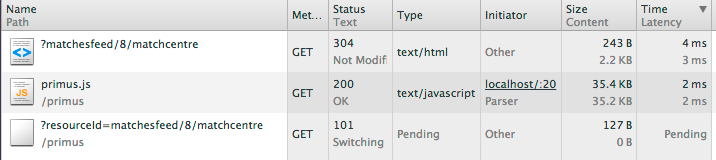
Primus connects
Here are the test results for einaros/ws library with Primus (160KB sent every second to 120 clients):
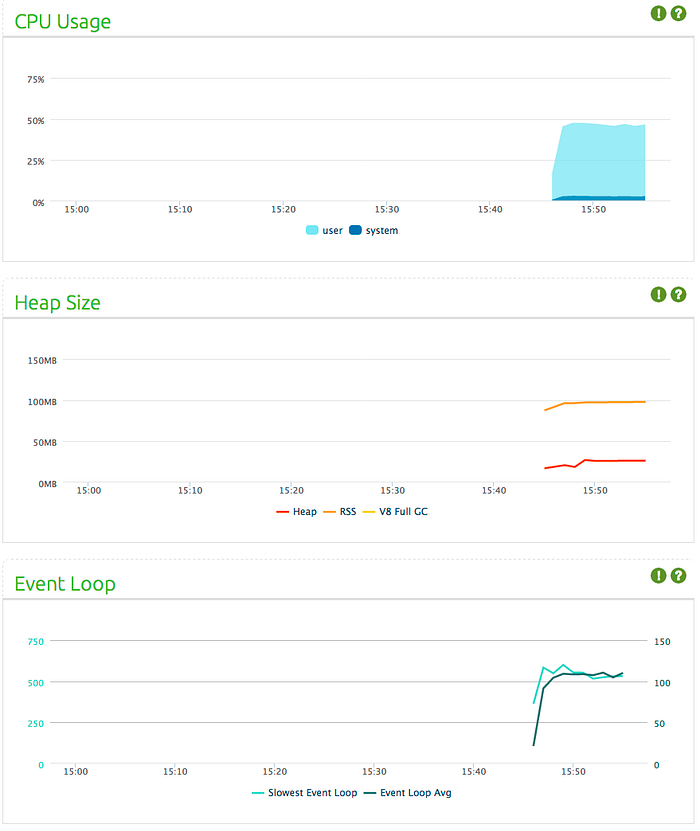
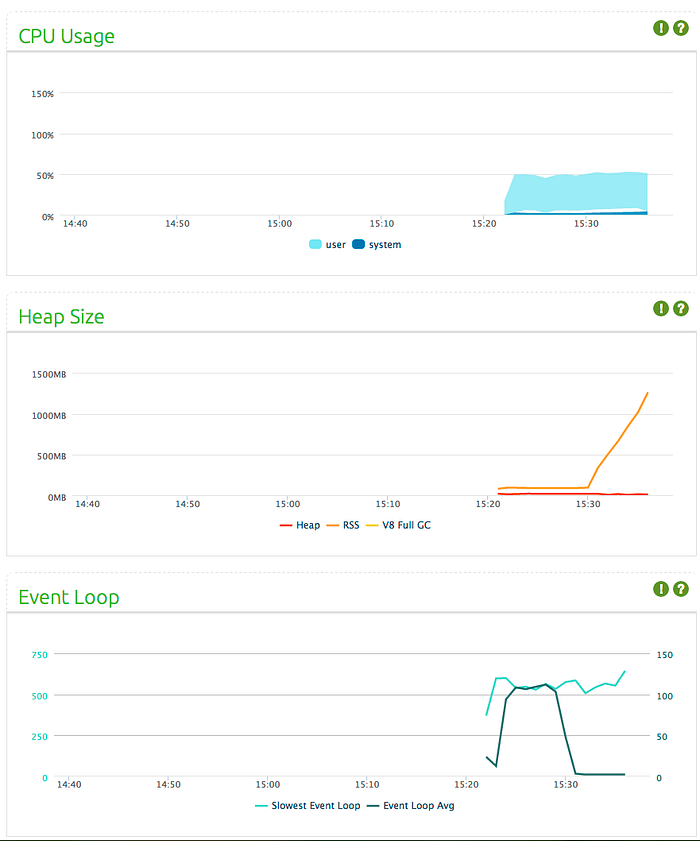
Compared to native implementation, it has a higher CPU usage and event loop latency, but a bit lower memory consumption. However, something unexpected happens after 10 minutes pass:
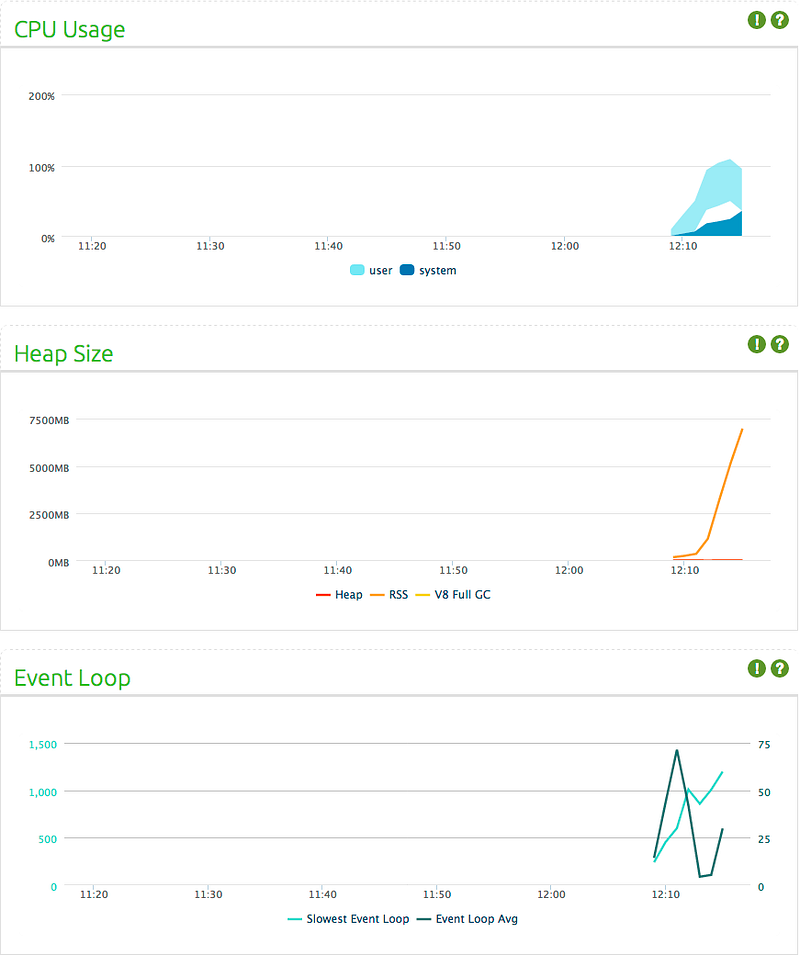
Event loop average drops to almost 0ms, but memory allocation starts to stack up, reaching GBs in minutes. This happened twice in two of my tries. I decided to leave this instead of digging deeper. (Please see Arnout’s comment about this issue on the right hand side)
As Primus is a wrapper for socket libraries, I decided to use a native library just to have things on a lower level.
Looking back: Performance limit of einaros/ws
At this point, I wanted to look back and see at what rate einaros/ws implementation (which I ditched as it doesn’t support other connection types) would crash.
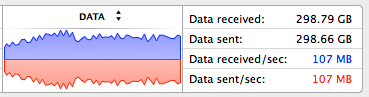
By handling 410 concurrent connections, sending 165KB data to each every second, einaros/ws’s performance was far more superior than any other framework I tried. Compare it with Socket.IO’s max 140 connections and Engine.IO’s max 230 connections. einaros/ws would fail at 415 connections in the same way with other implementations: memory usage would stack up seemingly almost indefinitely (I waited until 8GB consumption before killing the process).
Final decision on the framework
In summary, these test results showed that Engine.IO looks like the better choice for my application. It supports different connection types apart from WebSockets, and has a significantly better memory usage compared to others.

The difference in memory seems like a good trade of for losing the functionality of clients not reconnecting in a connection failure. At least, until Socket.IO 1.0 is released.
Changing the flow based on limitations
The aim when starting this project was to have a system that can support thousands, even 10 thousand concurrent users. It seems, with 165KB of data sent every second, this won’t be possible. This made me decide to decrease the data size, and introduce a delta model, in which the application would send only the new JSON content instead of the whole object each time.
Test 1: The impact of data size
I ran the a load test that uses 5KB of data, sent to 4000 users every second. 5KB of JSON makes around 200 lines of data with reasonable string length. I’ve also modified the test so that 10 new clients connect every second. The data throughput is equivalent to 20MB sent per second.
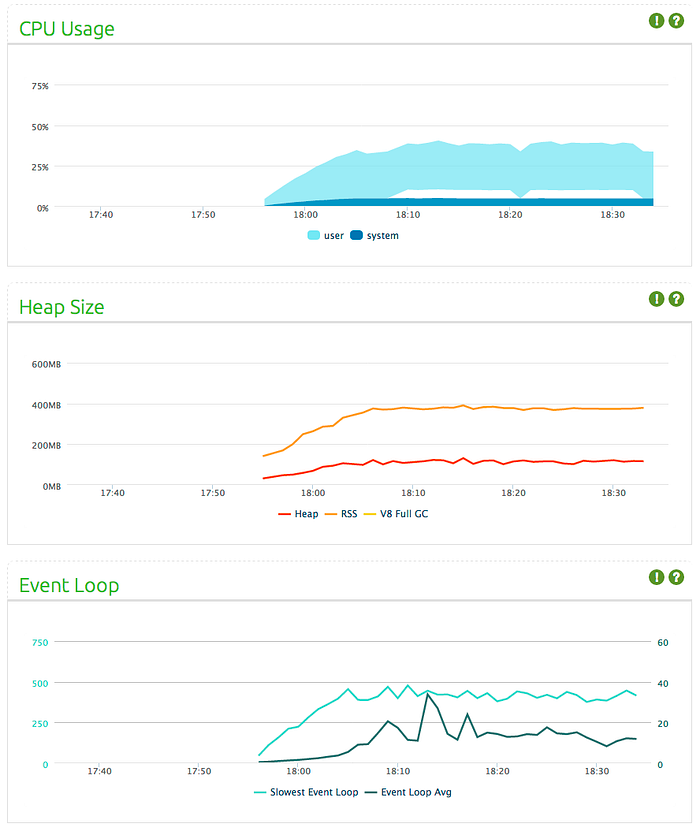
We will take these values as a base and see what happens when we keep throughput same and change some variables.
Test 2: The impact of concurrent connection size
In this test, 2000 users connected to the server, and received 10KBs of data every second. Again in this case, 20MB is sent every second.
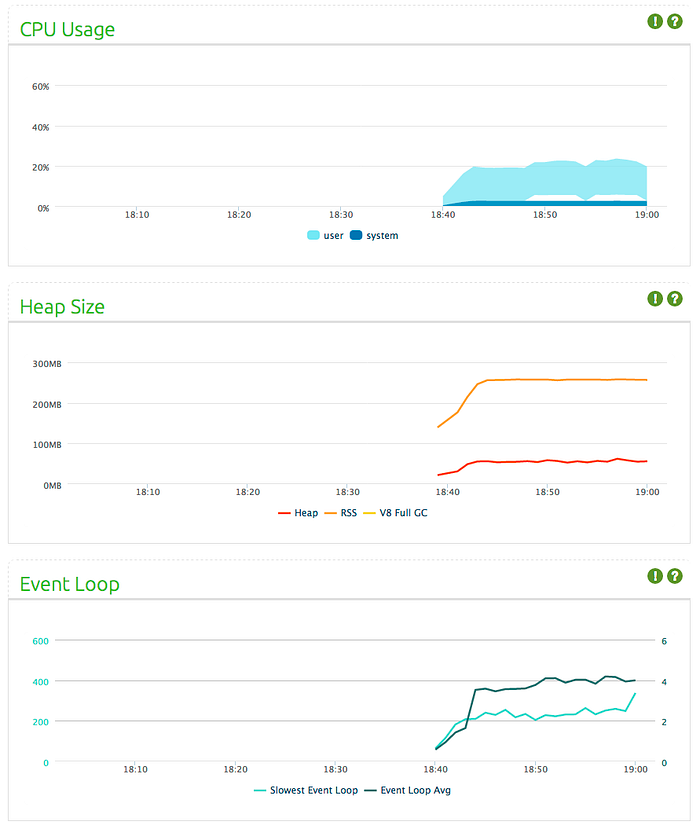
Compare these results with test one. As you see, doubling the data size and decreasing the connection size by half ended up in 20% lower memory consumption, 35% lower CPU usage and 75% less event loop latency.
Test 3: The impact of data broadcasting frequency
In this test, 4000 users connected to the server, and received 10KB of data every 2 seconds. Again, this equals to 20MB sent every second.
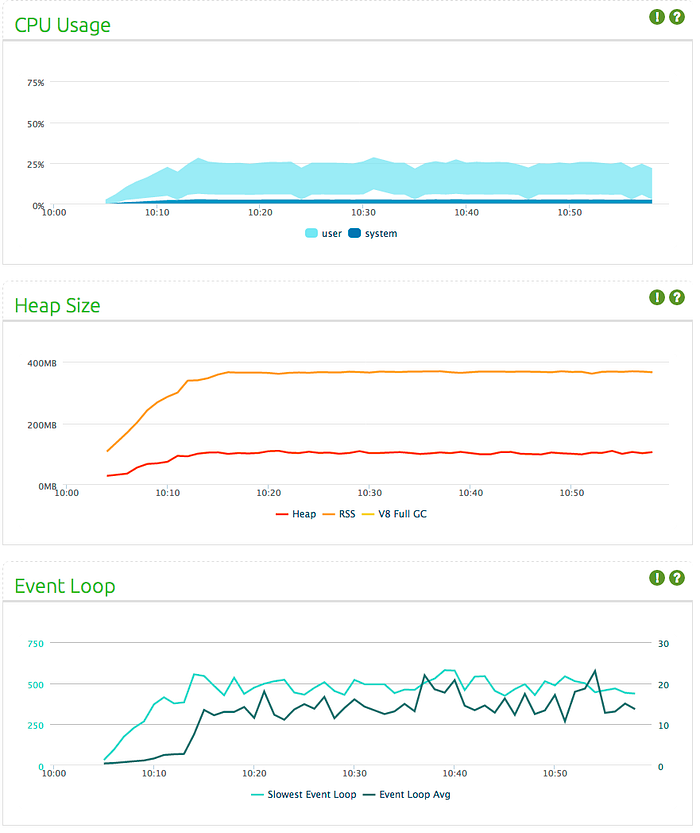
Compare these results with the first test. It seems doubling data size and decreasing frequency of data sent by half results in 25% lower CPU usage, but more or less the same memory consumption and event loop latency.
Conclusion
We do not really have a direct control over how many connections the application will have if we have one server, thus it seems we can only play around with the size of data sent, and how frequent we send this data. These tests show that for a constant throughput, (at least) for Engine.IO, the number of connections have the biggest impact on performance, then comes reducing size of data, and lastly reducing frequency of data sent. Sending larger data in less frequency appears to yield better performance. It’s a double-sided sword though: increasing size of data packets was what made my applications crash as well.
So I think the best way of balancing it is to estimate the max number of concurrent users in the long run (at least a couple of years forward), finding the maximum data size that can be used with that number, and then decrease the frequency of sending data if possible — but as said this is not that critical. After this point, as connection number has the biggest impact on the performance, by using a load balancer, adding more application instances should increase the performance more than any other method.
Acknowledgements: Benjamin Byholmfor reviewing and commenting on this article with his insights on caching, multiple servers, and V8 memory usage. Arnout Kazemier for his helpful comments, Nico Kaiser for his feedback, Guillermo Rauch and David Halls for taking the time to read the draft.
NodeJS 各websocket框架性能分析的更多相关文章
- nodejs的Express框架源码分析、工作流程分析
nodejs的Express框架源码分析.工作流程分析 1.Express的编写流程 2.Express关键api的使用及其作用分析 app.use(middleware); connect pack ...
- 背景建模技术(二):BgsLibrary的框架、背景建模的37种算法性能分析、背景建模技术的挑战
背景建模技术(二):BgsLibrary的框架.背景建模的37种算法性能分析.背景建模技术的挑战 1.基于MFC的BgsLibrary软件下载 下载地址:http://download.csdn.ne ...
- DevTools 实现原理与性能分析实战
一.引言 从 2008 年 Google 释放出第一版的 Chrome 后,整个 Web 开发领域仿佛被注入了一股新鲜血液,渐渐打破了 IE 一家独大的时代.Chrome 和 Firefox 是 W3 ...
- JS边角料: NodeJS+AutoJS+WebSocket+TamperMonkey实现局域网多端文字互传
---阅读时间约 7 分钟,复现时间约 15 分钟--- 由于之前一直在用的扩展 QPush 停止服务了,苦于一人凑齐了 Window, Android, Mac, ios 四种系统的设备,Apple ...
- EntityFramework、Dapper vs 草根框架性能大比拼,数据库访问哪家强?
扯淡 当前市面上 ORM 很多,有跑车型的,如 Dapper,有中规中矩型的,如 Mybatis.Net,也有重量型的,如 EntityFramework 和 NHibernate,还有一些出自草根之 ...
- 系统级性能分析工具perf的介绍与使用
测试环境:Ubuntu16.04(在VMWare虚拟机使用perf top存在无法显示问题) Kernel:3.13.0-32 系统级性能优化通常包括两个阶段:性能剖析(performance pro ...
- 【转载】推荐5款超实用的.NET性能分析工具
来源:http://www.csdn.net/article/2012-11-23/2812174-5-Good-and-useful-.NET-Profilers 虽然.NET框架号称永远不会发生内 ...
- 11个Visual Studio代码性能分析工具
软件开发中的性能优化对程序员来说是一个非常重要的问题.一个小问题可能成为一个大的系统的瓶颈.但是对于程序员来说,通过自身去优化代码是十分困难的.幸运的是,有一些非常棒的工具可以帮助程序员进行代码分析和 ...
- Java 集合系列08之 List总结(LinkedList, ArrayList等使用场景和性能分析)
概要 前面,我们学完了List的全部内容(ArrayList, LinkedList, Vector, Stack). Java 集合系列03之 ArrayList详细介绍(源码解析)和使用示例 Ja ...
随机推荐
- MySQL操作数据库和表的常用命令新手教程
1.查看数据库 获取服务器上的数据库列表通常很有用.执行show databases;命令就可以搞定. mysql> show databases; 2.创建数据库 mysql> crea ...
- Shell脚本编程初体验
原文:http://linoxide.com/linux-shell-script/guide-start-learning-shell-scripting-scratch/ 作者: Petras L ...
- 我的android学习经历19
怎样在标题栏中显示进度条 import android.app.Activity;import android.os.Bundle;import android.view.Window; public ...
- C语言实现数组快速排序(含对算法的详细解释)
/* 说明: 代码参考过网上代码,但分析为个人原创,本贴重在说明快速排序算法的思想和运行过程. */ 代码部分: #include<stdio.h> #include<stdlib. ...
- js 定位到某个锚点
js 定位到某个锚点 html页面内可以设置锚点,锚点定义 <a name="firstAnchor">&nsbp;</a> 锚点使用 <a ...
- 如何在iOS 7.0中隐藏状态栏
使用Cordova做了一个小项目,在原来iOS6的时候显示挺好,升级为iOS7后,每次App启动后都会显示状态栏,而且状态栏和App的标题栏重叠在一起,非常难看,因此需要将状态栏隐藏起来. 首先, ...
- Python字符串、元组、列表、字典互相转换的方法
直接上代码!!! 1 2 3 4 5 6 7 8 9 10 11 12 13 14 15 16 17 18 19 20 21 22 23 24 25 26 27 28 29 30 31 32 33 ...
- log4j的使用(1) —— 简单入门篇
这里会介绍三种打印日志的方法:控制台Console,文件File,数据库DataBase 1.下载lo4j的jar包并导入project 2.因为要在数据库添加日志,所以先新建一个库,并新建打印日志的 ...
- $.ajax() ,$.post(),$.get() 的用法
在编写代码的过程中,我们会用到一些的需要局部刷新,而且需要数据传递的情况,我们通常是有$.ajax() ,$.post(),$.get() 这三种方式. $.ajax()方法通过 HTTP 请求加载远 ...
- 2013 Multi-University Training Contest 9
HDU-4687 Boke and Tsukkomi 题意:给定一个简单图,询问哪些边如果选择的话会使得最大的连边数减少. 解法:套用一般图的最大匹配算法(带花树)先算出最大匹配数,然后枚举一条边被选 ...