
H5 Notes:PostMessage Cross-Origin Communication
Javascript中要实现跨域通信,主要有window.name,jsonp,document.domain,cors等方法。不过在H5中有一种新的方法postMessage可以安全实现跨域通信,并且使用简单。
要使用postMessage,首先得检查浏览器是否支持该方法,postMessage属于window对象,检测方法如下:
if('postMessage' in window){

}else{

    console.log('浏览器不支持postMessage');

}
postMessage使用语法如下所示。
otherWindow.postMessage(message, targetOrigin, [transfer]);

otherWindow必须是一个window对象的引用,如iframe的contentWindow,window.open的返回对象,window.frames[index]等。

targetOrigin指定otherWindow的源,如果目标窗口的协议,主机地址,端口只要一个不同,该方法便不会执行信息发送
为了能接收到postMessage发送的消息,必须在window对象上监听message事件,该事件对象包涵了data(消息)、origin(来源地址)、source(来源窗口代理)等属性,使用如下所示
window.onmessage = function(e){

    if (e.origin === 'http://www.test.zmx.com') {

        alert(e.data);

    }

}
下面是使用postMessage的小例子,帮助理解。
http://www.test.zmx.com/postmessage.html,简称A页面
<!DOCTYPE html>

<html lang="en">

<head>

    <meta charset="UTF-8">

    <title>Document</title>

</head>

<body>

    <iframe frameborder="0" src="http://www.select.zmx.com/select.html"></iframe>

    <input type="text" id="kw"><button id="btn">发送到子窗口</button>

    <script type="text/javascript">

        window.onload = function(){

            window.onmessage = function(e) {

                if (e.origin === 'http://www.select.zmx.com') {

                    alert("收到来自子窗口的消息:"+e.data);

                }

            }

            btn.onclick = function(e) {

                var val = kw.value;

                window.frames[0].postMessage(val, 'http://www.select.zmx.com');

            }

        }

    </script>

</body>

</html>
http://www.select.zmx.com/select.html,简称B页面
<!DOCTYPE html>

<html lang="en">

<head>

    <meta charset="UTF-8">

    <title>简单下拉框插件</title>

    <link rel="stylesheet" href="simpleSelect.css">

    <style type="text/css">

        body{ padding: 40px; }

    </style>

    <script type="text/javascript" src="jquery-1.9.1.js"></script>

    <script type="text/javascript" src="simpleSelect.js"></script>

</head>

<body>

    <input type="text" id="in1"><button id="btn1">发送到父窗口</button>

    <script>

        window.onmessage = function(e){

            if (e.origin === 'http://www.test.zmx.com') {

                alert("收到来自父窗口的消息:"+e.data);

            }

        }

        btn1.onclick = function(e) {

            var val = in1.value;

            window.top.postMessage(val, 'http://www.test.zmx.com');

        }

    </script>

</body>

</html>
在A页面中发送消息hello world给B页面,如下所示。

点击发送,则B页面则收到消息,如下所示。
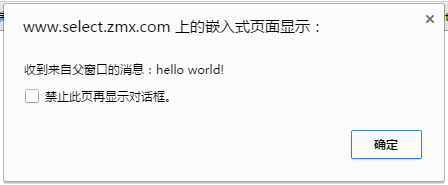
B页面向A页面发送消息也是一样的,就不叙述了。
H5 Notes:PostMessage Cross-Origin Communication的更多相关文章
- H5 Notes:Navigator Geolocation
H5的地理位置API可以帮助我们来获取用户的地理位置,经纬度.海拔等,因此我们可以利用该API做天气应用.地图服务等. Geolocation对象是我们获取地理位置用到的对象. 首先判断浏览器是否支持 ...
- 利用 pyhon 解决 Cross Origin Requests
在学习 ajax 时遇到了一个问题 XMLHttpRequest cannot load file:xxxxxxxx . Cross origin requests are only supporte ...
- 跨域问题:Cross origin requests are only supported for protocol schemes: http...
跨域:Cross origin requests are only supported for protocol schemes: http, data, chrome, chrome-extensi ...
- Ajax本地跨域问题 Cross origin requests are only supported for HTTP
问题:打开本地html文件时,报错如下 Cross origin requests are only supported for protocol schemes: http, data,chrome ...
- Blocking Cross Origin API request for /api/contents Creating Notebook Failed An error occurred while creating a new notebook.
anacoda安装的jupyter,使用nginx进行了转发,远程访问可以进去,但是创建文件和创建目录都会报错 浏览器页面报错: 第一次使用jupyter创建python时错误:Creating No ...
- jquery读取本地文件,Windows上报错。XMLHttpRequest cannot load xxx. Cross origin requests are only supported for protocol schemes: http, data, chrome, chrome-extension, https, chrome-extension-resource.k.cors.a.c
问题: 测试报告,使用本地的json.txt文件,结果文件读取失败,报错如下: XMLHttpRequest cannot load xxx. Cross origin requests are on ...
- Cross origin requests are only supported for protocol schemes: http, data, chrome,chrome-extension的问题
Cross origin requests are only supported for protocol schemes: http, data, chrome,chrome-extension的问 ...
- 用临时用户数据目录启动Chrome,关闭安全检查等(解决Cross origin requests are only supported for HTTP?)
Cross origin requests are only supported for HTTP? 参考:https://www.zhihu.com/question/20948649 批处理: s ...
- 【chrome错误】Cross origin requests are only supported for protocol schemes: http, data,chrome-extension, https, chrome-extension-reso
使用ajax请求本地文件,chrome会报跨域错误. XMLHttpRequest cannot loadfile:///C:/Users/Li/Desktop/images/alist.json.C ...
随机推荐
- 日期格式代码出现两次的错误 ORA-01810
错误的原因是使用了两次MM . 一.Oracle中使用to_date()时格式化日期需要注意格式码 如:select to_date('2005-01-01 11:11:21','yyyy-MM-dd ...
- 超大 Cookie 拒绝服务攻击
有没有想过,如果网站的 Cookie 特别多特别大,会发生什么情况? 不多说,马上来试验一下: for (i = 0; i < 20; i++) document.cookie = i + '= ...
- kindeditor4整合SyntaxHighlighter,让代码亮起来
这一篇我将介绍如何让kindeditor4.x整合SyntaxHighlighter代码高亮,因为SyntaxHighlighter的应用非常广泛,所以将kindeditor默认的prettify替换 ...
- SELECT INTO 和 INSERT INTO SELECT 两种表复制语句
Insert是T-sql中常用语句,Insert INTO table(field1,field2,...) values(value1,value2,...)这种形式的在应用程序开发中必不可少.但我 ...
- Javascript实现HashTable类
散列算法可以尽快在数据结构中找出指定的一个值,因为可以通过Hash算法求出值的所在位置,存储和插入的时候都按照Hash算法放到指定位置. <script> function HashTab ...
- bzoj1723--前缀和(水题)
题目大意: 你难以想象贝茜看到一只妖精在牧场出现时是多么的惊讶.她不是傻瓜,立即猛扑过去,用她那灵活的牛蹄抓住了那只妖精. "你可以许一个愿望,傻大个儿!"妖精说. ...
- Java开发中的23种设计模式详解
[放弃了原文访问者模式的Demo,自己写了一个新使用场景的Demo,加上了自己的理解] [源码地址:https://github.com/leon66666/DesignPattern] 一.设计模式 ...
- 原生JS实现-星级评分系统
今天我又写了个很酷的实例:星级评分系统(可自定义星星个数.显示信息) sufuStar.star();使用默认值5个星星,默认信息 var msg = [........]; sufuStar.sta ...
- Android之使用Bundle进行IPC
一.Bundle进行IPC介绍 四大组件中的三大组件(Activity.Service.Receiver)都是支持在Intent中传递Bundle数据的,由于Bundle实现了Parcelable接口 ...
- 敏捷转型历程 - Sprint3 Grooming
我: Tech Leader 团队:团队成员分布在两个城市,我所在的城市包括我有4个成员,另外一个城市包括SM有7个成员.另外由于我们的BA离职了,我暂代IT 的PO 职位.PM和我在一个城市,但他不 ...