
H5 Notes:PostMessage Cross-Origin Communication
Javascript中要实现跨域通信,主要有window.name,jsonp,document.domain,cors等方法。不过在H5中有一种新的方法postMessage可以安全实现跨域通信,并且使用简单。
要使用postMessage,首先得检查浏览器是否支持该方法,postMessage属于window对象,检测方法如下:
if('postMessage' in window){

}else{

    console.log('浏览器不支持postMessage');

}
postMessage使用语法如下所示。
otherWindow.postMessage(message, targetOrigin, [transfer]);

otherWindow必须是一个window对象的引用,如iframe的contentWindow,window.open的返回对象,window.frames[index]等。

targetOrigin指定otherWindow的源,如果目标窗口的协议,主机地址,端口只要一个不同,该方法便不会执行信息发送
为了能接收到postMessage发送的消息,必须在window对象上监听message事件,该事件对象包涵了data(消息)、origin(来源地址)、source(来源窗口代理)等属性,使用如下所示
window.onmessage = function(e){

    if (e.origin === 'http://www.test.zmx.com') {

        alert(e.data);

    }

}
下面是使用postMessage的小例子,帮助理解。
http://www.test.zmx.com/postmessage.html,简称A页面
<!DOCTYPE html>

<html lang="en">

<head>

    <meta charset="UTF-8">

    <title>Document</title>

</head>

<body>

    <iframe frameborder="0" src="http://www.select.zmx.com/select.html"></iframe>

    <input type="text" id="kw"><button id="btn">发送到子窗口</button>

    <script type="text/javascript">

        window.onload = function(){

            window.onmessage = function(e) {

                if (e.origin === 'http://www.select.zmx.com') {

                    alert("收到来自子窗口的消息:"+e.data);

                }

            }

            btn.onclick = function(e) {

                var val = kw.value;

                window.frames[0].postMessage(val, 'http://www.select.zmx.com');

            }

        }

    </script>

</body>

</html>
http://www.select.zmx.com/select.html,简称B页面
<!DOCTYPE html>

<html lang="en">

<head>

    <meta charset="UTF-8">

    <title>简单下拉框插件</title>

    <link rel="stylesheet" href="simpleSelect.css">

    <style type="text/css">

        body{ padding: 40px; }

    </style>

    <script type="text/javascript" src="jquery-1.9.1.js"></script>

    <script type="text/javascript" src="simpleSelect.js"></script>

</head>

<body>

    <input type="text" id="in1"><button id="btn1">发送到父窗口</button>

    <script>

        window.onmessage = function(e){

            if (e.origin === 'http://www.test.zmx.com') {

                alert("收到来自父窗口的消息:"+e.data);

            }

        }

        btn1.onclick = function(e) {

            var val = in1.value;

            window.top.postMessage(val, 'http://www.test.zmx.com');

        }

    </script>

</body>

</html>
在A页面中发送消息hello world给B页面,如下所示。

点击发送,则B页面则收到消息,如下所示。
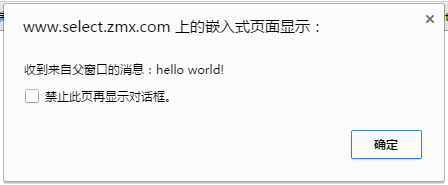
B页面向A页面发送消息也是一样的,就不叙述了。
H5 Notes:PostMessage Cross-Origin Communication的更多相关文章
- H5 Notes:Navigator Geolocation
H5的地理位置API可以帮助我们来获取用户的地理位置,经纬度.海拔等,因此我们可以利用该API做天气应用.地图服务等. Geolocation对象是我们获取地理位置用到的对象. 首先判断浏览器是否支持 ...
- 利用 pyhon 解决 Cross Origin Requests
在学习 ajax 时遇到了一个问题 XMLHttpRequest cannot load file:xxxxxxxx . Cross origin requests are only supporte ...
- 跨域问题:Cross origin requests are only supported for protocol schemes: http...
跨域:Cross origin requests are only supported for protocol schemes: http, data, chrome, chrome-extensi ...
- Ajax本地跨域问题 Cross origin requests are only supported for HTTP
问题:打开本地html文件时,报错如下 Cross origin requests are only supported for protocol schemes: http, data,chrome ...
- Blocking Cross Origin API request for /api/contents Creating Notebook Failed An error occurred while creating a new notebook.
anacoda安装的jupyter,使用nginx进行了转发,远程访问可以进去,但是创建文件和创建目录都会报错 浏览器页面报错: 第一次使用jupyter创建python时错误:Creating No ...
- jquery读取本地文件,Windows上报错。XMLHttpRequest cannot load xxx. Cross origin requests are only supported for protocol schemes: http, data, chrome, chrome-extension, https, chrome-extension-resource.k.cors.a.c
问题: 测试报告,使用本地的json.txt文件,结果文件读取失败,报错如下: XMLHttpRequest cannot load xxx. Cross origin requests are on ...
- Cross origin requests are only supported for protocol schemes: http, data, chrome,chrome-extension的问题
Cross origin requests are only supported for protocol schemes: http, data, chrome,chrome-extension的问 ...
- 用临时用户数据目录启动Chrome,关闭安全检查等(解决Cross origin requests are only supported for HTTP?)
Cross origin requests are only supported for HTTP? 参考:https://www.zhihu.com/question/20948649 批处理: s ...
- 【chrome错误】Cross origin requests are only supported for protocol schemes: http, data,chrome-extension, https, chrome-extension-reso
使用ajax请求本地文件,chrome会报跨域错误. XMLHttpRequest cannot loadfile:///C:/Users/Li/Desktop/images/alist.json.C ...
随机推荐
- BootStrap_02之全局样式及组件
1.BootStrap指定的四种屏幕尺寸: ①超大PC屏幕--lg(large):w>=1200px: ②中等PC屏幕--md(medium):1200px>w>=992px: ③P ...
- Java中Comparable与Comparator的区别
相同 Comparable和Comparator都是用来实现对象的比较.排序 要想对象比较.排序,都需要实现Comparable或Comparator接口 Comparable和Comparator都 ...
- spring boot 部署为jar
前言 一直在ide中敲代码,使用命令行mvn spring-boot:run或者gradlew bootRun来运行spring boot项目.想来放到prod上面也应该很简单.然而今天试了下,各种问 ...
- 前端开发:面向对象与javascript中的面向对象实现(二)构造函数与原型
前端开发:面向对象与javascript中的面向对象实现(二)构造函数与原型 前言(题外话): 有人说拖延症是一个绝症,哎呀治不好了.先不说这是一个每个人都多多少少会有的,也不管它究竟对生活有多么大的 ...
- dedecms 后台栏目添加图片
前台调用栏目时需要显示图标,整理一下: 第一步:“系统->SQL命令工具” , 插入sql语句 alter table dede_arctype add typeimg varchar() 第二 ...
- git多账号登录问题
作者:白狼 出处:http://www.manks.top/git-multiply-accounts.html 本文版权归作者,欢迎转载,但未经作者同意必须保留此段声明,且在文章页面明显位置给出原文 ...
- 从零开始,DIY一个jQuery(3)
在前两章,为了方便调试,我们写了一个非常简单的 jQuery.fn.init 方法: jQuery.fn.init = function (selector, context, root) { if ...
- 当前端也拥有 Server 的能力
今天看了不少文章,比较感兴趣的是 Cache API.它是浏览器 Request/Response 的缓存管理工具,其使用风格和运用场景让我瞬间联想到了 ServiceWorker 和 Fetch A ...
- iOS开发系列文章(持续更新……)
iOS开发系列的文章,内容循序渐进,包含C语言.ObjC.iOS开发以及日后要写的游戏开发和Swift编程几部分内容.文章会持续更新,希望大家多多关注,如果文章对你有帮助请点赞支持,多谢! 为了方便大 ...
- MongoDB与PostgresQL无责任初步测试
PostgresQL一秒能插入多少条记录,MongoDB呢?读取的情况又如何?我写了一些简单的程序,得出了一些简单的数据,贴在这里分享,继续往下阅读前请注意下本文标题中的“无责任”,这表示此测试结果不 ...